Tag Archives: DLNA

Abilis Systems and MaxLinear Introduce a Reference Platform for Satellite Home Gateways That Distrib

By Business Wirevia The Motley Fool

Filed under:


Abilis Systems and MaxLinear Introduce a Reference Platform for Satellite Home Gateways That Distributes up to Eight Satellite TV Channels to IP-Connected Devices

LUXEMBOURG–(BUSINESS WIRE)– SES Industry Days Conference – Abilis Systems and MaxLinear (NYS: MXL) , leaders in low-power IC design for digital TV applications, today announced the world’s first eight-channel satellite headless gateway reference platform.

This “headless gateway” platform addresses the ever-increasing demand for viewing of high-quality content on multiple screens. This platform is not directly connected to a TV, like a set-top box, but is network connected and accessible by multiple screens in a home. Acting as a media server, these headless gateway platforms are optimized for SAT>IP and DLNA services.

The gateway reference platform converts satellite TV content into IP packets for streaming in home, thus enabling users to enjoy the benefit of watching today’s DTH services on televisions as well as on IP-enabled devices such as tablets, laptops, smartphones, game consoles and other platforms.

The gateway platform has four RF inputs to be used with existing satellite dishes and low-noise block (LNB) downconverters. It combines the high throughput of the Abilis TB101 network processor with the MxL584 receiver to realize unprecedented low-power consumption and a very low bill-of-materials (BOM). This new platform offers satellite operators a cost, performance, and size-optimized solution to expand their TV offering to tablets and smartphones.

The reference platform is very small and can be designed with multiple applications in mind, for example with a single LNB (using DiSEqC) up to four LNBs. The small design is enabled by MaxLinear’s highly integrated MxL584 Full-Spectrum Capture™ (FSC™) DVB-S/S2 receiver.

The four-input MxL584 receiver integrates tuners required for multi-inputs, eight demodulators, and all the active front-end components, including the low-noise amplifiers (LNA) into a compact and cost-effective 10×10 QFN package.

The TB101 integrates a high-throughput demux supporting up to 800Mbps in eight independent TV streams, a CAS to DRM crypto engine and a Gigabit Ethernet. The chip transforms eight HD TV channels into IP format consuming less than 500mW, using only few DMIPS per channel.

“We’re very pleased to team up with MaxLinear to design the next generation of eight-channel satellite gateway platforms. With this unique co-developed cost effective platform, we’re enabling operators to differentiate their offering with easy to deploy solutions for distribution of secured and FTA content

From: http://www.dailyfinance.com/2013/04/18/abilis-systems-and-maxlinear-introduce-a-reference/

Review: PowerDVD 13 Ultra media player is loaded with under-the-hood improvements

The PowerDVD Ultra series have been the most powerful, feature-laden DVD, Blu-ray, and media players available at retail. On the other hand, each version has also been somewhat slow to launch and sluggish to respond. Version 13 starts up more quickly and is better all around, although it’s not a startling upgrade if you already have version 12. That said, there are more than a few new features here, including a user interface that Windows 8 aficionados will find appealing.

Before getting into the new stuff, a quick but impressive list of what PowerDVD Ultra already supports: Playback of DVDs and 2D and 3D Blu-ray movies with resolution enhancement; cataloging and playback of large collections of photos, music files, and videos; a 10-foot interface for use with a remote; and playback of media streamed via DLNA media servers (e.g., other PCs and NAS boxes).

PowerDVD 13 Ultra ($100) now supports every major video technology, including 2K/4K resolution, AVCHD 2.0 and 3D, and it comes with free players and remote-control apps for iOS and Android devices, plus PowerDVD Mobile for Windows tablets (both Windows 8 and RT). The Android and iOS apps are also free with the $80 Pro version, but you’ll need to pay $20 for PowerDVD Mobile. The Pro version drops support for 3D, 7.1-channel surround sound, and DLNA. You’ll need to pay for all three apps if you buy the $60 Deluxe version, which subtracts both Blu-ray and 3D support. Upgrades from previous versions of PowerDVD start at $45.

The last two versions of PowerDVD had the program morphing into a jack-of-all-trades media player, and version 13 continues that trend—albeit mildly. There’s a new a movie library with art for video files (not just movies), though as with many players, it’s rather hit or miss on whether the art is correct. If the file name is explicit enough, it does okay. PowerDVD is also ready for Ultra Violet, the online movie storage/delivery service, and it already supports video streaming from most social networks (Facebook, YouTube, etc.)

To read this article in full or to leave a comment, please click here

…read more
Source: FULL ARTICLE at PCWorld

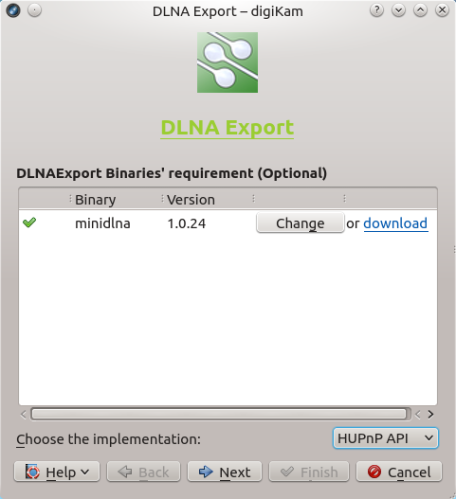
Export Photos from digiKam via DLNA

Using the DLNA Export Kipi plugin

Need to quickly push photos in digiKam to a device on the same network? Provided the device supports DLNA, you can do this using the DLNAExport Kipi plugin. Choose Export ? Export via DLNA to open the DLNA Export wizard. From the Choose the implementation drop-down list, select eitherHUPnP API or miniDLNA. Both options have their advantages and drawbacks.

Continue to read

…read more
Source: FULL ARTICLE at Planet KDE

Review: Songbird Desktop is much more than just a media player

Songbird Desktop is a media player that’s not chained to your desktop, despite its name. Although this free application for PC and Mac will organize you collection and playback audio and video files from your computer, it’s also a tool for discovering new music, learning more about your favorite artists, and connecting with friends.

Songbird installs quickly and easily, but getting your music into the program is entirely up to you. You have to add files manually, by pointing Songbird in the direction of your media collection. Once your songs and videos are added to Songbird, you can take advantage of its basic media playback functions. You can play songs, rip CDs (but not burn them), create playlists, and more. Songbird does play videos, but you may have to download some video codecs to play back all files, as Songbird doesn’t include some that would require it to pay a royalty.

Songbird includes a Web browser that lets you discover info about your favorite artists.

Songbird will sync with Android mobile devices and smartphones, but not Apple’s products. While iPhone and iPod owners are out of luck, Android users will appreciate that Songbird syncs with their devices. I had to download an add-on from Songbird’s library in order to get the application to recognize my Motorola Droid Bionic, but once I made it through that somewhat confusing process, Songbird worked seamlessly with my phone.

In fact, Songbird’s extensive library of add-ons is just one of the factors that make this application so interesting. In there, you can find add-ons that will do everything from adding lyrics to songs as they play to displaying album art from Last.fm. If you’re willing to spend some time poking around the add-on collection, you can find plenty of tools for customizing everything from the look of Songbird to the experience of using its Web browser, which displays right in the main window of the application. This  allows you to find out more about your favorite artists. It also allows you to connect with other users, and lets you connect via Facebook to find out what artists your friends like, too.

Songbird’s interface is a bit bland, but you can customize it with skins to get a new look.

And that’s not all: Songbird also works as a media server, streaming your media collection to UPnP or DLNA devices on the same local network. It’s also available as a Web app and an Android app that sync with the desktop version. In short, there’s not a lot Songbird can’t do.  It may all be too much for the casual user who simply wants to listen to a few tunes, and if you want to sync them to your iPhone, you’re out of luck. But adventurous music fans looking for a player that they can customize will find a lot to sing about in Songbird.

Note: The Download button on …read more
Source: FULL ARTICLE at PCWorld

Synology DS213air review: Wireless feature doesn't add enough value

The $300 Synology DS213air is a decent two-bay NAS box whose main claim to fame is its ability to perform as an 802.11 b/g Wi-Fi access point. The unit streams media quite well; however, its name is a bit misleading in that the DS213air has more in common with the $200 DS212j than the significantly faster $300 DS213. The DS213air’s wireless feature isn’t all that unique either, since you can turn add similar functionality to any current Synology NAS box using an inexpensive third-party USB 802.11 adapter. On the upside, this router sports Synology’s usual bountiful array of software features.

The DS213air uses a 1.6GHz Marvell Kirkwood mv6282 single-core CPU, and it sports 256MB of system memory. Our review unit arrived populated with two 1TB Seagate Barracuda drives in RAID 1 (mirrored). Using those components, the DS213air wrote our 10GB mix of smaller files and folders at 35.5MBps and read them at 38.3MBps. With our single large 10GB file, its performance increased to 43.6MBps writing and 74.5MBps reading. Those numbers aren’t bad, but they’re slower than what we see from most of the competition these days.

I also tested the DS213air’s streaming ability with a third-generation iPad, an Asus S7 laptop, and a slower Acer 7250 laptop. Music, photos, and even 1080p video streamed smoothly to all, though as with any Wi-Fi, your proximity and environment will impact results. Note that you must first configure the DS213air using wired Ethernet, pull the Ethernet cable, power down, and then power up again before the DLNA server will choose the Wi-Fi rather than wired network.

Synology’s operating system (along with QNAP‘s) stands head and shoulders above the rest of the competition for breadth of features. The short list includes DHCP, mail and website serving, DLNA and iTunes media serving, free one-camera video surveillance, Web-based photo/video/music serving, FTP, SFTP, HTTPS, and the usual administration features. That makes it a small business server in everything but name. A demo on Synology’s Web site lets you play with many of the features. You can check it out here.

To read this article in full or to leave a comment, please click here

Source: FULL ARTICLE at PCWorld

QNAP TS-269 Pro review: A fast and powerful NAS box with a steep learning curve

Few would dispute that QNAP makes very fast NAS hardware—the company’s boxes are consistently at the top of PCWorld’s performance charts. The TS-269 Pro is no exception, being the overall fastest two-bay NAS box that we’ve scrutinized on our new test platform. The margin of victory, however, wasn’t that great. What really sets this $600 (unpopulated) unit apart from the crowd is its slew of software features and its superior connectivity.

The TS-269 Pro features a 2.13GHz, dual-core Intel Atom D2700 CPU and 1GB of memory (which you can expand up to 3GB, using the single free SODIMM slot). One of my few complaints about the TS-269 Pro is that removing the case cover to access said memory slot was a bit of a chore the enclosure is baby smooth with nothing to grip. QNAP populated our test unit with two 1TB Western Digital WD10EFRX hard drives mirrored in RAID 1. The drive normally ships without drives.

My other minor gripe concerns the TS-269 Pro’s otherwise top-tier port array. The front USB port, normally used for quickly copying the contents of a USB flash drive, is only USB 2.0. I’m now using USB 3.0 thumb drives almost exclusively and reaching behind the unit to access the two significantly faster USB 3.0 ports is a bit of a pain. Otherwise it’s all good: dual gigabit Ethernet ports with failover and binding, an eSATA port, and two additional USB 2.0 ports. There’s also a Kensington lock port for securing the unit to your workbench or rack, and an HDMI port for outputting HD content and surveillance to a monitor or TV.

Don’t be fooled by the friendly graphical user interface; taking advantage of the TS-269 Pro’s advanced features requires deep knowledge on the part of the IT admin.

QNAP outshines everyone but Synology in the breadth of software features n its Linux-based operating system. These go way beyond simple file-sharing, administration, and backup to include iSCSI, iTunes and DLNA servers, direct photo/music/video viewing in your browser, and video surveillance support. You also get a VPN, FTP, and TFTP servers; full domain and LDAP support; and more. Check the company’s website for the full list, where you can also play with the operating system via an online demo. QNAP matches—and in some small ways beats—Synology in operating system features, QNAP’s OS is generally not as easy to use; it takes a fair amount of knowledge to implement many of its features.

To read this article in full or to leave a comment, please click here

Source: FULL ARTICLE at PCWorld

Review: DivX Plus 9 is a handy player and all-in-one video tool

DivX Plus Software is a desktop media player. And a video conversion application. And a Web browser plug-in. And a codec pack. And a DLNA server for streaming videos to compatible devices. In short, there’s not much this free application can’t do when it comes to video, and it handles most of the tasks very well.

As a desktop media player, DivX Plus is easy to use and attractive. It features a sleek black and gray design that looks more modern than the orange color scheme of VLC, another popular free media player. The design of DivX Plus is busier, though; where VLC tends to fade right into the background so you notice only the video you’re watching, DivX Plus is harder to ignore. A column (collapsible, luckily) along the right side of the application reminds you that you can do more than just watch your video, as it sports icons for streaming your video or transferring it to another device. While the icons are large and make all of these tasks look super easy, they were not all quite as user-friendly as I’d expected.

DivX Plus’ media player features a column with links to its many features; luckily, it’s collapsible so you can focus on the video you’re watching.

The first problem occurred when I tried to stream a video to a networked Samsung Smart TV. DivX Plus got me started on the task, leading me through the process of turning sharing on and identifying which folders I’d like to share, but didn’t provide much additional guidance. I would have liked some notification that the files were actually being shared, as I was never able to view them on the TV. I was unable to figure out if it was the TV or the software causing the problem.

I had more luck with the DivX To Go feature, which helps you transfer your videos to DivX devices. You select the video you’d like to transfer, and what kind of device you’d like to view it on (such as a TV or Blu-ray player). You then decide whether to burn it to a DVD or save it to a USB drive, and DivX Plus handles the transfer for you. The process isn’t super fast, as transferring a 22 minute TV show took nearly that same amount of time, but it worked well.

To read this article in full or to leave a comment, please click here

Source: FULL ARTICLE at PCWorld

Fabián Rodríguez: Exit la télé par câble, bienvenue à l’enregistreur numérique libre

Mon projet d’autonomie télévisuelle à la maison avance et a franchi une étape importante cette semaine: notre compte de câble (service Illico) de Vidéotron est officiellement fermé :) Un enregistreur numérique conçu à partir de logiciels libres et de composantes informatiques ordinaires remplace maintenant la boîte noire fournie par cette entreprise québécoise. Ce projet s’est étalé sur environ 2 ans à temps perdu, parfois quelques minutes à la fois, parfois quelques heures de suite lors de nuits blanches ou autre moments de loisirs (j’ai une famile plus nombreuse que la moyenne des foyers au Québec) :)

Je tiens à préciser que le service technique et la qualité des services et appareils de Vidéotron sont exceptionnels, par contre le service à la clientèle pour ce qui est de la facturation lors  un week-end de fête du travail peut vous laisser avec une brique à la maison à la place de votre enregistreur numérique.


Illico_télé_numérique

Source: Wikipedia 

Ce projet personnel et son partage sont motivés par plusieurs facteurs:

  • Les pratiques douteuses de Radio-Canada, société d’état canadienne, pays où je paie des taxes qui la financent, et leur utilisation douteuse et discriminatoire de formats qui exigent des logiciels propriétaires sur leurs sites web, un sujet qui revient souvent sur la liste de discussion Ubuntu Québec;
  • Le lancement du site Tout.TV avec son manque flagrant de respect pour son audience utilisant Gnu/Linux: il faut encore simuler être un navigateur Apple pour avoir accès à des formats standards ou utiliser Flash, une aberration en 2012- des restrictions futiles étant donné la possibilité technique de les contourner (sauf pour la qualité de l’image);
  • Les restrictions par géolocalisation, d’espace, format (pas de HD sur les site web, même si on voudrait payer pour), heure (un exemple, une émission “osée” qui avait été limitée sur Internet), visionnement (“uniquement en ligne”, pas de téléchargement direct possible/visionnement hors-ligne) et autres;
  • Le constat que mon enregistreur numérique était sous le contrôle de Vidéotron et devenait une brique si le service était interrompu, tout en bloquant l’accès aux émission enregistrées. J’ai d’ailleurs fait l’expérience du contrôle qu’exerce Vidéotron sur ces appareils lorsqu’ils ont effacé son contenu au complet à distance (à ma demande);
  • Le fait que passer à la technologie HD chez moi nécessiterait de racheter l’équipement (enregistreur numérique) et payer plus cher non seulement pour le service mais aussi pour les émissions/postes, ainsi que pour avoir accès au visionnement et programmation à distance;
  • Le manque d’exemples documentés publiquement auxquels on pourrait se référer facilement, sous forme de “recette”, en utilisant un maximum de logiciels libres et formats libres pour remplacer ces pratiques et équipements désuets.
Cbc_tux

Source: LibrePlanet QC

j’ai commencé à documenter ce que je trouvais pour contourner ou trouver une solution permanente à ces problèmes sur “Radio-Canada Libre“, une page wiki éditée sur LibrePlanet, site de communauté de la Free Software Foundation dont je suis membre. Je trouvais incohérent de faire la promotion d’autonomie et liberté technologique dans mon travail en même temps que j’avais cet appareil dans mon salon. Au fil du temps je me suis rendu compte que la solution de remplacement est possible pour peu qu’on se renseigne, et à la portée de tous, pour peu qu’on sache suivre une telle recette.

n298602129514_4994

Tux et Tou.TV

L’enregistreur numérique de Vidéotron est remplacé par TVHeadEnd (logiciel libre sous licence GPLv3) sur Gnu/Linux (dans une machine virtuelle), qui enregistre vers deux NAS (stockage réseau) DNS323 par NFS (protocole d’accès à distance aux fichiers sur le NAS), à partir de 2 syntoniseurs numériques réseau doubles HDHomeRun. Le NAS qui roule aussi Gnu/Linux (microgiciel Alt-F, logiciel libre sous licence GPLv2) partage ensuite par DLNA. La capacité de stockage des deux NAS est de 5 TB (combinée).

Des obstacles ou “irritants” importants demeurent, et on comprends pourquoi quelqu’un pourrait choisir de payer 100$ et plus par mois pour accéder au service par câble/satellite:

  • Pour avoir un bon signal il est indispensable d’avoir une bonne antenne. En poser une et la positionner correctement n’est pas toujours facile ou fiable ou simple ou abordable.
  • Malgré la présence d’une antenne, il faut être proche des zones où le signal des postes que vous voulez se rends, soit un grand centre urbain (Montréal) ou en banlieue pas trop loin. Un endroit idéal: la rive-sud de Montréal d’où on peut capter aussi des postes numériques américains. Même dans les zones de très bon signal les commis de magasins qui vendent des télévisions n’y connaissent pas grand chose ou vont rapidement proposer le service de câblo-distribution sans élaborer sur les alternatives. Pourtant, vendre l’équipement requis serait probablement plus payant!
  • Les 400+ postes parfois disponibles en combinant multitude de plans offerts par les cablo-distributeurs ne sont pas transmis gratuitement sur les ondes en HD. Si vous dépendez de postes comme RDS, Yoopa, History Channel, etc. ceci ne remplacera pas vos plans numériques
  • Le coût du matériel, qui, je suppose, est financé par les coûts d’abonnement aux services, monte vite. Ma configuration personnelle dépends d’un ordinateur (utilisé pour la famille aussi, oui), de capacité moyenne (Core i5 avec 8GB de RAM), un réseau local Gigabit, 2 NAS (~200$ ou plus chacun, neuf, moins seconde main), 4 disques durs (~150$ chacun), 2 syntoniseurs réseau doubles (~130$ chacun), une bonne antenne (prix variés), et j’en oublie certainement. En revanche cette équipement peut servir à beaucoup plus.
  • Pas de fonctions de télé intelligente (ie. comme le service Illico): TV à la demande, radio, etc. – à moins d’ajouter un système XBMC.
  • La programmation pour l’enregistrement se fait via une interface web, pas à partir du poste de télé directement (sauf si on utilise XBMC)
  • Pour écouter des émissions sur d’autres appareils ou à distance il faut transcoder dans le bon format
L'interface web de contrôle de TVHeadEnd

L’interface web de contrôle de TVHeadEnd

Quelques avantages très concrets de cette configuration libre “maison”

  • La programmation pour l’enregistrement se fait via une interface web, pas à partir du poste de télé directement (sauf si on utilise XBMC) :)
  • Les syntoniseurs réseaux ne sont pas “incrustés” à vie dans l’ordinateur qui en tire le signal de télé numérique, on peut donc les remplacer facilement en cas de bris
  • Les syntoniseurs réseaux sont disponibles à partir d’une machine virtuelle pour laquelle je peux allouer des ressources (mémoire, disque, etc.) selon les besoins, sans changer la configuration physique (câblage, connection, emplacement, antenne, etc.) de ceux-ci
  • On peut écouter des émissions d’une quantité illimitée d’appareils pour peu qu’on transcode au bon format
  • Pas de restrictions sur l’accès au fichiers: je peux le copier, partager sur mes appareils, couper (pour prendre un extrait de bulletin de nouvelles par exemple), archiver, graver, etc. sans limites pour fins personelles
  • Accès gratuit illimité au contenu en format HD (jusqu’à 1080p! 1920×1080) – j’ai souvent une réaction de surprise totale sur ce seul point. Comparé à ce qu’offre Tou.TV, c’est très intéressant.
  • Enregistrement et visionnement possible sur plus de 2 postes pour peu qu’on ajoute des antennes/synthoniseurs – quoique je crois que Bell est rendu à 4 en simultané
  • Possibilité d’organiser les émissions et trier le contenu pour parents, enfants, films, séries, etc.
  • Mobilité! Je peux maintenant quitter la maison avec quelques émissions pour enfants lors de longs voyages (pas pour la route, mais pour les soirées “patate”), sans payer un extra
  • Le serveur TVHeadEnd en place est compatible avec XBMC et si j’ajoute un ou plusieurs PC avec XBMC, ils pourront tous utiliser le même serveur TVHeadEnd sans changement à la configuration actuelle.
  • Autonomie et liberté: personne d’autre que moi contrôle et connaît les contenus ainsi obtenus
  • Logiciels libres: je peux participer au développement et aux rapports de failles et améliorer tous les logiciels qui rendent cette configuration possible, explorer le code source, poser des questions à la communauté et repartager toute cette information librement. Je peux aussi installer et reproduire toute cette configuration sans restrictions: pas de frais supplémentaires par prise/appareil/format, etc.!

Voici un exemple d’émission HDTV en format 720p (1280×720). Attention, c’est une émission complète qui prends presque 9GB!

Le Téléjournal Midi de Radio-Canada sur VLC

Le Téléjournal Midi de Radio-Canada sur VLC

Quelques détails de fonctionnement:

  • Le signal transmis au Québec par la plupart des chaînes que je peux capter inclût la piste vidéo (MPEG2-TS), deux pistes audio (AC3 et Dolby je crois), ainsi que jusqu’à 4 pistes de sous-titrage (“closed-captioning”). L’enregistrement via TVHeadEnd se fait directement dans un conteneur .ts bien supporté par VLC, mplayer, etc.
  • Il est indispensable d’avoir une source du “télé-horaire” (l’horaire complet des chaîne de TV) pour pouvoir utiliser un enregistreur. Le seul que j’ai trouvé au Canada est payant, dans certains pays certains signaux numériques incluent cette information. Le prix est très raisonnable et on peut l’utiliser sans restrictions (source de données XML). J’ai aussi aimé la mission de SchedulesDirect qui fnance d’autres projets libres, entre autres Cable in the Classroom.
  • Je contrôle TV HeadEnd et l’appareil NAS par une interface web chez moi ou à distance, sur un PC ou sur #Android avec TVHGuide (logiciel libre sous  licence GPLv3).
  • On visionne sur mobile (après transcodage par HandBrake) ou sur la TV Sony qui a lit directement les partages #DLNA. Je calcule que d’ici moins d’un an des tablettes et téléphones seront capables de jouer le format original en 1080p, si ce n’est pas déjà le cas.
  • Cette configuration a été testée sur Ubuntu
screenshot-1358542991928

L’application TVHeadEnd sur Android

Pour un remplacement à 100% de l’enregistreur numérique que nous avions dans le salon (pause en temps réel, enregistrement en voyant une émission, CC, etc.) il faudrait ajouter un PC dédié avec #XBMC. Plus tard, peut-être… :)

Si le sujet vous intéresse, contactez-moi ou mieux encore, joignez-vous au groupe Libre Planet QC en vous inscrivant à la liste de discussion.

Quelle est la suite de tout ça? Pour l’instant il est difficile d’accéder à nos contenus à distance efficacement, la vitesse des réseaux n’est pas tout à fait là. Les réseaux autonomes se développent de plus en plus suite aux mouvements globaux de protestation contre le contrôle et les abus des gouvernements, et d’autres mouvements et initiatives d’activisme pour promouvoir les media alternatifs, l’autonomie des données et l’informatique libre. En tant que citoyen je considère mon devoir de demeurer critique face à ce que proposent les entreprises et aussi tenter d’utiliser des alternatives utilisant les logiciels libres. Parfois il suffit de poser la question, parfois il faut démontrer par l’absurde (vu l’effort requis) que les alternatives techniques sont possibles. Encore faut-il qu’elles soient compatibles avec les modèles d’affaires existants, les intérêts des actionnaires ou le train de vie que nous menons. Pouvons-nous changer ces aspects de notre société par l’activisme technologique?

Pour l’instant, je me concentre sur rêgler ces problèmes pour moi, tout en essayant de partager les résultats. Le grandes questions de société démarrent parfois par des petit efforts individuels, et je crois qu’il est encore possible de provoquer des changements importants par de petits gestes quotidiens. En attendant, je vais placer une petite annonce pour vendre l’ancien enregistreur numérique de Vidéotron :)

Quelques liens pour aller plus loin:

flattr this!

Source: FULL ARTICLE at Planet Ubuntu

B&O Play unleashes new speakers and TVs you probably can't afford

LAS VEGAS—Let’s just get this part out of the way—B&O Play products are expensive. And they also happen to look and sounds pretty great. The sister company to Bang & Olufsen brought some fancy new toys with it to CES this year, including a new HDTV and some lovely in-wall speakers

BeoVision 11

The BeoVision 11 is the follow up to last year’s BeoPlay V1, an HDTV that pays as much attention to its looks and built-in audio as it does to the video.

The 240Hz LED-based LCD screen supports 2D and 3D content, and a 360-degree Automatic Picture Control feature uses an ambient light sensor to adjust brightness and contrast based on light levels on all sides of the TV. The smart TV also supports DLNA media streaming and even has a dedicated cubby in the back to house an Apple TV. And Android users can take advantage of YouTube’s new Send to TV.

BeoVision 11

On the audio side, the BeoVision 11 features dual 3-way speakers, powered by six amplifiers with 32 watts of power each. You can also add multiple additional speakers, and the company’s TrueImage technology adapts the sound to the number of speakers you have (there were 10 extra speakers hooked up around the room for my demo), as well as assign speaker groups for different purposes.

To read this article in full or to leave a comment, please click here

Source: FULL ARTICLE at PCWorld

Seagate launches Wireless Plus and Central networked drives

Seagate Wireless Plus

LAS VEGAS — Seagate emphasizes wireless storage with new drives announced today at International CES that are aimed at mobile and living room use.

The highly portable Wireless Plus drive offers high-capacity storage that targets on-the-go tablet and mobile phone users. The Central is designed to complement PCs, mobile devices, and Smart TVs (starting with Samsung’s).

The $200 Wireless Plus drive, available immediately, is actually the long-overdue follow-on to Seagate’s GoFlex Satellite that was first introduced a year and a half-ago.

That drive suffered from often-frustrating software and a chunky size, two flaws that Seagate has now addressed with this second-generation drive. The new drive is slightly slimmer and more stylish, but still has an integrated battery (rated for up to 10 hours of use) and a DLNA– and AirPlay-capable wireless hotspot.

To read this article in full or to leave a comment, please click here

Source: FULL ARTICLE at PCWorld