Tag Archives: USB

Windows 8.1 Enterprise Preview Reflects the Growing Trend of Working Remotely

Microsoft unleashed Windows 8.1 Enterprise Preview today. The early look at the enterprise version of Windows 8.1 follows the release of Windows 8.1 Preview at Microsoft’s BUILD conference last month, and includes a variety of tools that show Microsoft’s commitment to both BYOD and virtualization.

Aside from the slew of changes and enhancements in the regular Windows 8.1 Preview edition, Windows 8.1 Enterprise Preview also includes features uniquely designed for business customers. Windows 8.1 Enterprise Preview adds business-friendly elements like Direct Acess, and BranchCache. It also provides IT admins with the power to configure and lock down the Start screen on Windows 8 clients.

Microsoft also has tools in Windows 8.1 Enterprise Preview to help out with BYOD and virtualization: Windows To Go, and Virtual Desktop Infrastructure (VDI). Windows To Go lets the company put an entire managed Windows 8 desktop environment on a bootable USB thumb drive, and VDI gives the business the tools to enable users to use critical business software from virtually any Internet-connected device.

One of the hottest trends in business technology today is mobility and working remotely. The driving forces behind working remotely are the “bring your own device” (BYOD) trend and virtualization.

To read this article in full or to leave a comment, please click here

…read more

Source: FULL ARTICLE at PCWorld

Microsoft releases Windows 8.1 Enterprise preview with VDI, Windows to Go support

On Tuesday, Microsoft announced the preview version of Windows 8.1 for enterprises, bringing all of the functionality of WIndows 8.1 to big business, with specific improvements for enterprises.

Microsoft also reiterated that the corporate lifecycle of WIndows 8.1 would remain the same, and extend through January 10, 2023 for both the consumer preview as well as Windows 8.1 Enterprise. Microsoft didn’t say when it would release Windows 8.1 Enterprise for general availability, but did say that the Windows 8 customers would have two years from that future date to shift over to Windows Enterprise 8.1.
 
“We encourage customers to start testing the Windows 8.1 Enterprise Preview now!” Erwin Visser, senior director for Windows Commercial, said in a blog post
 
Microsoft announced the consumer preview of Windows 8.1 last month, complete with useful features that include a revamped Start screen, the ability to boot directly to the Windows 8 desktop, and other useful enhancements including a reorganized apps screen. All those have been carried over to Windows 8.1 Enterprise, as well as numerous additions that Microsoft believes will benefit enterprises.
 
At the time, Microsoft also revealed several features of Windows 8.1 that it felt would be useful to businesses, including the ability to lock down a device to a single application, known as assigned access; workplace join; and the the ability for businesses to “kill” corporate data that appeared on a user’s Windows 8.1 PC.
 
On Tuesday, Microsoft revealed some additional, enterprise-specific features that will be part of the Windows 8.1 Enterprise release: 
  • A Windows to Go creator tool. Windows to Go allows admins to create fully bootable Windows drives allowing employees to port their desktops from PC to PC.
  • Start screen controls that allow admins to control the layout and make sure important corporate apps are easily seen.
  • Direct Access, which allows remote users to access corporate resources without tapping into a VPN.
  • BranchCache, which allows frequently-accessed data to be “cached” in branch offices without the need to constantly re-download it.
  • Virtual Desktop (VDI), which allows users to tap into the power of a Windows Server 2012 to remotely render graphics, use touch devices and USB peripherals without a powerful local client.
  • Apps can now be side-loaded onto PCs, and the client can be locked down to run only apps and files selected by the admin.
A list of other business-specific features is here, Microsoft said.
 
Microsft rode an early wave of corporate client adoption, reporting healthy growth in its Windows division soon after the launch of Windows 8. With the new enterprise features, Microsoft is undoubtedly hoping that hope its key corporate customers remain interested.

…read more

Source: FULL ARTICLE at PCWorld

Martin Pitt: umockdev 0.4: Mocking phone calls

umockdev 0.3 introduced the notion of an “umockdev script”, i. e. recording the read()s and write()s that happen on a device node such as ttyUSB0. With that one can successfully run ModemManager in an umockdev testbed to pretend that one has e. g. an USB 3G stick.

However, this didn’t yet apply to the Ubuntu phone stack, where ofonod talks to Android’s “rild” (Radio Interface Layer Daemon) through the Unix socket /dev/socket/rild. Thus over the last days I worked on extending umockdev’s script recording and replaying to Unix sockets as well (which behave quite different and quite a bit more complex than ordinary files and character devices). This is released in 0.4, however you should actually get 0.4.1 if you want to package it.

So you now can make a script from ofonod how it makes a phone call (or other telephony action) through rild, and later replay that in an umockdev testbed without having to have a SIM card, or even a phone. This should help with reproducing and testing bugs like ofonod goes crazy when roaming: It’s enough to record the communication for a person who is in a situation to reproduce the bug, then a developer can study what’s going wrong independent of harware and mobile networks.

How does it work? If you have used umockdev before, the pattern should be clear now: Start ofonod under umockdev-record and tell it to record the communication on /dev/socket/rild:

  sudo pkill ofonod; sudo umockdev-record -s /dev/socket/rild=phonecall.script -- ofonod -n -d

Now launch the phone app and make a call, send a SMS, or anything else you want to replay later. Press Control-C when you are done. After that you can run ofonod in a testbed with the mocked rild:

  sudo pkill ofonod; sudo umockdev-run -u /dev/socket/rild=phonecall.script -- ofonod -n -d

Note the new --unix-stream/-u option which will create /tmp/umockdev.XXXXXX/dev/socket/rild, attach some server threads to accept client connections, and replay the script on each connection.

But wait, that fails with some

   ERROR **: ScriptRunner op_write[/dev/socket/rild]: data mismatch; got block '...', expected block '...'

error! Apparently ofono’s messages are not 100% predictable/reproducible, I guess there are some time stamps or bits of uninitialized memory involved. Normally umockdev requires that the program under test sticks to the previously recorded write() parts of the script, to ensure that the echoed read()s stay in sync and everything works as expected. But for cases like these were some fuzz is expected, umockdev 0.4 introduces setting a “fuzz percentage” in scripts. To allow 5% byte value mismatches, i. e. in a block of n bytes there can be n*0.05 bytes which are different than the script, you’d put a line

  f 5 -

before the ‘w’ block that will get jitter, or just put it at the top of the file to allow it for all messages. Please see the script format documentation for details.

After doing that, ofonod works, and you can do the exact same operations that you recorded, with e. g. the …read more

Source: FULL ARTICLE at Planet Ubuntu

Duane Hinnen: Utilite, a $99 quad-core ARM-based PC running Ubuntu

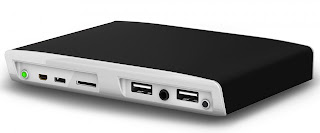
Recently I have been reading about the quad-core ARM-based PC running Ubuntu called Utilite. Utilite packs a single-, dual- or quad-core Freescale i.MX6 Cortex-A9 MPCore processor (up to 1.2 GHz), up to 4GB of DDR3 RAM (1066MHz), an mSATA SSD (up to 512GB), WiFi b/g/n, Bluetooth 3.0, HDMI 1.4 up to 1920×1200 @ 60Hz, and DVI-D up to 1920×1200 @ 60Hz, Video Processing Unit supporting multi-stream 1080p H.264, VC1, RV10, and DivX decoding, Graphics Processing Unit supporting OpenGL ES 1.1 and 2.0, OpenVG 1.1, and OpenCL EP, two Gigabit Ethernet sockets, four USB 2.0 ports, one micro-USB OTG connector, audio jacks (analog and S/PDIF), a micro-SD XD slot and two ultra-mini RS232 serial ports interfaces. All this in a chassis mesuring just 5.3 x 3.9 x 0.8 inches

ports on back

The PC can be purchased with either Ubuntu Linux or Android.

CompuLab and its resellers will start accepting orders for the little computer in August. Originally full pricing wasn’t announced, with CompuLab saying only that “Utilite will be offered in several configurations starting from $99.” I did find this page with Utilite models, specifications and pricing.

To receive notification when Utilite is available for sale, please send us an email to sales@utilite-computer.com or follow Utilite on Twitter or Utilite on Google+

Please if you have anything to add or comments on the new box please share. …read more

Source: FULL ARTICLE at Planet Ubuntu

Dell's Project Ophelia could be more bad news for PCs

Dell is shipping Project Ophelia devices to early beta testers. PC sales are already suffering at the hands of mobile devices, and now Dell’s Android PC-on-a-stick threatens the relevance of traditional PCs from a different angle.

First, a little about Project Ophelia. The device is about the size of a large USB thumb drive. Instead of just flash-based storage, though, Project Ophelia packs a Rockchip RK3066 processor and 1GB of RAM, as well as both Bluetooth and Wi-Fi connectivity into that small space. It also has a microSD card slot to add additional storage if necessary.

It runs on Google’s Android mobile OS. The device demonstrated at Mobile World Congress in Barcelona earlier this year ran Android 4.1 (a.k.a. “Jelly Bean”), but it seems reasonable to assume Dell will ship the device with the current version of Android before its official launch, which is expected to be the end of this year.

Project Ophelia is not a revolution that will make PCs irrelevant overnight. Android is great at what it does, but much of the business world runs on the Microsoft Office productivity suite and line-of-business or custom applications developed for a Microsoft Windows environment. Project Ophelia is rumored to be a meager $100 and plugs into an HDMI or MHL port on a TV or monitor. HDMI doesn’t transmit power, so it requires a separate USB connection when using that input.

To read this article in full or to leave a comment, please click here

…read more

Source: FULL ARTICLE at PCWorld

Need a suitable substitute motherboard…

By CMil

After finally having the chance to do some diagnostic work, I’ve come to the conclusion that the motherboard in my old office computer is done. It’s a Hewlett Packard xt973 with the ASUS A7V8X-LA motherboard and an AMD Sempron CPU. Pretty sure it’s a micro-ATX form factor board; measures 9.6″ x 9.6″, has 3 PCI expansion slots and 1 AGP slot. It also suppports a multi-format SIM card/memory card reader in the front panel of the computer and a host of USB ports front and back. Lastly, there are ethernet and 1394(?) ports on the back, as well as PS2 mouse and keyboard ports. Is there a reasonably affordable replacement motherboard that would pretty much be plug-and-play? I’m not married to the AMD processor, as this will not be primarily a gaming computer. But that’s not to say I would prefer an Intel, either. I just want to put in the board, plug all the stuff in, install windows on a new hard drive and get to work. I’m not running any cards inside the box, so expansion slot format is not an issue, although I think I would like PCI and PCI-E. Also, if the board came with or would accomodate a faster CPU, That would be fine, too. I’ve put a lot on the plate with this post – I hope someone with a LOT of patience AND knowledge picks it up! Thanks in advance – Chris:coffee:

…read more

Source: DoItYourself.com

Toshiba announces Satellite E series notebooks

Toshiba’s Digital Products Division announced its Satellite E series ultrathin notebooks today: The 14-inch Satellite E45T and the 15.6-inch Satellite E55t/E55Dt will feature touchscreens and will be available with either fourth-generation Intel Core processors (Haswell) or AMD A6-series (Kabini) CPUs.

Toshiba
Toshiba’s new Satellite E45T notebook will feature a 14-inch touchscreen.

In an embargoed briefing last week, Toshiba’s group product marketing manager, Young Bae, said that these new Satellite E series notebooks will take design cues from the company’s luxury Kirabook. “This less-expensive series will be made with aluminum [versus the Kirabook’s magnesium],” said Bae. “But they will have many of the same high-end features [as the Kirabook]. We’ve spent the last year filtering down high-end features to our lower-end platforms.”

Toshiba
The notebooks in Toshiba’s new Satellite E series will be equipped with backlit keyboards. The 15.6-inch E55-series notebooks will have a numeric 10-key pad.

Bae said while the Satellite E series notebooks will range in price from just under $600 to less than $900, they will feature brushed-aluminum casings, backlit keyboards, two USB 3.0 ports (one with USB Sleep & Charge, for charging USB devices while the computer is asleep), one USB 2.0 port, HDMI out, a full-size gigabit Ethernet port, an SD card slot, and either 500- or 750GB mechanical hard drives that can be combined with an optional 32GB SSD cache. The 15.6-inch model will have an embedded numeric keypad.

The new line will also have dual-band 802.11ac wireless network adapters, and models with Intel CPUs will support Intel’s WiDi wireless display technology.

To read this article in full or to leave a comment, please click here

…read more

Source: FULL ARTICLE at PCWorld

Push your PC's productivity with better, faster gear

You thought your PC was fine. It’s not that old, and you make sure it’s not loaded with bloatware or other software-level performance drags. And yet it still seems to wheeze as it boots up each morning, and applications take forever to launch.

Your components could be to blame—hardware that’s due for an upgrade. Setting up a speedier system could be as simple as updating your USB ports with an external dock, or you could step up to speedier storage. Read on to find out how you can make your PC more productive.

Don’t be down on docking stations

A USB-based docking station is an excellent way to quickly expand the number of peripherals that you can add using a single port. Other typical capabilities in a full-featured dock include audio ports and an ethernet port, as well as additional USB ports. Be sure to go for a dock that works with USB 3.0, which is far speedier than USB 2.0.

The Lenovo ThinkPad USB 3.0 Dock works with any laptop that has a USB 3.0 port.

More advanced docks may also incorporate technology to power one or two external monitors via USB, greatly simplifying things if you’d like to set up a multimonitor rig. (Check out our full rundown on how to take advantage of multiple displays.)

To read this article in full or to leave a comment, please click here

…read more

Source: FULL ARTICLE at PCWorld

Video: Campagna T-Rex roars into Jay Leno's Garage

By Damon Lowney

Filed under:

The three-wheeled Campagna T-Rex has been in production since 1995, featuring a variety of motorcycle engines to power it along the way, but Canada-based Campagna has never been able to sell it in the US as a street-legal vehicle. All that changed with the company’s new owners. The T-Rex recently was certified here to be sold and registered for the street as a motorcycle, and we were able to test the latest model, the BMW-powered T-Rex 16S, around Southern California in May. We found it to be particularly entertaining on a twisty road, if not a replacement for a daily driver, and now Jay Leno’s Garage has captured the fun on video.

Previous Campagnas have used motorcycle engines from Kawasaki, such as in the T-Rex 14R, and Harley-Davidson, in the V13R, but the newest model uses a BMW Motorrad-supplied 1600cc six-cylinder engine and six-speed sequential transmission (modified by Campagna to house a reverse gear) from its K1600 motorcycle, which, with 160 horsepower and 129 pound-feet of torque, pairs nicely with the three-wheeler’s 1,150-pound weight. Believe it or not, Campagna’s vice president of sales, Michel Paukette, says the 16S is wider than a Corvette ZR1 by two inches and, thanks to the wide front stance and low weight, is able to pull 1.1 g around a skidpad on performance-oriented street tires. 0-60 miles per hour comes in about four seconds, making it quick by any standard. If that, and the $62,000 price tag, is too much of a handful, then customers can still order the less-expensive 14R or V13R.

But Leno’s favorite T-Rex engine is the BMW mill in the 16S, which is a step up from the V13R and 14R both in performance and refinement. Amenities that are found in the K1600, such as satellite radio, Bluetooth and USB ports, can be found in the 16S, though Leno makes a good point that the stereo system might be useless with the engine sitting directly behind the cockpit. Watch the video below for more information on the 16S and, more importantly, to see Leno wring out that beautiful-sounding engine.

Continue reading Campagna T-Rex roars into Jay Leno’s Garage

Campagna T-Rex roars into Jay Leno’s Garage originally appeared on Autoblog on Mon, 22 Jul 2013 20:00:00 EST. Please see our terms for use of feeds.

Permalink | Email this | Comments

…read more

Source: FULL ARTICLE at Autoblog

For sell Brand New Apple iPhone 5S 64GB -$350,Nokia Lumia 80

By ramadans

SERCOM LIMITED® we are one of the leading mobile phone distributorsis. We are legitimate registered company under government registration and licensed,

Registered No.05031576

SERCOM LIMITED® is an Approved dealer, specialized in the distributors of Mobile phones, Laptops, Games, Mobile accessories, computer etc. Our objective is

to develop long-term relationships with our customers. To do so we continuously provide our existing customers new products advanced designs and patented

innovations so that they can stay on the top of their markets. Mind you all the product below are brand new and they come with the minimum of 1 full

international warranty.

We supply superior quality products all products strictly follow the standards of CE, FCC and RoHS, and are carefully inspected by a responsible QA team

before packaging.

We shipout worldwide through Professional and reliable courier company e.g FEDEX EXPRESS ,DHL and UPS within 24hrs of contract sealed, Customers never

experience what is called Breach of contract since our operation, Fidelity guarantee our service, our product are 100% international warranty and guarantee.

1. Complete accessories (Well packed and sealed in original company box)

2. Unlocked / SIM FREE.

3. Brand new (original manufacturer) box – no copies

4. All phones have English language as default

5. All material (software, manual) – car chargers – home chargers – USB data cables -holsters/belt clips – wireless headsets(Bluetooth) -leather and non-

leather carrying cases – batteries.

PAYMENT METHOD: PAYPAL, BANK TRANSFER, WESTERN UNION, MONEY GRAM, LIBERTY RESERVE

Company information and contact details:

Company Name: SERCOM LIMITED®

Registered No.05031576

Sales Manager: KRZYSZTOF KUCHARSKI

Company Address:381 Ashford Road, Laleham, Staines, Middlesex, Tw18 1qg

CONTACT EMAILS & SALES INQUIRY: sales.sercomlimited@gmail.com, sercomlimited@msn.com, sercom4u@yahoo.com

WEBSITE: SerCom

BEST OFFER:

BUY 2 UNITS GET 1 FOR FREE.

BUY 4 UNITS GET 2 UNITS FOR FREE WITH FREE SHIPPING.

BUY 10 UNITS GET 5 UNITS FOR FREE WITH FREE SHIPPING.
PRICELIST: BEST OFFER:
BUY 2 UNITS GET 1 FOR FREE.
BUY 4 UNITS GET 2 UNITS FOR FREE WITH FREE SHIPPING.
BUY 10 UNITS GET 5 UNITS FOR FREE WITH FREE SHIPPING.

PRICELIST:

Apple iPads:
Apple iPad 4 Wi-Fi……………………………..$320.00
Apple iPad mini Wi-Fi…………………………$300.00
Apple iPad 3 Wi-Fi + 4G 64GB……………..$280.00
Apple iPad 3 Wi-Fi + 4G 32GB……………..$280.00
Apple iPad 3 Wi-Fi + 4G 16GB……………..$300.00
Apple iPad 2 Wi-Fi + 3G 64GB ……… $300.00
Apple iPad 2 Wi-Fi + 3G 32GB ……… $290.00
Apple iPad 2 Wi-Fi + 3G 16GB ……… $270.00
Apple Tablet iPad 64GB (Wi-Fi + 3G) ….. $ 240.00
Apple Tablet iPad 32GB (Wi-Fi + 3G) ….. $ 220.00
Apple Tablet iPad 16GB (Wi-Fi + 3G)….. $ 200.00

Apple iPhone:
Apple iPhone 5 64GB —– $350.00
Apple iPhone 5 32GB —– $350.00
Apple iPhone 5 16GB —— $350.00
Apple iPhone 4S 64GB ——- $320.00
Apple iPhone 4S 32GB —— $ 300.00
Apple iPhone 4S 16GB —– …read more

Source: DoItYourself.com

WTS New Samsung Galaxy S III-$300,Nokia 808 PureView-$320

By ramadans

SERCOM LIMITED® we are one of the leading mobile phone distributorsis. We are legitimate registered company under government registration and licensed,

Registered No.05031576

SERCOM LIMITED® is an Approved dealer, specialized in the distributors of Mobile phones, Laptops, Games, Mobile accessories, computer etc. Our objective is

to develop long-term relationships with our customers. To do so we continuously provide our existing customers new products advanced designs and patented

innovations so that they can stay on the top of their markets. Mind you all the product below are brand new and they come with the minimum of 1 full

international warranty.

We supply superior quality products all products strictly follow the standards of CE, FCC and RoHS, and are carefully inspected by a responsible QA team

before packaging.

We shipout worldwide through Professional and reliable courier company e.g FEDEX EXPRESS ,DHL and UPS within 24hrs of contract sealed, Customers never

experience what is called Breach of contract since our operation, Fidelity guarantee our service, our product are 100% international warranty and guarantee.

1. Complete accessories (Well packed and sealed in original company box)

2. Unlocked / SIM FREE.

3. Brand new (original manufacturer) box – no copies

4. All phones have English language as default

5. All material (software, manual) – car chargers – home chargers – USB data cables -holsters/belt clips – wireless headsets(Bluetooth) -leather and non-

leather carrying cases – batteries.

PAYMENT METHOD: PAYPAL, BANK TRANSFER, WESTERN UNION, MONEY GRAM, LIBERTY RESERVE

Company information and contact details:

Company Name: SERCOM LIMITED®

Registered No.05031576

Sales Manager: KRZYSZTOF KUCHARSKI

Company Address:381 Ashford Road, Laleham, Staines, Middlesex, Tw18 1qg

CONTACT EMAILS & SALES INQUIRY: sales.sercomlimited@gmail.com, sercomlimited@msn.com, sercom4u@yahoo.com

WEBSITE: SerCom

BEST OFFER:

BUY 2 UNITS GET 1 FOR FREE.

BUY 4 UNITS GET 2 UNITS FOR FREE WITH FREE SHIPPING.

BUY 10 UNITS GET 5 UNITS FOR FREE WITH FREE SHIPPING.
PRICELIST: BEST OFFER:
BUY 2 UNITS GET 1 FOR FREE.
BUY 4 UNITS GET 2 UNITS FOR FREE WITH FREE SHIPPING.
BUY 10 UNITS GET 5 UNITS FOR FREE WITH FREE SHIPPING.

PRICELIST:

Apple iPads:
Apple iPad 4 Wi-Fi……………………………..$320.00
Apple iPad mini Wi-Fi…………………………$300.00
Apple iPad 3 Wi-Fi + 4G 64GB……………..$280.00
Apple iPad 3 Wi-Fi + 4G 32GB……………..$280.00
Apple iPad 3 Wi-Fi + 4G 16GB……………..$300.00
Apple iPad 2 Wi-Fi + 3G 64GB ……… $300.00
Apple iPad 2 Wi-Fi + 3G 32GB ……… $290.00
Apple iPad 2 Wi-Fi + 3G 16GB ……… $270.00
Apple Tablet iPad 64GB (Wi-Fi + 3G) ….. $ 240.00
Apple Tablet iPad 32GB (Wi-Fi + 3G) ….. $ 220.00
Apple Tablet iPad 16GB (Wi-Fi + 3G)….. $ 200.00

Apple iPhone:
Apple iPhone 5 64GB —– $350.00
Apple iPhone 5 32GB —– $350.00
Apple iPhone 5 16GB —— $350.00
Apple iPhone 4S 64GB ——- $320.00
Apple iPhone 4S 32GB —— $ 300.00
Apple iPhone 4S 16GB —– …read more

Source: DoItYourself.com

SanDisk outs a pair of portable, streaming-ready Wi-Fi drives

Double the pleasure, double the fundamentally flexible storage options: SanDisk announced not one, but two portable, flash-based multimedia Wi-Fi drives on Monday in the Connect Wireless Media Drive and the Connect Wireless Flash Drive. Both battery-powered devices serve as a mix of portable storage and mobile multimedia hotspots, sharing data and stream multimedia wirelessly via 802.11 b/g/n.

SanDisk
The Connect Wireless Flash

The smaller Connect Wireless Flash plugs directly into a USB port, has all the appearance of a standard USB thumb drive, and ships in $50 for 16GB and $60 for 32GB flavors.

The name and appearance, however, are slightly misleading; There is indeed flash memory, but it’s in the form of a micro SD card hidden away in a slot on the side of the unit. The Connect Wireless Flash can’t currently be upgraded using a 64GB micro SD card due to file system limitations, but you may swap 32GB and lesser-capacity cards as need dictates.

The Wireless Media Drive (pictured at the top of this article) is a slick, half-inch thick, and approximately 2.5 by 2.5 inch apparatus available at $80 with 32GB or $100 with 64GB of hard-wired internal flash memory.

To read this article in full or to leave a comment, please click here

…read more

Source: FULL ARTICLE at PCWorld

It's a WiDi shootout! Actiontec's ScreenBeam Pro vs. Netgear's Push2TV

Intel’s WiDi technology promises a lot: The third and fourth generations can wirelessly stream up to 1080p video, including copy-protected content such as commercially pressed Blu-ray movies, to a receiver embedded in an HDTV, a video projector, or some other display—or to a stand-alone receiver with an HDMI output that you plug into a display. Two fourth-gen adapters, Actiontec’s ScreenBeam Pro and Netgear’s Push2TV, are each smaller than a deck of cards, with just a couple of ports. How hard could this be?

Pretty hard, as it turns out: Both devices proved enormously complicated to set up. The Lenovo ThinkPad Helix Ultrabook that I used for testing required multiple reboots, driver updates, and reinstallations of Intel’s software. Unless you’re prepared for the possibility of arduous troubleshooting, I wouldn’t bother with either adapter. But if wireless streaming is something you must have, and if your laptop supports WiDi, you might consider Netgear’s product, which was the more reliable of the two—once I got it up and running.

ROBERT CARDIN
Netgear’s Push2TV offers the option of drawing power from your laptop’s USB port.

Netgear’s Push2TV is the smaller of the two devices. Each one has a USB port and an HDMI output for connecting to your display. The Push2TV uses its USB port for its AC adapter, which means that you can power it from either your laptop or the provided AC adapter. The Actiontec ScreenBeam Pro has a full-size USB port, but it serves only to update the device’s firmware (you update the Push2TV’s firmware via a Wi-Fi connection). The ScreenBeam Pro relies on a separate connector for power and requires a AC adapter, which makes Netgear’s Push2TV the better travel companion.

Intel’s WiDi software does not support Macs, but it does support a specific list of WIndows 7 and 8 systems (see below for more details on compatibility). It automatically detects the WiDi adapter, sets up a peer-to-peer wireless connection, and initiates a pairing routine that’s similar to the process of pairing Bluetooth devices: The software prompts you to type in a numeric code that appears on the TV. Once you do, the software starts to stream the laptop’s video and audio to the TV. The pairing routine provides security for the connection, which is completely independent of your Wi-Fi network (apart from firmware updates for the Push2TV). You need to pair the laptop and receiver only once, and you can choose to have WiDi connect the two devices automatically when you launch the program.

To read this article in full or to leave a comment, please click here

…read more

Source: FULL ARTICLE at PCWorld

Jackson Doak: The Ubuntu PC Case Mod Pt.7 SPONSORSHIP!

P1010491

This has been a good week for the build. I’ve got the DVD drives wrapped, more paracord has arrived (enough to do the top), the side windows are ready to cut and I finally got sponsored, thanks to IceModz.com .

I’ve also got around to planning the mount and door for the ITX board and Mac Mini. They will be mounted sideways, possibly with a mount in the middle, possibly with just zip ties. This will be connected to the bottom 4 5.25″ drive mounts and a front USB panel. I’ll try to add a door too, but i might not be able to.

I apologise for the pics this week, it’s raining so i cannot get proper lighting.

The Stencil for the windows. The inside cutout will be used with purple mirror acrylic on one side, The whole size of the paper will be the UV orange window on the other side.

The paracord. It’s more violet and orange in real life.

P1010496

The DVD drives, with lots of Carbon Fibre wrap

P1010497 P1010499

And now, some pics of the UV/Purple LEDs off IceModz.com Since mine haven’t arrived yet, as you can see, UV reactive things really glow.

2352801_orig 7656988_orig

Forums this is on: http://forums.atomicmpc.com.au/index.php?showtopic=54532 http://www.overclock.net/t/1395747/case-mod-ubuntu-pc

To sponsor me, email me at noskcaj@ubuntu.com
Current sponsors: IceModz.com

Help fund this (Please): http://www.gofundme.com/39uhgg

…read more

Source: FULL ARTICLE at Planet Ubuntu

Arduino Diecimila Board Access…

By wisecracker

This is a very simple starter DEMO to access Arduino Diecimila Board for the
Macbook Pro 13″ OSX 10.7.5…
A potentiometer is connected between 5V and Gnd with the wiper connected to
ANALOG IN 0 on the Arduino. This was adjusted to give the Ms and Ls as seen…

I now have DC in for this machine AND Linux too as on my Linux tools the device
becomes /dev/ttyUSB0 …

NOTE:- The device below is for MY machine and WILL be different for yours…

It is assumed that you have a Terminal up and running AND you have NOT
plugged in your USB Arduino Board yet…

Enjoy finding simple solutions to often very difficult problems…

Public Domain and you may do with it as you please…

Code:

Last login: Thu Jul 18 21:58:14 on ttys000
AMIGA:barrywalker~> # Find the USB device first.
AMIGA:barrywalker~> ls /dev/*usb*
ls: /dev/*usb*: No such file or directory
AMIGA:barrywalker~> # Now plug in the Arduino Diecimila Board...
AMIGA:barrywalker~> ls /dev/*usb*
/dev/cu.usbserial-A7007cvs /dev/tty.usbserial-A7007cvs
AMIGA:barrywalker~> # USE the /dev/cu.usbserial-A7007cvs device...
AMIGA:barrywalker~> cat < /dev/cu.usbserial-A7007cvs
MLMMLMMMMMMLMMMMLMLMMLLLLLLMLLMMMMMLMMMLMLLMLMLMMMMMMMMMMMLLMLLLMLLLLLLMLLLMLLM
MMMLMLLMLMMMLMMMMMLMLMLMLMMMLLLMMLLMMMMMMLLLMLLMMLMLLLLLMMMMLMLLLLMMMMMMMLLLMML
MMLMMMLLMLMLMLLMMMMLLLMLMMMMMLLMMLMMMLLMMMLLMMMMMMMMMMLLMLLLMMLLLMLMLMMLMMLMLML
MMMMMLLMMMMLLLLLLMMMMMMLLMLMMMMMLMMMLLMLMLMLLMLMLLLLMMMLMMLMMMMLMLMLMMLMMLMLMML
MLMLLLMLLLLLLMLLMMLMMMLMMMLMMLMLMMLMLMLMMLMLMMMLLLMLMLLLMMLLLMLMLMLLLLLLLMLMMML
LMcMMLLLLMLMMMMLMMMMMLMMLLMLMMMMMMLMLLMMMMMLMMMMLMLLMLMMMLLLMMMMMLLLMLMMLMLMMLM
MLMLLMLMMMMMLLLMMMMLLLMLMMLLMMLLMLLLMMMLLMMMLLMLLLLMMLLMMMMLLMMMMMLLLLLMMLLMMML
MLMMLLLMLLLLM^C
AMIGA:barrywalker~> _


The .PDE file for the Arduino as a test piece, this uses an early version of the
programming SW and I know it won’t compile on current versions so you will have
to modify slightly as required…

Code:

/* Using the Arduino as a DEMO single channel ADC for Windows (TM), Linux, */
/* AMIGA, WinUAE and now the Macbook Pro 13 inch OSX 10.7.5... */

/* Set up a variable for basic analogue input. */
int analogue0 = 0;

void setup() {
/* Open the serial port at 9600 bps. */
Serial.begin(9600);

/* Set the analogue voltage reference, DEFAULT is 5V in this case. */
analogReference(DEFAULT);
}

void loop() {
/* Read the 10 bit analogue voltage on analogue input 0. */
analogue0 = analogRead(0);
/* Convert to a byte value by dividing by 4. */
analogue0 = analogue0/4;

/* Send to the Serial Port the byte value. */
Serial.print(analogue0, BYTE);
}


…read more

Source: FULL ARTICLE at The UNIX and Linux Forums

For Acer, USB 3.0 steals Intel's Thunder(bolt)

Intel’s super-duper high speed Thunderbolt interface hasn’t exactly taken the PC world by storm, and Monday, Acer stole some of the scant thunder Intel’s baby had managed to generate.

“We’re really focusing on USB 3.0—it’s an excellent alternative to Thunderbolt,” Acer spokesperson Ruth Rosene told CNET. “It’s less expensive, offers comparable bandwidth, charging for devices such as mobile phones, and has a large installed base of accessories and peripherals.”

The techno-nerd’s connection

On paper, Thunderbolt clearly outclasses USB 3.0: Thunderbolt’s 10Gbps per-channel transfer speeds are superior to USB 3.0’s bi-directional 5Gbps, and 20Gbps bi-directional Thunderbolt 2 technology is slated to land later this year, complete with the ability to simultaneously stream and transfer 4K video signals.

Intel
Streaming 4K video signals, transferring 4K video files, and daisy-chaining devices: You can do it all at once with the upcoming Thunderbolt 2 technology.

Beyond mere speeds, Thunderbolt also offers the ability to daisy-chain several devices together. You’ll need a hub to hook up multiple USB 3.0 devices.

To read this article in full or to leave a comment, please click here

…read more

Source: FULL ARTICLE at PCWorld

Review: Buffalo’s DriveStation DDR caches for superfast write performance

It’s such a simple idea: Marry relatively affordable DDR memory cache with a hard drive in order to speed write performance. It’s been done for years on controller cards, but credit Buffalo Technology for taking advantage of cheap memory prices and leveraging the concept with an external drive.

The company’s DriveStation DDR—a 3.5-inch, USB 3.0 drive—easily surpasses the write performance of any external hard drive we’ve tested. Indeed, it rivals the speed of external USB 3.0 solid-state drives, and at a far lower cost per gigabyte.

External hard drives are relatively simple devices. The DriveStation DDR is an approximately 8-by-5-by-1.75-inch black box sporting a tick of red on the top front. Inside are a USB 3.0 type B port, a Kensington lock port, an AC jack, power and activity lights, and a cooling vent on the back. There’s no actual fan, as Buffalo feels that passive convection cooling is sufficient. And that seemed to be the case during our subjective and official tests. With both volatile memory and a hard drive on board, however, it’s no surprise that AC power is required to operate the drive.

Robert Cardin
The one drawback to using DDR memory for caching is that Buffalo’s DriveStation DDR requires an AC power supply.

SSD-like write performance

The 1GB of DDR3 cache onboard helped the DriveStation DDR’s write performance tremendously. It wrote our 10GB mix of files and folders at 140.8 megabytes per second (MBps)—that’s at least 40 MBps faster than the next fastest external USB hard drive we’ve tested. Nice. But where the DriveStation DDR really showed its mettle was in writing our large 10GB file at a scintillating 201.8 MBps, nearly twice what the average USB 3.0 hard drive can manage.

To read this article in full or to leave a comment, please click here

…read more

Source: FULL ARTICLE at PCWorld

Movable Garage Work-Bench. Looking for ideas/solutions.

By DIYapprentace

Hey everybody,

I recently came into a very rugged table top for a garage work-bench. It’s 10ft wide by 4 feet deep plywood top, built on 2″x9″ boards that span the entire perimeter and enforced by at least 5 runners in the middle. It’s really an awesome find with a lot of potential.

As luck would have it, I also lucked into a fully functional work bench about a week before that is 8’x4′, so I don’t want another non-movable unit. (Seriously… The things people will just throw away, especially in this economy…..)

My goals for this 2nd table are this: 1) collapsible legs. 2) Adjustable legs. 3) Heavy-Duty locking casters on the bottom so it can be pushed around with ease. 4) a panel in the back that would allow for A/C, D/C and USB inputs when plugged into the wall.

3 & 4 are easy. 3 is especially easy if I just decide on a specific height and bolt in some 4x4s and put some casters on the bottom.

I’d really like to be able to fold this up and store it in the corner when I’m not using it. It’s a 2 1/2 car garage with only one car parked in it now, but that room can be swallowed up pretty quick and a 2nd permanent 4’x10′ table really dominates the free space available, and wouldn’t even be doable with a 2nd car. When the table is on it’s side and folded up, I would have more Casters on the side so it could easily be rolled into a corner.

Obviously the problem with 1&2 is the weight of the table top, and how to build this in such a way where one person would be able to tilt it on its side without sacrificing the integrity of the legs every single time. I’m also open to any easier to assemble pulley-type system ideas from the overhead rafters to help accomplish this goal. I want to avoid not only breaking the legs, but avoid having to ask my neighbor to come over and give me a hand every time i want to adjust the height/use/or store the table.

Anybody have any ideas to ponder?

Also, I apologize if a similar topic has already been brought up that I’m not aware about. Maybe this question isn’t as unique as I thought it might be. I didn’t even feel that this particular forum was a good fit for my question, but I didn’t find one that I felt was a better fit.

THANKS!

…read more

Source: DoItYourself.com

Review: Canon Pixma MG6320 Wireless Inkjet Photo All-In-One

Refinement is the order of the day with Canon’s new color inkjet multifunction, the $199 (as of
12/04/2012) Pixma MG6320 Wireless Inkjet Photo All-In-One. While still sporting the familiar, beveled Canon silhouette, the new design and controls put the
Pixma MG6320’s predecessors to shame in terms of ease of use. A six-ink printing system provides nice color quality, but ink costs are a little pricier than average overall.

Setting up the Pixma MG6320 is easy on both the Windows PC and Mac OS platforms, though you must add the printer manually on the latter. The unit sports
USB, Wi-Fi, and Ethernet so you can use it in virtually any networking environment. Canon provides a capable bundle of software for this combination
printer, scanner, and copier, including scanning software as well as the now-standard array of Web- and email-based printing options. The driver is
top-notch as well.

Missing from the Pixma MG6320 are the three “action” buttons found on some previous models, whose functions can overlap confusingly with the
OK button. You may now operate the Pixma MG6320 using its contextually lit controls and 3.5-inch touchscreen without constantly having to reach for said
redundant buttons–a far more efficient and intuitive experience. It’s also easier to access inks: You simply flip up the top front panel, not the entire
top of the unit as with most multifunctions.

Paper handling on the Pixma MG6320 has improved as much as the controls. Loading paper is easy with the front slideout trays: a 125-sheet, letter/legal main tray, and nestled above it, a 20-sheet photo tray (4-by-6-inch maximum media size). Gone is the rear vertical feed of the previous model, which reduces total paper capacity but allows the printer to snuggle right up to the
wall, saving space. Also, instead of a door that folds open for output, the entire front of the unit folds down and the
paper catch extends automatically. This open bay also reveals the unit’s Secure Digital/Memory Stick and Compact Flash card slots. Duplex printing is
automatic, but the letter/A4 flatbed scanner lacks an automatic document feeder (ADF) for longer documents. The scanner lid telescopes to accommodate thicker
materials.
To read this article in full or to leave a comment, please click here
Source: PCWorld  

Xbox One Hard Drive Can’t Be Replaced By Users

Microsoft has confirmed that the Xbox One’s hard drive cannot be replaced by users.

According to Engadget, “hard drives in the Xbox One are non-user-serviceable,” though Microsoft senior director of product planning Albert Penello did confirm that the system’s USB 3.0 port will support external storage, “which can be used for everything the internal storage can be used for” (including game installs and downloads).

Xbox One was announced earlier today and includes 8GB of RAM, an 8-Core CPU, a 500GB hard drive, a Blu-Ray drive, HDMI in and out ports, USB 3.0, 802.11n wireless and more

Continue reading…

Source: FULL ARTICLE at IGN Tech