Tag Archives: HDMI

Duane Hinnen: Utilite, a $99 quad-core ARM-based PC running Ubuntu

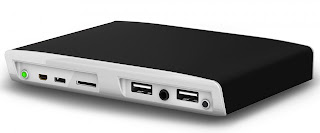
Recently I have been reading about the quad-core ARM-based PC running Ubuntu called Utilite. Utilite packs a single-, dual- or quad-core Freescale i.MX6 Cortex-A9 MPCore processor (up to 1.2 GHz), up to 4GB of DDR3 RAM (1066MHz), an mSATA SSD (up to 512GB), WiFi b/g/n, Bluetooth 3.0, HDMI 1.4 up to 1920×1200 @ 60Hz, and DVI-D up to 1920×1200 @ 60Hz, Video Processing Unit supporting multi-stream 1080p H.264, VC1, RV10, and DivX decoding, Graphics Processing Unit supporting OpenGL ES 1.1 and 2.0, OpenVG 1.1, and OpenCL EP, two Gigabit Ethernet sockets, four USB 2.0 ports, one micro-USB OTG connector, audio jacks (analog and S/PDIF), a micro-SD XD slot and two ultra-mini RS232 serial ports interfaces. All this in a chassis mesuring just 5.3 x 3.9 x 0.8 inches

ports on back

The PC can be purchased with either Ubuntu Linux or Android.

CompuLab and its resellers will start accepting orders for the little computer in August. Originally full pricing wasn’t announced, with CompuLab saying only that “Utilite will be offered in several configurations starting from $99.” I did find this page with Utilite models, specifications and pricing.

To receive notification when Utilite is available for sale, please send us an email to sales@utilite-computer.com or follow Utilite on Twitter or Utilite on Google+

Please if you have anything to add or comments on the new box please share. …read more

Source: FULL ARTICLE at Planet Ubuntu

Dell's Project Ophelia could be more bad news for PCs

Dell is shipping Project Ophelia devices to early beta testers. PC sales are already suffering at the hands of mobile devices, and now Dell’s Android PC-on-a-stick threatens the relevance of traditional PCs from a different angle.

First, a little about Project Ophelia. The device is about the size of a large USB thumb drive. Instead of just flash-based storage, though, Project Ophelia packs a Rockchip RK3066 processor and 1GB of RAM, as well as both Bluetooth and Wi-Fi connectivity into that small space. It also has a microSD card slot to add additional storage if necessary.

It runs on Google’s Android mobile OS. The device demonstrated at Mobile World Congress in Barcelona earlier this year ran Android 4.1 (a.k.a. “Jelly Bean”), but it seems reasonable to assume Dell will ship the device with the current version of Android before its official launch, which is expected to be the end of this year.

Project Ophelia is not a revolution that will make PCs irrelevant overnight. Android is great at what it does, but much of the business world runs on the Microsoft Office productivity suite and line-of-business or custom applications developed for a Microsoft Windows environment. Project Ophelia is rumored to be a meager $100 and plugs into an HDMI or MHL port on a TV or monitor. HDMI doesn’t transmit power, so it requires a separate USB connection when using that input.

To read this article in full or to leave a comment, please click here

…read more

Source: FULL ARTICLE at PCWorld

Toshiba announces Satellite E series notebooks

Toshiba’s Digital Products Division announced its Satellite E series ultrathin notebooks today: The 14-inch Satellite E45T and the 15.6-inch Satellite E55t/E55Dt will feature touchscreens and will be available with either fourth-generation Intel Core processors (Haswell) or AMD A6-series (Kabini) CPUs.

Toshiba
Toshiba’s new Satellite E45T notebook will feature a 14-inch touchscreen.

In an embargoed briefing last week, Toshiba’s group product marketing manager, Young Bae, said that these new Satellite E series notebooks will take design cues from the company’s luxury Kirabook. “This less-expensive series will be made with aluminum [versus the Kirabook’s magnesium],” said Bae. “But they will have many of the same high-end features [as the Kirabook]. We’ve spent the last year filtering down high-end features to our lower-end platforms.”

Toshiba
The notebooks in Toshiba’s new Satellite E series will be equipped with backlit keyboards. The 15.6-inch E55-series notebooks will have a numeric 10-key pad.

Bae said while the Satellite E series notebooks will range in price from just under $600 to less than $900, they will feature brushed-aluminum casings, backlit keyboards, two USB 3.0 ports (one with USB Sleep & Charge, for charging USB devices while the computer is asleep), one USB 2.0 port, HDMI out, a full-size gigabit Ethernet port, an SD card slot, and either 500- or 750GB mechanical hard drives that can be combined with an optional 32GB SSD cache. The 15.6-inch model will have an embedded numeric keypad.

The new line will also have dual-band 802.11ac wireless network adapters, and models with Intel CPUs will support Intel’s WiDi wireless display technology.

To read this article in full or to leave a comment, please click here

…read more

Source: FULL ARTICLE at PCWorld

Google's Chromecast Could Cause Surge In Subscribers For Netflix, Other Streaming Providers

By Matt Hickey, Contributor

Today, (a day after accidentally leaking it to everyone,) announced the Chromecast, a multi-media dongle that plugs into any HDTV’s HDMI port, allowing those TVs to become second screens to Google-powered devices, like Android phones and PCs and Macs running the Chrome browser. At first blush this looks like a competitor to the AppleTV and other related devices, but it’s more than that: The Chromecast – which costs $35 — is now the cheapest and easiest way for the average consumer to become a “cord cutter” and dump their cable or satellite TV provider. …read more

Source: FULL ARTICLE at Forbes Latest

Google Chromecast Device Is A Game Changer

By Tony Bradley, Contributor

held an event today, which it dubbed “Breakfast with Sundar Pichai.” Predictions of an updated Nexus 7 tablet proved true, but Google also had another trick up its sleeve–Chromecast. The event basically went like this: Blah, blah, Nexus 7…faster processor, sharper display, 4G connectivity…blah, blah…Chromecast! This tiny dongle plugs into the HDMI port on your TV, and lets you wirelessly stream content from the Web using virtually any mobile device as a remote control. Oh, and it’s only $35. …read more

Source: FULL ARTICLE at Forbes Latest

ChromeCast: Google's $35 Response to Apple's AirPlay

chromecast

For some time now, Apple has offered AirPlay as a way to stream content to your HDTV through its set-top box, the $99 Apple TV. And while AirPlay is certainly convenient, the setup requires another piece of hardware on your TV stand. Today, Google has offered an alternative with ChromeCast, a small receiver which plugs right into an HDMI port.

Continue reading…

…read more

Source: FULL ARTICLE at IGN Tech

It's a WiDi shootout! Actiontec's ScreenBeam Pro vs. Netgear's Push2TV

Intel’s WiDi technology promises a lot: The third and fourth generations can wirelessly stream up to 1080p video, including copy-protected content such as commercially pressed Blu-ray movies, to a receiver embedded in an HDTV, a video projector, or some other display—or to a stand-alone receiver with an HDMI output that you plug into a display. Two fourth-gen adapters, Actiontec’s ScreenBeam Pro and Netgear’s Push2TV, are each smaller than a deck of cards, with just a couple of ports. How hard could this be?

Pretty hard, as it turns out: Both devices proved enormously complicated to set up. The Lenovo ThinkPad Helix Ultrabook that I used for testing required multiple reboots, driver updates, and reinstallations of Intel’s software. Unless you’re prepared for the possibility of arduous troubleshooting, I wouldn’t bother with either adapter. But if wireless streaming is something you must have, and if your laptop supports WiDi, you might consider Netgear’s product, which was the more reliable of the two—once I got it up and running.

ROBERT CARDIN
Netgear’s Push2TV offers the option of drawing power from your laptop’s USB port.

Netgear’s Push2TV is the smaller of the two devices. Each one has a USB port and an HDMI output for connecting to your display. The Push2TV uses its USB port for its AC adapter, which means that you can power it from either your laptop or the provided AC adapter. The Actiontec ScreenBeam Pro has a full-size USB port, but it serves only to update the device’s firmware (you update the Push2TV’s firmware via a Wi-Fi connection). The ScreenBeam Pro relies on a separate connector for power and requires a AC adapter, which makes Netgear’s Push2TV the better travel companion.

Intel’s WiDi software does not support Macs, but it does support a specific list of WIndows 7 and 8 systems (see below for more details on compatibility). It automatically detects the WiDi adapter, sets up a peer-to-peer wireless connection, and initiates a pairing routine that’s similar to the process of pairing Bluetooth devices: The software prompts you to type in a numeric code that appears on the TV. Once you do, the software starts to stream the laptop’s video and audio to the TV. The pairing routine provides security for the connection, which is completely independent of your Wi-Fi network (apart from firmware updates for the Push2TV). You need to pair the laptop and receiver only once, and you can choose to have WiDi connect the two devices automatically when you launch the program.

To read this article in full or to leave a comment, please click here

…read more

Source: FULL ARTICLE at PCWorld

Xbox One Hard Drive Can’t Be Replaced By Users

Microsoft has confirmed that the Xbox One’s hard drive cannot be replaced by users.

According to Engadget, “hard drives in the Xbox One are non-user-serviceable,” though Microsoft senior director of product planning Albert Penello did confirm that the system’s USB 3.0 port will support external storage, “which can be used for everything the internal storage can be used for” (including game installs and downloads).

Xbox One was announced earlier today and includes 8GB of RAM, an 8-Core CPU, a 500GB hard drive, a Blu-Ray drive, HDMI in and out ports, USB 3.0, 802.11n wireless and more

Continue reading…

Source: FULL ARTICLE at IGN Tech

12 ways Windows 8 dominates the OS competition

While we’re on the topic of hardware, let’s talk monitors. More specifically, let’s talk lots of monitors.

Display die-hards love Windows 8’s deeply improved multi-monitor functionality—it’s a huge step up over Windows 7’s several-screen support. Is it perfect? Nope. But it’s pretty darned good, and an absolute cinch to set up.

Macs and Linux boxes have dead-simple multi-monitor software, too, but they can be a hassle to set up on the hardware side. Mac desktops drive video via
Mini DisplayPort or Thunderbolt connectors. Both technologies are utterly awesome, don’t get me wrong—but neither is anywhere near as
ubiquitous as HDMI, DVI, or VGA. Linux multiple-monitor support works great, except for when it doesn’t. Finding working monitor drivers can occasionally be a hassle, and Linux sometimes stutters while trying to drive multi-monitor setups in multi-GPU rigs.

From: http://www.pcworld.com/article/2035821/12-ways-windows-8-dominates-the-os-competition.html#tk.rss_all

Chromebooks vie to replace netbooks

The once-hot netbook may have been decimated by the arrival of tablets, but inexpensive, lightweight laptops are showing staying power. The latest iteration in that category is Chromebooks, laptops with Google’s Chrome OS, which is seen as a lightweight OS alternative to Windows for users who do most of their computing on the Web. There is substantial backing for Chromebooks with companies like Google, Lenovo, Samsung, Hewlett-Packard and Acer offering models with different screen sizes and hardware.

A first wave of Chromebooks released in 2011 from Samsung and Acer failed to catch on, but a new wave that went on sale late last year have better hardware and a more refined OS. Typical features include 100GB of Google Cloud storage, Wi-Fi, webcams, and in some models, 3G connectivity. However, IDC suggested that early sales of Chromebooks have been weak, and it remains to be seen if they will fill the void left by netbooks.

Acer’s Chromebook C7

The US$199.99 Acer Chromebook C7 is the cheapest Chrome OS laptop available. It has an 11.6-inch screen and a 320GB hard drive, while other models have 16GB of local solid-state storage. One disappointment is the three-and-a-half hours of battery life, while more expensive models offer up to six-and-a-half hours. The C7 has an Intel Celeron dual-core processor running at 1.1GHz, 2GB of memory and an HDMI port. Like a majority of other Chromebooks, the screen displays images at a resolution of 1366 by 768. Acer maintains the C7 has sold better than expected, and has said it will come out with more Chromebook models in the future.

To read this article in full or to leave a comment, please click here

From: http://www.pcworld.com/article/2035904/chromebooks-vie-to-replace-netbooks.html#tk.rss_all

How DisplayPort multi-streaming delivers new levels of multi-monitor madness

When a vendor sends us a demo system, it typically take great care to ensure that we experience the system exactly as the maker intends us to. So when VESA, the trade group responsible for the DisplayPort standard, said that it was sending PCWorld a multiple-monitor demo system similar to the one it exhibited at CES in January, I expected it to arrive bundled with a detailed guide and all the software needed to present DisplayPort in its best light.

Imagine my surprise when an MSI GX60 gaming laptop, two 24-inch Dell U2413 displays, and a 21.5-inch HP Elite L2201x showed up in the PCWorld Labs without so much as a user manual for any of the four devices. “Wow,” I thought. “They must be pretty confident that setting all this up will be self-evident.”

Robert Cardin
The Mini DisplayPort connector is located on the MSI GX60’s rear panel, between the VGA and HDMI ports.

As things turned out, setup was pretty much self-evident. The GX60 has HDMI and VGA video outputs, but obviously I was more interested in its Mini DisplayPort. Both of the Dell monitors have full complements of digital video inputs (HDMI, DVI, and full-size DisplayPort, along with ports labeled ‘DisplayPort In’ and ‘DisplayPort Out’), but the HP display has only a DisplayPort input.

I connected the full-size DisplayPort on the first Dell to the notebook, plugged a second cable to that monitor’s DisplayPort Out, and connected that to the other Dell’s DisplayPort In. Then I attached a third cable to the second Dell’s DisplayPort Out and plugged it into the HP display to complete the chain.

To read this article in full or to leave a comment, please click here

From: http://www.pcworld.com/article/2035700/how-displayport-multi-streaming-delivers-new-levels-of-multi-monitor-madness.html#tk.rss_all

Toshiba's "Retina-like" Kirabook limited to 1080p video output

Toshiba is launching a new luxury Ultrabook that’s housed in a magnesium alloy case and boasts a 13.3-inch display with native resolution of 2560-by-1440 pixels. In a briefing with PCWorld earlier this month, Toshiba’s group product marketing manager, Young Bae, described the Kirabook as having a “MacBook Pro screen on an Ultrabook that’s lighter than a MacBook Air.”

There’s just one problem with that description: Toshiba has outfitted the Kirabook with an HDMI output that can drive an external display at only 1920-by-1080 pixels.

Apple provides HDMI out on its MacBook Pro, too. However, Apple’s machine also delivers Thunderbolt, so it’s capable of driving up to two external displays at resolution of 2560-by-1600 pixels each. While the HDMI standard is capable of resolutions higher than 1920-by-1080, when doing so it’s limited to refresh rates of only 24- or 30Hz (4096×2160 pixels at 24Hz, and 3840×2160 pixels at up to 30Hz). Anyone connecting the Kirabook to a 27- or 30-inch display is likely to be disappointed with the image they see on the big screen compared to what they see on the little screen next to it.

Toshiba
Toshiba’s Kirabook boasts a Retina-like display in a 13.3-inch Ultrabook.

It’s a curious design decision considering that Toshiba is positioning the Kirabook as a luxury machine. “We intend to deliver an upscale, premium customer experience,” said Bae. “We will have a dedicated tech-support line for Kirabook owners. Their calls will be answered within 45 seconds. And the device will come with a two-year warranty during which we’ll provide paid overnight shipping on warranty claims.”

To read this article in full or to leave a comment, please click here

From: http://www.pcworld.com/article/2035432/toshibas-retina-like-kirabook-limited-to-1080p-video-output.html#tk.rss_all

Review: Dell’s UltraSharp U3014 delivers the big picture

A 30-inch desktop giant, the Dell UltraSharp U3014 offers resolution of 2460 by 1600 pixels on a matte IPS screen with environmentally friendly LED backlighting. The U3014 boasts several nice-to-have features and a long list of on-board controls for tuning your image on screen.

You might need to enlist some help in attaching the heavy monitor to its stand. But once you’ve done that, you can connect it to your computer using your choice of DVI, HDMI, DisplayPort, or Mini DisplayPort.

The U3014 supports DisplayPort 1.2, including multistreaming, so you can daisy-chain two or more monitors and display independent images on each one (provided your video card also supports DisplayPort 1.2).

Dell’s UltraSharp U3014 is a bright and beautiful display with a host of video inputs, a USB hub, and a media card reader.

The U3014 also supports picture-in-picture mode, but only with certain combinations of connections. DVI and HDMI can’t be used together, nor can the two types of DisplayPort connections (DisplayPort In is used only in daisy-chain scenarios). I was also surprised to discover that the monitor doesn’t scan all of its inputs on power-up, so I had to manually select the input I was using the first time. There is an input-scan button, but you must engage it by pushing a button.

To read this article in full or to leave a comment, please click here

From: http://www.pcworld.com/article/2034673/review-dell-s-ultrasharp-u3014-delivers-the-big-picture.html#tk.rss_all

Next Xbox Could 'Take Over' Your TV

The official reveal of the next Xbox may still be weeks away, but all signs point to Microsoft making a major play for dominance of the living room. A new report from The Verge suggests the next-gen system will be capable of integrating a user’s cable or satellite signal into a unified user interface, similar to Google TV. According to the site’s multiple sources, the console will connect to set-top boxes via HDMI and combine broadcast content with its interactive interface. Microsoft is reportedly working with content partners to offer more streamlined integration with the service.

Continue reading…

Source: FULL ARTICLE at IGN Tech

Panasonic Debuts 3rd-Generation VariCam with Native 1080P, AVC-ULTRA Recording and Expanded Off-Spee

By Business Wirevia The Motley Fool

Filed under:

Panasonic Debuts 3rd-Generation VariCam with Native 1080P, AVC-ULTRA Recording and Expanded Off-Speed Shooting; Announces Native 4K Resolution LCD Production Monitor

LAS VEGAS–(BUSINESS WIRE)– At the National Association of Broadcasters (NAB) annual convention, Panasonic has unveiled its third-generation VariCam® HD production camera, and a new 31″ LCD production monitor with native 4K resolution for 4K/2K/HD cinema production. The recently announced AJ-PX5000G and AJ-PD500, the company’s first P2 HD camcorder and recorder with native AVC-ULTRA recording and built-in microP2 card slots, will be shown for the first time here.

Panasonic also announced major sales to broadcasters Griffin Communications and Denali Media Holdings.

The third-generation VariCam improves upon the camera brand’s signature features–off-speed shooting and film-like image production—while incorporating Panasonic’s new AVC-ULTRA family of video codecs. The camcorder utilizes three advanced, full 1920 x 1080p wide dynamic range MOS imagers for native 1080/60p recording/operation, and boasts a true RGB imager/prism system that provides full resolution color. With an EFP-style body, the VariCam’s 2/3″ B4 lens mount enables use of native format prime lenses and servo zooms, eliminating the expensive and cumbersome workarounds required when using such optics on larger formats. Among the camcorder’s top-level production features are real-time high frame rate, off-speed recording to 120fps in full 1080p (in AVC-Intra Class100), a wide dynamic range and 24-bit LPCM audio. The camera will feature a range of high-quality recording formats including AVC-Intra Class100, AVC-Intra Class200 and AVC-Intra Class4:4:4. The third-generation VariCam will be available early next year, with pricing to be announced.

The BT-4LH310 is a 31-inch 4096 x 2160 resolution LCD monitor for unrivalled 4K/2K monitoring in the field, including use in a video village for live viewing of 4K cameras and devices with I/Os as well as for viewing of dailies. The 4LH310’s 4K 10-bit IPS panel affords native 4K resolution (more than four times that of full HD), a wide viewing angle, and faithful reproduction of up to 1.07 billion colors. Equipped with a production-tough aluminum frame, the BT-4LH310 features multiple professional inputs (including HD-SDI, 3G-SDI and HDMI); true color processing with a 3D look-up table (LUT); HD/SD closed captioning; 28V DC operation for field use; and an eco-friendly panel with mercury-free LED backlight. In addition to 4K, the 4LH310 Iis ideal for 2K and HD resolutions, meaning it can be used for all types of cinema production and post production. The BT-4LH310 will be available in fall 2013, with pricing to be announced.

The 2/3-inch, 2.2M 3-MOS AJ-PX5000G combines superb image production, light weight and innovative expandability. The camcorder features 720p and 1080p/i recording, and is the …read more

Source: FULL ARTICLE at DailyFinance

HP Envy x2 looks great and lasts a long time, but speed is just adequate

Will the HP Envy x2 evoke jealous thoughts in the coffee shop? Given its sleek, brushed-silver looks and thin clamshell design, probably. Will it stir the deeper emotions that other, faster convertible Windows 8 tablet/laptops do? Sorry HP, no. Still, this thoughtfully designed portable delivers enough battery life and performance to more than adequately fill the roles of both tablet and small laptop.

Light, usable design

The Envy x2 sports a 1366 by 768 (16:9), 11.6-inch display that shows off video well and delivers more than enough usable brightness. The tablet portion weighs a comfortable (given its wide nature) 1.54 pounds, with the 1.56-pound keyboard/port dock bringing that up to 3.1 pounds. All told, toting the package is no great feat. The tablet portion locks into the keyboard dock, and is released via a slide switch.

Most of the EnvyxX2’s ports reside on the dock, including a headset jack, HDMI video output, and two USB 2.0 ports. The lack of USB 3.0 or any other high-speed interface for backing up is a minor quibble given the light-use nature of the product. There’s also a SDHC car reader, and a large power connector jack. Connectivity (all on the tablet) includes 802.11 a/b/g/n, Bluetooth 4.0, as well as Near-Field Communication, though there are few applications for the latter at the moment.

The tablet portion sports the usual features: a 1080 display-side Webcam, an 8-megapixel back camera, plus an ambient light sensor. There are only two ports–the power jack and the headset jack. With no USB or card reader, you’ll need to load or offload data docked or via Wi-Fi. The tablet also has a power button and rocker-volume switch which are placed handily on the back, just a short reach from where your fingers fall when holding the tablet with both hands.

To read this article in full or to leave a comment, please click here

…read more

Source: FULL ARTICLE at PCWorld

Lenovo IdeaCentre Q190 review: Call it a full-figured micro PC

Compared with Intel’s diminutive NUC and Sapphire’s slim and sexy Edge VS8, you might think of Lenovo’s IdeaCentre Q190 as a full-figured micro PC. It’s not the smallest such model, but it boasts a ton of ports, it has enough interior space to move air over its components, and it has a Blu-ray drive option. If you’re looking for a home-theater PC, those are important features.

Design and ports

The Q190 is a small monolith measuring 6.10 by 7.55 inches. It’s 0.86 inch thick (expanding to 1.5 inches thick with its piggyback slot-feed optical drive attached). A stand that stabilizes the unit when upright adds about another half-inch of height, but Lenovo also provides a VESA mounting bracket so you can mount the Q190 on the back of a display.

Robert Cardin
A drop-down panel (lowered here) hides the Q190’s front ports.

Mic and headphone jacks, two USB 3.0 ports, and a six-in-one media-card reader are hidden behind a door on the front of the unit. On the back you’ll find HDMI and VGA video outputs, three USB 2.0 ports, ethernet, an optical S/PDIF port, and the power jack for the AC adapter. The computer and the optical drive both have Kensington lock points. The Q190 also has a built-in 802.11b/g/n wireless network adapter. The bundled keyboard and mouse are middle-of-the-road units, but Lenovo’s palm-sized Enhanced Multimedia Remote, which combines a backlit QWERTY keyboard and fingertip mouse and costs $80, is worth a look if you plan to use the system from your sofa.

The Q190 is not quite as quiet as the nearly noiseless NUC, or the Edge with its super-quiet fan, but we didn’t find its noise signature to be bothersome.

To read this article in full or to leave a comment, please click here

…read more

Source: FULL ARTICLE at PCWorld

Hyperkin Reveals RetroN 5: NES, Genesis, Famicon Support and More

After announcing the reveal of retro classic franken-console RetroN 4, third-party hardware developer Hyperkin pulled a fast one at the Midwest Gaming Classic and instead revealed a different console, the RetroN 5. Jam-packed with the RetroN 4’s NES/SNES/Genesis/Gameboy capabilities and HDMI compatibility, the RetroN 5 adds on a fifth console: Japan’s Famicom system.

Continue reading…

…read more
Source: FULL ARTICLE at IGN Tech

Official: 2014 Acura MDX shows up exactly as expected

By Steven J. Ewing

2014 Acura MDX - front three-quarter studio view, silver

Filed under:

Acura (and parent company Honda, for that matter) doesn’t always leave a lot to be left to the imagination when they unveil prototypes at auto shows. Case in point: Take a gander at the Acura MDX Prototype that debuted at the Detroit Auto Show this past January, and then look at the production-spec 2014 MDX pictured above. See what we mean?

Design-wise, there frankly isn’t a whole lot to get excited about with this MDX. Sure, a lot of the chiseled, sharp lines from the previous-generation model have been smoothed out in favor of something that will likely have more mass-market appeal, but to our eyes, the MDX has simply lost a lot of its visual flair in the process. To quote Autoblog senior editor Seyth Miersma, this new one just looks like the old one after melting by 10 percent. The end result is something that more closely resembles the company’s smaller RDX crossover than anything else, with other subtle design elements mimicking what we’ve seen on the ILX and RLX sedans. It’s all fine, but again, not exciting. The good news, however, is that thanks to the use of new lightweight materials, the 2014 MDX is 275 pounds lighter than the outgoing model.

Updates to what’s underneath the MDX’s new skin are hardly surprising, but still welcome. Power comes from a direct-injected 3.5-liter V6 making 290 horsepower and 267 pound-feet of torque, mated to a six-speed automatic transmission with both front-wheel drive and Acura’s Super-Handling All-Wheel Drive on offer. Acura estimates that front-drive models will achieve 20/28/23 miles per gallon (city/highway/combined), and says that adding the SH-AWD drops those numbers to 18/27/21. Acura will offer a new Integrated Dynamic System that allows the driver to choose between normal, sport and comfort settings, and the new MDX will ride on a choice of either 18- or 19-inch alloy wheels.

Inside, the MDX is loaded with comfort and technological features, including AcuraLink, a premium ELS audio system, and the dual-screen display that’s similar to what we experienced in the company’s new RLX flagship earlier this year. Up top is an eight-inch display that houses things like navigation data, while the seven-inch display below with haptic feedback works as a sort of command center for the whole infotainment system. Other new goodies for the 2014 MDX include Acura’s Jewel Eye adaptive front lighting, a host of standard safety equipment and premium features like a rear entertainment system with a 16.2-inch screen complete with HDMI compatibility.

Have a look at Acura’s press release below for the full list of changes for the 2014 model. We’ll have live images straight from the New York Auto Show floor in a jiffy, too, so stay tuned.

Continue reading 2014 Acura MDX shows up exactly as expected

2014 Acura MDX shows up exactly as expected originally appeared on Autoblog on Wed, 27 …read more
Source: FULL ARTICLE at Autoblog

Setting up a Pandaboard for KWin development

The Pandaboard is a nice little ARM powered device which is meant for development and suited for example to test KWin on real OpenGL ES hardware. This weekend I decided to set it up again, I had done it before, I had installed KWin on the PI, so I’m not a complete NOOB for ARM hardware. I wanted to test a few things and see how the latest changes to master do on a non x86 architecture.

I got the memo about Linux is for normal users and not for LEET, but I do not understand why it has to be so difficult to setup a device which is meant for development. In the past it was as simple as dd an image to an SD-card, plug it in and done. Well those times are over.

My requirement for a base distributions are rather small:

  • Up to date kdelibs, because compiling is slow on the device
  • Working drivers for GL hardware

With this combination we can rule out most distributions like for example Debian (issues with both) or openSUSE (no drivers). I decided to try Linaro 13.02 which offers an image for Pandaboard and is Ubuntu 12.10 based, which means we can easily install KDE packages.

Linaro is still rather simple: dd to SD card, plug in and go. Just that you don’t get any output on the screen. I already thought my Pandaboard was broken. What’s a little bit tricky is that the Pandaboard has two HDMI connectors (one as HDMI, one as DVI) and at least openSUSE reports that only the real HDMI works. But with Linaro I did not get anything on either screen or TV.

So I had to connect to the Serial port to get some output. And look there: it boots. Once I was logged in I was able to figure out that the system is pretty basic, e.g. no X installed. But even after installing X I did not get anything on the screen: it complained about missing /dev/fb0. That was then the point where I considered trying a different distribution. (Search did not help).

Next choice was Kubuntu. This also used to be rather simple: dd to SD card. Downloaded daily build of 13.04, dd to SD card, plugged in and screen turns on. But instead of starting the system, the installer is started. Well since 12.10 you need to install. Obviously the system is not able to install to the SD card which is plugged in. So I got an USB stick, dd to stick, plugged in and nothing. The pandaboard doesn’t boot from USB stick. Now it got difficult: search for a second SD card. Found one, dd image to the second card, moved the first SD card to a card reader, plugged everything in and installed to the SD card at the card reader.

After installation, I swapped the SD cards, plugged in and nothing. System doesn’t boot. Well maybe the system expects at a different device, so I plugged the card reader …read more
Source: FULL ARTICLE at Planet KDE