Tag Archives: HTTPS

Get your privacy ducks in a row with DuckDuckGo

Google, Bing, and Yahoo are bitter rivals in their quest for your search engine affection, but they have at least one thing in common: They track your search history and tailor the results of your queries to your interests. Yes, they’re attempting to improve your search experience, but that sort of surveillance is anathema to privacy enthusiasts and anyone who doesn’t want to be stuck in an echo chamber of their own interests. DuckDuckGo is a different kind of search engine, designed to capitalize on the big shots’ poor privacy practices by offering an alternative that’s simple and anonymous.

Private searching made simple

At the DuckDuckGo site, just type your query and click the green magnifying-glass search button. DuckDuckGo employs HTTPS encryption and will not include your search query when it builds links to websites, so the sites you visit won’t know what terms you used to find them. DuckDuckGo also refrains from logging your queries and doesn’t tailor results based on your browsing history, so you’re guaranteed to get unfiltered access to the Web.

Rest assured that DuckDuckGo keeps your searches private, so nobody will know about your eclectic taste in electronic music.

If your search results don’t pop up quite as quickly as they do on Google, that’s because DuckDuckGo isn’t just checking your query against its own database (carefully collected by the DuckDuckBot Web crawler)—it’s simultaneously running your search across Google, Bing, Yahoo, and more than 30 other search engines. DuckDuckGo will also check against Wikipedia, Wolfram ­Alpha, and other knowledge engines to try to create short summaries, called “0-click boxes,” that answer your query so that you don’t have to click through.

If you don’t want to wait, you can switch off 0-click boxes in the Results section of the DuckDuckGo Settings menu. While you’re there, consider turning on the integrated Web of Trust ratings for your search results, which will cause DuckDuckGo to display color coding to help you gauge whether the link is safe to click: green is all clear, yellow suggests caution, and red signals danger. Web of Trust ratings are crowdsourced from millions of volunteers who rate sites’ trustworthiness in handling user data. Although Web of Trust is available via free add-ons for almost every browser, DuckDuckGo is the first search engine to display WoT reputation data alongside each search result.

To read this article in full or to leave a comment, please click here

From: http://www.pcworld.com/article/2035703/get-your-privacy-ducks-in-a-row-with-duckduckgo.html#tk.rss_all

Review: Dooble enters the crowded field of alternative browsers

Dooble is another entry into the large field of “web browsers that aren’t Explorer, Firefox, or Opera.” As with most such entries, it is reasonably functional and has a few new ideas, but it doesn’t offer an overwhelmingly compelling reason to switch from your primary browser.

The main focus of Dooble is privacy and security. Dooble operates by default in what other browsers call “private mode,” and the user explicitly grants exceptions to retain data from various sites between launches. It will request a password on application launch. A built-in cookie browser is easily accessible from the main menu bar, making it simple to see what data sites are tracking (if you know how to interpret the information). The more secure HTTPS protocol is on by default, as well.

To read this article in full or to leave a comment, please click here

…read more
Source: FULL ARTICLE at PCWorld

KDE will start using SNI starting July 1st.

This is an announcement that the KDE Sysadmins will start using SNI on the KDE servers starting from July 1st. If you don’t know what SNI is, here is a small explanation:

This allows a server to present multiple certificates on the same IP address and port number and hence allows multiple secure (HTTPS) websites to be served off the same IP address without requiring all those sites to use the same certificate. It is the conceptual equivalent toHTTP/1.1 virtual hostingfor HTTPS.

Simply put: IP-addresses (the old v4 ones) are starting to run out. Up to now we needed each and every https-site to run on a different IP-address. SNI makes it possible to run multiple https-sites on one IP-address. But if your browser does not support SNI, you get to see a certificate error.

We’ve pushed SNI to Qt long ago, that way Konqueror supports it (from KDE 4.9.0), and all other main browsers we care about support it. If you run Konqueror with an earlier version of KDE, we suggest you reserve some time before July to upgrade.

If you want to test if your browser supports it, go tohttps://sni.velox.ch/. If you get certificate errors, then your browser does not support it. If the page says ‘Great’, than you can safely read the next blog now…

…read more
Source: FULL ARTICLE at Planet KDE

Trouble accessing SVN on Ubuntu

By Zel2008

Hi all,
I’m running SVN on Ubuntu 12.04, and I have to connect it to an online repository accessed by HTTPS. I can check out files from the repository just fine with the command:

Code:

svn checkout


But, I can’t update the working copy properly after I make changes. I change a file in the working copy, and then try to update and get this:

Code:

svn up
At revision 3.


Revision 3 is the most current in the repository, but the update command doesn’t seem to know that I changed any files.

I’ve been doing some Googling on this, and there seem to be 2 possible answers to this (or maybe 1, I’m not sure). It seems like you can either install a program called neon (or do I have to build it inside my existing svn executable?), or create your own web server. But, it also seems like you have to do both, based on some sources. I don’t need to serve any repositories; all I need to do is access the online repository and update my working copy or commit to the online repository when necessary.

I’m very confused here — would anyone be willing to give me a clear explanation of what I need to do? I’m sure if I get pointed in the right direction that I’ll be able to handle it — I just need that first push.

If anyone could clarify things for me, I’d really appreciate it.

Thanks,
Zel2008

…read more
Source: FULL ARTICLE at The UNIX and Linux Forums

Howto: Syncing multiple calendars between Android and Zarafa

Screenshot_2013-02-23-01-12-31

Syncing multiple calendards between Zarafa (or any other groupware) and Android over ActiveSync is not possible due to limitation in Android. However, Zarafa can export calendars via CalDav, and there is an Android apps which adds CalDav calendars to the native calendar system.

Background: ActiveSync and CalDav

ActiveSync is the Microsoft way of syncing data, and is well established in the business ecosystems and thus also in groupware sync solutions like z-push. However, sharing multiple calendars via ActiveSync is not possible with Android without any special hacks. Additionally, ActiveSync is patented and copyrighted and as as result for each device which is able to sync via ActiveSync a fee is payed to Microsoft.

CalDav on the other hand is an open standard for syncing data, available to everyone for free. Unfortunately, it is not natively supported by Android although many groupware solutions provide support for it. But there are 3rd party apps to add CalDav support to Android.

Zarafa

The zarafa support for CalDav is quickly added by installing the zarafa-ical package. Here is for example the package description on a CentOS/Fedora system:

$ rpm -qi zarafa-ical
[...]
The zarafa-ical package includes the Zarafa iCal/CalDAV gateway service
to enable users to access their calendar using iCalendar (RFC 2445/5545)
or CalDAV (RFC 4791) compliant clients. The iCal/CalDAV gateway service
can be configured to listen for HTTP and HTTPS requests.

The configuration is done in /etc/zarafa/ical.cfg. The only really interesting part is if you want to enable ical over TLS or not. After everything is set up, try to reach the calendars of your system via web browser, the address should look similar to https://www.example.net:8443/caldav/testuser/Calendar. Afterwards, create some more calendars to verify later on that everything worked.

Many other groupware solutions offer CalDav support as well, the setup should be equal similar. The beauty in CalDav is that it does not contain any special magic.

Android

Once Zarafa is set up, you can configure the Android client. As mentioned before, Android does not provide native CalDav support, thus a 3rd party app is required. I made quite good experiences with the app CalDav sync beta. While the app does cost 2,55 €, the author does promise to open source the app once it has matured enough.

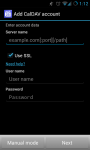
After the app was installed, you just enter user credentials and server URL and are ready to go:

The synced calendars show up in the Android calendar overview natively, and can be re-used in any calendar app out there which accesses the default Android calendar store:
Screenshot_2013-02-23-01-13-18

That’s it, you can now sync all calendars you want, even carious task lists, to your Android mobile phone. It works pretty well for my own Zarafa setup, but we’ve also tested it at credativ with dedicated calendar server in a productive environment.

Conclusion

As a result, the sync between multiple calendars in Zarafa and Android does work now flawlessly. An additional bonus is that you are free to choose the colors of the calendars, in contrast to the ActiveSync …read more
Source: FULL ARTICLE at Planet KDE

Microsoft's Azure service falls to expired SSL certificate

Microsoft’s Azure cloud platform faced a worldwide outage in its storage services from Friday afternoon because of an expired SSL (secure sockets layer) certificate. The company reported services were restored Saturday.

The company also reported problems with its Xbox Music and Video Store services.

The service problems come on a day the company said it was recently a victim of a cyberattack similar to ones that targeted Apple and Facebook.

Beginning Friday, February 22 at 12:44 PM PST, Storage experienced a worldwide outage impacting HTTPS operations (SSL traffic) due to an expired certificate,” Microsoft said on its Windows Azure service dashboard. HTTP traffic was not impacted, the company said. It said it executed steps to update the SSL certificate and expected HTTPS traffic to notice gradual recovery in many sub-regions.

To read this article in full or to leave a comment, please click here

…read more
Source: FULL ARTICLE at PCWorld

Synology DS213air review: Wireless feature doesn't add enough value

The $300 Synology DS213air is a decent two-bay NAS box whose main claim to fame is its ability to perform as an 802.11 b/g Wi-Fi access point. The unit streams media quite well; however, its name is a bit misleading in that the DS213air has more in common with the $200 DS212j than the significantly faster $300 DS213. The DS213air’s wireless feature isn’t all that unique either, since you can turn add similar functionality to any current Synology NAS box using an inexpensive third-party USB 802.11 adapter. On the upside, this router sports Synology’s usual bountiful array of software features.

The DS213air uses a 1.6GHz Marvell Kirkwood mv6282 single-core CPU, and it sports 256MB of system memory. Our review unit arrived populated with two 1TB Seagate Barracuda drives in RAID 1 (mirrored). Using those components, the DS213air wrote our 10GB mix of smaller files and folders at 35.5MBps and read them at 38.3MBps. With our single large 10GB file, its performance increased to 43.6MBps writing and 74.5MBps reading. Those numbers aren’t bad, but they’re slower than what we see from most of the competition these days.

I also tested the DS213air’s streaming ability with a third-generation iPad, an Asus S7 laptop, and a slower Acer 7250 laptop. Music, photos, and even 1080p video streamed smoothly to all, though as with any Wi-Fi, your proximity and environment will impact results. Note that you must first configure the DS213air using wired Ethernet, pull the Ethernet cable, power down, and then power up again before the DLNA server will choose the Wi-Fi rather than wired network.

Synology’s operating system (along with QNAP‘s) stands head and shoulders above the rest of the competition for breadth of features. The short list includes DHCP, mail and website serving, DLNA and iTunes media serving, free one-camera video surveillance, Web-based photo/video/music serving, FTP, SFTP, HTTPS, and the usual administration features. That makes it a small business server in everything but name. A demo on Synology’s Web site lets you play with many of the features. You can check it out here.

To read this article in full or to leave a comment, please click here
Source: FULL ARTICLE at PCWorld