Tag Archives: IRC

Jonathan Carter: Gnome Panel is Alive

The death of Gnome Panel

Gnome Panel (or more properly, gnome-panel) is the main dock that you would see in the Gnome 2 series desktop, and in the Gnome Fallback session (also called Gnome “Classic” in many distributions) in Gnome 3.

To provide the typical desktop experience, it’s also accompanied by Nautilus and Metacity along with a few other libraries (hence forth, gnome-panel’s friends). Gnome Panel and friends have recently been deprecated so that developers have more time to focus on Gnome Shell, the new default shell for Gnome that has a vastly simplified (and better) technology stack. Last November, Vincent Untz announced that he would stop maintaining Gnome Panel and friends beyond the 3.6 release, which means the death for it unless anyone else takes it up.

Then What

I’ve been an avid user of the Gnome 2.x series and also Gnome Fallback in the 3.x series. I’ve gotten rather good at supporting it too. We include it by default in Edubuntu, and even have an option in the installer to make it the default for installations over Unity. It provides a low-footprint, fast and simple desktop experience with very reasonable usability, while being very configurable and lockdownable. (my spell check says that’s not a word, but I don’t care).

I’ve been considering whether we should switch to having Xfce or LXDE as an alternative to Unity, but after discussing it with other Edubuntu contributors, it became clear that if I wanted to do that, I’d have to be willing to maintain it for Edubuntu by myself. In Edubuntu we’ve been pretty good at having at least 2 people being interested in any side-project we pick up and I like to keep it that way if we can. It means that if someone gets a bit busy, there’s someone who can pick up the slack for a little while. Also, Xfce and LXDE had big holes in usability, especially when it came to things like having multiple displays and running on laptops. I decided to put that project on the backburner a little since Ubuntu 13.04 will still be using Gnome 3.6, which meant that we’d have the Fallback session for one more release anyway.

The Inevitable Fork

Ikey Doherty forked off Gnome Panel to create a new environment called Consort. Metacity is forked to become Consortium. The website where the Consort desktop environment used to live seems gone now, but here’s a link to some screenshots from Google+.

This caused a bit of a stir, Vincent Untz posted a good chronology of what lead up to it and why he believes that a fork is a bad idea when the Gnome project has effectively put the upstream code up for adoption.

I’ve been interested in the Consort family since it could potentially be something that we could use in Edubuntu once the upstream gnome-panel is no longer in the archives. Also, while Gnome Shell, KDE Plasma Desktop and Unity are great and have come incredibly far in terms of stability and performance, it’s just not always for me. I want to be able to use it for myself in virtual machines, older machines and some other special cases (most notably, on LTSP).

Josselin Mouette, maintainer of Gnome in Debian, approached Ikey after some requests have been made for it in Debian. If you’ve read the post and the IRC logs linked, then you’ll probably agree that it could’ve gone a lot better. I’m not on the SolusOS IRC channel so only saw the conversation after the fact, but I was disappointing since it would need to go into Debian if I’d want to support it in Edubuntu. I think both Josselin and Ikey could’ve handled it better, but humans are just that and emotions and misunderstandings happen.

And so I Bite

I was chewing a bit on Josselin’s comment on how the former maintainer “maintainer decided to give the key to anyone who wanted to” and it’s been several weeks since Vincent invited people to take over maintainership. I decided that I’d at least be willing to do the absolute minimum just to keep the project releasable every six months so that it can be included in distributions, maintain its online presence pages, bug tracker status and keep up with component changes in the stack. So I e-mailed Vincent and explained what I’m willing to do. I had very little resistance, Vincent sent an email out to other people who are steakholders in the gnome-panel project and after a week, there were no objections. So here I am, brand new maintainer of the Gnome Fallback session and its components!

This means that the project is, at least for now, alive again. It’s not going to be part of the official Gnome 3.8 release (I still have to figure out exactly what that means), but there will be a 3.8 release of Gnome Panel and friends as tarballs and for people who maintain it in distributions, things will continue to work exactly as it did before.

Short-term Goals

  • My complete primary goal for this at the moment is to ensure that gnome-panel, metacity, etc is releasable alongside the Gnome 3.8 release. This basically means making sure it builds, including any patches that we can and releasing.

Medium-term Goals

  • Do something about the long buglist. The Gnome bug tracker has an ugly long list of gnome-panel bugs (939 at my last count). I want to eliminate all the stale Gnome 2.x gnome-panel bugs of which a very large amount of them are no longer relevant (at least on first glance). Then I’d like to do some regular posts to the mailing list and blog about a few prominent bugs every now and again and try to fix them and get people involved.
  • Porting Metacity to GTK3. So here’s a bit of really good news. Josselin is also involved with this and one of his mid-term goals is to port metacity to gtk3. It’s something that I know would have to happen, but I don’t have the skills to do that (yet) and I’m glad that he has took this up. Josselin’s mid-term goals also include possibly adding support for the new notification  system (if necessary) and adding support for the new Gnome global menu.
  • Create a nice project page with goals and to-do list, who’s envolved and what they’re doing and encourage more people to get involved. The current page is rather outdated so it would be nice to fix it. For now that mostly involved bringing the Gnome Panel Gnome Wiki page up to date.

Long-term Goals

  • My pet peeve…  intelligent launcher icons. Windows 7, Mac OS X, KDE, Unity and Gnome Shell have docks that work very similarly in many ways. You click on a launcher and those same launcher entries are recycled as your window list. Gnome Panel is a bit old fashioned in this regard. Many people use 3rd party panels and launchers just to get around this. I have thought for a long time that this should be fixed in Gnome Panel and long-term, it’s something that I’d like to see happen.
  • Make the stack as downstream-friendly as possible. Regarding Ikey and Consort, I don’t actually think it was a completely horrible idea at the time. We live in a free world where we use free software and anyone is allowed to do whatever they want and fork whenever they want, and while that doesn’t necessarilly mean it’s a good idea, it also doesn’t mean that we need to get all hissy about it. I’d actually be very interested in working with people who want to fork and find out why they want to fork and try to reel them in closer to upstream. In the case of Consort, I think it would be most beneficial for both projects and all their users if Consort was a branch of Gnome Fallback, rather than a fork. Both projects use Git, FFS. I’ll reach out and try to minimize duplication of effort while not blocking anyone on experimenting with new features or implementing distro-specific changes.
  • More metacity features. Metacity’s compositing features have come quite a long way, there are still a few bugs that need to be sorted out, but more than that, there are many window manager features that users have become accustomed to in pretty much all the other environments. Ikey has indicated previously that he wants to do this for consortium. It’s one of the reaons I’ll be super-nice to him because I’d really prefer that he submit as much of that upstream as possible.
  • Make everything worth configurable and lockdownable. There are some settings that I get requests from from the users I support so often that it’s just getting boring. The Gnome 2.x series proved to work well in educational and corporate environments. I say we should play on that strength and make it even more  so, while sticking 100% with the Gnome Human Interface Guidelines, of course.

Very Long-term Goals

Well, the fact is, Gnome Fallback will die. There’s a new project called Gnome Legacy, it implements a Gnome 2.x-like experience in Gnome 3. As time goes by, older machines become more powerful and the missing pieces will be implemented and eventually there would be no more good reason for anyone to want to run what we now know as Gnome Fallback. I think it could still have a good 3-5 years or maybe even more in it. Who knows, by then Gnome 4 might even be in development and all of this will be ancient history.

So, my very quick “Eek, I’m now maintainer of Gnome Panel!” post has become quite lengthy post, if you have any questions, I’ll respond to it in the comments.

Source: FULL ARTICLE at Planet Ubuntu
QML Engine Internals, Part 3: Binding Types

This blog post is part of an ongoing series about the internals of the QML engine.

In the last blog post, we covered how bindings in the QML engine work. In this post, we’ll examine the different kind of bindings and have a brief look about the future of JavaScript engines in QML.
Some of this content is already covered by my DevDays talk QtQuick Under the Hood. In addition to that, there will be new content in this post as well.

Recap

To recap, let’s quickly look at a simple binding:

text: "Window Area: " + (parent.width * parent.height)

Each binding like this one is actually a JavaScript function which is evaluated at runtime by the v8 engine. The result of the evaluation is the return value of the function, which is then assigned to the text property. v8 doesn’t know about Qt’s objects and properties, when encountering objects like parent or properties like width it asks the context wrapper and the object wrapper in QML to resolve them. These wrappers remember which properties were accessed while a binding was evaluated, and can therefore automatically connect to the changed signal (e.g. widthChanged()) of each property and connect it to a slot that re-evaluates the binding.

With the way bindings work now freshly in mind again, let’s move on and have a look at the different binding types.

Binding Types

In the last post, I stated that each binding is represented by an instance of the QQmlBinding class. That was actually a lie-to-children. Having a full-blown QQmlBinding instance for each binding would be much to costly – there are hundreds if not thousands of bindings in a typical QML application, therefore a binding needs to be lightweight. In addition, each binding is compiled separately when loading a QML file, so there is a lot of overhead by invoking the v8 compiler many times during loading.

QV8Bindings

To resolve the large overhead of QQmlBinding, there is another binding class, confusingly named QV8Bindings. QV8Bindings is a collection of all bindings in a QML file, using an array of the much more lightweight QV8Bindings::Binding structure. The QML devs have gone to great lengths of minimizing the memory usage of this structure – they even exploit the fact that the last 2 bits of a pointer are unused because of alignment, and use that unused space to store flags (a common enough pattern that QML has a special-purpose class QFlagPointer for this). As a result, a QV8Bindings::Binding is only 64 bytes large.

The big advantage of QV8Bindings compared to QQmlBinding is that it compiles all bindings together, so only one v8 compiler invocation is needed. In QQmlCompiler::completeComponentBuild(), you can see that when compiling a QML file, all binding functions are concatenated together into one big JavaScript program, and stored in QQmlCompiledData (a structure that contains all kind of compiled data for each QML file). When the QML file is first instantiated, the v8 program is compiled, which happens in QV8Bindings::QV8Bindings(). The compiled program is then also stored in QQmlCompiledData and the original source is discarded. When instantiating the same QML file another time, the QML engine re-uses the QQmlCompiledData from before and does not need to compile the bindings program again. This is not the case with QQmlBinding, which need to be compiled each time a QML file is instantiated.
To sum up: Since QV8Bindings packs together all bindings of the same QML file, it uses much less memory for each individual binding and can compile all bindings together in one go.

So, where does that leave us QQmlBinding, why does this class even exist? In some cases, bindings are non-shareable, for example because they use closures or eval(). In this case, each binding function requires a different context, and can therefore not be compiled together with the other bindings that share the same context. Therefore, in these special and rare cases, a binding will get its own QQmlBinding instance instead. The decision on what binding type is used happens when compiling the QML file, in QQmlCompiler::completeComponentBuild(). There, a SharedBindingTester is used to check which bindings will be part of QV8Bindings and which will become their own QQmlBinding. SharedBindingTester is visitor for the JS AST. If you look at the code, you’ll see that the SharedBindingTester also tests whether a binding is safe, which is used to avoid evaluating bindings multiple times when instantiating a QML file, which is best described in the commit message for this optimization.

To keep things in the QML code simple, both QQmlBinding and QV8Bindings::Binding inherit from QQmlAbstractBinding.

QV4Bindings

If you have looked at the QML engine code a bit, you will probably have noticed the class QV4Bindings, which is also a subclass of QQmlAbstractBinding. Yet another binding type? What is this one about? Like QV8Bindings, this is a collection of bindings of a QML file. Unlike QV8Bindings, QV4Bindings stores only so-called optimized bindings, also wrongly and confusingly called compiled bindings. Some bindings can be optimized, in which case they will be part of QV4Bindings, some bindings can not, and will be part of QV8Bindings.
So what is this optimization? v4 bindings are not evaluated by the v8 engine. Instead, v4 bindings are compiled to bytecode, and run through a bytecode interpreter. This bytecode compiler and interpreter can not deal with all JavaScript expressions, simply because ahead-of-time compilation of JavaScript is impossible for all cases.

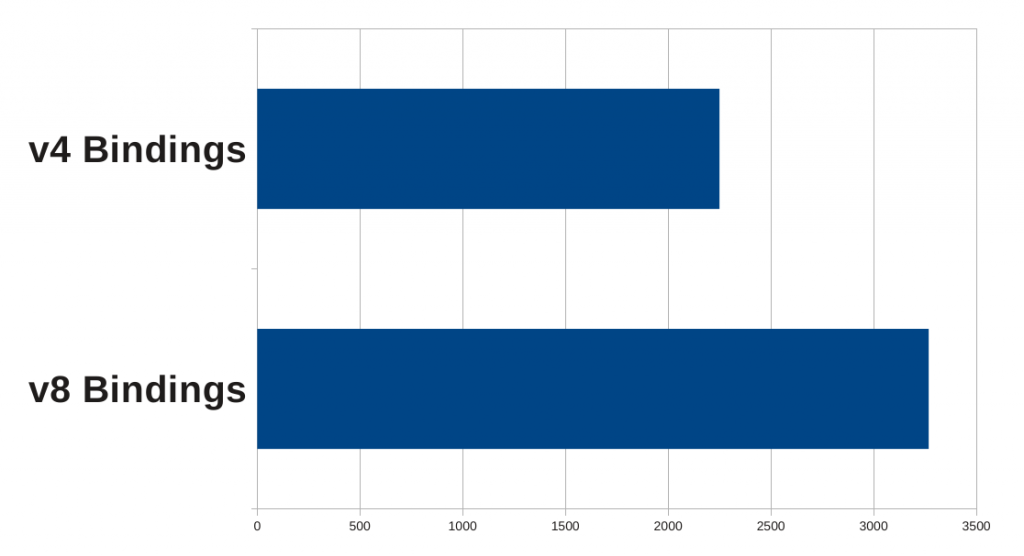
But why bytecode? After all, the v8 engine compiles to machine code, isn’t that faster than a bytecode interpreter? Turns out it isn’t: the v8 engine has quite a bit of overhead when invoking it and when it needs to call out to the QML engine to resolve objects and properties. In addition, the v8 engine sometimes recompiles a function on the fly, with more optimizations, when it is called multiple times. All of this is too much overhead for the QML usecase, which typically are a lot of one-line binding functions. Here is the result of a benchmark I did for my DevDays talk. I basically let the QML engine evaluate a binding a few hundred times. The binding was a simple one which the v4 compiler could deal with. To compare that to using the v8 engine, I used the environment variable QML_DISABLE_OPTIMIZER=1 to disable v4 bindings altogether.

v4 benchmark

As you can see, the v4 bytecode engine is indeed faster than v8 for this particular usecase.

Internally, v4 is a register machine. Much like a CPU, it has registers to store temporary values. Unlike a CPU, it does not load and store values from memory – instead it loads and stores values from QObject properties. Using the environment variable QML_BINDINGS_DUMP=1, let’s have a look at a simple binding:

text: parent.width * parent.height

The output will be:

Program.bindings: 2
Program.dataLength: 92
Program.subscriptions: 4
     [SNIP of other, unrelated bindings)
     160        14:15:
     176                Block                   Mask(1)
     192                LoadScope               -> Output_Reg(0)
     208                FetchAndSubscribe       Object_Reg(0) Fast_Accessor(0x7f05f6e51060) -> Output_Reg(0) Subscription_Slot(1)
     272                FetchAndSubscribe       Object_Reg(0) Fast_Accessor(0x7f05f6e51090) -> Output_Reg(0) Subscription_Slot(2)
     336                LoadScope               -> Output_Reg(1)
     352                FetchAndSubscribe       Object_Reg(1) Fast_Accessor(0x7f05f6e51060) -> Output_Reg(1) Subscription_Slot(1)
     416                FetchAndSubscribe       Object_Reg(1) Fast_Accessor(0x7f05f6e510a0) -> Output_Reg(1) Subscription_Slot(3)
     480                MulNumber               Input_Reg(0) Input_Reg(1) -> Output_Reg(0)
     496                ConvertNumberToString   Input_Reg(0) -> Output_Reg(1)
     512                Store                   Input_Reg(1) -> Object_Reg(0) Property_Index(42)

As you can see, the properties width and height are loaded into register 0 and 1, then these registers are multiplied together, and the result stored in the text property (which happens to be property number 42 in the QQuickText class). The instruction FetchAndSubscribe not only loads a property, but also subscribes to its changed signal, which is needed for automatic binding updates to work. In the above “assembler” code, you can also see another advantage: The v4 compiler resolve objects and properties at compile-time, and stores the property index in the bytecode. Thus, at runtime, no name lookup is needed, the properties can be accessed directly by index. Contrast that to the v8 engine, which calls out to QML object and context wrappers to resolve object and property names, which of course is much more overhead. The disadvantage is that the v4 engine can not deal with dynamic objects, for example those exported from C++ via setContextProperty(). A binding containing such a dynamic object will be part of QV8Bindings.

Summary of Binding Types

To sum up, there are 3 binding types, all inheriting from QQmlAbstractBinding:

  1. QV4Bindings::Binding
  2. QV8Bindings::Binding
  3. QQmlBinding

v4 bindings are fastest as they use a custom bytecode engine. Both QV8Bindings and QQmlBinding use the v8 JS engine for evaluation, however QV8Bindings packs together all bindings to compile them all in one go, and QQmlBindings are compiled individually and on each QML component instantiation.

Here is a (nonsensical) example with all binding types:

import QtQuick 2.0

Rectangle 
    width: 360
    height: 360

    Text {
        anchors.centerIn: parent
        text: parent.width * parent.height
        font.pointSize: eval("14")
        font.wordSpacing: parent.width > 10 ? 90 : ~parent.width
    }
}

Using QML_COMPILER_DUMP=1, you’ll see the QML compiler uses STORE_COMPILED_BINDING two times, STORE_V8_BINDING once and STORE_BINDING once as well.

STORE_BINDING is for QQmlBinding, it is used for font.pointSize, as that binding uses eval() and can therefore not be shared.

The bindings for anchors.centerIn and text are both v4 bindings (STORE_COMPILED_BINDING instruction, QV4Bindings::Binding class).

Finally, font.wordSpacing is an ordinary QV8Bindings::Binding (STORE_V8_BINDING instruction). The v4 bytecode compiler and interpreter is smart enough to deal with the tenary operator, but the complement operator is not yet implemented, therefore the QML compiler chose to use v8 bindings instead.

The future

In the future, all of this is going to change, and for one reason: iOS. iOS does not allow JIT compilers. Because of that, v8 can not be used – it always compiles JavaScript to machine code, and that is not allowed on iOS. iOS simply does not allow to mark memory regions as executable. Thus, v8 does not run on iOS. Digia is dedicated to support iOS in the future though, so a replacement is needed for v8. And that is what some people are working on at the moment: A new JavaScript engine, called V4VM that is going to replace v8 in QML.

I’d expect that at least the QV4Bindings class will disappear because of this, and QV4Bindings and all other places in QML that used the v8 engine will use V4VM instead. Replacing the bindings is probably the easiest part. v8 is however used directly in quite a lot of places in the QML engine, so replacing those usages with V4VM will be a huge undertaking.

To run on iOS, V4VM needs to be a bytecode interpreter. Actually, V4VM supports 3 different backends:

  1. LLVM
  2. MASM
  3. Moth

V4VM is abstracted reasonably well – V4VM first creates a V4VM-specific intermediate representation of the code, which is then passed on to the backend. As a result, the LLVM-specific code, which converts the V4VM IR to LLVM code, then lets LLVM compile that to machine code, is only about 1400 lines.

Moth is the custom bytecode interpreter and will be used on iOS. Both MASM and LLVM are third-party libraries that compile to machine code, so those will be used on other platforms. I don’t really know why they have two backends doing the same thing, but I heard that the LLVM dependency is probably too heavy, so I guess MASM would be used in most cases on non-iOS systems. Note that MASM is not the Microsoft assembler, but Macro Assembler, which is the assembler from JavaScriptCore, copied into V4VM.

V4VM is under heavy development at the moment. One of the top contributors is actually Lars Knall, Qt’s chief maintainer. For the curious, there is the #qt-v4vm IRC channel to watch.

Altogether, I don’t have much information on V4VM yet. It will probably be quite suitable for QML’s usecase, i.e. small binding functions. Beyond that, there are lots of unknowns, for example how resolving of Qt’s objects and properties will work, and how much ahead-of-time compilation will be possible, and how MASM and Moth handle the cases where ahead-of-time compilation is not possible.

I for one am very curious about this new engine and am looking forward to learn more about it, as more details will hopefully emerge in the future.

Source: FULL ARTICLE at Planet KDE

Raphaël Hertzog: My Free Software Activities in January 2013

This is my monthly summary of my free software related activities. If you’re among the people who made a donation to support my work (84.25 €, thanks everybody!), then you can learn how I spent your money. Otherwise it’s just an interesting status update on my various projects.

Debian Packaging

In one of my customer projects, I had to use libwebsockets and since it was not packaged for Debian, I filed a “Request For Package” (RFP #697671). I discovered a fork of this library on github and decided to mail the original author and the author of the fork to learn a bit more about the reason of the fork. It turns out that they miscommunicated and that the original author was interested by most of the improvements. The fork still exists but the important fixes and most of the improvements have been merged (and he released a version 1.0 after that!). Furthermore the original author setup a bug tracker to better organize the project and so that the author of the fork can submit patches and be sure that they won’t be forgotten (as it happened in the past). I spend quite some time discussing with both parties but at the end I’m pleased to see that good progress has been made (although nobody stepped up to maintain this package in Debian).

I packaged zim 0.59 (an important bugfix release) and wordpress 3.5.1 (with several security fixes). I updated the dpkg-dev squeeze backports to version 1.16.9~bpo60+1 on request of Daniel Schepler. This backport led me to file #698133 on kgb-client because the bot literally spammed the #debian-dpkg IRC channel for multiple hours by resending old commit notices that got merged in the squeeze-backports branch. BTW, they need help to get this issue fixed.

I updated python-django-registration to fix a compatibility issue with python3-sphinx (see #697721 for details).

Misc Debian Stuff

Serious bug with salt. I filed a grave bug on salt (#697747—) and prepared the upload to fix the issue on request of the maintainer. In the mean time, the maintainer orphaned the package. Franklin G. Mendoza already announced its willingness to take over but this package deserves multiple maintainers since this is a good piece of software that is getting more and more popular.

net-retriever and alternate keyrings. I filed a wishlist bug (#698618) on net-retriever to request a way for derivatives to use another keyring package (i.e. not debian-archive-keyring-udeb) without having to fork net-retriever.

Linux 3.7 on armel/armhf. I helped the kernel maintainers to fix the 3.7 kernel on armel/armhf by reporting on IRC the results of successive failing kernel rebuilds on those architectures (this kernel version is only in experimental).

Carl9170 firmware. I also pinged the kernels maintainers about a missing firmware for the carl9170 driver (already reported in #635840) and Ben Hutchings took care of re-activating its inclusion in upstream’s linux-firmware.git and then uploaded firmware-free 3.2 to Debian. Thanks Ben!

New QA team member. And to finish with the miscellaneous stuff, I helped Holger Levsen to be added to the “qa” group so that he could integrate his awesome work on automated QA checks with Jenkins.

Debian France

Preparation for Solutions Linux. The people organizing the “village of associations” in the Solutions Linux conference have asked all organizations to apply for a booth if they wanted one. Last year Carl Chenet took care of organizing this and this time we had to find someone else. I made multiple call for volunteers (on the mailing list, on my blog) without much success but I finally managed to convince Tanguy Ortolo to take care of this. Thank you Tanguy!

Get in touch with treasurer who disappeared. During the transition with the former Debian France officers, it has been said that Aurélien Gérôme — another former treasurer of Debian France — had entirely disappeared together with some papers that he never gave to his successor. I didn’t want to give up on this without at least trying to get in touch by myself… so after multiple tries (over IRC, phone, and snail mail), and some weeks without answers, he got back to me, explaining that he’s currently in a foreign country and that he will take care of that next time that he comes in France. o/

New website in preparation. Replacing the single-page website webpage with a more comprehensive website is an important goal. Alexandre Delanoë provided a basic ikiwiki setup inspired by dsa.debian.org. I cleaned it and integrated it in a git repository on our machine. There’s thus a new test website on http://france.debian.net/test/. Tanguy Ortolo and Fernando Lagrange immeditaly made some small improvements but since then nobody stepped up to further complete the website. I’ll try to do this in February and put the new website in production.

Paypal and handling of members. We installed a paypal plugin in galette so that members can renew their membership online. I asked Christian Bayle to try it out and we found some issues that I reported upstream and that got fixed. But this is only the first step, we want to go much further and automate all the membership handling, from membership renewal mail reminders up to integration in the accounting system. To this end, I filed some new tickets in the Galette tracker and completed some that were already opened: #490, #368 and #394. We requested a quote for those tickets and Debian France is going to fund the work on those tickets so that we have a 100% free software solution for our needs.

Thanks

See you next month for a new summary of my activities.

No comment | Liked this article? Click here. | My blog is Flattr-enabled.

Source: FULL ARTICLE at Planet Ubuntu

Ubuntu Classroom: Ubuntu User Days next weekend!

Next weekend, from Saturday at 14:30 UTC to Sunday at 03:00 UTC the Classroom team will be hosting the Ubuntu User Days!

User Days was created to be a set of chat-based classes offered during a two days period to teach the beginning or intermediate Ubuntu user the basics to get them started with Ubuntu. User Days sessions include:

  • how to get help
  • the basics of how to use the command line
  • different ways to install software
  • equivalent programs
  • and much more!

You can check the full schedule here: https://wiki.ubuntu.com/UserDays

The best thing is, everyone can come! If you want to participate, you just need to join #ubuntu-classroom and #ubuntu-classroom chat on your IRC client, or just click here: Webchat.

We hope to see you next weekend!


Source: FULL ARTICLE at Planet Ubuntu

Daniel Holbach: Ubuntu Developer Week is back

The times for Ubuntu have never been more exciting. Cloud, server, desktop, laptop, TV, tablet, phone – everything runs Ubuntu or is soon going to. This makes developing Ubuntu very special, because fixes which go into Ubuntu in one place will benefit all form factors and all circumstances where it’s used. By improving Ubuntu you make millions of people around the globe happy.

During every 6 month release cycle we run Ubuntu Developer Week. It’s back and we’re going to have it from 29th January to 31st January. During the event we will have online sessions where seasoned Ubuntu developers introduce you to their respective area of expertise or to Ubuntu Development in general.

We will have many great sessions, from hands-on introduction to packaging and Ubuntu development to talks about how to quickly get involved in certain teams and interact with other projects. We will talk about tools and infrastructure, fixing bugs, finding memleaks, working with apps, create Ubuntu images and much much much more. This is the best opportunity to get a feel for how Ubuntu development works, get to know people and ask all the questions you might have.

I talked to a few session hosts, read below what they had to say.

Martin Pitt

Martin Pitt

Martin Pitt, who will talk about Automated Testing, says: “We have been, and are changing the Ubuntu development process to employ automated testing and avoid introducing regressions, and to improve confidence, focus, and development speed. In the first talk I will give an overview about the various kinds of tests that we do, so that you know where to watch out for failures and get debugging information. The second talk focuses on how to write tests, i.e. which technologies are available for e.g. hardware and GUI related behaviour or system-wide integration checks.”


Stefano Rivera

Stefano Rivera

Stefano Rivera, who will talk about Upstreams and Debian in particular, said: “So, working effectively in Ubuntu means also working with the teams and people upstream who wrote the software we distribute. I’ll talk about why this is important, when it’s necessary, and how to go about it. In particular, our most important upstream is Debian. Debian has a rather unusual (though powerful) bug-tracker. We’ll cover finding, submitting, and modifying bugs on it.

Chris Wilson

Chris Wilson

Chris Wilson, project leader of the Hundred Papercuts Team, says: “Unity may be the shiny new thing that everyone loves, but style without substance is only so much fluff, and the substance of Ubuntu is still its GTK-based apps. Once Hundred Paper Cuts focuses it’s attention on that substance, rubbing out the little annoyances that get under our skin every day we’re using Ubuntu. This session will introduce you to the project, how it works, and how to get involved. If you want to contribute to Ubuntu in a way that has the biggest impact on the quality of experience for the end user, then don’t miss this.


Bhavani Shankar

Bhavani Shankar

Bhavani Shankar, said about his talk about patch systems: “Many a time we wonder how to integrate a particular fix a particular part of the code in a program and upload into repositories without having to change code each time by hand and making it clumsy. In this session I’m going to show how to use different patch management systems that are in practice now.

About his talk about the app review process in Ubuntu he says: “In this session I’m going to explain the present workflow of reviewing apps and give an introduction into the new app dev upload process to automate reviews.

The forum we use for this is IRC, as it makes it easy to interact for many people without losing track, you can easily copy/paste and we can save the logs as searchable docs afterwards. You join in by simply connecting to #ubuntu-classroom on irc.freenode.net.

Check out the schedule and find more info on the Ubuntu wiki. We hope to see you all there, please let you friends know too. :-)

Source: FULL ARTICLE at Planet Ubuntu

Mythbuntu: How I got started developing for Mythbuntu (or how you can help too)

I wrote this blog post after having a conversation on IRC with someone (snippet below)

* sabhain wants to be laga in his next life and restore the diskless stuff to its awesomeness of 10.04

sabhain, then the first step, would be joining #ubuntu-mythtv-dev

tgm4883, lol then step 0 would be to have time and learn programming beyond F90

sabhain, possibly. I didn’t know python though before I started helping out

Back in late 2006, I was what I like to think the average “computer guy”. Whether they are purchasing a new computer or having computer issues friends and family all came to me with their questions. I knew a fair amount about the latest video cards, processors, RAM, and hard drives. I knew the best places to buy these things online, and I had built my previous two desktops. I had been exposed to Linux a few times previously, but hadn’t really used it as a long term solution. I had been hopping back and forth between Windows XP and Fedora Core (4 – 6). This all changed at the beginning 2007.

At the end of 2006, I was finally fed up with the reformat and reinstall everything loop that is the maintenance cycle of Windows (although I had customized my install disk, so it was pretty quick). I made the decision to try and use Linux as a full time solution. Now I don’t recall the reason I left Fedora (I have a vague recollection it was some issue I had with Yum), but I installed Ubuntu 6.10 in early 2007 on my Dell Inspiron 5100. I chose Ubuntu probably because of a Google search, but possibly also DistroWatch (previously, I had installed and tested Redhat 9, Mandrake, and SuSe). As I recall, it was also the first distro that didn’t make my fan run at full speed 100% of the time. As I could now run Ubuntu on my laptop and not have it sound like a jet engine (and the battery ran considerably longer too), I was free to see what else I could do with Linux.

I had an old TV Tuner card laying around, so I looked into what software was available to make a DVR. This led me to MythTV and the #ubuntu-mythtv channel on IRC. This was around April 2007 and pre-Mythbuntu. As this was pre-Mythbuntu, MythTV was still a pain to setup. On top of that I was recording from a cable box, so I was recording over firewire (since my tuner was a crappy software encoder). I received a lot of help from someone who went by the handle majoridiot. As most of this was knowledge people had from installing it, I decided I was going to help out where I could. At this point, I didn’t know any programming languages. I was a senior in college getting a BS in Information Systems, but we were required to take 2 Java programming classes, and the only thing I remembered was that I could define how to draw a circle and then just call drawCircle() whenever I needed it (oop ftw).

I started helping with documentation as it seemed the easy thing to do. Since Mythbuntu was just starting up there was much stuff to do, so I helped where I could. If the website needed updating I helped update it. Something needed tested, I installed it in a VM and tested it. Website needed completely rebuilt from Google cache because the host that Mythbuntu used went down and our contact would completely ignore every attempt we had to contact them (yes that actually happened in the early days. No I will not name who it was), lets get to rebuilding it. Eventually it came that there were things missing that would need to be developed. As most of the other developers knew Python, it seemed like a good thing to learn. So I started learning Python and making my first program. Where did I learn how to program in Python? From http://docs.python.org/ and superm1, the lead Mythbuntu developer.

So now I’m one of the main Mythbuntu developers and have been for some time. I’ve gotten both of my post-college jobs, been sponsored to go to UDS (2x), and am now working on the MythTV integration for Ubuntu TV, all because of my involvement with Mythbuntu. I point this out not as a “look at how awesome I am” but a “look what you can do just by investing your time in something you like”.

If you want to help out in a project you love (whether it is Mythbuntu, MythTV, or anything else), we really do mean it when we say “No programming experience necessary”. There are many different areas to help in, so come and talk to us and we can find a good fit for you. Everyone has to start somewhere, and the time spent can help you in other areas of your life/career.

TL:DR – You don’t need programming experience if you want to help create something awesome. You can help in non-programming ways or learn it on the way. Come talk to us in #ubuntu-mythtv-dev and we’ll help find you something to do.

I’d also like to thank superm1, daviey, rhpot1991, mrandr, majoridiot, foxbuntu, davemorris, and anyone else that has helped me along the way. I wouldn’t be where I am now without the help from these people.

Source: FULL ARTICLE at Planet Ubuntu

Server has been compromised

By franx47

Hi,

I want to ask something about server that has been compromised. Recently, one of my VPS server has been hacked and the attacker install somekind like “IRC” script.

Everytime I killed the process or close the port, it can open again .. and again ..I’m sure the attacker has installed something like a hidden script. I hv using tool like Rootkit Hunter and find each of the suspicious result.

It really makes me crazy and pain. How can he/she go into my server (as a root) even I have changed the root password.

OS: Centos 5.

Please help. 🙁

Source: FULL ARTICLE at The UNIX and Linux Forums

Ubuntu Ohio – Burning Circle: Burning Circle Episode 97

This week’s episode talks about the need for Ubuntu Hours across our state, the need to start working out a plan for OLF 2013, the need to settle a time & date for the next IRC meeting, and an explanation by Stephen as to why he’s starting to run for local elective office in lieu of direct Ubuntu evangelization so he can help fill in some of the missing parts of the lower levels in his local community’s respective version of Maslow’s Hierarchy of Needs first so that evangelization might be effective later.

Download here (MP3) (ogg), or subscribe to the podcast (MP3) to have episodes delivered to your media player. We suggest subscribing by way of a service like gpodder.net.

This work is licensed under the Creative Commons Attribution-ShareAlike 3.0 United States License. To view a copy of this license, visit http://creativecommons.org/licenses/by-sa/3.0/us/.

Source: FULL ARTICLE at Planet Ubuntu

Student's Eye: Google Code-In

Hey, guys!

My name is Illya. I am 13-14. During the GCI I got a huge experience in Software Development. Now I am KDE Developer and a part of the Marble dev. team!

Now, after the contest I want to tell a bit how it was for me. I don’t want to lie – I will tell you only the thruth. I develop applications with Qt during 1.5 year. It wasn’t interesting – I was developing IRC bots, IDEs, text editors, computional languages, etc. Do you know what was really interesting for me? It’s Google Code-In. When I heard about this contest I thought – “It’s time to visit Googleplex!” and started working. During the whole contest I was targeted on grand-prize.

So, now, when I described you my targets, I want to tell you a bit about how it was. Let’s be honest, it wasn’t easy. As far as I remember, there were 8-14 tasks I solved that had difficulty as 4-day task but were labeled as 2-day tasks. This is not important.

Mentors are awesome. Really! I was working on Marble, so during the GCI my mentors were Torsten Rahn and Dennis Nienhüser. They are the best mentors in the world! They were able to give an answer for any question I’ve asked in 10 minutes. It’s really awesome. In IRC you could see smth like: claimed-assigned-done-closed. Interval between claimed-assigned was ~40 seconds. They are really fast and cool!

About the tasks. As far as I know, tasks are grouped as “Code”, “Documentation”, “Research”, “UI” and “Unit Testing”. For instance, I love coding tasks and I hate documentation tasks :P. Why? Maybe ‘cause I love to develop things rather than talk about developed things.

By the way, I’ve completed 62 tasks for KDE. 62 tasks! Can you imaging that? For me it’s like an infinity! I got a lot of exp. while I was working on them. That was really cool and I can sleep more now. I was sleeping 7 hours during the GCI, now I can sleep 9-10 hours.

UPD: KDE will choose 2 grand-prizers up to 4th February (my birthday, btw) – until this date, that feeling won’t leave me…you know which feeling 😉

Happy coding,

Find your way and explore the world!

Source: FULL ARTICLE at Planet KDE

Milo Casagrande: Working from Home, Six Months Later

Almost six months ago I started working for Linaro, from home. It was the first time for me with a home-based job, and I’m enjoying every minutes of it.

Before joining Linaro I did my fairly amount of researches on the Internet about how to organize your workday and also your life: try to do as if you had to get ready for office, eat & drink, do not always stand sit…

I didn’t change much of my usual habits, and I’m trying to keep home and work activities as much as possible separate from each other. Sometimes they will interfere, but I guess it is normal, as long as you remember to stick to your plan of separating them.

So, this is something I would call my usual day…

Getting Out of Bed

I’m an “early bird” as to speak.

I like getting up early in the morning. Luckily from where we live, opening the window we can see the sea and the sun rising. Getting out of bed is not that bad after all.

During the warmer months I also enjoy going out jogging for 40 minutes, during the colder months I usually start my days with a 30-40 minutes training. Nothing much heart-pumping, and everything weight-free, just free body weight: abs, squat, push-ups, and lots of stretching (sometimes even yoga, but my yoga-skills are really rudimentary). On the Internet you can find plenty of videos and web-sites on how to train in the correct way and for how much, so you still get to vary your training (I still haven’t found a really good Android app for something I would call zen-training: a mix of body and mind exercises, that doesn’t get much into the way, and that suggests you exercises).

Shower, that helps me like a caffeine shot (I do not drink coffee, even if I drink tea), and a big breakfast. Breakfast that for me is the most important meal of the day.

No computer or any electronic gadgets activities until after breakfast.

The Work Day

I sit in from of the PC around 8-8.30, checking emails, reading newspapers and the usual social websites. At 9, my (virtual) pomodoro clock usually starts ticking. I try to organize my working days in that way, sticking to the pomodoro technique as much as possible, and having pomodoro times also for checking IRC and other work related activities I have to do online.

Code, Eat & Drink

I always have something to drink next to my keyboard. Sometimes it even gets on my keyboard, but that’s another story…

Tea in the morning, that usually propels me almost close to lunch time, than water. I do not eat anything else in the morning, and in the afternoon sometimes I have a little break and usually I eat a fruit. At lunch time, I cook: I enjoy cooking, and it is one activities the me and my girlfriend enjoy doing in the evening together. It is a good moment for talking, and for preparing food.

Getting Into Bed Again

After dinner, we spend time on the couch watching movies, or doing our open-source-communities related activities. I also enjoy doing a 10-15 minutes streching/yoga session before getting into bed again. And before falling asleep, I always read a good book.

As in all rules that you set for yourself, form time to time I do not follow them, without feeling guilty. I need the liberty of doing what I like to do, with the confidence of getting back to my habits.

Source: FULL ARTICLE at Planet Ubuntu

Help make Plasma Active 4 shine

PA4

Plasma Active 3 was released on 15th October 2012, and since then, work on the next version has not stopped for a minute, now the work on Plasma Active 4 is well on the way.

Another important release at the horizon is the KDE Plasma Desktop shell 4.10, due in February.

We believe our desktop and mobile products are closely interrelated, both from a technology point of view and from a continuity of the user experience, therefore Plasma Active 4 will be based upon the KDE 4.10 release. This will mean that PA4 will automatically gain some of the features of 4.10, at least from the technology platform point of view, but means also another important thing: ease of setup.

PA4

We are planning to release it around the end of March, and since some hardware is approaching as well, this release is more important than ever.

Plasma Active 4 will have a number of important new features over PA3, there are countless small improvements, and few features that will be really visible, including:

  • Faster and more usable web browser
  • Improved usability of the on-screen keyboard
  • Numerous improvements in the File browser application: faster, more usable and scalable to very big amounts of data
  • Device-wide ownCloud integration
  • “Developer mode” on the device, to more easily work with it
  • More user friendly ui for setting alarms
  • Better notification
  • New applications
  • Community support for new devices

PA4

But I want to know more!

This is where you can make the difference: it’s very important that the new release will have an user experience as smooth as possible. The work for new features is coming to an end (even tough you are still in time to present a work plan if you want to work on a particular one). But is starting an even more important period: testing, stabilization, bugfix.

There are many ways to help in making the release shine: it may be just installing an image and testing, it may mean getting random people to test and register the issue they had with it, it may be participating in the discussions on IRC or the mailing list, it may be setting up a build environment, and start hacking.

PA4

Starting hacking on the components of Plasma Active is easier than ever, because as i said, PA4 will be based on KDE 4.10, that means everything specific of Plasma Active can be built on top of the development packages of KDE 4.10 from your distribution of choice, while having the active workspace and active applications running from git from your machine in matter of a minute.

From a packaging point of view, is ridiculously easy as well, as all you have to do is to install the Mer sdk, that is completely self contained, can be dropped on top of any distribution and doesn’t really “touch” your system

If you are interested, drop in in IRC, on the #active channel of Freenode, or join the malinglist active@kde.org

Source: FULL ARTICLE at Planet KDE

[Help KWin] Create a KConfigXT file for KWin’s configuration

Just the other day a user in IRC complained about a default in KWin. I thought that the default he expected, is the one which is set in KWin sources. So I opened the respective source file and saw my assumption confirmed. But still the user claimed that there is a different default and I believed him. Further investigation showed that the source code of the configuration module had a different default set. It’s probably like that for years but it shows a problem: the config values are written and read at different places and the hard coded default values might diverge.

This reminded me of the great project we had last year to migrate the configuration of the KWin effects to KConfigXT and of the project to transform the configuration modules in KWin to have ui files. The combination of both calls for a new project: let’s migrate KWin core to KConfigXT. Now this isn’t a project which we will be able to do in one go. So I will split it into three parts:

  1. Create the kcfg file
  2. Migrate KWin core
  3. Migrate the configuration modules

Let’s start with the first one: create the kcfg file. Interestingly we already have such a file in the kwin directory – last change: Nov 20th 2007. It might be that some of the options are still encoded correctly, but I rather doubt it and default values are missing anyway. So I suggest to start clean. I would like to split the task into creating the XML part for the different config groups in KWin, so that the tasks are small. Later on we can then put it together to have one complete file. The project is outlined in this wiki page. Just add yourself to a section if you want to work on it :-)

Source: FULL ARTICLE at Planet KDE

Charles Profitt: Ubuntu: That was friendly!

When I first started using Ubuntu the difficulty with using it on a laptop was centered around wireless issues. Today wireless issues are much less common, but Linux laptop compatibility is still plagued with problems due to ‘optimus’ graphics and poor bios decisions from many vendors. As an IT professional I know enough to avoid certain hardware, but for people without my IT background trying to find a laptop that works well might seem an impossible task.

Option 1:
A consumer willing to purchase a laptop on-line might order a laptop with Ubuntu pre-installed from a vendor like System76 or Dell.  For many of people they would prefer to order from HP, Lenovo, or a local store like Best Buy.

System76 Lemur Ultra

System76 Lemur Ultra

System76 offers excellent laptops for a broad range of users including power-hungry gamers (with Steam being on Ubuntu graphics power is likely to be much more sought after). Dell offers a fantastic ultra-book with Ubuntu pre-installed that is aimed at Developers.

Dell XPS 13

Dell XPS 13

These options still amount to a very small selection of laptops and many people would like to get specific features in their hardware that are not offered on models with Ubuntu pre-installed. In the past when people got a laptop and then installed Ubuntu themselves it has resulted in experiences like the following:

After 3 days of solid searching, installs, compiles, theories, interfaces config, supplicant creation, and “this is what worked for me”- I’m once again at the end of my rope.

I’ve been having a real hard time staying with linux because of my laptop. it doesn’t have the worst combination of hardware, but the ATI card is really close to the worst thing.

Having a hell of a time installing ndiswrapper and wpa-supplement to get my wireless working. Again. ndiswrapper did come with Ubuntu, but wpa-supplement didn’t. I had it on a flash drive though, so I attempted to go compile it. Except it took about 50 tries before I realized Ubuntu must not have installed any dev tools. Got Make installed and tried to compile this stuff, now I can’t figure out why it keeps choking on some stupid error. I’m sure I’m doing something stupid that a Linux pro would a laugh at, but I’m so frustrated at this point I may give up.

All of the above issues could be avoided by knowing what hardware will work before a purchase is made. Around May of 2011 Ara Pulido and a small team from Canonical started Ubuntu Friendly to address this concern. Ubuntu friendly differs from the ‘Certified Program’ in that it is driven by community submissions. Ubuntu Friendly is a brilliant idea and will help as more and more people want to use Ubuntu.

Ubuntu Friendly

Ubuntu Friendly

There is a need to transfer this project from the Canonical employees to a community team. Nicholas Skaggs and I had a discussion on IRC last night and we both hope to get this process rolling in the next few weeks. There is a need to ensure the information on the wiki page is accurate and up-to-date as well as get familiar with the current process. I am sure that the needs will include web development, database work, testing application work and documentation. As the details are worked out I will blog more about the specific team needs, but if you are interested in helping out please contact me or join the discussion on #ubuntu-quality of irc.freenode.net. This is a fantastic opportunity to contribute to the growth and success of the Ubuntu Community.


Source: FULL ARTICLE at Planet Ubuntu

SFLPhone-KDE 1.2.1 have been released

Hello Planet!

My name is Emmanuel Lepage, I am a software developer from Montreal, Canada. Over the last decade, I have been contributing to KDE in multiple ways, including many applications you have never heard of, including the KliGN interactive terminal/shell and Kimberlite WYSIWYG HTML/PHP editor. I also contribute to Umbrello and maintain a few third party patches for features that will never be merged. Since 2009, I am the developer of SFLPhone-KDE, an Open Source softphone sponsored by Savoir-Faire Linux, a Canadian Free/Libre consulting company.

Today, we are proud to announce the release of the 1.2.1 version of SFLPhone, SFLPhone-Gnome and SFLPhone-KDE. For this cycle, our main focus was usability improvments and bug fixes. I spent hours on IRC with Nuno (thanks!) to try to make this release the best one ever. The main new feature is the inclusion of a new view subsystem for displaying on-canvas background information. It is used both for visual feedback and informative tips. See the video bellow for an overview of the feature.

snapshot25

snapshot26

This feature is 100% abstracted, so if other developers are interested, you are free to use it for your own application. It can be integrated in any Qt views (QTableView, QTreeView, QListView, etc) with only a couple of lines. I will blog about this feature design in a later blog post. The other big new feature is an on-canvas toolbar to replace the traditional QToolBar. This feature was done because the older toolbar had a different set of actions for different call states and was often larger than the window width, causing discoverability and usability issues. Given that the next iteration will focus on Plasma-Active/Mer/Ubuntu mobile integration, this will also prove very useful in mobile contexts (I don’t plan to port the call view to QML just yet).

snapshot27snapshot28

Other noteworthy improvements include:

* Ability to edit numbers

* New “Reload all accounts” button in the statusbar

* Required fields in wizard and configuration dialog (prevent the creation of invalid accounts)

* Caps lock auto detection when entering passwords

* Reduced CPU usage

* Automatic selection of the call tab when there is a new incoming call

* Improved DTMF handling

* Bug fixes

snapshot25

SFLPhone is available for Ubuntu as a PPA and the source code is available from http://sflphone.org/ and http://download.kde.org/stable/sflphone/ (coming soon). The next version should focus on reviving the QML version and improve our mobile support. We may also enable the video by default (currently available via compilation option) and have a better command line interface (for KAddressBook/KDEPIM integration)). I hope you enjoy this version.

snapshot26


Source: FULL ARTICLE at Planet KDE

Jhosman Lizarazo: Recruitment for the project for #ubuntuco #Gammers

Project that will maintain a large and constant activity in the world of free games, should organize Lan Party’s and tournaments online where all members of the community and beyond to participate, learn and share. Although games should be mostly free also possible developments supporting platform.

The main idea of this project is not only fun, it is also a world of spreading Ubuntu and Free Software through the games, suggesting they should be part of events held within the community.

Additionally should create guides / tutorials for installing, configuring, and tips to practice the different games, and very important that they have a lot of activity on the platforms support willing to help those who need it for any eventuality with a game.

Recruitment:
Friday 11 of Junary 2013 to 19:00 hours
Saturday 12 of Junary  2013 to 10;00 hours

On the IRC channel #ubuntu-co-meeting en Freenode (http://www.ubuntu-co.com/chat)

Wiki of Project: https://wiki.ubuntu.com/ColombianTeam/Proyectos/Jugadores

Souce: http://distanciazeroopensource.wordpress.com/2013/01/09/reclutamiento-para-el-proyecto-de-gammers-para-ubuntuco/

Source: FULL ARTICLE at Planet Ubuntu

Ubuntu Classroom: Introduction to QA / Testing class

Next week, on Tuesday, January 15th at 19:00 UTC the Classroom welcomes Nicholas Skaggs (balloons) of the Quality Assurance (QA) team who will be presenting “an introduction to QA, the quality team, the tools and what we do” including signing up for a launchpad account and the ubuntu-quality email list, using the wiki, IRC, getting connected, and an overview of testing areas.

This is the first in what will be several classes by the QA team, visit their wiki page to learn more about upcoming proposed sessions: https://wiki.ubuntu.com/Testing/Activities/Classroom

This event will be held in #ubuntu-classroom on irc.freenode.net (#ubuntu-classroom-chat for questions).


Source: FULL ARTICLE at Planet Ubuntu

Ubuntu Ohio – Burning Circle: Burning Circle Episode 96

(A heavily compressed version was previously e-mailed to the LoCo while efforts were underway to resolve why this could not be uploaded at the usual time)

This week’s episode mentions Ubuntu Phone briefly, talks about the need for discussion on the mailing list about an upcoming educational session for the LoCo on IRC, the standing promise that if there is a lack of discussion the first educational topic is going to be a discussion of “The Joy of the BeagleBoard”, and the need for bug squashing in Debian Wheezy which will trickle down to help Ubuntu.

Download here (MP3) (ogg), or subscribe to the podcast (MP3) to have episodes delivered to your media player. We suggest subscribing by way of a service like gpodder.net.

This work is licensed under the Creative Commons Attribution-ShareAlike 3.0 United States License. To view a copy of this license, visit http://creativecommons.org/licenses/by-sa/3.0/us/.

There is an opportunity available to purchase material goods to replace some of the hardware that has died at Erie Looking Productions over the past three weeks. Over the past three weeks the SheevaPlug server died which resulted in hurried realignment of the mission of the BeagleBoard away from its prior desktop role while the 5 year old keyboard PDA/phone finally bit the dust and the 6 year standalone digital media player finally died too. There are some other fallbacks available but they’re not maintainable long-term.

Source: FULL ARTICLE at Planet Ubuntu

KDAB contributions to Qt 5.0 (part 5)

Continuing the series on KDAB contributions to Qt 5.0 (part 4), this time we cover community involvement, work on the Qt installer, QPointer and QWeakPointer modernization, and various macros.

Community involement

KDAB has been contributing to Qt since before the launch of Open Governance. With the launch of the Qt Project, everything changed regarding how Qt is made.

  • All development and design discussions became ‘open’
  • All who contribute to Qt started to do so as equals
  • All who depend on Qt became able to use their time and money to directly influence the progress of Qt.

KDAB community involvement ranges from development, code design and reviews to community support such as IRC chat, mailing lists, and Qt Project forums where KDABians Sean Harmer and Giuseppe D’Angelo are moderators.

Aside from being involved in community presence and support, KDAB is maintaining several parts of Qt directly, namely:

  • QtWidgets module – Marc Mutz
  • Itemmodel and Itemviews – Stephen Kelly
  • QMimeType support – David Faure

For Qt 5.1, KDAB is additionally assuming maintainership of the Qt3D and QtX11Extras modules.

Maintainership in Qt 5 is about ensuring that the code is always ready to enter a release cycle, and ensuring that all code submissions get reviewed, so this is certainly part of ‘making the release happen’.

One of the highlights of the Qt calendar for several years has been the Qt Developer Days. KDAB organized the European Qt Developer Days event in 2012 together with co-hosts ICS and Digia, and partner organization KDE. The event was a huge success, taking place in Berlin and featuring expert Qt training, a wide range of talks and speakers from throughout the industry, and plenty of social events. KDAB also co-hosted the sibling Developer Days event in Silicon Valley. Both events coincided closely with release candidates for the eventual Qt 5.0.0 release.

Tracking QObjects with QPointer

Various work went into QPointer and QWeakPointer in Qt 5.0. Although QPointer was mostly replaced in Qt 4, after some back and forth, it eventually became again the preferred smart pointer to use to track QObjects. The previous preferred method of tracking QObjects was deprecated by myself.

Marc Mutz also optimized the implementation of QPointer in several ways. One of the optimizations is a code-size optimization. QPointer had been refactored to be re-implemented in terms of QWeakPointer – because QWeakPointer is already the more-performant and because one implementation is better than two. The problem with the initial implementation was that QPointer was implemented in terms of QWeakPointer. That means that any time a QPointer is instantiated with a new type, the compiler needs to create lots of duplicate code for each type.

This problem is known as template bloat. The solution was to implement QPointer in terms of QWeakPointer. Because QPointer has only ever worked with subclasses of QObjects, it was possible to avoid template bloat by using casting, and remain source-compatible.

Many more macros

If debugging code, writing Squish GUI tests, or marking objects to more-easily find them in tooling, giving QObjects an objectName is a common task. For any task which is so common, a convenient and fail-safe way to execute it is always welcome.

In this case, KDAB added the Q_SET_OBJECT_NAME macro to Qt, which is always available. It can be used with QObjects as pointers or as values:

  QFile someFile;
Q_SET_OBJECT_NAME(someFile)

QWidget *smartWidget = new QWidget;
Q_SET_OBJECT_NAME(smartWidget)

Another macro added for Qt 5 is the QT_NO_SIGNALS_SLOTS_KEYWORDS macro.

Defining that macro while using Qt disables the Qt keywords ‘signals’ and ‘slots’, forcing the user to use the alternative keywords ‘Q_SIGNALS’ and ‘Q_SLOTS’ instead. This is desirable when using boost, which uses ‘signals’ itself, and when using some Mac headers which use ‘slots’. The Qt 4 solution for this is the QT_NO_KEYWORDS define, but that also makes it impossible to use ‘emit’, forcing users to use ‘Q_EMIT’. The new macro is a ‘smaller hammer’ to solve the smaller problem. The QT_NO_KEYWORDS macro also still exists of course.

Qt Installer

The Qt Installer Framework is used to create installer packages on Windows, Linux and Mac. KDAB contributed various fixes and features to it leading up to the Qt 5 release.

Source: FULL ARTICLE at Planet KDE

Red Hat Bachelor & Diploma Theses about KDE projects

Every year Red Hat Czech offers a list of topics for bachelor and diploma theses to students from local universities. The topics are usually suggested and posted by Red Hat employees who then work with the students as technical consultants and mentors.

We see this as a good opportunity for students to learn about open source software, communities and collaboration and for us to find potential future employees Smilie: :-) (so there’s a great motivation too). We want students not to see their diploma or bachelor thesis as some boring obligation, but rather a “fun” way to learn new things, meet people and gain experience. And last but not least they are potential contributors to the projects they are involved in.

This year I managed to get several students I’m mentoring to pick a topic related to KDE. Although all projects are somehow related to KDE Telepathy, it’s a good start Smilie: ;-)

Today I want to introduce work of first two students, Stanislav Láznička and Artur Dębski.

Makneto++

Stanislav Láznička is doing his bachelor thesis on Brno University of Technology. His topic is “Shared Board – Makneto“, more specifically, his task is to port Makneto to Telepathy. Makneto is a whiteboard-sharing application for KDE, similar to KWhiteboard. It has been written some time ago as a diploma thesis. Since then several students have based their theses on this project (not all of them successfully though). Stanislav is now researching how to use the Telepathy framework and preparing to start the actual port soon. If you are interested in further progress, follow his blog and his git repo on bitbucket.

KTp Active

Artur Dębski (IRC: mentero), a student fromSilesian University of Technology in Poland. His topic is “Touch interface for KDE Telepathy“. Yes, hang on to your hat, we are going to have a totally awesome Plasma Active application for Instant Messaging. Artur has written an extensive blogpost about his work together with some mockups. You can checkout the existing code from here, there’s already a demo app to play with!

Source: FULL ARTICLE at Planet KDE