Tag Archives: Nicholas Skaggs

Nicholas Skaggs: Core Apps Burndown: Ramping up for success

Today I thought we’d take a break from the testing all the things series to take a look at what we’re doing, how far we’ve come, and most importantly, where we need to get to.

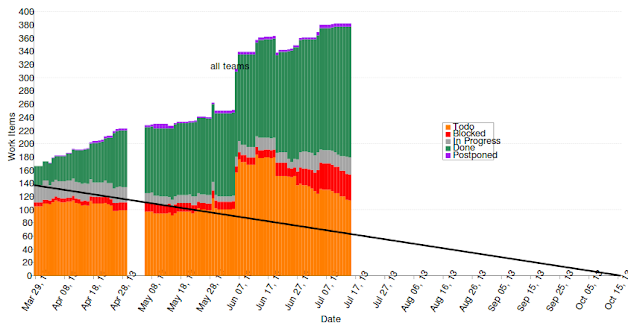
The core apps project has come a long way since it’s inception at the beginning of this cycle. So as the development started maturing, testing was the natural step for me to get involved and check out what the apps had to offer. With that in mind, let’s look at the

So even as the work items has increased from adding things like tests, this month the community have been working hard at finishing work items and bringing us back to the trendline. See that nice driving downwards the last couple weeks? Excellent job! Let’s get down to that trendline!
From the quality side, we’ve had several people come forward, learn about autopilot and the core apps and then get a merge in. A special thanks to Carla Sella, Daniel Kessel, Michael Spencer, Adrian Goodyer, Riccardo Padovani and Arturas Norkus for your contributions last week to core apps projects. Well done, and I look forward to seeing and merging more of your work!
For those of you still working on getting commits in, or sitting on the sidelines, let me help! You can be a part of this effort! There’s still more work to do, and the entire community around core apps would appreciate your help. Hack on an app, a testcase, wherever your skills and interests lie. For autopilot tests specifically, check out this recipe on developer.ubuntu.com and watch this video.
I look forward to merging your work!

…read more

Source: FULL ARTICLE at Planet Ubuntu

Nicholas Skaggs: Beta Testing Extraordinaire with Ubuntu Quality

The quality team invites you to a testing event for the final beta iso images. We’ll be providing real-time help (IRC, or even one on one video hangouts if needed), encouraging you to download the final beta images, install, upgrade and test them out with us. You only need yourself, a machine (virtual or real!) and a bit of willingness to learn. We’ll even be broadcasting for part of the event on ubuntuonair. So here’s the details you need to know:

Tuesday April 2nd, 2013

  • 1800 UTC – 2200 UTC 
  • Quality team members are dedicated to hanging out in #ubuntu-quality executing testcases and helping answer questions
  •  2000 UTC: 
    • We’ll be streaming live on ubuntuonair doing live testing demos and offering help
    • Basic iso test install
    • More exotic examples — netboot, server, non-english
    • Your requests!

    Interested? Great, mark the time and date on your calendar and check out the tutorial here to get a leg up on what you’ll be doing during the event.

    Can’t make the 4 four window? Don’t worry! Give testing a whirl anyways, and feel free to ask on #ubuntu-quality, and our mailing list for help.

    See you on Tuesday!

    …read more
    Source: FULL ARTICLE at Planet Ubuntu

    Howard Chan: QA Cadence Week 7 Global Jam Special + Testcase Conversion script

    Hello world!

    Ubuntu Global Jam is coming to town (seriously) from 1st to 3rd March, 2013, with different Ubuntu contribution projects that you can play with friends in your city or on the Internet.

    Our QA Cadence Week 7 is at the same time as it, so Nicholas Skaggs has posted a new wiki page for all people to check out what YOU can do for QA. Find it at https://wiki.ubuntu.com/QATeam/Cadence/Raring/Week7UbuntuGlobalJam.

    We will be focusing on three aspects:

    Application testing: This time we have multiple applications for you to test, including Deja-dup, Empathy, Evince, Eye of Gnome, Fileroller, Firefox, Gedit, Gnome Screenshot, Gnome Terminal, LibreOffice, Nautilus, Network Manager, Orca, Pulseaudio, Rythmnbox, Shotwell, Thunderbird, Totem and Ubuntu One. Just follow the detailed testcases and report bugs along the way. Make sure you report them through terminal using `ubuntu-bug (packagename)`.

    Images testing: We have Raring daily images freshly prepared for you to come and test. Bring along your spare machine or VM (or even a Nexus 7!) to play with testing. Make sure it installs and works and no bugs.

    Hardware testing: If you have a laptop, try to install the Raring daily images and make sure not only the software but the hardware works too, like Trackpad, DVD drive, USB, sound, etc.

    If you want to write manual testcases and followed the format but don’t know if it is right or wrong, check out Javier P.L. (chilicuil)’s script in https://raw.github.com/chilicuil/learn/master/sh/test_case_format Download the script and run `./test_case_format (testcase)` to get it converted. Then submit a merge request against lp:ubuntu-manual-tests !

    WELCOME TO QUALITY ASSURANCE!!!!!!!!!!!!!!!!!!!!!!!

    …read more
    Source: FULL ARTICLE at Planet Ubuntu

    Nicholas Skaggs: Plan a ubuntu global jam testing event!

    Ubuntu Global Jam is just a few short weeks away. I trust you’ve seen the posts announcing and asking you to plan your events. Maybe you are confused about what type of session to plan or how the event could go. I will echo my friend Daniel Holbach in saying just do it! Grab a buddy (even an online one!) and plan to jam together. If your confused about what to jam with, check out the testing page.

    It’s got everything you need to run a session, and the documentation has all been done for you. Folks can choose what they are interested in testing (packages, images, or hardware), or even do some hacking on testcases. No need to be a programmer, manual tests can be written by anyone! Participants don’t need anything besides there laptop and an image of ubuntu on a cd or usb stick (assuming of course they aren’t already running ubuntu raring 🙂 ).

    If your curious about wanting to host a testing event, checkout the testing page on the global jam site. Feel free to get in touch with me as well if you wish to share your stories or ask questions. Let’s jam, quality style! …read more
    Source: FULL ARTICLE at Planet Ubuntu

    Nicholas Skaggs: Some quality resources

    A couple posts ago, I mentioned the ubuntu quality team was looking for people to join the team and help out in the testing efforts we undertake. Thanks to those of you who’ve already answered the call and our now joining our testing ranks. We love sharing the joys of testing with others!

    We’re serious about wanting to make sure you are able to contribute and join the community as easily as possible. So for the last couple months, as a team we’ve been writing tutorials, giving classroom sessions, and hosting testing events. We really do want you as part of the team. Check out some of the resources available to you and consider becoming a part of the team!

    Classroom Sessions
    Video Tutorials
    Written Walkthroughs

    …read more
    Source: FULL ARTICLE at Planet Ubuntu

    Ubuntu Classroom: Your first ISO test

    We’re happy to announce that next week, on Wednesday, February 13th at 13:00 UTC, in #ubuntu-classroom on irc.freenode.net (#ubuntu-classroom-chat for questions). Howard Chan (smartboyhw) will be hosting the final scheduled session by the Quality team, Your first ISO test. Phill Whiteside (phillw) and Nicholas Skaggs (balloons) will also be available during this session to assist with questions. Please visit the Section 3 requirements wiki page if you wish to actively follow the exercises in this class.

    In other Quality news, the logs for our most recent sessions with the team are available. The first is their series on bugs by Phill Whiteside (phillw) and Gema Gomez-Solano (gema):

    We then had a series of laptop testing sessions presented by Sergio Zanchetta (primes2h) Carla Sella (Letozaf) and Sergio Meneses (SergioMeneses):

    Today Phill Whiteside (phillw) and Jackson Doak (Noskcaj) of the Quality team hosted a series of sessions in #ubuntu-quality about the QA tools available for ISO testing:

    Thanks to everyone who participated and the effort put into making the schedules work!

    …read more
    Source: FULL ARTICLE at Planet Ubuntu

    Nicholas Skaggs: A glance at Autopilot

    So, as has been already mentioned, automated testing is going to come into focus this cycle. To that end, I’d like to talk about some of the tools and methods for automated testing that exist and are being utilized inside ubuntu.

    I’m sure everyone has used unity at some point, and you will be happy to know that there is an automated testsuite for unity. Perhaps you’ve even heard the name autopilot. The unity team has built autopilot as a testing tool for unity. However, autopilot has broader applications beyond unity to help us do automated testing on a grander scale. So, to introduce you to the tool, let’s check out a quick demo of autopilot in action shall we? Run the following command to install the packages needed (you’ll need quantal or raring in order for this to work):

    sudo apt-get install python-autopilot unity-autopilot

    Excellent, let’s check this out. A word of caution here, running autopilot tests on your default desktop will cause your computer to send mouse and keyboard commands all by itself 😉 So, before we go any further, let’s hop over into a ‘Guest Session’. You should be able to use the system indicator in the top right to select ‘Guest Session’. Once you are there, you’ll be in a new desktop session, so head back over to this page. Without further ado, open a terminal and type:

    autopilot run unity.tests.test_showdesktop.ShowDesktopTests.test_showdesktop_hides_apps

    This is a simple test to check and see if the “Show Desktop” button works. The test will spawn a couple of applications, click the show desktop button and verify clicking on it will hide your applications. It’ll clean up after itself as well, so no worries. Neat eh?

    You’ll notice there’s quite a few unity testcases, and you’ve installed them all on your machine now.

    autopilot list unity

    As of this writing, I get 461 tests returned. Feel free to try and run them. Pick one from the list and see what happens. For example,

    autopilot run unity.tests.test_dash.DashRevealTests.test_alt_f4_close_dash

    Just make sure you run them in a guest session — I don’t want anyone’s default desktop to get hammered by the tests!

    If you are feeling adventurous, you can actually run all the unity testcases like this (this will take a LONG TIME!).

    autopilot run unity

    As a sidenote, you are likely to find some of the testcases fail on your machine. The testsuite is run constantly by the unity developers, and the live results of commit by commit success or failure is actually available on jenkins. Check it out.

    So in closing, this cycle we as a community have some goals surrounding easing the burden for ourselves in testing, freeing our resources and minds towards the deeper and more thorough testing that automation cannot handle. To help encourage this move of our basic testcases towards automation, the next series of blog posts will be a walkthrough on how to write Autopilot testcases. I hope to learn, explore and discover along with all of you. Autopilot tests themselves are written in python, but don’t let that scare you off! If you are able to understand how to test, writing a testcase that autopilot can run is simply a matter of learning syntax — non-programmers are welcome here!
    Source: FULL ARTICLE at Planet Ubuntu

    Ubuntu Classroom: Ubuntu Developer Week: Review of Day 2, Outlook: last day

    Ubuntu Developer Week is passing by much too quickly, as always. Still it’s great to see how many new people get involved, find out more about Ubuntu Development and get involved. Day 2 was yesterday and brought us many great sessions. Here’s what happened yesterday:

    1. How to write apps for Ubuntudpm: David Planella was well prepared as always and gave some good insights into what it takes to take an app from idea to a working app. He got quite a number of questions during the session, so I guess we can expect more apps coming to Ubuntu soon. :-)
    2. Ubuntu App review process explainedcoolbhavi: Bhavani Shankar explained the next step in terms of apps and demonstrated how a typical App Review works. Unfortunately the session was interrupted by a bot misbehaving towards the end, but lots of questions were still answered.
    3. Finding memory leaksachiang (Hangout!): Memory leaks can become huge problems in no time, and sometimes it’s not easy to debug or fix them. Alex Chiang is passionate about fixing them and provided a great session about how and where to start.
    4. Testing with autopilotballoons: Nicholas Skaggs and Thomi Richards are becoming the autopilot double-act (you will likely see them in tomorrow’s Automated Testing Hackfest as well). They gave a very nice introduction into autopilot and how to use it to test UI elements properly. Be sure to check it out and make good use of it.
    5. Unity integrationmhall119: Michael Hall, the author of “Hello Unity” and things like “singlet” knows how Unity works and how best to integrate your apps with it. It’s these finishing touches which make your app stand out and give the users the nice feeling of a seamless experience.

    Here’s what’s on for today. Hope to see you all there!

    • 15:00 UTC – Automated Testing in Ubuntu — pitti
    • 16:00 UTC – Syncing your app’s data with u1db — aquarius
    • 17:00 UTC – Interacting with Debian’s Bug Tracking Systemtumbleweed
    • 17:30 UTC – Building Ubuntu images — ogra
    • 18:00 UTC – The Ubuntu Nexus 7 images — ogra
    • 18:30 UTC – Fixing packages to cross-build – xnox
    • 19:00 UTC – Developers Roundtable — bdrung & geser

    This is the last day of this cycle’s UDW, so make sure you let your friends know and show up yourself. Join in!


    Source: FULL ARTICLE at Planet Ubuntu
    Charles Profitt: Ubuntu: That was friendly!

    When I first started using Ubuntu the difficulty with using it on a laptop was centered around wireless issues. Today wireless issues are much less common, but Linux laptop compatibility is still plagued with problems due to ‘optimus’ graphics and poor bios decisions from many vendors. As an IT professional I know enough to avoid certain hardware, but for people without my IT background trying to find a laptop that works well might seem an impossible task.

    Option 1:
    A consumer willing to purchase a laptop on-line might order a laptop with Ubuntu pre-installed from a vendor like System76 or Dell.  For many of people they would prefer to order from HP, Lenovo, or a local store like Best Buy.

    System76 Lemur Ultra

    System76 Lemur Ultra

    System76 offers excellent laptops for a broad range of users including power-hungry gamers (with Steam being on Ubuntu graphics power is likely to be much more sought after). Dell offers a fantastic ultra-book with Ubuntu pre-installed that is aimed at Developers.

    Dell XPS 13

    Dell XPS 13

    These options still amount to a very small selection of laptops and many people would like to get specific features in their hardware that are not offered on models with Ubuntu pre-installed. In the past when people got a laptop and then installed Ubuntu themselves it has resulted in experiences like the following:

    After 3 days of solid searching, installs, compiles, theories, interfaces config, supplicant creation, and “this is what worked for me”- I’m once again at the end of my rope.

    I’ve been having a real hard time staying with linux because of my laptop. it doesn’t have the worst combination of hardware, but the ATI card is really close to the worst thing.

    Having a hell of a time installing ndiswrapper and wpa-supplement to get my wireless working. Again. ndiswrapper did come with Ubuntu, but wpa-supplement didn’t. I had it on a flash drive though, so I attempted to go compile it. Except it took about 50 tries before I realized Ubuntu must not have installed any dev tools. Got Make installed and tried to compile this stuff, now I can’t figure out why it keeps choking on some stupid error. I’m sure I’m doing something stupid that a Linux pro would a laugh at, but I’m so frustrated at this point I may give up.

    All of the above issues could be avoided by knowing what hardware will work before a purchase is made. Around May of 2011 Ara Pulido and a small team from Canonical started Ubuntu Friendly to address this concern. Ubuntu friendly differs from the ‘Certified Program’ in that it is driven by community submissions. Ubuntu Friendly is a brilliant idea and will help as more and more people want to use Ubuntu.

    Ubuntu Friendly

    Ubuntu Friendly

    There is a need to transfer this project from the Canonical employees to a community team. Nicholas Skaggs and I had a discussion on IRC last night and we both hope to get this process rolling in the next few weeks. There is a need to ensure the information on the wiki page is accurate and up-to-date as well as get familiar with the current process. I am sure that the needs will include web development, database work, testing application work and documentation. As the details are worked out I will blog more about the specific team needs, but if you are interested in helping out please contact me or join the discussion on #ubuntu-quality of irc.freenode.net. This is a fantastic opportunity to contribute to the growth and success of the Ubuntu Community.


    Source: FULL ARTICLE at Planet Ubuntu

    Ubuntu Classroom: Introduction to QA / Testing class

    Next week, on Tuesday, January 15th at 19:00 UTC the Classroom welcomes Nicholas Skaggs (balloons) of the Quality Assurance (QA) team who will be presenting “an introduction to QA, the quality team, the tools and what we do” including signing up for a launchpad account and the ubuntu-quality email list, using the wiki, IRC, getting connected, and an overview of testing areas.

    This is the first in what will be several classes by the QA team, visit their wiki page to learn more about upcoming proposed sessions: https://wiki.ubuntu.com/Testing/Activities/Classroom

    This event will be held in #ubuntu-classroom on irc.freenode.net (#ubuntu-classroom-chat for questions).


    Source: FULL ARTICLE at Planet Ubuntu