Tag Archives: IRC

Script runs in shell but not cron

By herot

We run some menu driven software that has the ability to batch menu paths and generate reports quickly. Normally you run a batch like:

Code:

$ BATCH BATCHNAME


The batch program then prompts you for the date you want the report run for. I got some help from some folks on IRC to do the following:

Code:

BATCH BATCHNAME $(date +%y%d%m)


This allowed me to run the batch using the current date without having to enter the date at the prompt (it auto-fills the prompt in effect). It runs fine from the $ (ksh) and it runs fine from a script (sh something). However, when I try to run it with cron it errors out with invalid date. I have tried calling the script from cron AND running the straight BATCH command from cron (both methods listed above). Why wont cron let me feed the above date variable to my batch program?

Source: The UNIX and Linux Forums

new years blog post

In a few hours 2012 ends and 2013 begins. So it is a good opportunity to recap and look back what happend in the past 12 month in the ownCloud world. I must say that is was an awesome year where a lot of things happened that are worth mentioning. A huge thank you to everybody in the ownCloud community and my coworkers at ownCloud Inc. which made all this possible.

The things that I specifically want to mention are:

KDE
The first significant thing of 2012 for me was the departure of the ownCloud project from KDE. This was the result of an intense discussion in KDE about the role of ownCloud in KDE, the requirements to be a KDE project and my role. I stepped down as a KDE e.V. board member and treasurer as a result and ownCloud is now an independent free software project. I still find the outcome a bit sad and not optimal for both communities but on the other hand sometimes a fresh start is good and needed. ownCloud participated in this years Google Summer of Code and Google Code-in together with KDE so there is still a lot of collaboration happening where it makes sense. All the best to KDE and thank you to my friends there.

The community
The ownCloud community grow dramatically in the last year. It’s a bit difficult to measure as we don’t collect real community metrics yet. But just a brief look at the number of post to the mailing-list, the activity in our bug-tracker, the number of commits, the number of contributors and the number of downloads show a very significant increase. I’m super happy that we have such a healthy volunteer community. If you found a company around an free software community projects there is sometimes the effect that the company consumes the community by employing all the community people. Luckily the free software community is growing even faster than our company so this works perfectly.
The ownCloud community has volunteers in all important areas like PHP development, Qt desktop development, iOS development, Android development, packaging, testing, security, design and UX, events and PR. Thanks to all of you who contributed.

Developer meetings
In 2012 we had 2 big developer meetings. The first one was hosted in our Stuttgart office in April with about 18 contributors. A lot of new people came and joined the community and it was the biggest meeting so far. We couldn’t fit more people into the room as you can see at the pictures here: http://blog.karlitschek.de/2012/04/what-weekend.html so we had to look for a new location for the next meeting. Luckily for the fall meeting KDAB hosted us in Berlin and the University of Michigan in Ann Arbor hosted a second meeting at the same time in the US. Over 30 developer attended and it was a blast. Thanks to our hosts and everybody who joined. Let’s see what we do next year if we grow even bigger.

Releases
We had several great releases in 2012.
First of all we released ownCloud 3 in January, ownCloud 4 in May and ownCloud 4.5 in October. But additionally we also released our iOS and Android clients which are constantly improved and we also released the ownCloud Desktop clients for Mac, Windows and Linux.
I don’t want to list all the features here but I can say that I’m super impressed by the new features the ownCloud community developed in just 12 month. I also have to confess that not every feature is as stable and bug-free as I wished. Because of that we have to concentrate more on stability and quality in the future. More about this later.
I’m especially happy about the integration with KDE and GNOME which are both already quite advanced and it’s awesome that ownCloud is now packaged for all major Linux distributions and available as virtual appliances.

Development process
One year ago we had a relatively unstructured development process on gitorious.org. We wanted to focus more on quality so we introduced several processes over the last few month. We have a Jenkins server for continuous integration testing. People are working on unit tests, acceptance testing, integration testing and other things. We moved from gitorious.org to github which gave us a lot of new features for better collaborative coding and it is very successful so far. We moved from our own hosted TheBugGenie bug-tracker to the github one which is really nice because of the integration of coding, bug fixing and feature request tracking.
At our last developer meeting in Berlin we decided to introduce peer reviews for all commits that go into the ownCloud core repository and we use pull requests for that. It makes development sometimes a bit slower but you can already see the impact on quality. We are getting way better here. Of course we have to make sure that contributing to ownCloud is not more complicated as needed but I think we found a good middle ground here.

Company
I’m involved in free software for over 15 years and I think that a truly open and community driven development process, like for example in KDE, is the most effective technique to create great software and innovation. But it’s also clear that communities don’t work very effective in areas like QA or structured product planing where companies are better. So I always wanted to try to combine the best of both worlds. See also my blog post here for more thoughts or my chapter about open source business models in the Open-Advise book. ownCloud Inc. became fully functional at the beginning of 2012 and I must say that it works great together with the community. The community and the company are able to push ownCloud forward together in a very effective way. ownCloud Inc. employs now 35 people and closed it’s second financing round this fall. We at ownCloud Inc. have already several well known customers that use ownCloud. Unfortunately we are not allowed yet to name them publicly but this will hopefully change very very soon. So this is very exiting.

Talks and booth
I’m happy that I had the opportunity to gave several talks in 2012. I presented ownCloud at LinuxCon in San Diego, at the Campus Party in Berlin, the Heidelberger Innovationsforum, the Tizen Conference in San Francisco, SIGINT in Cologne and LinuxTag in Berlin where we also had a community and a company booth. In october I had the opportunity to give a keynote at Latinoware in Brazil where I presented the User Data Manifesto.

The User Data Manifesto
This is a very important topic because it describes why ownCloud is so important to me. Running free software on your PC is not enough anymore to give you control over your data and garantee freedom and free speach. A free cloud service software like ownCloud is needed. I don’t have to repeat the thinking behind that because I described it already well in this blog post This is the reason why I started ownCloud in the first place and what keeps me, and I think most of the community, motivated.

2013?
So I think 2012 was a great year but what are the challenges and plans for 2013? One of the biggest challenges is to keep on moving forward with the same speed. This is more difficult as you might think because a growing community and a growing user-base can slow you down if you do it wrong. Another important thing for next year is that we have to focus more on stability and quality. But we also have to develop innovative new features so that we can lead the market instead of just copying the features of proprietary competitors as other free software projects do. The IT, PC and cloud market is moving fast forward and standing still means loosing.

I think ownCloud is a very welcoming community so if you want to participate then join our mailinglist, IRC channel or help to improve ownCloud or write a 3rd party app for it.

Thanks to everybody who contributed. Let’s make a difference together.

Source: Planet KDE

Hello Hackfest!

Hi!

If you’re reading this, I’ll have the pleasure of helping you contribute to KDE at Hackfest in January 2013.

Although most of concepts I will discuss at Hackfest will be independent of which project you eventually aim to contribute, I’ll discuss things in context of KStars.

Prerequisites

The only true prerequisite is that you should have a working KDE environment. If you aren’t already using KDE, it is good idea to start now.

In case you’re starting from a fresh install, you could start with Kubuntu. An alternate is to set up your own Virtual Machine if your host machine can perform well.
A Virtual Machine is specially advantageous if you wish to play around with the distros first. Add and remove packages. Break stuff. Have fun!

Everything after this point everything is optional. The more you learn about, the better. If you have any questions, leave a comment or email me.

Things to do

Here’s a bunch of things you can learn about while you wait for Hackfest. These are not prerequisites but it will help if you are familiar with at least these.

  • Search. Use Google, Bing, or the Large Hadron Collider. 90% of your issues have already been faced and solved by someone on the Internet.
  • Learn about IRC. This will help you get support if you ever get stuck. But only if you use it right. Join us at the channels I mention at the end.
  • Learn about Git. I personally feel setting up a Github account and practicing on a repository works best.
  • Read some stuff about Qt.
  • Once you are ready, you may set up an environment to start hacking on KStars.
  • Setting up

    Follow the instructions at: http://techbase.kde.org/Projects/Edu/KStars/Building_KStars

    Please note that an additional package: zlib (found as zlib1g-dev) will be needed to build KStars.

    So for debian based systems:

    sudo apt-get install build-essential cmake kdelibs5-dev libeigen2-dev libcfitsio3-dev zlib1g-dev

    should get the prerequisites set up.

    Virtual Machine

    To experiment, you can use this Virtual Machine that I’ve made. It has all the prerequisites installed and KStars repository cloned.

    Kubuntu 12.04 LTS (32 bit) on Virtual Box
    username: hackfest
    password: hackfest

    I’m hosting this Virtual Machine on a low end server so be patient when downloading. Also, share it. Let me know if you encounter issues with the VM.

    Click here to download the VM
    (I’m uploading the VM using very slow DSL connection so it should be up by 31st Dec 10 AM.)

    Questions?

    Leave a comment, or email me at ra.rishab {at} gmail {dot} com

    Ping me on IRC. I’m ‘spacetime’ and I idle at a lot of channels including #kde-in and #kde-kstars

    To talk to the KDE India community, please join the KDE India Mailing List.
    Find us at #kde-in on freenode (IRC).

    To get in touch with other KStars developers,
    join the KStars Developers Mailing List or, say hello at #kde-kstars on freenode (IRC)

    Source: Planet KDE

    KDE SC 4.10 RC1 packages available for openSUSE

    The release of KDE SC 4.10 is approaching and RC1 packages are now available for openSUSE 12.2 and Factory users from the KDE:Distro:Factory repo aka KDF. You can test them and report packaging and openSUSE-specific bugs on IRC (#opensuse-kde) or the mailinglist (opensuse-kde). Everything else should be filed upstream at bugs.kde.org.

    Big thanks to everybody involved!

    KDE:Release:410 aka KR410 will be set-up shortly and published as soon as KDE officially releases the final packages for KDE SC 4.10.

    Those using KR49 will have noticed that KDE SC 4.9.4 got already published and 4.9.5 will follow at the end of this month.

    The KDE team is also proud to congratulate Raymond Wooninck on his election to the openSUSE board! Given his constant commitment to packaging KDE SC and other apps for openSUSE over the last years, I am sure the openSUSE community will profit from his work as member of the board. Congratulations also to Robert Schweikert, the second candidate who got elected to the openSUSE board.


    Source: Planet KDE

    Duncan McGreggor: Seeking a Twisted Maintainer


    Last week we posted on the Twisted Matrix blog about the maintainer position for the Twisted project being open. We are accepting applicants for a motivated and experienced release manager and core contributor. Our core maintainers are getting busier and busier with specialized Twisted work, and don’t have the time that they used to be able to dedicate to maintaining Twisted.

    The post on the Twisted Matrix blog gives a quick overview of the position; if you’re interested, please check out the fellowship proposal for more details and email the address on that page (at the bottom).

    Also, feel free to ping glyph, exarkun, or myself (oubiwann) on #twisted-dev on IRC to chat about it more.

    Source: Planet Ubuntu

    Michael Hall: Quickly: Reborn

    Back around UDS time, I began work on a reboot of Quickly, Ubuntu’s application development tool.  After two months and just short of 4000 lines of code written, I’m pleased to announce that the inner-workings of the new code is very nearly complete!  Now I’ve reached the point where I need your help.
    The Recap
    First, let me go back to what I said needed to be done last time.  Port from Python 2 to Python 3: Done. Add built-in argument handling: Done. Add meta-data output: Well, not quite.  I’m working on that though, and now I can add it without requiring anything from template authors.
    But here are some other things I did get done. Add Bash shell completion: Done.  Added Help command (that works with all other commands): Done.  Created command class decorators: Done.  Support templates installed in any XDG_DATA_DIRS: Done.  Allow template overriding on the command-line: Done.  Started documentation for template authors: Done.
    Now it’s your turn
    With the core of the Quickly reboot nearly done, focus can now turn to the templates.  At this point I’m reasonably confident that the API used by the templates and commands won’t change (at least not much).  The ‘create’ and ‘run’ commands from the ubuntu-application template have already been ported, I used those to help develop the API.  But that leaves all the rest of the commands that need to be updated (see list at the bottom of this post).  If you want to help make application development in Ubuntu better, this is a great way to contribute.
    For now, I want to focus on finishing the port of the ubuntu-application template.  This will reveal any changes that might still need to be made to the new API and code, without disrupting multiple templates.
    How to port a Command
    The first thing you need to do is understand how the new Quickly handles templates and commands.  I’ve started on some documentation for template developers, with a Getting Started guide that covers the basics.  You can also find me in #quickly in Freenode IRC for help.
    Next you’ll need to find the code for the command you want to port.  If you already have the current Quickly installed, you can find them in /usr/share/quickly/templates/ubuntu-application/, or you can bzr branch lp:quickly to get the source.
    The commands are already in Python, but they are stand-alone scripts.  You will need to convert them into Python classes, with the code to be executed being called in the run() method.  You can add your class to the ./data/templates/ubuntu-application/commands.py file in the new Quickly branch (lp:quickly/reboot).  Then submit it as a merge proposal against lp:quickly/reboot.
    Grab one and go!
    So here’s the full list of ubuntu-application template commands.  I’ll update this list with progress as it happens.  If you want to help, grab one of the TODO commands, and start porting.  Email me or ping me on IRC if you need help.
    add: TODO
    configure: TODO
    create: DONE!
    debug: TODO
    design: TODO
    edit: TODO
    license: TODO
    package: TODO
    release: TODO
    run: DONE!
    save: TODO
    share: TODO
    submitubuntu: TODO
    test: TODO
    tutorial: TODO
    upgrade: TODO
    Source: Planet Ubuntu

    Guest post: Google Code-in experience #3 (ctaka)

    KDE is once again taking part in Google Code-in this year, a contest to bring 13 to 17 year-olds closer to Free Software. I asked some of our students to write about their experience with KDE. Here’s the third one by ctaka.

    “What have I gotten myself into with the Google Code-In?! I’m smart. I get good grades. I’m good at learning stuff. Yet I kept running into little problems on every task. What makes it so frustrating is that it’s basic stuff. I feel like I’m learning to walk again. And look, now I’m talking to myself …”
    Ohhhh, the stories my mentors could tell you! Fortunately, the three of them are sworn to secrecy. ;-) [Note: This includes you too, Lydia … although I have yet to do something eye-roll-worthy. But the task isn’t over yet. Just give me time!!! hahaha] What I am at liberty to say, is that working on the tasks and getting things done is very satisfying, but the best thing about the Google Code-In has been getting to know the mentors. KDE has some really amazing people.
    My first mentor, who shall remain nameless (hint: his name rhymes with Mascha Sanns!), welcomed questions and suggestions. He laughed at my misconceptions and good-naturedly pointed out reality. He was very patient and appreciative, and it felt great to have my work acknowledged. (THANK YOU, Mascha!) Even after the task was over, he encouraged me to learn DocBook, as it is widely used in industry. So I’m working on that. Lafar, whose name I have so cleverly encrypted (I’m a walking Enigma machine), works for CERN. He may as well have said, “I work on Mount Olympus.” It’s the same thing. Still, he found the time to explain APIs, answer my questions about CERN, and offered very constructive feedback. And then there’s Anne-Marie, who is very efficient at diagnosing problems. It took her all of three questions to figure out what I was doing wrong. Of course, that was after patiently waiting while I muddled through learning to use IRC. Note to others: If you want to chat with someone, don’t bother looking for a nice, big “Click here to reply” box or button. It’s about 5mm tall and is disguised as part of the bottom border. :-P
    I’m impressed with how well my mentors communicate in English, and am inspired to continue studying Spanish until I become as fluent. I am aware that they are helping us with Code-In tasks in addition to their regular jobs, and this encourages me to become more selfless. I love the idea of free and open source projects; I had no idea this type of collaboration was going on. Welcoming students to work on their projects makes me feel like the world is not so big and far away, and that we can work as one to advance society. As a result of the Google Code-In, I am developing more than code; I am developing into a better person.*
    @ Anne-Marie: Don’t forget our virtual pinkie swear.
    @ Lafar: One basket of cookies delivered to your altar every third waxing gibbous moon when the sum of the digits of that day is evenly divisible by 3. Got it.
    @ Mascha: Just remember that I have your email address … and I’m not afraid to use it!
    @ Lydia: Please disable the mentors’ “reject” button. If they don’t currently have that option (for when students request tasks), you might be getting some requests! LOL =D
    *Disclaimer: I have not done any actual coding yet, as I am waiting for winter break and a task I think I can do without causing too much pain to my mentor—HAHAHA. But linguistically, it seemed like the perfect phrase.
    Source: Planet KDE

    Guest post: Google Code-in experience #2 (Sumit)

    KDE is once again taking part in Google Code-in this year, a contest to bring 13 to 17 year-olds closer to Free Software. I asked some of our students to write about their experience with KDE. Here’s the second one by Sumit.

    “I come from India, where one in every five of the world’s children lives. I come from India, where 400 million children and young people below the age of 18 live; this is larger than the population of America, Argentina and Australia put together. “ – Derek O’Brien
    I’m a 16 year old kid from Kolkata. I started learning how to code when I was in grade 7, while stumbling across a few YouTube tutorials on Java. 3 years later, Google Code-In was the first time I was exposed to the world of open-source, and I must say, it has been truly marveling.
    My first task with KDE was relating to ownCloud. I learnt how to use IRC and immediately after, got in touch with Michael Gapczyski(MTGap) , my mentor. I encountered many helpful souls in the IRC chat, who were a great resource when the task seemed daunting at first. They helped me understand what the task wanted, and how I was supposed to go about all my work. This was one of the most counter-intuitive things I had learnt in my life. That people will go out of their way to help you out just because you ask. I discovered how truly wonderful the open source community was. But coming back to the task, my job was to write a short overview of describing the different types of apps available on ownCloud. After spending several hours using the ownCloud demo online, experimenting with internal and 3rd party apps, reading source gode on git, I finally began writing my summary. After several proofreads, I felt ready to upload my file online. MTGap thought that my summary needed a little more work, and helped by adding the text to TitanPad, where both of us could edit it simultaneously. After a little more research and some edits, my work was finally approved. I felt proud. It was my first task on Google Code-In, and I was glad it went well. Immediately after, I searched for another task. Maybe it was coincidence, but my 2nd task also ended up with KDE. Once I switched, over to Ubuntu, I downloaded Kamoso, which was the crux of my 2nd task. Kamoso is a program to use your webcam to take pictures or make videos. I fired up Kamoso on Ubuntu and started fiddling with all the features. Once I felt I had explored it fully, I started my task of writing documentation for how to use it. Some problems arose as I never got a chance to speak to my mentor, Alex Fiestas, and even long after I had completed the task, nobody reviewed my work. But it was a very minor issue, for when I inquired with GCI, they immediately spoke to KDE, and my work was approved. KDE was extremely swift at getting my work approved and I was equally contented by the fact that I had now completed 2 tasks. I was enthralled by the experience of open source software.
    KDE has given me my debut to open source development, and, hopefully, I have a long way to go from here. I felt a little lost coming into Google Code-In, but I can safely say, I know what to do a lot better, and can take on tasks without feeling ill at ease, and it’s all thanks to KDE.
    Links to my work :
    ownCloud : http://www.google-melange.com/gci/task/view/google/gci2012/7989204
    Kamoso : http://www.google-melange.com/gci/task/view/google/gci2012/7980218
    Thank you.
    Source: Planet KDE

    Watch streaming video better with these tips for power users

    If you’re reading this, you don’t need to be told that streaming live video on your PC and mobile gadgets is blowing up in a big way; with streaming sites like Justin.tv, UStream, and game-specific streaming services Twitch.tv and Own3d.tv, you have more options for live news and entertainment than ever before. But with so many streams on so many sites (and not so many full-featured standalone player apps), staying on top of the brave new world of streaming TV can be a pain. With that in mind, here are some quick tips and tricks for making your live video streaming experience less painful.
    Switch streams easily using third-party clients
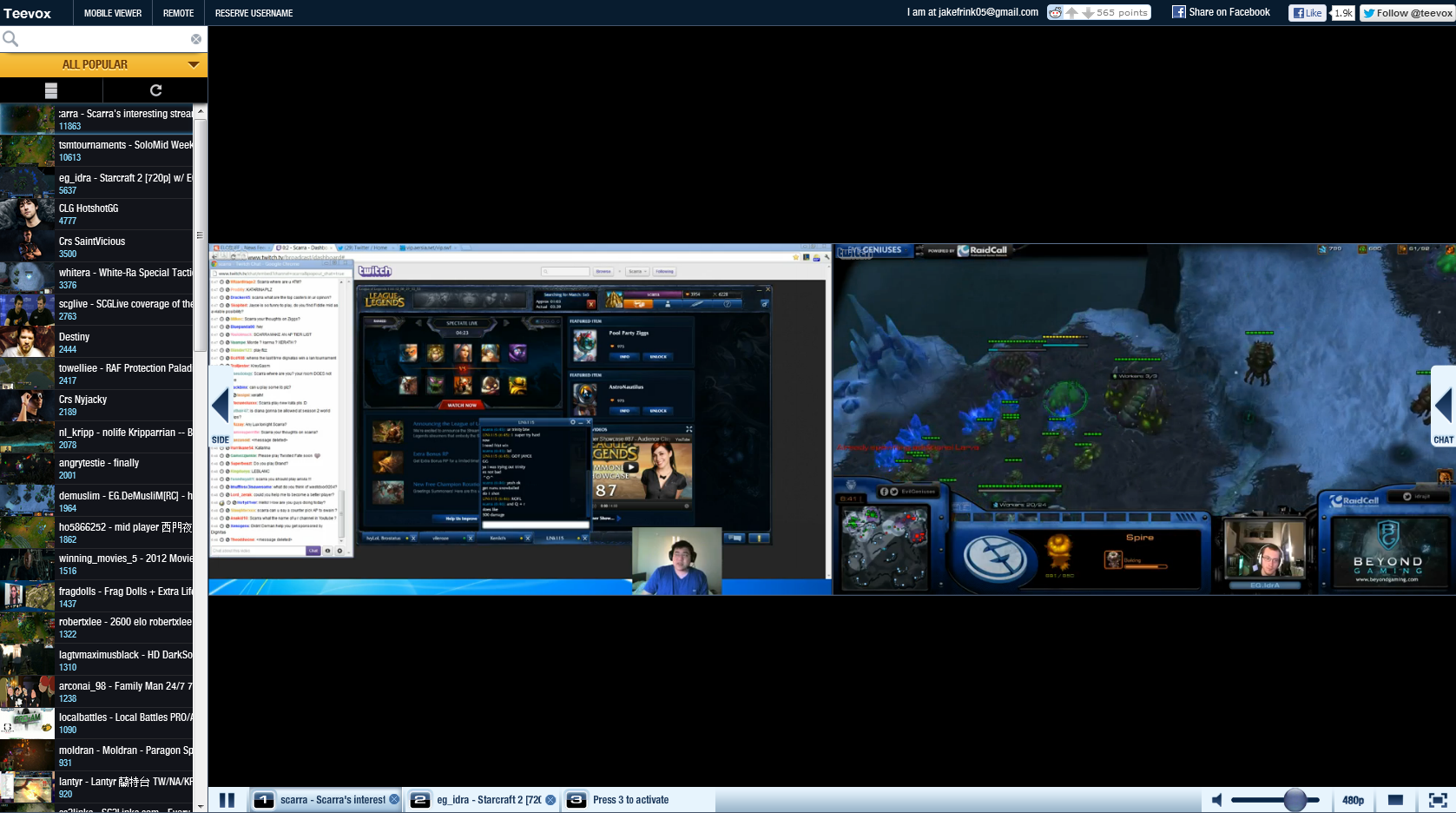
    This tip is mostly useful for folks who like to stay on top of video game-related streams; third-party stream viewers Teevox and WellPlayed offer a much more user-friendly, all-in-one interface for watching streams from Twitch.tv and Own3d.tv. Teevox in particular makes it very easy to quickly switch between two streams, or watch multiple streams at once, both of which are handy if you’re trying to follow a major game event with multiple concurrent streams. What’s more, Teevox even features two mobile apps (Android only), one which lets you use Teevox’s multiple-stream features on the go, and one which lets you use your smartphone or tablet as a remote control for your PC–excellent if you’re watching a stream on an HDTV through your PC and don’t want to get up to change the channel.
    Use a third-party program like Teevox to switch between multiple live video streams quickly and efficiently.
     
    Use an IRC client for chat
    Part of the fun of watching live streaming events is the chance to interact with other viewers (and sometimes even the host) through the built-in chat client. If you already use an IRC chat client (mIRC, for instance) and you’d rather use that, you can log into Justin.tv and Twitch.tv chat rooms by setting your login name to your Justin.tv/Twitch.tv account name, your IRC server to [channelname].jtvirc.com (replace [channelname]  with the name of the channel you want to join; if you’re on the Justin.tv site, just take the name that shows up after www.justin.tv/ in the URL), the port to 6667, and the server password to your Justin.tv or Twitch.tv account password. Once you’ve connected to the IRC server, you can join the stream chat room by using as the name of the channel you want to join. This tip will help alleviate stress on your browser (leading to less lag on your video stream) and make it easier for you to chat with your fellow viewers quickly and efficiently.
    To read this article in full or to leave a comment, please click here
    Source: PCWorld

    KDE Testing for 4.10 – The Developer Version

    The KDE Quality Team is designed to, amongst other things, manage the release tesing for KDE and move towards having a structured approach rather than just releasing some code, and seeing what happens.
    This means keeping clear instructions on how to install the latest betas, promoting testing and trying to do the testing more effectively.
    What’s being done

    Making easy instructions on how to get the latest release
    Making and running “release checklists” for various components of KDE to ensure everything still works as it should
    Making a list of changed areas, and putting an emphasis on testing these
    Running bug days, with bug reporting tutorials to improve the usefulness of the bug reports

    As a developer how can I help/benefit from this?
    If you have refactored a large area of code, or introduced a new feature, please add it to the to-test list (http://community.kde.org/Getinvolved/Quality/Beta/4.10/AreasToTest) along with instructions of how to get to test it. Use end-user terminology, and keep things deliberately vague to encourage users to spot bugs in areas that you (as a developer) haven’t thought about.
    Be on top of the bugzilla lists. KDE only works if all developers are on top of triaging their own products, confirming bugs, closing duplicates and invalid bugs and of course, fixing them 🙂
    As a distro packager, how can I help?
    Make sure our wiki page of “how to get the latest beta” (http://community.kde.org/Getinvolved/Quality/Beta/4.10/Installing) is up to date with clear instructions. A link to the relevant release page is enough. It’s a wiki for a reason, edit away 🙂
    Help co-ordinate
    You may have noticed we’re running a bit behind this release. We really need to step it up, both now and for future releases. It’s a new-ish team, and I’ve ended up being ridiculously busy.
    We have a number of ways to get involved in the managing side of KDE Quality:

    Redesigning the landing wiki page to be more graphic, easy to navigate and inviting
    Updating our list of changed areas in 4.10 that need extensive testing
    Co-ordinate with the kde-promo team to include testing instructions on the release notes
    Hang around our IRC channel #kde-quality to help answer testers questions

    It’s a real work in progress, but we’re already showing real results both in terms of bugs reported, and bugs fixed.
    Join our mailing list [https://mail.kde.org/mailman/listinfo/kde-testing] or find us in #kde-quality.
    Source: Planet KDE

    The strange world of (release) candidates

    You’ve seen the news: the first release candidate for Qt 5.0 has just been released. .And if you haven’t, you can go download it from http://qt-project.org/downloads. I’d like to first of all congratulate everyone involved in getting it out, with a special nod to the release team. Thanks for all the work!But I’d like to talk about what will exactly happen in the next couple of weeks from now until the 5.0 final. If you’re familiar with previous Qt releases, you may have noticed that our release candidates weren’t really release candidates. In particular, the release plan called for exactly one release candidate and we knew the time between that release and the final. We also knew that the release candidate wasn’t really a candidate because there were still changes we needed to make. Finally, after those changes were in — and some of which were quite significant — we released the final directly, without a second release candidate.No more. This time, we’re doing it the right way. More importantly, it’s all done in the proper, Open Source and Openly Governed way.The Qt 5.0 Release Team is composed of people from many different companies, not just one, testing many different platforms. We’ve released the alpha, the two betas and this release candidate as a group. Sure, there have been growth pains, especially in the Beta1 release, but those have mostly been ironed out now.The last mistake we fixed was one that I had unfortunately caused: in order to support the Tier specification for the 5.0 release, I had required that packages produced by the Qt Project be tested for 48 hours before they could be released. The idea was to make sure that everyone got the chance to participate in the release process and especially the opportunity to find and fix bugs on their platforms before the release went out. And that’s what we were doing for the Release Candidate.Then it dawned on me: that IS the release candidate model. In other words, we were doing release candidate release candidates!After a discussion on Monday’s release team meeting, we agreed to drop that indirection and just do regular release candidates. Here’s what we’ll do on releases from now on:Release team prepares a package set;Release team does a sanity check on the packages:did the build succeed?do the packages include the latest / correct commits?do the installers work?etc.If the sanity check went ok, the release team releases this package set as a new release candidate;For a week, we’ll collect bug reports and other issues, as well as fixes;Then a subjective decision needs to be made: do we have outstanding showstopper issues? Were there any important changes that require wide testing?If so, go back to the first step and let’s do a new Release Candidate;If not, repeat the packaging and sanity-checking steps but for the Final.We released RC1 today and I can bet we will find issues that require intrusive fixes. That means you should expect an RC2 package in a week or a week and a half. Hopefully, that RC2 should be the last we need, though.So, please, get RC1 now, test it and let us know. There’s usually a lot of helpful people in the #qt-labs IRC channel on Freenode, especially during European daytime. And any issues you find that could potentially be showstoppers, file them in our bug tracking system at http://bugreports.qt-project.org.Let’s try and get the final out by the end of the year.
    Source: Planet KDE