Tag Archives: UI

The 14 best Windows Store music and movie apps

Microsoft may be stuffing gratis copies of Office into Windows RT slabs and small-screen Windows 8 tablets alike, but all the spreadsheets and PowerPoint presentations in the world won’t change the fact that the modern UI was made for mobile devices—and mobile devices just beg to be used for media consumption.

Fortunately, although the Windows Store
still lags in many crucial app categories, it pretty much has entertainment down pat. Sure, it would be nice if more big-name music services called Windows 8 home, but these 14 stellar music and movie apps can keep you rocking out and tuned in long into the night—especially if you’re into streaming services.

…read more

Source: FULL ARTICLE at PCWorld

Awesome days during Akademy 2013

Joola Phone demo

Awesome days during Akademy 2013

Hi all,

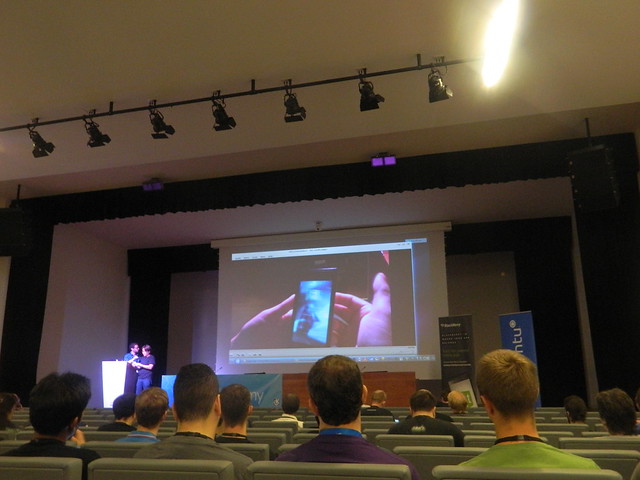
Being a part of KDE Akademy is one of the most awesome experiences ever. This was my second Akademy after the one in 2012 . Akademy 2013 was held in the beautiful city of Bilbao in Spain. Held from 13th July to 19 July, it had 2 days conference followed by 5 days of workshop, Birds of a Feather sessions (BoFs), lots of hacking, and of course lots of fun!

Day 0

I reached Bilbao on 12th July and went for pre-registration where I also met many KDE folks (some of them I already met during last Akademy and some new people). It was great to meet everyone again, we all had a fun time together with greeting each other, drinks and lovely music.

Day 1

The first day of the conference started with a keynote by Eva Galperin . A member of EFF, she talked about the NSA surveillance and how it affects people outside the US.

After keynote, Kevin Krammer gave talk on Declarative widgets where he explained and showed demo on how to create widgets based UI in QML. This approach enables non-C++ programmers to participate in UI development for traditional desktop applications.

Till Adam talked about KDE on Blackberry where he explained about Blackberry …read more

Source: FULL ARTICLE at Planet KDE

How to Customize the Android App Icons on Your Nexus 7 Tablet with Free Themes

Android’s stock appearance is easy on the eyes, but after a while, it’s outright boring to look at.

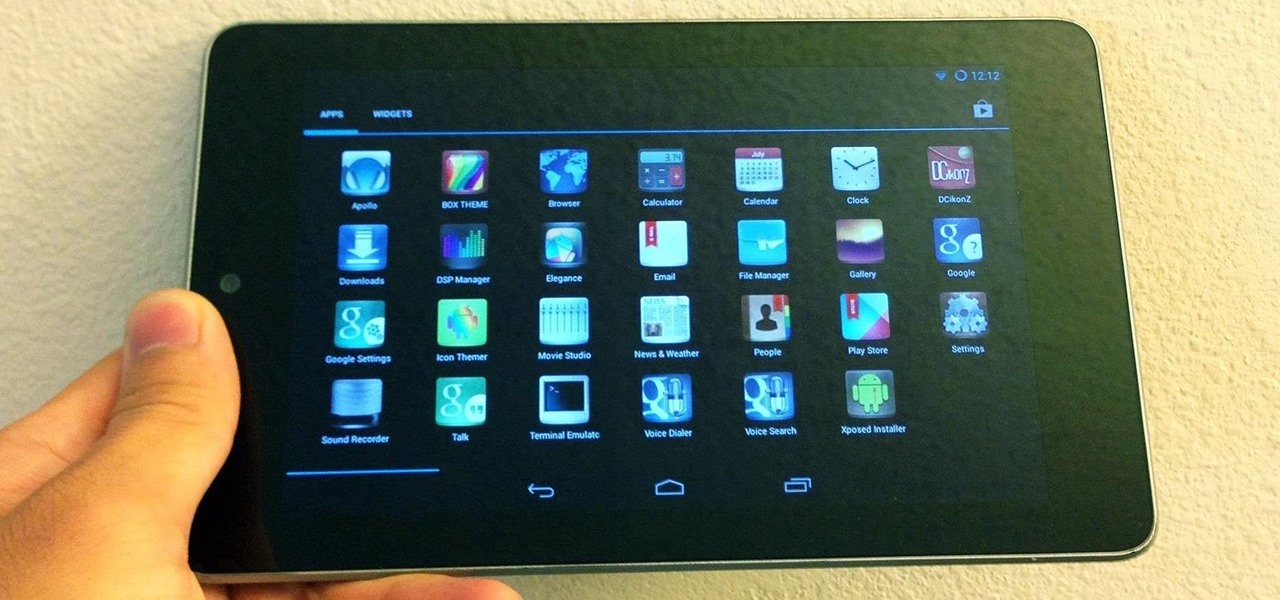
Unlike other tablets from some manufacturers, the Nexus 7 runs stock Android and is free from any special UI tweaks or customizations. Sure, you can download themes for a third-party launcher, but themes are launcher specific. They will not work for launchers they weren’t designed for.

Today, I’ll show you how to get any theme working on your Nexus 7 tablet using a special app called Icon Themer by Android developer ruqqq.
Video: .
Step 1: Make Sure You’re Rooted

You’ll need to be rooted, so… more

…read more

Source: Wonder How To

Eight Areas of BB10 That BlackBerry Needs To Address

By Ewan Spence, Contributor

Having spent some time with the BB10 powered Z10 and Q10 handsets from BlackBerry, I can see a lot of promise, but there’s a lot of work for the Canadian smartphone company to get through to bring BB10 up to the standards on show from Android, Windows Phone, and iOS. If BlackBerry is to reclaim the title of ‘the third ecosystem’ back from Windows Phone, there are a few areas I think they need to address. Developers, Developers, Developers The smartphone in 2013 is all about the apps. That’s where the extra functionality comes in, that’s where third parties can get their services into the handsets, and that’s what people go looking for in the stores. BlackBerry’s initial approach of bolstering their numbers with the ability to side-load Android apps is a nice touch, but it’s a stop-gap solution at best. Apps designed for BB10 are needed, and BlackBerry need to invest to build up the developer ecosystem. Make Sure There Are Lots Of Trial Versions This is one of the few areas where everyone can learn from Windows Phone – which has a trial version available for the vast majority of the applications in the store. For BlackBerry, where many functions are provided by second tier apps (such as ebook reading – where’s the Kindle or Nook readers?) there’s no way to try before you buy. Building up the confidence of users in third party apps is just as important as evangelising the developer community towards the platform. Stop Relying On Gestures Yes, I get it, the swiping gestures are the big marketing push – but it’s nothing more than a different implementation of a home button in your user interface. At least it’s not as gimmicky as the air gestures on the Samsung Galaxy S4, but relying on this upward move (with a twist to the left or right to open the hub) is not going to drive the PR message through the rest of 2013 and into 2014. Send In A Ninja Across The UI While I’m talking about the user interface, BlackBerry needs to get someone who’s entire job is to make sure every single part of the user interface works in the same way – in some menus you have to keep your finger on the screen as you slide through options, while others need you to lift from the screen. BB10 needs to mature and work in the same way in every area. Physical Keyboards Mean Too Much Scrolling While we’re at it, is there a way that BB10 can reduce the need for scrolling? It’s not that noticeable on the Z10, but on the physical keyboard devices such as the Q5 and Q10 there’s a huge amount of vertical scrolling, from the menu ribbons and setting screens to flicking through the Hub and reading emails. The scrolling is tiresome, and it’s very easy to trigger a gesture when you don’t want it. Some more thoughts and tweaks around the UI design might mitigate …read more

Source: FULL ARTICLE at Forbes Latest

How to Get the GS4 Google Play Edition's New Camera & Gallery on Your Samsung Galaxy S3

Just like the HTC One Google Play Edition, the recently released Samsung Galaxy S4 Google Play Edition ditches the manufacturer’s UI in favor of a pure Google experience, i.e. AOSP, but is also optimized specifically for the device’s hardware.

One specific optimization for the GS4 GPE was an update to the Google Camera app, the same one seen in the leaked Jelly Bean 4.3, and you don’t have to wait to get it. You can download and use it on your Samsung Galaxy S3 right now.

I’ve covered how to do this before, but this new Android 4.3. version should eliminate any FCs (Force Closes) and provide… more

…read more

Source: Wonder How To

Lock and encode your flash drives with BitLocker To Go encryption in Windows 8

Losing your USB flash drive before a big presentation is a terrible way to start a Monday. Losing a drive that also contains valuable personal data or confidential company information will ruin your whole week—and maybe your career. Luckily, Windows users can easily hedge their bets against such disasters by using the free BitLocker To Go utility to quickly encrypt portable drives.

One of the best-kept secrets of Windows 8, BitLocker To Go is the latest incarnation of an encryption tool that’s been included with select versions of Windows since Microsoft first introduced BitLocker disk encryption with Vista, way back in 2007. Like most encryption utilities, BitLocker protects your data by making it unreadable or inaccessible without a password or some other form of unique key. To secure the data, BitLocker uses an AES (Advanced Encryption Standard) encryption algorithm with a 128-bit key plus a data-mixing algorithmic function (known as an Elephant diffuser) for disk-related security features not offered by AES alone.

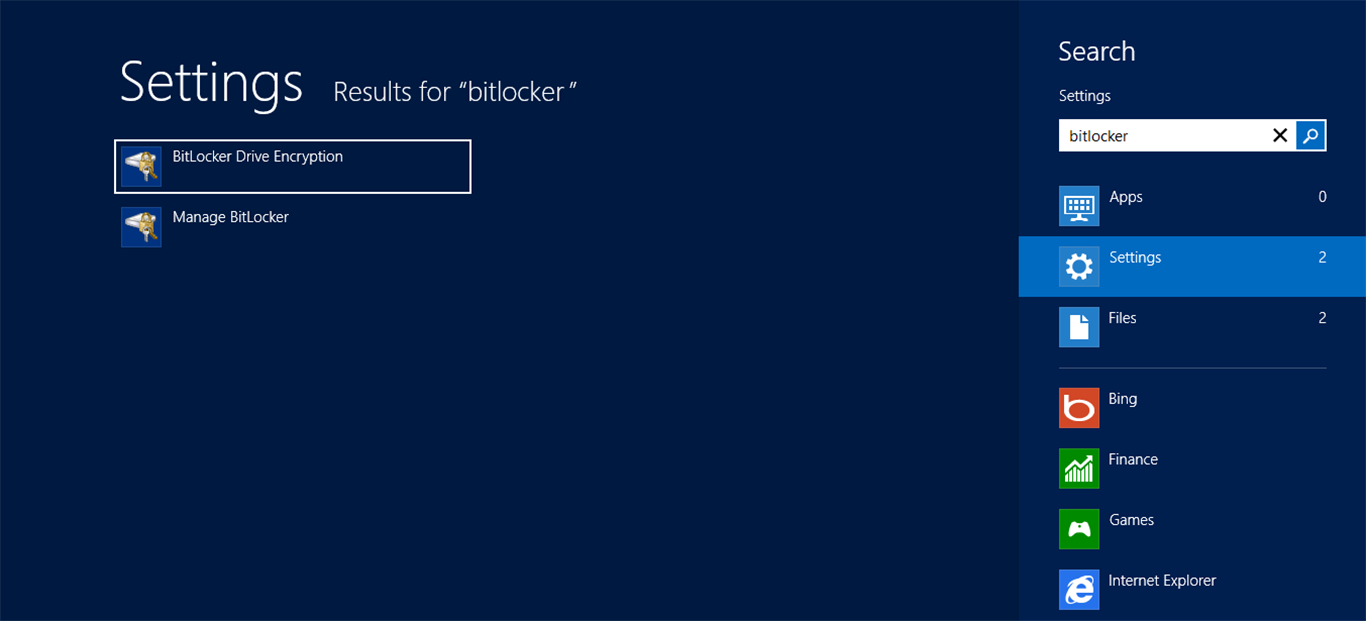
BitLocker To Go can be enabled in the new Windows 8 UI by searching for the feature or via File Explorer while in Desktop mode.

Not only does BitLocker give users the ability to encrypt their OS volume to prevent access to a system and the data stored on it, but a feature called BitLocker To Go (introduced with Windows 7) enables encryption of externally attached portable drives. It uses the same encryption technology, but instead of protecting an OS volume, it’s designed to secure data stored on a portable drive, such as a USB flash or hard-disk drive. And with Windows 8, Microsoft has updated BitLocker To Go with some new features that make it faster and easier to use than ever before.

Using BitLocker To Go on Windows 8

While the lion’s share of the new features is meant to reduce headaches for IT professionals managing BitLocker use in business, Microsoft has also sped up the initial drive encryption process. BitLocker To Go, which is available on Windows 8 Professional and Enterprise editions, now has the ability to progressively encrypt only the portions of a drive you’re actually using, instead of the entire drive (as was the case with Windows 7). The old method is still available for disks that already contain data, but if you’ve got a fresh, clean drive you’d like to protect with BitLocker To Go, enabling drive encryption can be completed in seconds, not minutes or even hours, depending on the size of the drive. Instead, when you add new data the drive, it will be automatically encrypted while BitLocker To Go is enabled.
To read this article in full or to leave a comment, please click here
Source: PCWorld  

Windows Blue may help, but Microsoft still faces hurdles

Microsoft’s failure thus far to significantly spark PC and tablet sales with Windows 8 has put high expectations on an expected 2013 refresh of the OS, dubbed “Blue.”

But changes to the operating system’s feature set, tweaks to its user interface (UI) and modifications to some of its subcomponents are actually solutions to minor problems, analysts said. They point to more important issues like pricing and positioning, app shortages, and enterprise reluctance as beyond the scope of an upgrade. (See also “Windows Blue wish list: 15 must-see improvements.”)

Few Blue hints

Microsoft has said little of Blue, the code name for the first Windows 8 upgrade, reportedly to ship this summer or fall, as well as the moniker for the company’s faster-paced development and release schedule. It’s only acknowledged the code name and touted what it’s called a new “continuous” update strategy for Windows on desktops, tablets, servers, and smartphones.

For example, last week Microsoft’s CFO Peter Klein used the “Windows Blue” label, and added, “With Windows 8, we are setting a new, accelerated pace for updates and innovations.”

To read this article in full or to leave a comment, please click here

Source: FULL ARTICLE at PCWorld

Mark Zuckerberg Should Be Happy With 500,000 Downloads Of Facebook Home

By Ewan Spence, Contributor

Facebook Home, the Android based UI replacement utility for the social network, has passed 500,000 downloads. That should go down as a win for the marketing team, with extra marks for an execution that had no obvious failures.

From: http://www.forbes.com/sites/ewanspence/2013/04/22/mark-zuckerberg-should-be-happy-with-500000-downloads-of-facebook-home/

Quo vadis, Dolphin? Results from the developers study.

We report the results of our Dolphin developer study and outline the follow-up study with users. Next to feedback we are looking for translation support.

Results of the developers study

Recently, we conducted a small study how developers want to improve Dolphin. First we asked about usability criteria. When forced to prioritize the developers’ goal is to provide functionality in favor of simplicity, individualization, and learnability. This does not mean to produce a Swiss army knife but the opposite “as simple as possible” is clearly refused. Regarding these goals the current state is estimated as rather good by the developers; only one response was given with a negative tendency. Beside bug fixing the next planned tasks are enhancement of the information panel (including UI usage) and better system integration (seamless handling of KIO slaves and removable devices, activity awareness, better Nepomuk queries).

Rationale for Usability

Starting point of the investigation was the finding that “Recents” is barely useful at the moment because of the few and fixed periods (today, yesterday, this week, last week) that are offered. To broaden the original question how to improve Recents: We need a concept for Dolphin’s sidebars. Currently we have Places in terms of special folders that can be extended by Favorites or bookmarks, and Devices for access to all external interfaces. Users can show a tree structure for the file system (Folders), a Terminal for command line in- and output, and context sensitive Information of selected file(s) or folder. Additionally, Recents can be used to show files not according to folder structure but based on other criteria, like time of last access so far.

Options

According to Dolphin’s philosophy the primary usability goal is to provide features that are easy to discover and efficient to use. Since Dolphin was introduced as a simple alternative to Konqueror it’s focus could hence be defined as providing a maximum of simplicity (notice the contrast to what developers actually state in the survey).

Alternatively, if users really demand more features, simple solutions that focus on a particular problem make sense. For the actual question of Recents it might be a vertical dual slider (aka range slider) for instance, placed contiguous to Recents’ data.The control has a lower anchor (the oldest known entry) and an upper anchor (the most recent file), and thumbs to adjust the upper and lower bounds to define shown range.

On the other hand, users might want to have a more sophisticated interface with full control for different purposes and perhaps with fancy visualization. In terms of Recents users might not only want to browse files by time of last access but as well by file size, file type, or given tags, for example. Such a solution could be similar to a graphical presentation of folder content with some kind of drill-down navigation like offered by Filelight.

Objectives of further research

All three options make sense: purification (keep it simple and don’t

From: http://user-prompt.com/quo-vadis-dolphin-results-from-the-developers-study/

Microsoft says small Windows touch devices are in the works

Microsoft may be busy making changes to the Windows technical requirements and licensing terms to pave the way for smaller Windows tablets. For the most part, however, the company has only hinted that sub 10-inch tablets could be in the works. That changed recently after the company came awfully close to confirming a 7-inch Windows tablet was on the way.

“We…are working closely with OEMs on a new suite of small touch devices powered by Windows,” said outgoing chief financial officer Peter Klein during Microsoft’s third quarter earnings call Thursday.

Klein offered few details about the upcoming devices other than to say they will be priced competitively and available in the coming months. He didn’t mention anything about display sizes, form factors, specific manufacturers, or branding for the upcoming devices. So while it’s tempting to assume Microsoft was talking about a 7-inch Windows tablet, we can’t say for sure that’s what he was referencing.

Nevertheless, a lot of rumors floating around out there suggest that 7-inch Windows 8 slates are coming. Most recently, Microsoft dropped its minimum allowable screen resolution for Windows tablets to 1024-by-768, making it easier for small and low-priced tablets to make the cut. A leaked copy of Windows Blue, an upcoming Windows 8 revamp, allows you to use the Windows 8 Snap feature with 1024-by-768 resolutions. Current versions of Windows 8 cap the Snap feature at 1366-by-768. Snap lets you view two modern UI apps (or the desktop and one modern UI app) at once. The feature would be a key differentiator for a 7-inch Windows tablet as Android and iOS slates don’t have a similar feature to view apps simultaneously—and no, Android widgets don’t count.

To read this article in full or to leave a comment, please click here

From: http://www.pcworld.com/article/2035757/microsoft-says-small-windows-touch-devices-are-in-the-works.html#tk.rss_all

Defiance Review (PC)

I didn’t hate the dozens of hours I spent shooting generic aliens and mutants in Defiance, but I know I’m not going back to it, either. Rather than the addictive, “Where did the day go?” sort of experience I had when I started out my adventures in World of Warcraft and Star Wars: The Old Republic, Defiance doesn’t do anything special enough to hook me, even for the short term.

Decent story missions and well-designed dungeons are too few and far between, and the vast intervening stretches are filled with some of the dullest and most repetitious quest design I’ve experienced in an MMO, punctuated by polish issues in the form of a poor mouse-and-keyboard UI, occasional broken quests, and crash bugs. The competitive multiplayer entertains for a while, but that and a few other redeeming features ultimately aren’t enough to make Defiance worth spending more than a short time with.

Continue reading…

From: http://www.ign.com/articles/2013/04/18/defiance-review-pc

ShootMania Storm Review

Few moments in a competitive first-person shooter feel as good as nailing someone with a rocket from across the map. It’s a satisfaction that comes from knowing that you not only had swift reflexes and precise aim, but that you out-thought him and knew exactly where he planned to be before he did. That’s the sensation that ShootMania Storm is built around. Its humble graphics are deceptively simple, as its modes incorporate some really clever ideas that make it a tense and unique experience, at least for a little while.

This is a PC shooter through and through, and that has both good and bad connotations. On the one hand, it’s packed full of little options missed by most modern shooters, from dedicated servers and LAN play to the ability to individually choose the color of every letter in your player name. There are so many of these old-school features, in fact, that the absence of a server ping indicator on the server browser is extremely strange. On the other hand, there’s a general lack of UI polish and consistency. The flashy tile-based main menu screen that looks like something designed to run on an iPad, which makes no sense for a mouse-and-keyboard shooter, and the moment you go down a level into the server browsers and options it switches to a totally different, cluttered, and less-than-intuitive style.

Continue reading…

From: http://www.ign.com/articles/2013/04/18/shootmania-storm-review

Tokamak 6 Kicking Off: Why switch graphics stacks?

We (the KDE Plasma Team) are sitting at the SUSE office in Nürnberg, Germany right now, kicking off the already 6th edition of Tokamak, which is the name for (most of) our Plasma meetings. A Tokamak is a container for Plasma, which uses magnetic force to keep the Plasma in one (very hot) place. For the Plasma team, it provides a high-bandwidth setting where we can discuss, design, review and hack on the technology behind the Plasma workspaces. This meeting’s topic is Plasma2, the evolution of Plasma into the Qt5 and Wayland world.

First, we agreed on a bottom line: “Plasma 2 will be at least as good as the current Plasma, and probably better in many aspects.” This means that we’ll have to invest considerable effort and time into stabilization. At this point, where we are probably still a year or so away from a Plasma2-based release, making it part of our planning now will allow us to focus on the things that we think, matter. Among that is making sure the transition to KDE Frameworks 5, Plasma 2 and Wayland will be as seamless as possible, and perceived as an upgrade to our users.

But why are we doing this? Why are we putting so much work into it, what’s the benefit for the user?

Why switch graphics stacks?

In the past years, the landscape of graphics under Linux has changed quite a bit. Many things, like memory management of the graphics stack, rendering of primitives, font rendering, and a few other things involved in the process of “getting pixels onto your screen” have changed, and they’ve changed for the better. With a stack based on Wayland (and in extension Qt5), we are able to utilise modern graphics hardware better, to reduce maintainance effort and hopefully grow the community around the graphics stack, and not at least, to make sure that every frame that ends up on the screen is perfect. In the X11 world, we can’t really control it, since we have no idea when something is painted, in which way it is, where it’s painted, and when the pixels end up on the screen. With Wayland, this process of event processing, rendering and blitting is structured and guaranteed to happen in a certain order. In the end, this transition will enable us to put 60 perfect frames every second on the screen.
The new architecture also allows us to split the rendering into its own thread, so data processing or event handling in the application doesn’t end up delaying rendering. 60 frames per second will make the UI feel smooth as buttery silk, leading to less strain on the eyes and a nicer user experience.

From: http://vizzzion.org/blog/2013/04/tokamak-6-kicking-off-why-switch-graphics-stacks/

A vision for Microsoft’s smartwatch and four more Surface family members

If Microsoft ever releases the smartwatch that the Wall Street Journal reports is in development, the gadget won’t just be entering a wearable computing market that has yet to be proven out. The watch would also extend a family of Surface hardware devices that no one is clamoring to buy.

Yet hardware is a critical component of Microsoft’s mobile-focused reinvention, and the company can’t let crappy tablet sales dim its ambition. The Surface family must grow larger if Microsoft is to realize its quite public aspirations, and if you really begin to think about what a Surface Watch might offer, the concept suddenly segues from misguided and far-fetched to “Hmmm… I might actually buy that thing.”

The watch won’t look anything like the MSN-connected Swatch Paparazzi shown in the image above, but it could go down in flames like the Paparazzi if Microsoft doesn’t nail the gadget’s design and intent. With that, I describe the Surface Watch that I would want to buy, and wax fantastically on four more Surface brand extensions.

Surface Watch

If you can’t sell customers a $1,000 Surface tablet, maybe you can sell them a Surface smartwatch that’s priced to move. Let’s say this device is $150 (the same as Pebble’s smartwatch). Let’s say it grabs Microsoft’s modern UI, and tosses a new Live Tile on your screen every 10 seconds. How’s that for a conversation starter? With its always-on connection, the Surface Watch throws tweets, news headlines, and other streaming bits and bobs directly onto its touchscreen face.

To read this article in full or to leave a comment, please click here

From: http://www.pcworld.com/article/2034667/a-vision-for-microsoft-s-smartwatch-and-four-more-surface-family-members.html#tk.rss_all

Should Microsoft Kill Windows 8 Immediately?

By Evan Niu, CFA, The Motley Fool

Filed under:

Microsoft Windows 8 is totally killing the PC market. As if PC shipments weren’t already stagnating, Windows 8 just knocked unit volumes down for the count.

The 14% decline in the first quarter that IDC estimated is the worst quarterly contraction in nearly 20 years. There were initial indications that Windows 8 wasn’t taking off, such as when IDC pegged fourth-quarter PC units at negative 6.4%. The new operating system was released about a month into that quarter, so it was fair to say then that Windows 8 maybe just needed some time. It was simply too early to call it for sure.

Well, we can now call it for sure: Windows 8 has bombed. Don’t just take my word for it. IDC‘s Bob O’Donnell makes it quite clear:

At this point, unfortunately, it seems clear that the Windows 8 launch not only failed to provide a positive boost to the PC market, but appears to have slowed the market. While some consumers appreciate the new form factors and touch capabilities of Windows 8, the radical changes to the UI, removal of the familiar Start button, and the costs associated with touch have made PCs a less attractive alternative to dedicated tablets and other competitive devices. Microsoft will have to make some very tough decisions moving forward if it wants to help reinvigorate the PC market.

Windows 8 was a huge risk. It was a risk that Microsoft needed to take in the face of lackluster global PC shipments, but after five months on the market, the data show that consumers just aren’t buying into Microsoft’s vision, literally and figuratively. Users want the Start Menu back; some certified technicians even offer services to downgrade brand-new PCs back to Windows 7 (that’ll be $125, please), allowing users to go back to the familiar interface and embrace of that OS.

Should Microsoft just kill Windows 8 immediately in order to minimize the damage it’s doing to the PC market? That’s not likely, considering how much time and money the software giant plunged into developing it. That would be about the toughest decision Microsoft could make.

This is before we even consider Windows RT, the less-capable variant that doesn’t support legacy apps. Surface RT sales haven’t made a dent in the market, and many OEMs are already abandoning the platform. Samsung just shuttered Windows RT sales in Europe, which it was using as a testing ground before possibly bringing those devices stateside. Other Windows RT OEMs are already dropping prices to clear out inventory.

Here’s IDC‘s tablet guru Tom Mainelli last month:

Microsoft’s decision to push two different tablet operating systems, Windows 8 and Windows RT, has yielded poor results in the market so far. Consumers aren’t buying Windows RT’s value proposition, and long term we think Microsoft and its partners would be better served by focusing their attention on improving Windows 8. Such a

From: http://www.dailyfinance.com/2013/04/12/should-microsoft-kill-windows-8-immediately/

new network KCM

Stop me if you can

If you followed my last post about sessionk you might be wondering “what the hell…”, well I like to code on stuff I’m in need, about sessionk I hope soon I give it an update now that I have more or less the whole picture.

So what’s up with networking? If you didn’t see the new plasma network managergo take a look, the greatest thing about it in my opinion is to have new blood around, so when I look at it I decided I should stop complaining and do something I wanted for a long time.

There’s nothing basically wrong with the NM plasmoids, it’s just that for the use case I’m interested in no plasmoid will ever fit it. The Mom’s use-case. If you have non nerd friends, wife, kids, parents that use Linux you know that they will someday call you. And when they do you need some sort of script to diagnose why isn’t “Facebook” opening. My script is like this:

  • First click on the (hmm) icon that looks like (hmm) a dot with semi-curves next to the clock
  • – There’s none.
  • Ok then try to find one that is a square with a smaller square inside
  • – There’s none.
  • Maybe a square with a black empty square in?
  • – Ah ok…
  • – But it says the cable is not connected and I just plugged on the power
  • ….
  • Do you have an wifi right?
  • – I have a Wifi…

As you can it’s hard to describe a plasmoid UI by phone, also the user might have removed the plasmoid from the tray or might be using plasma-netbook (I took half an hour trying to explaing where the K menu was till I figured out it was netbook edition…). Also the current Network Manager KCM only handle connections which means you must have a plasmoid if you want to manage network.

This is where System Settings comes in:

  • The user can’t screw the interface
  • The user can read labels like “networking”
  • It has regular buttons (not flat things that are transparent and hard todistinguish)
  • It offers the possibility of a more advanced user interface

With this new plasma-nm I felt it was just the right time for me to do this, more people active on looking at NM means people can fix your code and the other way too. Last week then I started this and at the same time I tried to give some Qt/C++ classes toJayson Rowe and we immediately feel that some parts of the API was hard to use, like the IPv4 class was giving you an Int, when I saw this I had no idea how to convert that easily to an string, luckly there is a QHostAddress class that I never had used but it turns out I decided to make libnm-qt actually return a QHostAddress, and I started lot’s of changes on the lib, among them a change on how to handle pointers which has fixed some crashes here.

And here is the first screenshot <img alt=":)" class="wp-smiley"

From: http://dantti.wordpress.com/2013/04/12/new-network-kcm/

The 10 most glaring Windows Store no-shows

After grinding to a standstill earlier in
the year, Microsoft’s Windows Store is finally starting to pick up steam, with recent additions such as Nokia Music,Twitter, and MLB.TV bringing big-name clout to the fledgling platform. Nevertheless, spending a week of self-imposed exile in Windows 8’s modern UI made it abundantly clear to me that some glaring omissions in Microsoft’s app catalog remain to be filled.

Still, even if some of your must-have apps appear in this list of the missing, all is not lost. You may be able to make do with Web apps, desktop apps (unless you’re on Windows RT), or third-party replacements. But ultimately there’s nothing like the real thing, which means that these apps need to appear in the Windows Store, stat!

From: http://www.pcworld.com/article/2033876/the-10-most-glaring-windows-store-no-shows.html#tk.rss_all

Killing the desktop: Can you survive in Windows 8's modern UI alone?

Can Windows 8’s modern UI replace the traditional desktop? That’s the question everyone’s been asking since Microsoft released Windows 8 last October.

Thus far, the consensus theory has been a resounding NO! There aren’t enough modern apps in the Windows Store, critics point out. And the full-screen view of modern-style apps isn’t conducive to PC-style multitasking, they say. And hey, the control panel is still located on the desktop!

But so what?

For all the gripes, no complainers have yet to answer the basic question: Even with these limitations, is it conceivable to spend all of your time in the modern UI, and shun the desktop completely?

To read this article in full or to leave a comment, please click here

From: http://www.pcworld.com/article/2033875/killing-the-desktop-can-you-survive-in-windows-8s-modern-ui-alone-.html#tk.rss_all

Review: ModernMix runs modern UI apps in windows

Slowly but surely, Windows 8 is transforming into the desktop OS users thought it would be when they first heard about it, and it’s not Microsoft doing the work: It’s Stardock. The company’s Start8 start menu replacement is best-of-breed, and they’ve hit the nail on the head again with ModernMix, a $5 program (with 30-day free trial) that lets you open Windows 8 modern UI apps as windows on the classic desktop.

If you didn’t know better, you’d think these Windows 8 modern UI apps were designed to run in windows.

ModernMix is super-easy to use. Head to the Modern UI, open a modern UI app, press the F10 key, and the app moves to a window on the classic desktop. You can also choose to make this the standard behavior for programs launched from the Modern UI so you don’t even have the press the key.

Right-click the icon in the upper left-hand corner, and along with the usual move, size, close, etc. options you’ll find the option to create a shortcut to the app on the classic desktop. When you subsequently launch the program using this icon, it behaves as a classic windowed application. When you access the same app from within the modern UI, it behaves as it normally would. Best of both worlds.

However, you can change this behavior as well, having the icons launch the program full-screen. There’s also an overlay menu in the top right corner of windowed Modern UI apps that lets you full-screen or window the application.

To read this article in full or to leave a comment, please click here

…read more

Source: FULL ARTICLE at PCWorld

Adobe Named the Leader in Web Content Management for Digital Experience by Independent Research Firm

By Business Wirevia The Motley Fool

Filed under:

Adobe Named the Leader in Web Content Management for Digital Experience by Independent Research Firm

Adobe Recognized for Breadth of Functionality, Market Momentum and Resources

SAN JOSE, Calif.–(BUSINESS WIRE)– Adobe Systems Incorporated (NAS: ADBE) today announced that Adobe® CQ, part of Adobe Experience Manager within Adobe Marketing Cloud, was recognized as the Leader in “The Forrester Wave™: Web Content Management For Digital Customer Experience, Q2 2013” report by Forrester Research, Inc. Adobe was among the select companies Forrester invited to participate in the independent report, which evaluated 10 Web content management (WCM) products across 100 comprehensive criteria such as vendors’ current offering, strategy and market presence.

“Adobe provides a solid set of tools to enable business users to manage experiences,” stated the recently published report. “Adobe has made progress integrating the CQ5 WCM product with its other products, particularly analytics, testing, and optimization. The strength of Adobe’s platform and the company’s resources make it the vendor to beat in the DX (Digital Experience) space.”

Adobe’s position as the Leader in the WCM evaluation was also attributed to its “strong support for content authoring and editing and an intuitive and well-designed UI.” The report added, “Adobe is sharpening its focus on digital marketers” and “has leveraged acquisitions such as Day Software’s CQ WCM platform and Omniture’s analytics to establish a DX management portfolio that appeals to marketers, developers, and implementation partners.”

“The Web experience management market is dynamic and growing, underscored by Forrester’s latest industry report,” said Aseem Chandra, vice president, Adobe Experience Manager and Target business, Adobe. “We believe recognition by Forrester as the Leader further validates our strong position with Adobe Experience Manager as the best solution to help organizations deliver compelling online experiences across Web, mobile and social for building brand and driving revenue.”

Deeply integrated with other solutions in Adobe Marketing Cloud, Adobe Experience Manager delivers capabilities for Web content management, digital asset management and media publishing across digital channels. The solution provides marketers with touch-enabled applications that can be deployed in the Cloud or on premise, helping organizations build engaging commerce experiences and brand loyalty. Recent customer wins include Bombardier Recreational Products, Citrix, Fairfax Media, Kellogg Company, Pearson, and Williams-Sonoma.

A complimentary copy of “The Forrester Wave™: Web Content Management For Digital Customer Experience, Q2 2013” report is available here.

About Adobe Marketing Cloud

…read more

Source: FULL ARTICLE at DailyFinance