Tag Archives: GUI

GNUnify 2013 was awesome

This is a month of FOSS events – and one of them was GNUnify 2013 at Symbiosis Institute of Computer Studies and Research. There were talks ranging from systems stuff like GCC, about Android hacking to KDE development. We met people from communities of KDE, Mozilla, Wikimedia, friends from RedHat and of course the awesome awesome organizers and volunteers.

It is nice to see a Free Software event like GNUnify to turn into a tradition where teachers and students work hard to create what is rightly said a forum to unite open minds.

Day1 of the event had lots of talks including our very own KDE – we planned a full day track on KDE primarily aimed to introduce people to KDE (and Open Source in general) and give them starting tips on how to get started. The talks started with introduction of Qt and a hands-on where people tried writing sample applications. Something new here was that we had to cover QtQuick/QML which these days is the preferred way of doing GUI in Qt, but at the same time we couldn’t leave out the traditional QWidget style of doing GUI. This was primarily because of two reasons, first most of the current KDE applications are written in QWidget so people will need that if they want to contribute and secondly the desktop components of QML still aren’t widely used.

Pradeepto on KDE

We started with the Qt talk and the hands-on was very well received by the attendees. They tried Qt Creator and created sample apps, winning KDE.in tshirts in the process šŸ˜€ After lunch Sinny talked about and gave a demo on using QtQuick/QML for writing fluid and modern GUI. This was followed by a talk on getting started with KDE development where we demo’ed a small hack in rekonq (a KDE browser based on WebKit) so that people get confident that its pretty easy to get started. We also spent an hour or so in answering questions that people had in mind about contributing.

The organizers were kind enough to arrange a pool-side dinner for us and it turned out to be a nice opportunity to socialize more, and meet all of the volunteers at one place. And whats more, I got a chance to be picture’d with the ą¤¹ą„ˆą¤•ą¤° laugh

Day2 saw talks on various kinds of topics like Android, Python, Drupal etc and I gave a Plasma Active demo to a group of volunteers. After Day1 which was kinda tiring due to the day long session, the 2nd day was quite fun with meeting friends again and chatting over lots of stuff šŸ™‚ Not only this, we had a nice evening and dinner, thanks to Siteshwar.

(Photos courtesy Sinny Kumari, …read more
Source: FULL ARTICLE at Planet KDE

QWinFF Media Converter 0.1.8 (KDE Video Application)

Thumbnail

QWinFF Media Converter 0.1.8
(KDE Video Application)
QWinFF is a cross-platform, easy-to-use and open-source media converter GUI using FFmpeg as its backend. Featuring a rich set of pre-defined parameters, QWinFF helps users use FFmpeg easily without having to manually input command-line flags. Average users can convert multiple media files in just a few clicks, while advanced users can still adjust conversion parameters in detail.

Ubuntu users can install this application from ppa: https://launchpad.net/~lzh9102/+archive/qwinff

openSUSE builds are available through the Open Build Service: https://build.opensuse.org/package/show?package=qwinff&project=home%3Alzh9102

Translation of the following languages are currently available:

English – built-in
Traditional Chinese – by the author
JapaneseTilt (http://tiltstr.seesaa.net/)
ItalianTheJoe (http://thejoe.it/), Francesco Marinucci
CzechPetr Gaďorek
Simplified ChineseęØę°øę˜Ž

We would be very pleased if you could provide a translation for your language. To translate this application, please download the latest translation template from http://code.google.com/p/qwinff/downloads. If you are not familiar with translating Qt applications, please see the instructions [url=http://code.google.com/p/qwinff/wiki/TranslatorsNotes]here[/url]. After you are done, please make your name and the translation file available to us (lzh9102 AT gmail DOT com) and we’ll include it in the next release.

changelog:
Version 0.1.8:
(2013-02-13)
– Improved video/audio cutting interface.
– Fixed some bugs when working with newer ffmpeg versions.

Version 0.1.7:
(2012-09-17)
– Drag&Drop reordering tasks
– Fixed progress-displaying of wav input files.

Version 0.1.6:
(2012-08-26)
– New Feature: Adjust video speed (requires sox to be installed).
Added Czech translation.
– Rearranged toolbar actions.
– Fixed: Auto presets got messed up when being edited.
– Removed “Auto bitrate” option
– Many UI improvements.

Version 0.1.5:
(2012-08-17)
– New Feature: Shutdown computer when all tasks are done.
Added Italian translation.
– Added several ffmpeg presets that don’t give extra arguments.

Version 0.1.4:
(2012-06-21)
– Some minor gui improvements
– Include desktop file and application icon in installation.

Version 0.1.3:
– Enable users to select the range of the media file to encode.
– Fixed video encoding error on some systems due to ffmpeg multithread options.
– Removed “-aq 60” option in OGG Vorbis to prevent inflating the output file.

Version 0.1.2:
(2012-02-11)
– Use notify-send by default.
– Made libnotify optional and disabled by default.
– Explicit link with gtk+-2.0. (libnotify can be used with either gtk2 or gtk3)
– Fixed compilation error with older libnotify versions.

Version 0.1.1:
(2012-02-07)
– Use libnotify …read more
Source: FULL ARTICLE at KDE Apps

Kscope4 1.7.0 (KDE Development Tool)

Thumbnail

Kscope4 1.7.0
(KDE Development Tool)
Kscope4-1.7.0 is the port to KDE4 / Qt4 of Kscope-1.6.0 by Elad Lahav, a GUI frontend for cscope.

This is intended to search a set of files, call a `project’ for the definition or the usage of a function or a variable, a text. All the cscope commands are usable and a graph part is available to visualize the link between calling and called functions.

Build process requires KDE4 & Qt4; the `graph’ feature requires Qt3Support and Dot & Graphviz packages to be installed.

At runtime, Kscope4 needs cscope & a `ctags like’ binary

An online documentation will be created during build process.

[read more]

job recommendations:

Sales Engineer full time employee
ownCloud Inc. United States of America, Boston more about this offer

[more jobs]
…read more
Source: FULL ARTICLE at KDE Apps

Attach Solaris 11.1 rwn driver to RaLink RT8200/8260 Wi Fi Adapter

By JWH

I installed Solaris 11.1 on a X86 PC. It’s working except for one glaring problem : I cannot get a driver attached to the RaLink RT2800 (Wi Fi Adapter). Can someone point me in the direction where ” the correct” driver exists, or let me know how I can tell Solaris to attach the device to the existing rwn driver (which looks correct to me)?

Any help much appreciated.

The output below from several commands reflects the system recognizes the Wi Fi Adapter as a RT2800/2860 and has a driver for the RT2800, but that there is no driver attached.

First the simple commands with simple and obvious output:

Quote:

# sysdef
pci, instance #0

pci8086,244e, instance #0
pci1814,2860 (driver not attached)


Quote:

# pkginfo | grep rwn
system SUNWrwn Ralink RT2700/2800 IEEE802.11 a/b/g/n Wireless Network Device


Now for more detailed info provided from GUI tools

# The Device Driver Utility (DDU) -> Detailed Info:

Quote:

Driver URL:
node name: pci1814,2860
Vendor: Ralink corp.
Device: RT2800 802.11n PCI
Sub-Vendor: Ralink corp.
binding name: pci1814,2860
devfs path: /pci@0,0/pci8086,244e@1e/pci1814,2860
pci path: 11,1,0
compatible name: (pci1814,601.1814.2860.0)(pci1814,601.1814.2860)(pci1814,2860)(pci1814,601.0)(pci1814,601)(pciclass, 028000)(pciclass,0280)
driver name: unknown
assigned-addresses: 82110810
reg: 110800
compatible: pci1814,601.1814.2860.0
model: Network controller
power-consumption: 1
devsel-speed: 2
interrupts: 1
max-latency: 4
min-grant: 2
subsystem-vendor-id: 1814
subsystem-id: 2860
unit-address: 1
class-code: 28000
revision-id: 0
vendor-id: 1814
device-id: 601


Package Manager -> General:

Quote:

Name: driver/network/wlan/rwn
Summary: Ralink RT2700/2800 Wireless NIC Driver
Installed: 0.5.11 (Build 5.11-0.175.1.0.0.24.2)
Size: 82.44 kB
Category: Drivers/Networking
Publisher: solaris
Description:
Wireless Network device driver for Ralink RT2700/RT2800 chipset-based 802.11a/b/g/n NICs.


…read more
Source: FULL ARTICLE at The UNIX and Linux Forums

R-Drive Image 4.7

While some companies spend a lot of time and effort adding fringe features that few users will ever need, or gussying up the interface and calling it a major upgrade, R-Tools Technology spends its time making sure its programs are fast and work correctly. Case in point: R-Drive Image 4.7. While the GUI is simple (but easy to learn and use), the feature-list is not: full, incremental, and differential backups; compression; disk cloning; encryption; and support for Windows Dynamic Disks (a bugaboo with some imaging programs) and BSD slices (Linux partitions); split files; optical media support; file system conversion.

Every feature worked fine in my testing. The program is fast, and I particularly liked the way R-Drive Image mounts a backup image. With R-Drive Image, you use the program itself to mount the image as a read-only virtual drive with its own drive letter. This eliminates a background process when you don’t need it, and renders the backup complete searchable using standard Windows methods. I can’t begin to tell you how much time I’ve wasted restoring True Image backups simply so I could search them for a vital file a customer had to have right away.

The Linux-based, bootable CD (or floppies if you wish) that R-Drive Image creates hearkens back to the 80’s and early 90’s with a character-based interface. It looks quaint, but it has the latest drivers for USB and SATA, as well as mouse support. Also, because it doesn’t have to deal with graphics drivers or a bitmapped GUI, R-Drive image boots very quickly.

Networking support is this program’s weak point. Using the boot disc to back up over the network involves configuring your Ethernet adapter, entering server IP addresses as well as the share name of the location you’re imaging to, plus any applicable passwords. There’s no network browsing, even after configuring the adapter so you must have this info on hand. Also, the help file is curiously lacking, well… help on the topic. Hence, if you don’t understand what I just wrote, don’t buy this program for imaging across a network.

To read this article in full or to leave a comment, please click here

…read more
Source: FULL ARTICLE at PCWorld

Kwave 0.8.10 (KDE Sound Application)

Thumbnail

Kwave 0.8.10
(KDE Sound Application)
Kwave is a sound editor designed for the KDE Desktop Environment.

With Kwave you can edit many sorts of audio files including multi-channel files. Kwave also includes many plugins to transform the audio data in several ways and presents a graphical view with a complete zoom- and scroll capability.
Supports many sound formats, playback and recording via ALSA and OSS.

changelog:
0.8.10 [2013-02-09]

* support for Ogg/Opus codec
* bugfix: unwanted termination if splash screen closed while the first
toplevel widget still was starting up
* improved auto detect of svg-to-png conversion,
added support for “rsvg-convert” (SF bug #38)
* increased default memory sizes
* some GUI improvements

[read more]

job recommendations:

Sales Engineer full time employee
ownCloud Inc. United States of America, Boston more about this offer

[more jobs]
…read more
Source: FULL ARTICLE at KDE Apps
wacom tablet 1.99.3 (KDE System Tool)

Thumbnail

wacom tablet 1.99.3
(KDE System Tool)
KDE 4 KCModule

This module implements a GUI for the Wacom Linux Drivers and extends it
with profile support to handle different button / pen layouts per profile.

For hardware support have a look at http://www.linuxwacom.sourceforge.net

Project Repository:
https://projects.kde.org/projects/extragear/base/wacomtablet

get the source with
git clone git://anongit.kde.org/wacomtablet

(K)Ubuntu packages for 12.04 and 12.10 from these repositories:
1.3.7: https://launchpad.net/~maret/+archive/wacom
2.0-beta3 (1.99.3): https://launchpad.net/~maret/+archive/wacom-unstable

changelog:
+++++++++++++++++++++++++++
+ v2.0 (1.99.3)
* Huge refactoring
* first start to support libWacom
* Added Unit-Tests
* started working on support for the Intuos 4 Led project
* Global HotKeys for the screen selection
* several bugs fixed

+++++++++++++++++++++++++++
+ v1.3.7-2
* Added translations to the 1.3.7 release

+++++++++++++++++++++++++++
+ v1.3.7
* Fix rotatation bug
* Add some more Tablets

+++++++++++++++++++++++++++
+ v1.3.6
* fix button mismapping due to RelWheelUp settings
* fix mapping bugs due to a change in kernels >= 2.6.38
* bump version correctly again šŸ˜‰
* added several new tablet devices
* add button mapping list to wacom_devicelist if the physical button number is different from what the xserver and xsetwacom needs. This allows to address the issue with button 4 = button 8 due to scrolling and now completly changed button numbers for the new pen and touch devices.

+++++++++++++++++++++++++++
+ v1.3.5
* fixed button assignment for buttons higher than 4
* fixed a bug where the tablet area gets messed up when the screen/tablet is rotated

+++++++++++++++++++++++++++
+ v1.3.4
* included all translation .po files again (no changes in the program)

+++++++++++++++++++++++++++
+ v1.3.3
* swap cw/ccw tablet rotation when xRandR detects that the screen was rotated
* ignore button1=1 assignment, works around the click error with the stylus/eraser
* remove cursor settings (Cursor prox. didn’t work anyway, and applying settings resulted in errors with the wacom device mouse)

+++++++++++++++++++++++++++
+ v1.3.2
* Fixed crash in the kded module when a new tablet is conected
* Fixed typo for the “eraser” detection

+++++++++++++++++++++++++++
+ v1.3.1
* Fixed a small bug preventing tablet detection by whatever changed in kubuntu natty

+++++++++++++++++++++++++++
+ v1.3
* Add support for global shortcuts.
Now Touch on/Off
Stylus Absolute/Relative
can be mapped onto the tablet pad buttons or other shortcuts

+++++++++++++++++++++++++++
+ v1.3-beta2
* The stylus and eraser page are combined to one pen page
* The touch features are on their own page
* support for easy creation of the Coordinate Transformation Matrix with all kind of screen setups
* force proportions / keep shape option
* support for more tablets (Pen & Touch series and some other)
* Plasma applet allows to switch touch feature on/off easily

+++++++++++++++++++++++++++
+ v1.3-beta1
* Support for the new 0.10.11 wacom driver
* Automatic tablet rotation when the XRandR screen rotates (need XRandR 1.2)
* Calibration tool
* More settings for the touch feature
* More settings for the stylus/eraser part
* Some …read more
Source: FULL ARTICLE at KDE Apps
Charles Profitt: Wireframe Options

Recently I became involved in Ubuntu Friendly and one of the tools I wanted was a wireframe application so I could make quick mockups moving forward. I learned about several options:

  • Pencil – Pencil is built for the purpose of providing a free and open-source GUI prototyping tool that people can easily install and use to create mockups in popular desktop platforms.
  • Wireframe Sketcher – WireframeSketcher is a wireframing tool that helps designers, developers and product managers quickly create wireframes, mockups and prototypes for desktop, web and mobile applications. It’s a desktop app and a plug-in for any Eclipse IDE.
  • Balsamiq – Using Mockups feels like drawing, but because it’s digital, you can tweak and rearrange easily. Teams can come up with a design and iterate over it in real-time in the course of a meeting.

I eliminated Balsamiq because it requires Adobe Air (which is no longer being developed for Linux).

Pencil:
I found working with Pencil very easy to create the mockup of Ubuntu Friendly. Pencil included resources for Windows, Android, iOS and Web Applications. The drawing produced is very clear and does not simulate being drawn by hand. I had one rather important issue with Pencil; it would not export the mockup as a .png. The dialog box would come up and you would take the steps to save a file, but no file was actually saved. When making a .pdf file the table resource was not rendered.

Screenshot from 2013-02-03 12:50:43

Wireframe Sketcher:
Working with Wireframe Sketcher was not quite as easy as Pencil, nor were there as many built-in resources. The program had no tool to create a table. The resulting sketches simulate being drawn by hand and the program was able to export .png files. This software is also not free and will cost roughly $100.

uf-wireframe

In the end Wireframe Sketcher is the winner as it is able to create functional mockups without requiring Adobe Air or Java and was able to successfully save .png versions. An added feature, that I will not make use of, is that it works with Ecplipse IDE as well. If you are comfortable with Eclipse, or even Visual Studio, the application will be comfortable immediately.

wireframe-sketcher

The IDE style allows you to build an application with multiple screens and even have the screens be interactive. All the other mockup programs I tried lacked this depth. The program even allows for custom made svg images to be used as additional shapes or icons.

If you are an Ubuntu User like I am you can find it in the Ubuntu Software Center.

Screenshot from 2013-02-03 17:01:12


Source: FULL ARTICLE at Planet Ubuntu

Kdenlive 0.9.4 (KDE Video Application)

ThumbnailKdenlive 0.9.4
(KDE Video Application)
Kdenlive is a non linear video editor for KDE. Its goal is to bring easy and powerfull video editing to your KDE Desktop. Current features include:
* Multi track editing
* Realtime effects and transitions
* Image, color, titles, video and audio clips
* Customisable layout
* Export to various formats

If you compile from source code, make sure to read the requirements.

Forums, instructions and tutorials can be found on our web site.

changelog:
0.9.4
Rewritten DVD wizard and screen capture, many bug fixes and small performance / GUI improvments
http://kdenlive.org/users/j-b-m/kdenlive-094-released

0.9
New effect stack, allows effect grouping, drag & drop, etc
Automatic audio alignment when you have several sources for one event
http://kdenlive.org/users/j-b-m/kdenlive-09-released

0.8.2.1
Bugfix release
http://kdenlive.org/users/j-b-m/kdenlive-0821-released

0.8.2
Bugfix and stability release
http://www.kdenlive.org/users/j-b-m/kdenlive-082-released

0.8
Audio monitoring (spectrogram,…)
Stop motion assistant
Proxy clips
New effects
http://www.kdenlive.org/users/j-b-m/kdenlive-08-released

0.7.8
Color correction widgets
Edit effects / transitions directly on monitor
Animated slideshows
Track effects
Etc
http://www.kdenlive.org/users/j-b-m/kdenlive-078-released

0.7.7:
Fix Qt 4.6 compatibility issue, improved titler and general stability

0.7.6:
Many crash and timeline corruption issues have been fixed.
More infos at http://www.kdenlive.org/users/j-b-m/kdenlive-076-released

0.7.5:
This release mostly focuses on bug fixes and stability issues. New features include:
Vertical zoom for timeline
Keyframe editor for effects
Improved titler with support for unicode characters
and some more. check our website for more infos.

0.7.4:
Compatibility with MLT 0.4.x
Rewritten DVD wizard
New dialog for missing clips
Bugfixes and other small improvements

0.7.3:
Fix several crashes, new features include: creation of rendering scripts, double pass encoding, clip grouping and more.

0.7.2.1:
Fixes a nasty bug in Kdenlive that caused a freeze when starting the Config Wizard on some MLT version…

[read more]

job recommendations:

Sales Engineer full time employee
ownCloud Inc. United States of America, Boston more about this offer

[more jobs]

Source: FULL ARTICLE at KDE Apps

UNIX without GUI

By Omar_M

Hello guys,

I am new to Unix, because of low RAM, i want to install Unix terminal (command line) without the GUI. Basically, i want to install two Unix OS (without the GUI) on VMware and make a TCP connection between them. I have a total of 2GB RAM on the host computer running window 7, so i want a light version of Unix so that it all runs smoothly. Can anyone provide a download link for such non GUI version of Unix? and if it is not too much to ask could you also provide a guide for such connection. Thanks in advance.

Source: FULL ARTICLE at The UNIX and Linux Forums

KRadio4 4.0.7 (KDE Sound Application)

ThumbnailKRadio4 4.0.7
(KDE Sound Application)
KRadio is a comfortable KDE4 application for internet radio and AM/FM radio cards supported by V4L/V4L2. It has a lot of valuable features such as RDS decoding, pre-recording, timeshift playback, recording (wav, mp3, ogg), PVR support, versatile alarms, LIRC support, and much more (see below).

4.0.7 Release Notes

KRadio 4.0.7 is a bugfix release. It fixes issues with recent libffmpeg updates (planar samples by default now, perviously interleaved). Furthermore, added ID3 tags for recording setup. For details please have a look into the ChangeLog:

http://kradio.sourceforge.net/ChangeLog-4.0.7

Source code and translation packages as well as binary packages for Debian/unstable can be downloaded from the KRadio homepage:

http://kradio.sourceforge.net/download.html

Please test and give feedback about bugs but also success!

With best regards and thanks to all contributors!

Martin

FAQ: http://kradio.sourceforge.net/faq.html

Translation Status:

  • Czech(98%)
  • English(100%)
  • German(100%)
  • Islandic(65%)
  • Italian(96%)
  • Polish(3%)
  • Portuguese(49%)
  • Portuguese/Brasil(78%)
  • Russian(88%)
  • Slovak(18%)
  • Spanish(77%)
  • Turkish(42%)
  • Ukrainian(96%)
  • KRadio4 now supports:

  • KDE >= 4.2
  • DBus Support
  • Internet Radio
  • PulseAudio Support (indirect via ALSA)
  • RDS
  • Shortcuts
  • Pre-Recording – no worries any more about starting recording too late
  • Timeshift playing
  • V4L/V4L2 radio cards (including Line-In based cards, PCM capturing based cards and PVR cards)
  • ALSA
  • MP3 and Ogg/Vorbis recording
  • LIRC
  • Alarms and sleep countdowns
  • Dynamic plugin library architecture
  • Your contributions are highly appreciated!

    changelog:
    2013-01-19 (4.0.7)
    – fix for planar sound sample formats in very recent ffmpeg releases
    – support for id3 tags in recording configuration
    – fixed segfault in case sample format is unknown
    – fixed charset/encoding of id3 tags / vorbis comments

    2012-08-15 (4.0.6)
    – bugfixes for playlist file .pls handling (BBC stations and further UK radio stations, see bugreport 3534405)
    – support for WMV playlists (see bugreport 3534405)
    – improved playlist type autodetection

    2012-08-02 (4.0.5)
    – bugfix for http error handling in playlist handler
    – cleanup of internet radio libffmpeg/libav code
    – fixed watchdog handling: it was not stopped during station change and caused accessing empty playlists, thus div/0
    – removing cr/lf in ICY meta data / RDS data for running text in GUI
    – fixed typo in escape sequence code for ICY meta data parsing
    – fixed content-type handling for mms streams (allows now skipping slow autodetection)
    – finally fixed the problem with skips and stops in internet radio stream decoding
    – fixed handling of HTTP 304 (not modified) response code
    – updated preset file for RioDeJaneiro/Brazil
    – initial partial Slovak translation
    – added watchdog for internet streams: reconnects after a configurable stall time
    – visualization of disabled alarms
    – endianess and sample conversion code speedup
    – disabled alsa blocking usleep workaround by default and added configuration option
    – updated German translation
    – added config option for internet radio stations to set metadata encoding charsets
    – further buffer management fixes to stop repeated skips on certain systems
    – individual name for quickbar window title
    – Czech translation update
    – spec file updates

    2012-02-18 (4.0.4)
    – improved shoutcast support: fixed “Accept:” HTTP header field
    – issue warning if a broken V4L2 kernel is detected
    – fixed buffer alignment issue to avoid alignment-error segfault in libffmpeg sse2 code

    [read more]

    job recommendations:

    Sales Engineer full time employee
    ownCloud Inc. United States of America, Boston more about this offer

    [more jobs]

    Source: FULL ARTICLE at KDE Apps

    Can't shutdown the computer

    By mi117

    i cannot shutdown my computer through GUI or CLI when i put the command


    shutdown -P/-r now


    or press the shutdown button it goes to the login prompt and stays like that afterwards, so i press CTRL+ALT+delete (which works) but that only restarts it and closes processes like winbind and apache

    ———- Post updated at 01:30 AM ———- Previous update was at 01:22 AM ———-

    i m using mint 13 OS
    kernal 3.2.0

    Source: FULL ARTICLE at The UNIX and Linux Forums

    Daniel Holbach: Ubuntu Developer Week is back

    The times for Ubuntu have never been more exciting. Cloud, server, desktop, laptop, TV, tablet, phone – everything runs Ubuntu or is soon going to. This makes developing Ubuntu very special, because fixes which go into Ubuntu in one place will benefit all form factors and all circumstances where it’s used. By improving Ubuntu you make millions of people around the globe happy.

    During every 6 month release cycle we run Ubuntu Developer Week. It’s back and we’re going to have it from 29th January to 31st January. During the event we will have online sessions where seasoned Ubuntu developers introduce you to their respective area of expertise or to Ubuntu Development in general.

    We will have many great sessions, from hands-on introduction to packaging and Ubuntu development to talks about how to quickly get involved in certain teams and interact with other projects. We will talk about tools and infrastructure, fixing bugs, finding memleaks, working with apps, create Ubuntu images and much much much more. This is the best opportunity to get a feel for how Ubuntu development works, get to know people and ask all the questions you might have.

    I talked to a few session hosts, read below what they had to say.

    Martin Pitt

    Martin Pitt

    Martin Pitt, who will talk about Automated Testing, says: ā€œWe have been, and are changing the Ubuntu development process to employ automated testing and avoid introducing regressions, and to improve confidence, focus, and development speed. In the first talk I will give an overview about the various kinds of tests that we do, so that you know where to watch out for failures and get debugging information. The second talk focuses on how to write tests, i.e. which technologies are available for e.g. hardware and GUI related behaviour or system-wide integration checks.ā€

    Ā 

    Stefano Rivera

    Stefano Rivera

    Stefano Rivera, who will talk about Upstreams and Debian in particular, said: ā€œSo, working effectively in Ubuntu means also working with the teams and people upstream who wrote the software we distribute. I’ll talk about why this is important, when it’s necessary, and how to go about it. In particular, our most important upstream is Debian. Debian has a rather unusual (though powerful) bug-tracker. We’ll cover finding, submitting, and modifying bugs on it.ā€

    Chris Wilson

    Chris Wilson

    Chris Wilson, project leader of the Hundred Papercuts Team, says: ā€œUnity may be the shiny new thing that everyone loves, but style without substance is only so much fluff, and the substance of Ubuntu is still its GTK-based apps. Once Hundred Paper Cuts focuses it’s attention on that substance, rubbing out the little annoyances that get under our skin every day we’re using Ubuntu. This session will introduce you to the project, how it works, and how to get involved. If you want to contribute to Ubuntu in a way that has the biggest impact on the quality ofĀ experienceĀ for the end user, then don’t miss this.ā€

    Ā 

    Bhavani Shankar

    Bhavani Shankar

    Bhavani Shankar, said about his talk about patch systems: ā€œMany a time we wonder how to integrate a particular fix a particular part of the code in a program and upload into repositories without having to change code each time by hand and making it clumsy. In this session I’m going to show how to use different patch management systems that are in practice now.ā€

    About his talk about the app review process in Ubuntu he says: ā€œIn this session I’m going to explain the present workflow of reviewing apps and give an introduction into the new app dev upload process to automate reviews.ā€

    The forum we use for this is IRC, as it makes it easy to interact for many people without losing track, you can easily copy/paste and we can save the logs as searchable docs afterwards. You join in by simply connecting to #ubuntu-classroom on irc.freenode.net.

    Check out the schedule and find more info on the Ubuntu wiki. We hope to see you all there, please let you friends know too. :-)

    Source: FULL ARTICLE at Planet Ubuntu

    KXStudio, a good audio distribution using KDE

    Since a few months my main computer is running a special Ubuntu-based distribution called KXStudio.
    It’s actually a set of PPAs on top of ubuntu repositories, meant to provide updated and additional audio-creation software. Also it’s using KDE Plasma as official desktop, with a very good default configuration and an up-to-date 4.9.5 version. So if you’re interested in a good audio distribution, a good KDE system or both, keep on reading…

    As I said KXStudio is a set of PPA repositories, divided in categories, so when I first installed it I started from a fresh Xubuntu install, added the most important repositories on top of it (main, plugins, kernel and drivers, kxstudio, and latest) and installed ā€œkxstudio-desktop-xfceā€ meta-package. I used an XFCE desktop first because I’ve always had better experience for ā€œreal-timeā€ audio on this light desktop, but then when I saw that the officially supported desktop was KDE 4.9, I added the ā€œKDE 4.9″ PPA and installed ā€œkxstudio-desktop-kdeā€, and never had to return to XFCE since then ;)
    Now since ~2 weeks there’s a new .iso image to test and install it directly, so you may try it instead for a simpler installation.

    The most important difference with any regular distribution is that it’s using the JACK audio server for the system by default. For those who are new to audio software on Linux, JACK is the ā€œrealtimeā€ audio server used to run audio software with very low latency and to connect their inputs and outputs to make them work together. So here we have jack launched directly with the desktop, with some bindings for applications using only ALSA or Pulseaudio to JACK. This works very well (and, on a side note, on the KDE desktop it somehow fix the weird issue I had with phonon popping a window now and then saying it can’t find a device..)

    It includes new software to make it easy:
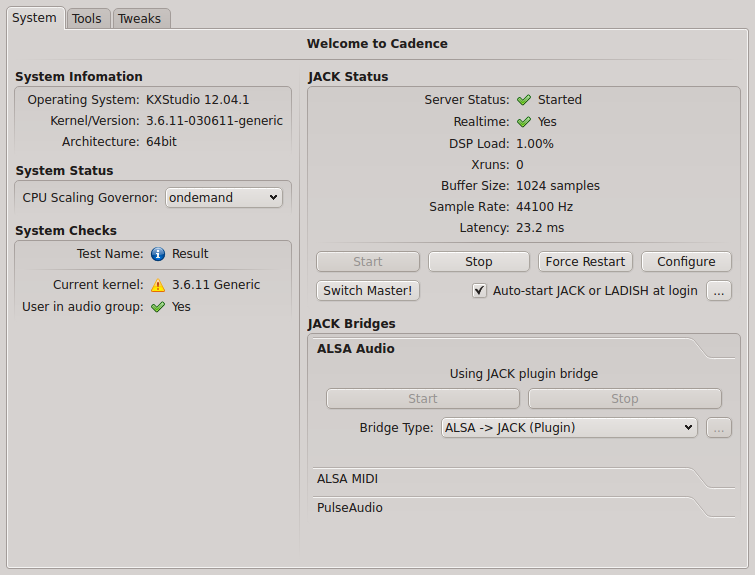
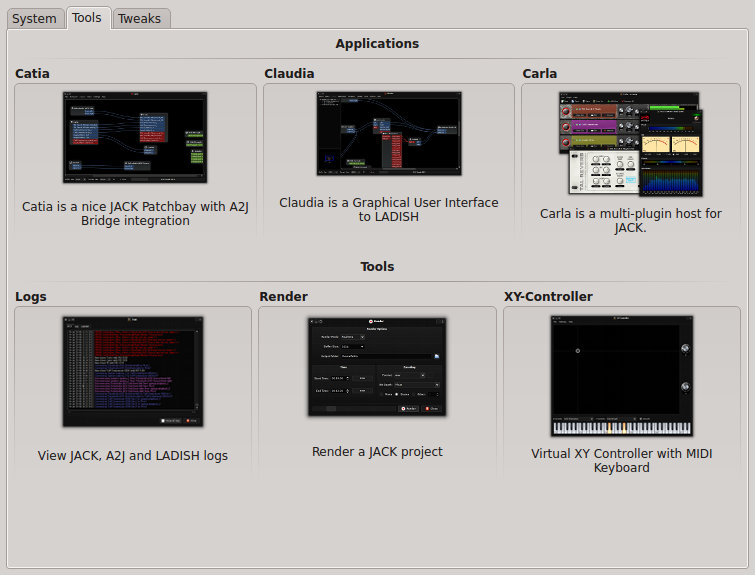
    -Cadence, a cool GUI to configure JACK, check current system status, and launch the other JACK-tools.
    -Catia, a simple patchbay to check and modify audio and midi connections.
    -Claudia, same thing as Catia but using LADISH sessions to save and reload settings (for advanced use)
    -Carla, a great multi-plugin host for JACK
    -a classic log window for troubleshooting
    -a render tool to record a JACK project
    -a virtual XY-controller+midi keyboard to simulate the equivalent hardware.

    Cadence

    Cadence tools

    For a better experience, I recommend to use JACK-native software as much as possible, use the alsa-jack bridge for everything else, and really just if none of these works for the software you want to use, install and launch the pulseaudio jack-bridge (but there really is not much pulseaudio-only apps, at least I don’t use any).

    For audio player, Aqualung and Clementine have good JACK support.
    For video, VLC and MPlayer are JACK compatible too.
    Firefox/flash is using the alsa/jack bridge.

    Just give it a try when you have a moment, you’ll see by yourself…

    Many thanks to the little KXstudio team for all the work!

    Technical note specific to intel GPU users:
    I use a laptop with intel GPU (Ivy Bridge), which requires drivers much more recent than those shipped with Ubuntu 12.04 (or even 12.10, so I’m still using a 12.04 base..) so I had to activate some more external PPAs for better up-to-date drivers:
    – https://launchpad.net/~ubuntu-x-swat/+archive/x-updates
    – https://launchpad.net/~ubuntu-x-swat/+archive/intel-graphics-updates
    And I installed by hand a more recent 3.6.x kernel from http://kernel.ubuntu.com/~kernel-ppa/mainline/
    With recent kernels, it’s not really necessary to have a low-latency or realtime kernel to use realtime in JACK for most cases. However if you have a very big audio workload and start to get some xruns, you may try with a less recent but low-latency or realtime kernel (all versions I’ve find of these are 3.5.x at best…)

    Source: FULL ARTICLE at Planet KDE

    glnemo2 1.53 (KDE Scientific)

    Thumbnailglnemo2 1.53
    (KDE Scientific)
    Glnemo2 is an interactive 3D visualization program which displays particles positions of the different components (gas, stars, disk, dark mater halo, bulge) of an N-body snapshot. It’s a very useful tool for everybody running N-body simulations from isolated galaxies to cosmological simulations. It can show quickly a lot of information about data by revealing shapes, dense areas, formation of structures such as spirals arms, bars, peanuts or clumps of galaxies. Glnemo2 has been designed to meet the requirements of the user, with simplicity in mind, easy to install, easy to use with an interactive and responsive graphical user interface (based on Nokia QT 4.X API) , powerful with a fast 3D engine (OPenGL and GLSL), and generic with the possibility to load different kinds of input files.

    You can zoom in/out, rotate, scale, translate, select different particles
    and plot them in different blending colors, color particles according to their density,
    play with the density threshold, trace orbits, play different time steps, take automatic
    screenshots to make movies, select particles using the mouse, fly over your simulation
    using camera path. All this features are accessible from a very intuitive graphic user interface.

    Currently, glnemo2 reads:
    NEMO files (http://carma.astro.umd.edu/nemo)
    – Gadget 1 and 2 -little and big endian- files (http://www.mpa-garching.mpg.de/gadget/)
    RAMSES files (http://irfu.cea.fr/Projets/Site_ramses/RAMSES.html)
    FTM files (Clayton Heller‘s sph/nbody code)
    – phiGRAPE file (http://wiki.cs.rit.edu/bin/view/GRAPEcluster/phiGRAPE)
    – list of files stored in a file
    – realtime gyrfalcON simulation via a network plugin (see $NEMO/usr/jcl/glnemo2/gyrfalcon/README)

    Glnemo2 uses a plugin mechanism to load data, so it’s easy to add a new file reader.
    It uses the latest OpenGL technology like, shaders (glsl), vertex buffer object, frame buffer object, and takes in account the power of your graphic card to accelerate the rendering. Millions of particles can be rendered, in real time, with a fast GPU.

    Glnemo2 runs fine on Linux, Windows(using minGW compiler), and MaxOSX, thanks to the QT4 API.

    Trailer: http://www.youtube.com/watch?v=QKmQiYwGNpk

    changelog:
    1.53 (January, 9th 2013)
    – bug fix release
    – phiGrape snasphots can be loaded again (see issue #443)

    1.52 (December, 1st 2012)
    – bug fix release
    – bug fix on temperature with gadget files
    – fix about rescaling data when physical values are negative
    – ramses files, give time in giga years
    – ramses files, fix crash when no hydro files
    – ramses files, resize positions and hsml with respect of boxlen

    1.51 (July, 26th 2012)
    – bug fix release
    – fix density threshold not correctly set between frames (see issue #125)
    – fix bug on accumulation blending rendering (key press “m”)

    1.50 (May, 31st 2012)
    – add GUI option to control timeline and
    to play forward and backward direction from a list of snaphots
    – add option to render opaque sphere like the SUN
    – add GUI and CLI for center of density option

    1.42 (May, 16th 2012)
    – happy qt4.6 compilation

    1.41 (February, 15th 2012)
    – fix wrong density value displayed on colorbar when min/max phys set from cli
    – fix compilation issue with gyrfalcON manipulator

    1.40 (February, 08th 2012)
    – rotation interface totally rewritten. Rotations are now applied around
    SCREEN axis x,y,z, which are fixed. It’s more intuitive for the user.
    – add new tab option to manage automatic rotations
    – add screen axis display
    – add orthographic projection
    – density threshold controlled with mouse middle button
    – fix bug#58 crashs on ramses file loading
    – fix bug#61 colorbar disapear on ATI/Intel hardware
    – happy qt4.8 compilation

    1.30 (November, 25th 2011)
    – add color bar display on 3D view (see “color bar” tab)
    – fix a bug when physical values are out of limits
    – fix a bug when list of files contains blank lines
    – experimental object creation

    1.20 (May, 3rd 2011)
    – new rendering pipeline based on a new shader
    – better interactivity with density threshold
    – faster rendering according to density threshold
    – experimental temperature display sorted by density
    – all components are selected when, from cli, select=”all”
    – add hotkeys to autorotate around x,y,z axis counter clockwise
    – add lmin value for ramses amr file
    – fix bug on histogram display if phys value

    [read more]

    job recommendations:

    Sales Engineer full time employee
    ownCloud Inc. United States of America, Boston more about this offer

    [more jobs]

    Source: FULL ARTICLE at KDE Apps

    Review: Eraser removes files safely and permanently

    Secure deletion utility Eraser is free, comes with a beautiful GUI, can do just about anything when it comes to secure file wiping.

    Eraser includes its own interface into the Task Scheduler, letting you set automated disk sweep schedules from within the application. You’re not limited to wiping free space, either: Eraser can be set to securely delete the contents of any folder on a set schedule. That sounds like a scary proposition for me (remember, there’s no way to recover files securely deleted), but for braver souls, the option is there. Also, if you’d like to have your recycle bin regularly and securely purged, Eraser can help you there.

    Last but not least, Eraser integrates with the file context menu built into Windows, so that you can right-click any file or folder and get an Eraser submenu. From there, you can securely wipe the file or folder either now, or the next time your computer reboots. All in all, if you’re serious about wiping files on a regular basis, Eraser is a very solid tool.

    Note: The Download button on the Product Information page will download the software to your system.

    To read this article in full or to leave a comment, please click here

    Source: FULL ARTICLE at PCWorld

    Andrea Grandi: Spotify 0.8.8 for Linux crashes if it cannot connect to Internet: how to fix it

    If you upgrade Spotify for Linux to 0.8.8.x version and you have some network connection problems (for example you’re behind a company firewall and need to set a proxy…) the application will crash/hang without letting you doing anything (neither setting Proxy informations)

    Screenshot from 2013-01-06 18:56:15

    This is caused by a deadlock in the GUI and you can view the complete debugging informations hereĀ http://pastebin.com/zcKgXEqz
    To fix this, you just need to open this file ~/.config/spotify/prefs and add these two lines:

    network.proxy.addr="123.123.123.123:1234@https"
    network.proxy.mode=2
    

    of course substituting 123.123.123.123:1234 with your proxyip:proxyport.

    Source: FULL ARTICLE at Planet Ubuntu

    PokerTH 1.0 (KDE Card Game)

    ThumbnailPokerTH 1.0
    (KDE Card Game)
    PokerTH is a poker game written in C++/QT4. You can play the popular “Texas Hold’em” poker variant against up to 9 computer-opponents or play network and internet games with people all over the world. This poker engine is available for Android, Linux, Windows, and MacOSX.
    To check your PokerTH results you can visit the PokerTH online ranking page: http://www.poker-heroes.com

    changelog:
    2013-01-01 version 1.0
    – Online log file analysis tool
    – Support for higher Android screen resolutions
    – Sound support for Android
    – Support for Windows 8 (desktop mode)
    – License change: OpenSSL exception (for Windows 8 support, because gcrypt currently crashes on Windows 8)
    – Server refactoring using google protocol buffers which basically enables use of html5 clients
    – Emoticons for the chat
    – Online game name in window title
    – New card deck version which supports changes of the action label position
    – Extra column in lobby game list for timeouts
    – Updated country flags
    – Enable activating the “accidentally call after big raise” blocker by default
    – Chatbot whitelist for poker expressions
    – new startwindow gfx for 1.0 final (thx to danuxi)
    – translation updates
    – several bugfixes

    2012-12-25 version 1.0-beta2
    – Support for Windows 8
    – License change: OpenSSL exception (for Windows 8 support, because gcrypt currently crashes on Windows 8)
    – Call logfile dialog from startwindow via button now
    BUGFIX: resolution switched to 800×480 when applying settings on android tablets with bigger screens
    BUGFIX: rejoin dialog not translatable
    BUGFIX: desktop settings dialog does not close, settings not saved on android (#162)
    2012-12-23 version 1.0-beta1
    – Support for higher android screen resolutions (enhancement #160)
    – Android sound support (enhancement #156)
    – Game name in window title (enhancement #155)
    – New game table style version which supports changes of the action label position (enhancement #154)
    – Emoticons for the chat (enhancement #153)
    – Online log file analysis tool (enhancement #146)
    – Show only one game in the log preview (enhancement #145)
    – Extra column in lobby game list for timeouts (enhancement #140)
    – Updated country flags (enhancement #137)
    – Enable activating the “accidentally call after big raise” blocker by default (enhancement #131)
    – Server refactoring using google protocol buffers which basically enables use of html5 clients
    – Chatbot whitelist for poker expressions
    BUGFIX: Chip Miscalculation fixed (bug #152)
    BUGFIX: IPv6 settings are now correctly grayed out (bug #148)
    BUGFIX: Fixing rejoin after synchronization error (bug #147)
    BUGFIX: Rich AI players raise although opponents are all-in (bug #4)
    BUGFIX: In rare case, winner doesn’t win, money disappears (bug #3)
    2012-06-21 version 0.9.5
    – First experimental Android release (#80)
    – Add a minimize button to the Lobby window (#59)
    – Fixed crash when trying to connect to non existing network game (#138)
    – Ignore additional join game messages if the player already joined a game (#134)
    – Double game invite no longer leads to kick (#135)

    2012-04-09 version 0.9.4
    – New report bad-game-name system (right-click on a game in the lobby) (#129)
    – Raise-blind sound is now optional (#127)
    – Delete log files with the Del button of the keyboard (#122)
    – Chat bot and admin bot improvements (#114, #115, #128)

    2012-02-11 version 0.9.3
    – Maemo support was updated in this source release
    – Logs can now be stored for more than 7 days (#18)
    – Logos are shown in the log preview (#101)
    – “multiline” game names are now prevented in the lobby, also on server side (#116)
    – Several log files can now be deleted at once (select with CTRL + left click) (#110)
    – The behaviour of the “Display idle players” sorting menu was slightly changed (#112)
    – The serverlist is only downloaded once per day (and if an error occurs) (#119)

    2012-01-28 version 0.9.2
    – Show card symbols in the log preview and in html export (#101)
    – Implement optional “accidentally call” blocker (#35)
    BUGFIX: Rejoin a new game when previous game is still running (#108)
    BUGFIX: Incorrect descriptions of hands in log (#97)
    BUGFIX: Setting different log path (#99)
    BUGFIX: Warning that a change of log directory is only active after restart (#102)
    BUGFIX: Default file extension when exporting log is incorrect (#98)
    BUGFIX: “Show player stats” item doesn’t work in game info field (#100)

    2012-01-09 version 0.9.1
    – New game log format with export function (now active)
    – The chat bot in games no longer kicks players, instead they are muted
    – Configuration can now be reset to default settings
    – Admin kick no longer happens in ranking games (#93)
    BUGFIX: Rating stars are now shown correctly on Windows XP (#91)
    BUGFIX: Several problems with the server list download were solved (#95)
    – Several additional bugfixes

    2012-01-04 version 0.9
    – Players are able to rejoin internet games after being disconnected
    – The chat bot is now also present in ranking games
    – Tooltip and rating system for other players- Linking connected players in the game info box to poker-heroes player data
    – Country flag name is displayed in a tooltip
    – New game list filter (show only ranking games)
    – Show cards chances also after fold
    – Private messages in the lobby chat are possible (use /msg command)
    – Automatically leave the table after the game finished (optional)
    – After a certain timeout, players are switched to an “autofold” state
    – Maximum limit for highest set and minimum raise
    – Automatic notifications before server restart
    – Ensure that the ranking data is stored even if the DB server is not available
    – Support single internet server password
    – Optional unlimited thinking time in network games
    – Performance improvements in network code
    – Sound when blinds increase
    – Several small bugfixes

    2012-01-02 version 0.9-rc1
    – New game log format with export function
    BUGFIX: “stars” on the game table are displayed correctly on Windows and MacOS
    BUGFIX: Message “Waiting for next hand to rejoin” did not appear sometimes
    BUGFIX: Leave game button now correctly enabled after end of game (really šŸ™‚ )
    BUGFIX: Creating a network game is now possible again (#90)

    2011-12-30 version 0.9-beta6
    – New start window and splash screen
    BUGFIX: Ranking calculation corrected for players which rejoin (#86)
    BUGFIX: Timeout warning within game occurs even after sitting out (#87)
    BUGFIX: Error “the server referred to an unknown player” directly after rejoin (#88)
    BUGFIX: Leave game button now correctly enabled after end of game
    BUGFIX: Choosing preaction is no longer possible during autofold-state

    2011-12-27 version 0.9-beta5
    BUGFIX: Behaviour is now correct if someone is all in due to blinds (blind-of-death)
    BUGFIX: Fixed admin-timeout (in non-ranking games)
    BUGFIX: Players rejoining the lobby are no longer kicked directly after login (#81)
    BUGFIX: Seat state is now displayed correctly after rejoin

    2011-12-26 version 0.9-beta4
    – Sound when blinds increase (#83)
    BUGFIX: Could not open the server list MD5 file (#85)
    BUGFIX: Server crash when reactivating an unknown player
    BUGFIX: Use correct timeout message

    2011-12-23 version 0.9-beta3
    – After a certain timeout, players are switched to an “autofold” state
    – Players no longer stay as “ghosts” after leaving the table (#82), they are kicked after some time
    – Several fixes regarding the new rejoin feature
    BUGFIX: close login dialog after error message

    2011-11-15 version 0.9-beta2
    – Fixing nasty crash when a player left a game which was not running
    – add a tableview-link for each nick on the table instead of calling every single profile page

    2011-11-13 version 0.9-beta1
    – add aditional log message for rejoined players
    – disable rejoin for players who have been kicked
    BUGFIX: Country flag name is displayed in a tooltip (#9)
    BUGFIX: prevent delayed begin of logging in network games
    BUGFIX: close an information gap in server-client-communication
    BUGFIX: player is now shown as “active” after rejoin

    2011-10-29 version 0.9-alpha:
    – Players are able to rejoin internet games after being disconnected (#5)
    – The chat bot is now also present in ranking games (#1)
    – Tooltip and rating system for other players (#36)
    – Linking connected players in the game info box to poker-heroes player data (#63)
    – Country flag name is displayed in a tooltip (#9)
    – New game list filter (show only ranking games) (#6)
    – Show cards chances also after fold (#79)
    – Private messages in the lobby chat are possible (use /msg command) (#12)
    – Automatically leave the table after the game finished (optional) (#2)
    – Maximum limit for highest set and minimum raise (#61)
    – Automatic notifications before server restart (#47)
    – Ensure that the ranking data is stored even if the DB server is not available (#51, #14, #66)
    – Support single internet server password (#76)
    – Optional unlimited thinking time in network games (#24, #71)
    – Performance improvements in network code (#52)
    BUGFIX: There are games without a name (#75)
    BUGFIX: More than 10 players are sometimes assigned to a game in the database (#74)

    2011-01-16 version 0.8.3:

    – Fixed a crash which sometimes occurs when other players leave a game (bug 0000021)
    – Updated language files

    2011-01-03 version 0.8.2:
    – Report bad avatar function to tell the admins about inappropriate avatar pictures (right click on players avatar on the table)
    – Optional add country flag to avatar feature
    – /me messages supported in lobby-chat now
    – Bugfixes (e.g. 0000022, 0000024)

    2010-10-09 version 0.8.1:
    (this is a bugfix release)

    – Fixed a bug where “large small blinds” could cause freezing of the client in network games
    – Fixed a bug concerning auto start timer of invite-only games
    – Two players with the same IP address are no longer allowed to join a single ranking game (server)
    – Block guest chat in lobby on server side
    – New experimental Windows x64 release

    2010-09-25 version 0.8:
    – See beta releases below for changes from version 0.7
    – User profile links on the game table to the online ranking system
    – Improved slider behaviour on the game table
    – Updated language files (adding Lituania translation)
    – Small fixes

    2010-09-05 version 0.8-beta3:
    – All ranking games require 10 players now
    – Lobby: sort by country or filter idle players
    – Lobby: countdown when internet game starts automatically
    – Store all places for every ranking game in the database (server)
    – Encrypt own cards which are sent at the beginning of the hand – only applicable to registered users
    AFK players are now kicked from ranking games after some timeouts if they do not enable autocheck/fold.
    – Bad game names can now be blocked (server)
    – Bugfixes

    2010-08-15 version 0.8-beta2:
    – Allow to show own cards if human player is the last not folded player (also without showdown)
    – Disallow any kind of kicking in ranking games
    – Caseinsensitive sorting and string search function for lobby nick list
    – Store all players of each game in the database (Server)
    – Store date/time when the game ends (Server)
    – Bugfixes

    2010-07-23 version 0.8-beta1:
    – New login/registration system: Players can register their nicks for internet games via an online registration system. It is still possible to play as guest, but certain restrictions apply.
    – Online player ranking: Registered players can join “ranking games” toimprove their rank.
    – The country flag of players is optionally displayed in the lobby (based on voluntary registration information).
    – Custom game names are now possible.
    – Internet or LAN games can be automatically started when the maximum number of players is reached.
    – Invite-only game mode for internet games: In order to invite a player to an invite-only game, right click on the player’s nick in the lobby.
    – Display “Player xyz plays in game xyz” in the context menu for a nick in the lobby.
    – Ignore list for chat messages and game invitations from “unfriendly” players. Right click on a player’s nick in the lobby to place the player on the ignore list.
    – Only players who really have to show cards actually show them after postriver. Everyone else who did not fold is now able to show the cards by choice.
    – New chat system with admin bot (no longer IRC).
    – Completely new network protocol, including a secure authentication mechanism
    – Bugfix: 0000001: Full bet rule is not implemented – BUGFIX: 0000016: Join network game without giving address = crash
    – Bugfix: 0000018: Removing avatar can become a bit complicated
    – Bugfix: 0000020: Ability to start a vote not restored when leaving a game

    2009-06-25 version 0.7.1:
    – internet lobby window size adjusted for netbook resolution 1024×600
    – bigger window icon
    – pokerth.desktop translation update
    – Bugfix: compatibility fix for qt 4.4.3

    2009-06-20 version 0.7.1-beta:
    – Refactored the network engine using boost::asio to improve scalability of the server
    – Reduced per-game memory usage of the server, which enables playing with several hundred players on a low-end vserver
    – New internet games list filter to just show e.g. open games, password-free games etc.
    – New large chip count delimiter: 1000000 –> 1.000.000
    – New “join any game” button behaviour – joins the game with the most players connected
    – Styles handling enhancements (e.g. no activation needed any more)
    – Readd the option to hide splashscreen
    IP address bans now automatically expire
    – Bugfix: incorrect handling of maximum number of players in network games

    2009-05-03 version 0.7:
    – enabled sorting of private/public games in the internet game lobby
    – size of the lobby dialog was decreased for netbook resolution 1024×600
    – default action pictures were adjusted for better readable card index
    – portuguese (portuguese) translation was added
    – bugfix: bet input lenght was adjusted

    2009-04-25 version 0.7-beta2:
    – Fixed problems with paths which contain special (non-ascii) characters
    – Timeout animation moved so it no longer hides sets
    – Improved bet slider handling for higher start cash like $1000000
    – Minimum blinds adjusted for higher start cash
    – Remember last styles directory
    – New stay-on-table animation when a user is inactive but not disconnected
    – Avatar uploads are logged (because of possible legal issues)

    2009-04-15 version 0.7-beta1:
    – Supporting up to 10 players on a table
    – Easily choose different table and card styles
    – Create your own style in simple steps
    – Online style gallery
    – Netbook support with minimum 1024×600
    – Automatically restore game table geometry (including fullscreen)
    – Server IP-address bans and nick bans based on regular expressions
    – Server list supports multiple server entries
    – bugfix(#0000009): No pause after first hand when starting a fresh local game
    – bugfix(#0000010): Strange side pot behaviour after All-in

    2009-03-22 version 0.6.4:
    – enhanced server performance
    – optional external avatar system to improve scalability
    – feature-request(#0000008): sorting of columns in the gamelist of the lobby is saved
    – bugfix(#0000007): Improved highlighting of the cards on split pot
    – bugfix(#0000003): Correctly pick low straight flush (with A)
    – bugfix: doubleclicking “join game” in the lobby no longer causes an error

    2008-12-22 version 0.6.3:
    – new start dialog, separated from game table
    – new chance tab shows current chance to get a certain hand
    – users can be kicked by vote from within a game (right click on avatar)
    – game creators are no longer allowed to kick when the game is running
    – server irc bot automatically reconnects every day
    – 18 translations now (danish and finnish added)

    2008-05-21 version 0.6.2:
    – more flexible internet server connection (automatic download of server list)
    – fixed DNS problems, IPv6 and SCTP are fully available now
    – reduced bandwidth usage in internet games
    – use GnuTLS instead of OpenSSL
    – extended server logging

    2008-03-11 version 0.6.1:
    – new timeout system for internet-game-lobby to improve the game-flow
    – 2 new translations (greek and chinese)

    2007-12-13 version 0.6-final:
    – bugfixes
    – gui improvements (hover for bet/call/fold)
    – translation updates (14 languages now!)

    2007-12-07 version 0.6-rc2:
    – bugfixes (closeable-windows, chat-nick-highlighting)
    – gui improvements (gfx & fonts)
    – translation updates
    – Qt-4.3.3 Update

    2007-12-03 version 0.6-rc:
    – bugfixes
    – dmg available for MacOSX
    – new “join any game”-button
    – gui improvements
    – translation updates
    – improve blind logging

    2007-11-18 version 0.6-beta5:

    – bugfixes (dedicated server, anti-peek-mode, sidepot logging)
    – bet/raise redesign
    – improve actions-preselection
    – gui improvements (e.g. scrollbars, new handranking-gfx)
    – support for password-protected irc-channels
    – admin irc channel for server

    2007-11-11 version 0.6-beta4:
    – bugfixes (ingame-kick; cards background scale distortion; pre-actions during allIn)

    2007-11-07 version 0.6-beta3:
    – bugfixes
    – new Back-to-Lobby button
    – irc-nick-cleaning to avoid connection troubles

    2007-11-01 version 0.6-beta2:
    – bugfixes (avatars are enabled in internet-game again)
    – avatars preview in internet-game-lobby

    2007-10-31 version 0.6-beta:
    – Internet Game – Play poker online games easy on PokerTH-dedicated-Server (no ip addresses or port-fowarding needed anymore)
    – New Input Field (You can now pre-select your wanted action which will be done if it is your turn)
    – Avatars are shown in Network-/Internetgame
    – Lobby-Chat
    – Computer-Players can be added in Network-/Internetgame
    – Blinds values and blinds order completely adjustable
    – Auto-check/fold and Auto-check/call-any options for temporary away situations.
    – New kicker-card-detection for log
    – Improved distribution of the pot

    2007-06-17 version 0.5:
    – Play network games with up to 7 people all over the world
    – Internationalization – PokerTH is now available in different languages (German, Dutch, Spanish, Russian and Norwegian)
    – New avatar gallery
    – Sound effects
    – Minimized disc access, optimized speed

    2007-04-04 version 0.4:
    – feature: settings menu (to do a lot of settings and save preferences)
    – feature: set player names and avatars for computer opponents
    – feature: switch to fullscreen mode
    – feature: cards animation (show winning hand, flip cards)
    – feature: set you own card-flipside picture
    – feature: log-window and log-files
    – feature: start-stop button (for break between hands)
    – feature: game-speed slider (for changing speed during game)
    – feature: graphical handranking overview
    – feature: keyboard shortcuts (e.g. for human player action)
    – change: now you can play against up to 6 opponents
    – change: complete new gui (gfx by tranberry)
    – change: complete new engine design
    – bugfix: a lot of bugfixes

    2006-10-16 version 0.3:
    – change: some changes on game-speed and game-rhythm. game-speed delay near 0 is possible šŸ˜‰
    – change: gui-language changed from german to english
    – change: some ai-engine changes
    – change: now POT-distribution works better (especially for multible All-In situation and split-pot)
    – change: switched to Qt-4.2
    – change: some GUI-changes (e.g. killed the “Next Round”-Button –> task #131930)
    – bugfix: #1572742 – “bet-loop”
    – tasks: new published tasks #131988, #131980, #131987, #131978, #131992, #132018

    2006-10-04 version 0.2.1:
    – bugfix: fix the Bug that causes freeze average all 52 rounds. It was a problem with random-number-generation

    2006-10-04 version 0.2:
    – first public release
    – feature: now you can play preflop, flop, turn and river
    – change: its nearly complete portet to qt4

    2006-05-18 version 0.1:
    – first release
    – feature: you can play preflop and river

    [read more]

    job recommendations:

    Sales Engineer full time employee
    ownCloud Inc. United States of America, Boston more about this offer

    [more jobs]

    Source: KDE Apps