InternetNews: AsteriskNOW is an all-in-one Asterisk Linux distribution including the core operating system as well as a front end GUI.
Tag Archives: GUI

A fresh new KMix

KMix is KDE’s forgotten redheaded stepchild.
Humble beginnings
It is old, has been maintained my Christian Esken since early 2001, and has grown organically. Through no fault of Christian’s or anyone else’s, it is buggy, messy, and nobody else wants to help fix it, or at least has the constitution to do so.
Us redheads need to stick together.
At last year’s Randa, I started working on refactoring and rebuilding KMix from the ground up. Why should adjusting the volume in your desktop be so frustrating? It shouldn’t, thats why.
That is the prototype for the new KMix. The UI design has been shamelessly stolen from pavucontrol:

pavucontrol
As you can see, there is much work left to do. However, I feel that it is ready for others to hack on and test. This restructuring of KMix contains a *lot* of the original KMix code that has been contributed to over the years by over 142(!) people. The biggest committers have been Christian Esken (601), Colin Guthrie (130), and Laurent Montel (123). Mad props to those people and everyone else involved for their work and dedication.
When I started out on this endeavor, I aimed to fix a number of issues I had encountered before:
- Sometimes at startup, your volume would be all kinds of broken since the KDED module, Tray application, and a session startup script would all sometimes try to restore the volumes and sometimes it just wouldn’t.
- The GUI was completely rebuilt with every device change. Back in the early days of KMix, hot-pluggable audio devices wasn’t a major use case so it wasn’t included in the design.
- Since there is no one process that controls all the volume everywhere, that means lots and lots of backend libraries and their respective data structures loaded into many processes, such as plasma, the tray application, the KDED module, the tiny script at startup that restores your volumes.
- All these different points of control had to make sure they didn’t step on each others toes all the time.
- To control the volume over dbus, the tray application had to be running. There was no dbus autolaunch, and why would you want a GUI application to automatically launch and do weird things when you just want a small script to turn down your volume between the hours of 3 am and 6 am?
- pavucontrol had neat VU meters
- I’m just kinda okay at UI and UX design for end-users.
In response, I’ve come up with the following design:
- There exists a unique daemon on the session bus at org.kde.kmixd, which is managed via dbus autolaunch
- This unique daemon supports multiple backends being loaded at once, such as ALSA and PulseAudio (note: currently requires commenting out an if statement)
- Clients don’t need to worry about learning the oddities of ALSA or PulseAudio control since all interaction happens over the bus in a backend-agnostic manner. You are given …read more
Source: FULL ARTICLE at Planet KDE
Testing, another way to help your favorite FOSS project
I’ve done some testing before, but this time I want to document it here, so I can come back later and remind myself of some of the critical steps, and so others new to testing can get the confidence to start contributing in this way as well.
I’m lucky in that I have some extra computers I can use as testing machines. But when I didn’t, I used virtual machines, and those aren’t too difficult to set up. However, I’ll discuss that another time.
In general, please read the /topic in your development IRC channel, then ask about testing, or join the testing channel if there is one. Often you’ll be given bug numbers to test for a specific package — please be sure to comment completely in the actual bug report, not just give feedback in the channel. Be sure to ask what information is necessary. ISO testing is another place where folks are needed; again, your devel channel /topic should give you some good information. And don’t forget to join and read the relevant lists as well; no one can be in IRC all the time.
Right now, some packages need testing in the next distribution release. I prefer using the command line for things like this, because 1. in the console, upgrades happen “under” the desktop, so config files are updated cleanly, and 2. it is much faster. So first, the upgrade.
If your computer is already on, log out of your session. At the login screen, rather than typing in your password, hit Control + Alt + F2. Then log into first your computer with your username and password, then
sudo update-manager -d
This updates all your repositories to the development release. Next, the start the actual upgrade:
sudo do-release-upgrade -d
You’ll have to OK a few things, so it’s not entirely unattended. After the packages are all downloaded, the upgrade still takes quite awhile. Sometimes I start this at night, and just check on things in the morning.
Next, you’ll need to install the package, or build the application from a tarball, or source. Depending on your distro tools, this might vary a bit.
Building from source
For Amarok, Myriam has a great blog post about how to build from git: http://blogs.fsfe.org/myriam/2009/09/26/compiling-amarok-from-git-locally-full-summary/, so I won’t cover that. If you doing a local build of a different package, the steps will be similar. Consult the documentation for details.
Install from a PPA
To install a package from a PPA, in Debian-based distros, there is an easy way to add it (addrepo in Debian):
sudo add-apt-repository ppa:
This will download and register the public key, as well as adding the repository. Then you can simply install the package via the command line or using the GUI tools you prefer.
Build from a tarball
To get the tarball, cd to the directory …read more
Source: FULL ARTICLE at Planet KDE

Microchip's Graphics Display Designer X Supports PIC® MCU-based GUI Creation on Windows®, Linux or M
By Business Wirevia The Motley Fool
Filed under: Investing
Microchip’s Graphics Display Designer X Supports PIC® MCU-based GUI Creation on Windows®, Linux or Mac® Computers
Easy-to-Use Tool Enables the Development of Graphical User Interfaces and Saves Valuable Design Time
CHANDLER, Ariz.–(BUSINESS WIRE)– Microchip Technology Inc. (NAS: MCHP) , a leading provider of microcontroller, mixed-signal, analog and Flash-IP solutions, today announced the release of Graphics Display Designer X (GDD X), Microchip’s enhanced visual design tool that provides a quick and easy way of creating Graphical User Interface (GUI) screens for applications using Microchip’s 16- or 32-bit PIC® MCUs. With GDD X, developers have the freedom to work in the environment of their choice, including Windows®, Linux or Mac OS® operating systems.
Graphical user interfaces are found in a wide range of products today, from coffeemakers to automotive dashboards. While the requirement is becoming commonplace, there is a lack of cost-effective tools available to the developer. Placing dialog boxes, guidance text, buttons, sliders, dials and other elements of your GUI while determining colors and calculating x/y coordinates can be very time-consuming. GDD X enables the development of GUIs in a “What You See Is What You Get” (WYSIWYG) environment, and saves valuable design time by automatically generating the C code needed for the user interface. With GDD X, a highly effective GUI can be created to improve the customer experience for applications in the automotive (e.g., numeric, gauge or infotainment displays), industrial (e.g., operator touch-screen interfaces), home-appliance (e.g., coffeemakers, refrigerators, cook tops, microwave ovens), consumer-electronics (e.g., home automation, alarms and learning toys) and medical markets (e.g., bedside monitoring or medical lab analysis equipment).
GDD X enables development using Microchip’s Graphics Library, and can be used as a stand-alone tool or as a plug-in to Microchip’s free MPLAB® X Integrated Development Environment (IDE). It allows the creation of a project with configurable display resolution, and imports all the required driver/board support files into MPLAB X. Generated code can be compiled and tested on hardware. Key improvements to the original GDD include: thumbnail view of screens and snap-to-grid feature, cut/copy/paste, auto object align, and event handling, as well as palette support for 1-, 4-, and 8-bits-per-pixel (bpp) color modes.
“With GDD X, Microchip is bringing together key components of the graphical user interface on 16- and 32-bit hardware platforms in an easy-to-use graphics development tool,” said Sumit Mitra, vice president of Microchip’s MCU32 Division. “Developers can drag and drop GUI elements into place, and GDD X creates the C code for their project. This saves a …read more
Source: FULL ARTICLE at DailyFinance
Enable a Key
By Adhi
Hi team,
Print Screen key is disabled in my machine. How can i enable it?? How do i do that via command line?? Or tell me in GUI.. Am using Linux Fedora 14 OS.
…read more
Source: FULL ARTICLE at The UNIX and Linux Forums

Zilog Announces the New MCU Based Battery Charging Reference Design
By Business Wirevia The Motley Fool
Filed under: Investing
Zilog Announces the New MCU Based Battery Charging Reference Design
High-Performance Design Solutions Offering Digital Improved Battery Management Technology
MILPITAS, Calif. & BIEL, Switzerland–(BUSINESS WIRE)– Zilog, a wholly-owned subsidiary of IXYS Corporation (NAS: IXYS) and a pioneer supplier of application-specific, embedded microcontroller (MCU) system-on-chip (SoC) solutions for industrial and consumer power management applications, is introducing its new Buck Converter Battery Charger Reference Design that employs Zilog’s Z8F042A MCU to control a step-down DC-DC converter (also known as a buck converter) that acts as a regulated power source.
This buck converter battery charger hardware is capable of regulating charger output in a number of modes, such as constant voltage or constant current with set current limits. The charger can be viewed as a complete control system. The type and capacity of the battery determines the mode of operation of the battery controller. The voltage and current set points are also determined by the type and capacity of the battery. All battery control loop operations can be controlled by the user via the Z8F042A MCU‘s UART block and feedback is provided in the HyperTerminal console. Additionally, LEDs provide a visual status of the charging process.
This low-cost reference design demonstrates a lithium ion battery charger consisting of a Z8F042A MCU and a buck converter. The charging process utilizes the highly accurate ADC peripheral and alternates between current and voltage monitoring which is controlled in the background software routine, allowing for the UART to be processed in the main function. With the provided hyper terminal GUI, the user can enter desired set-voltages and set-currents. A proportional/integral (PI) control loop is used to charge the battery and to monitor the battery voltage after the charging process is completed. To save memory resources, the provided UART does not implement the STDIO.H libraries. Instead, a simple UART using only integer values is used.
“This battery charger reference design allows operation either via UART or an external 5-15V power supply. The advantage of this battery charger implementation is in the efficient utilization of the Zilog MCU resources, allowing for low cost digital power management solution, which is flexible and adaptable to different batteries,” commented Steve Darrough, Zilog’s VP of Marketing.
Zilog’s Buck Converter Battery Charger Reference Design is now available for customers that place orders through Zilog’s online store. …read more
Source: FULL ARTICLE at DailyFinance

Simple QML vs EFL comparison

Recently I found
| elemines |
Surprisingly, the QML implementation didn’t take much time:
| Activity | Hours | Comment |
|---|---|---|
| Development time spent on JavaScript code |
8
|
I have never written any minesweeper engine |
| Development time spent on QML code |
12
|
Dialogs, button, animations(explosions) etc. |
I should also mention my experience with related technologies:
- Intermediate Qt knowledge (3 years)
- A few months of QML development
- Basic Javascript knowledge (only used with QML code)
Plain Qt knowledge was not a requirement in this case because the QmlMiner contains no C/C++ code at all. Understanding QML and simple JS was just enough. The QmlMiner can be executed with the qmlviewer tool but afterwards I added simple main.cpp for memory and startup performance tests to make “lightness” of the QML app possibly similar to elemines. Basically, qmlviewer has many features that are not needed for the task.
After creating the QmlMiner I reviewed some source code of elemines to spot similarities and noticed that both applications have corresponding game engines and default.edc (*.edc) file has syntax similar to JSON. It has programs section which I believe is somewhat similar to QML states.
Another observation is that the edc file is a resource of data used in C code. The C code creates objects, imperatively defines interactions between them and lays out the UI. Please note these are only my guesses – guesses of developer neither much experienced in plain C nor in EFL.
2. Source code size and used languages
I measured size of source code with the wc command and SLOCCount tool. SLOCCount was used to count lines of elemines C code and QmlMiner’s C++ code (it skipped comments). wc (with -l option) was used to count lines of QML files and eliemines’s deafult.edc file. The QML file didn’t have any comments and the edc file had only 20, which I excluded. I assumed that the whole QmlMinerModel.qml file contains JS code – it is the ,,game engine”. Other files describe the GUI (look and behavior). I didn’t analysed the build system files (Makefiles in elemines and a pro file in QmlMiner) because they are not very relevant.
The results are as follows:
|
lines of code
|
purpose
|
QmlMiner
|
EFL elemines
|
||
|---|---|---|---|---|---|
| Business logic | jacascript | <div …read more Source: FULL ARTICLE at Planet KDE |
|||

Analog Devices' Next Generation of Digital Power Controllers with PMBus Interface Targets Highest De
By Business Wirevia The Motley Fool
Filed under: Investing
Analog Devices’ Next Generation of Digital Power Controllers with PMBus Interface Targets Highest Density, Energy Efficient Isolated Power Converters
NORWOOD, Mass.–(BUSINESS WIRE)– Analog Devices, Inc. (ADI), a global leader in high-performance semiconductors for signal-processing applications, today introduced the ADP1051 advanced digital power controller with PMBus™ interface targeting ultra-compact, high density isolated DC-to-DC power supply systems with parallel/redundant capability. The ADP1051 is an extremely versatile digital controller with six PWM (pulse width modulation) logic outputs that can be programmed using an easy-to use graphic user interface (GUI) via the PMBus interface. The device enables high energy efficiency topologies including full bridge and active clamp forward variants with precision drive timing and control of secondary synchronous rectifiers. Energy efficiency is further optimised using adaptive dead-time compensation to improve the efficiency over the load range and programmable light load mode operation combined with low device power consumption (<100mW) to reduce system low power standby losses. The ADP1051 implements an extensive PMBus command set including the ability to accurately read input and output power measurements and enable the end-user to make intelligent system management decisions to optimize energy efficiency. The tiny size 4 x 4 mm LFCSP package makes the ADP1051 ideal for high density, ultra-compact isolated DC-to-DC power module or embedded designs for networking, communications and industrial applications ranging typically from 100 W upwards.
- Order samples and download data sheet: http://www.analog.com/ADP1051
- Connect with engineers and ADI product experts on EngineerZone™, an online technical support community: http://ez.analog.com/community/power
- Learn more about ADI‘s power management applications, design tools and case studies: http://www.analog.com/en/power-management/products/index.html
The ADP1051 power controller is easily programmed using an intuitive graphical-user interface which enables customers to design and store settings in the high reliability, internal EEPROM memory. The ADP1051 implements several features to enable a robust system of parallel and redundant operation for customers that require high availability for increased current scaling. The device includes master/slave synchronization, reverse current protection and pre-bias start-up, accurate passive or droop current sharing between power supplies and a patented technique to identify and safely shutdown an erroneous power supply in parallel operation mode.
Key ADP1051 Features and Benefits:
- Small 4 x 4mm package enables ultra-compact isolated DC-to-DC design
<li …read more
Source: FULL ARTICLE at DailyFinance

Randall Ross: And There Was Jam

Just before that GUI (giant Ubuntu icestorm) gripped the interwebs, there was a massive event called the “Ubuntu Global Jam.” If you’ve been following along on “Amplify the Signal” (rather than fixating on soviet space stations, software release management jargon, and losing the big Ubuntu bi-annual love-ins) then you might have caught the story that this cycle’s Ubuntu Global Jam was a big one.
It’s an interesting dichotomy. Interweb fiction versus AFK fact. When one looks at what’s being said about Ubuntu on the web, one might get the sense that Ubuntu’s community has collapsed (or is about to), that people are defecting all over the place, and that Ubuntu has somehow “lost it’s way.” Really? Come on!
I’m here to report that nothing could be farther from the truth. Here are some facts from the ground campaign, where all good battles are won:
1) Our local Ubuntu group has reached the highest membership levels in our history, and we’re still growing!
2) People come to our events with enthusiasm and happiness knowing that they are near others that enjoy Ubuntu and that they can share their discoveries with each other.
3) People are excited to learn that they can get involved in Ubuntu. They think it’s incredible that they are a part of something big. They have an “Aha” moment when it clicks why “Ubuntu is not just software.”
4) People generally don’t give a “rat’s ass” about display server stacks, rolling releases, and other computer science minutia. Most people just want an enjoyable interaction with their technology and Ubuntu delivers solidly on that. Tech journalists, keep reporting stuff that doesn’t matter. It makes us giggle and snort, usually uncontrollably. 🙂
5) People who use proprietary technology systems (our competitors) are stuck going to stores in malls for help and support, essentially renting “community” from their technology landlords. That’s profoundly sad. I am relieved and happy that Ubuntu is alive and thriving in my city and a great place to experience community the way it was meant to be: in the spirit of sharing a gift.
6) The people (mainly journalists) who are deriding Ubuntu, saying that “Ubuntu has a community problem” are the same people that don’t show up for local Ubuntu events, don’t bother to get to know Ubuntu contributors, Ubuntu’s culture, and generally never gave a flying leap about Ubuntu in the first place except perhaps where it intersected with their pet project – page clicks. Are you an Ubuntu Advocate? Please do me a favour and tune them out. If you find that too difficult, at least don’t spread what they are saying. Ever. Let their pages rot on the site where they were published.
So, what does the real “on the ground” “AFK” Ubuntu community really look like? I’m glad you asked! Here’s a little glimpse:
Smiling faces. Loving Ubuntu community!
Dear readers, I’ll follow up with a few more details shortly… Until then, keep building real Ubuntu community in your town or city.
The Jam never stops.
—
image CC BY-SA rrnwexec
SNMP application for production environment
By kashif_islam
Hi
Is there any default/open source snmp application to send traps and monitor some processes in Solaris that can be used in production environment
I am using
SunOS Server1 5.10 Generic_142910-17 i86pc i386 i86pc
If it has a GUI its a plus 🙂
…read more
Source: FULL ARTICLE at The UNIX and Linux Forums

TRADE NEWS: Agilent Technologies Integrates Device Modeling Flow with Shipment of Newest SPICE Model
By Business Wirevia The Motley Fool
Filed under: Investing
TRADE NEWS: Agilent Technologies Integrates Device Modeling Flow with Shipment of Newest SPICE Model Extraction and Qualification Software
SANTA CLARA, Calif.–(BUSINESS WIRE)– Agilent Technologies Inc. (NYS: A) today announced shipment of the latest release of its industry-leading SPICE model extraction tool, Model Builder Program, and SPICE qualification tool, Model Quality Assurance.
MBP and MQA 2013 feature major enhancements designed to enable device modeling engineers to deliver higher-quality models to their customers. Chief among them are a fully integrated data flow across Agilent’s device modeling platform and the ability to establish and enforce standard operating procedures for modeling in team environments.
“With our acquisition of Accelicon last year, we continue to expand our expertise in device modeling,” said Charles Plott, director of product planning at Agilent EEsof EDA. “This expertise uniquely positions Agilent to deliver a seamless data flow from measurement to model extraction to qualification.”
Key MBP Capabilities
One of MBP‘s new components, Model Reviewer, allows users to standardize various aspects of device modeling in team environments. Model Reviewer enables teams to standardize model extraction policies, setup of the extraction environment, data usage, parameter-range enforcement and review procedures, among other things.
“Device modeling teams are mostly concerned with model quality and team efficiency,” said Xisheng Zhang, device modeling marketing manager at Agilent. “Being able to establish and enforce standard operating procedures through MBP is critical to minimizing human errors from the onset of model extraction, which significantly improves team efficiency.”
Other new MBP capabilities include model extraction based on circuit-level figures of merit, built-in principal component analysis, and a GUI-based custom model extraction environment.
New MQA Features
MQA now offers full support for Agilent’s GoldenGate, the industry premium RF circuit simulator, and Synopsys’ FineSim tool. It also gives users the ability to benchmark SPICE libraries with various versions of a simulator, making it a breeze for simulator upgrade qualification. Additionally, a parallel-run mechanism enables MQA to deliver considerably faster performance.
“The numerous and diverse set of new capabilities in MBP and MQA reflect the latest device modeling challenges in methodology and productivity that our customers now face,” said Brian Chen, device modeling product manager at Agilent. “Having these solutions in MBP and MQA 2013, …read more
Source: FULL ARTICLE at DailyFinance

KBibTeX 0.4.1, 0.5-beta2 (KDE Scientific)

KBibTeX 0.4.1, 0.5-beta2
(KDE Scientific)
KBibTeX is a BibTeX editor for KDE to edit bibliographies used with LaTeX. Features include comfortable input masks, starting web queries (e. g. Google Scholar or BibSonomy) and exporting to PDF, PostScript, RTF and XML/HTML. As KBibTeX is using KDE‘s KParts technology, KBibTeX can be embedded into Kile or Konqueror.
changelog:
2013-Mar-10
KBibTeX 0.5-beta2 has been released. Please test this beta and report bugs at KBibTeX’s bug tracker at Gna (not KDE‘s bug tracker).
2012-Oct-15
KBibTeX 0.4.1 has just been tagged and tar-balled. This release is a maintenance release, although some minor feature improvements from the development trunk have been backported as well.
Everyone using KBibTeX 0.4 is encouraged to upgrade to this version if possible.
Changes from 0.4 to 0.4.1 include, but are not limited to:
2011-Nov-24
After month of development, KBibTeX 0.4 has been released today.
KBibTeX 0.4 has the following improvements over KBibTeX 0.3, extracted from a 21000+ lines difference in code.
Source: FULL ARTICLE at KDE Apps

Kid3 2.3 (KDE Sound Application)

Kid3 2.3
(KDE Sound Application)
If you want to easily tag multiple MP3, Ogg/Vorbis, FLAC, MPC, MP4/AAC, MP2, Speex, TrueAudio, WavPack and WMA files (e.g. full albums) without typing the same information again and again and have control over both ID3v1 and ID3v2 tags, then Kid3 is the program you are looking for.
With Kid3 you can:
– Edit ID3v1.1 tags
– Edit all ID3v2.3 and ID3v2.4 frames
– Convert between ID3v1.1, ID3v2.3 and ID3v2.4 tags
– Edit tags in MP3, Ogg/Vorbis, FLAC, MPC, MP4/AAC, MP2, Speex, TrueAudio, WavPack, WMA, AIFF and WAV files
– Edit tags of multiple files, e.g. the artist, album, year and genre of all files of an album typically have the same values and can be set together.
– Generate tags from filenames
– Generate tags from the contents of tag fields
– Generate filenames from tags
– Rename and create directories from tags
– Generate playlist files
– Automatically convert upper and lower case and replace strings
– Import from freedb2.org, MusicBrainz, Discogs, Amazon and other sources of album data
– Export tags as CSV, HTML, playlists, Kover XML and in other formats
changelog:
Sat Mar 2 09:36:02 CET 2013 Urs Fleisch
* Release 2.3
* New:
+ Automatic batch import for multiple directories.
+ Import catalog number and release country from Discogs and
MusicBrainz.
+ Quick access tags are configurable for tag 2.
+ Setting for default file name to save cover art.
+ Select all in directory.
+ Apply text encoding.
+ Support Qt 5.0.
* Improved:
+ Better responsiveness when working with a huge number of files,
long operations can be aborted (filtering, renaming, expanding).
+ Support custom frame names in formats and imports.
+ Display accuracy and cover art URL for imports.
+ Added more unified frame types.
+ GUI and usability.
* Fixed:
+ Swapped mapping of too and enc for M4A files.
+ Compatibility of ID3v2.4.0 COMM frames with iTunes.
+ Do not remove spaces in Vorbis comment field names.
+ Crash and decoding for fingerprints with libav 9.1.
Mon Dec 3 11:09:12 CET 2012 Urs Fleisch
* Release 2.2.1
* Improved:
+ Updated Czech translation.
* Fixed:
+ Fixed selection of language and handbook with Qt 4.8.
Fri Oct 26 17:07:27 CEST 2012 Urs Fleisch
* Release 2.2
* New:
+ Option to load last opened file on startup.
+ Option to use locale for character conversion.
+ Support new features of TagLib 1.8: More ID3 frames, ID3v2.3,
tracker modules (MOD, S3M, IT, XM).
+ Support use of GStreamer instead of FFmpeg for Chromaprint decoding.
+ …read more
Source: FULL ARTICLE at KDE Apps

Fruits of CSS2013
Putting unexpected visions of space tourists aside, now for something completely different. This was a busy weekend with Calligra Suite Sprint 2013 which despite of different timezone fully dominated Essen and Bangalore. More about that here, here, here, here, here and here. You can find the full agenda on the KDE Community Wiki.
Lords of the ring like me were able to join at least remotely through various media. So here’s a list of my limited activities.
A Mockup for Calligra Words Look & Feel Rework
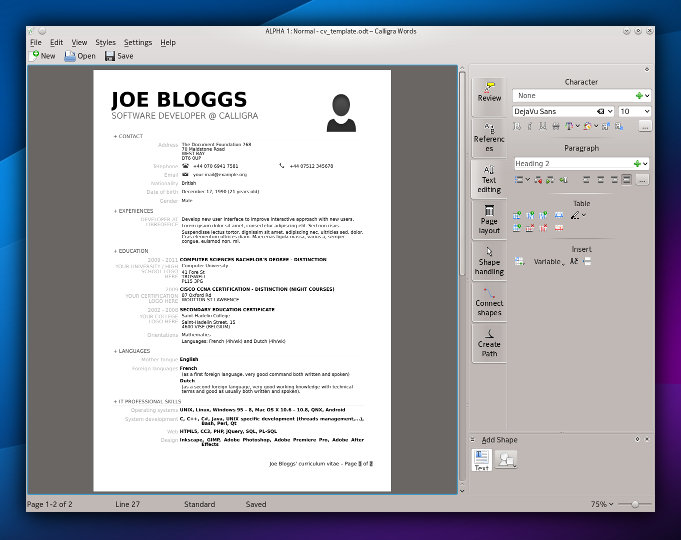
The Modern GUI and Startup screen is already established in Kexi, people know it and use saving many mouse clicks. I took some time to present a follow up, mockup of how Calligra Words word processor would look. The topic was iterated before at the previous sprint.
Calligra Words before:
Calligra Words after:
You can read about the story behind the look and inspirations that can influence what I’ll try to do. Obviously thanks to the Qt Quick taking over the overall GUI concepts, our users can expect the apps can be run will pleasure. Yes, it’s time for the desktop.
Calligra Mail Merge
The Kexi virtual BoF turned out to be an IRC meeting between me and Smit Patel, a Calligra dev who is successfully collaborating with me already on the Bibliographic Database project for Calligra Words. It takes advantage of rather awesome desktop database capabilities that Kexi offers to other apps.
This time we covered fully fledged Mail merge for Calligra, an initiative that was planned long ago. It should be as easy as possible (no tinkering with database/data source as in LibreOffice) and visible in Words with some optional visibility in Kexi for premium integration. Like the Bibliographic Database, Mail Merge reuses certain features of Kexi so that provokes my attention. More on the Mail Merge Design wiki page.
Finally a small announcement about interesting opportunity: Karbon, Plan and Braindump apps from Calligra are looking for new Maintainers. That’s rare opportunity for you!

…read more
Source: FULL ARTICLE at Planet KDE
Mobile hotspot connection on Linux
Hi,
I always wanted to write a short blog post about connecting to a mobile hotspot like joikuspot on my N9 phone. The application uses ad-hoc mode, but it can be easily adapted to managed mode like on the Blackberry DevAlpha, Z10 and Q10 devices. Just replace the “ad-hoc” mode with “managed”. Unfortunately, joikuspot does not support wpa and wpa2, so this command will be primarily useful for wep. If you leave the key option out, it is also useful for open (i.e. brief sanity checks, et cetera).
Here you can find a reference command which works fine across distributions and even without GUI:
iwconfig wlan0 mode ad-hoc essid Test key s:TestTestTests && dhclient wlan0
It is admittedly not a big thing. However, I lost this command several times in the past. Now, I would know what to do by heart, but what about this in half a year or later? 🙂
Also, netcfg and similar distribution specific utils kept being broken for some reason. This was always the fallback for me which worked off-hand. Hope it helps. 🙂
…read more
Source: FULL ARTICLE at Planet KDE
Lpstat: Bad Request Error in Linux
Dear Team,
Earlier my
Code:
lpstat syntax
is working on o/s, I have installed cups
Code:
"cups-1.6.1"
after that I’m not able to open the printer option in GUI and cannot do the query
Code:
"lpstat -a"
Below is the error i’m getting..Request you to advice me the best to me.
Code:
[root@r12devdb cups-1.6.1]# lpstat

lpstat: Bad Request
My O/s Version.
Code:
[root@r12devdb ~]# uname -v

#1 SMP Wed Oct 10 16:48:44 EDT 2007

[root@r12devdb ~]# uname -a

Linux r12devdb.ghobash.com 2.6.18-53.el5xen #1 SMP Wed Oct 10 16:48:44 EDT 2007 x86_64 x86_64 x86_64 GNU/Linux

[root@r12devdb ~]# uname -r

2.6.18-53.el5xen

[root@r12devdb ~]# uname -mrs

Linux 2.6.18-53.el5xen x86_64

[root@r12devdb ~]#

[root@r12devdb cups-1.6.1]# cat /etc/*release

Red Hat Enterprise Linux Server release 5.1 (Tikanga)

[root@r12devdb cups-1.6.1]# cat /proc/version

Linux version 2.6.18-53.el5xen (brewbuilder@hs20-bc1-7.build.redhat.com) (gcc version 4.1.2 20070626 (Red Hat 4.1.2-14)) #1 SMP Wed Oct 10 16:48:44 EDT 2007

[root@r12devdb cups-1.6.1]#
Thank you,
Faiz.
…read more
Source: FULL ARTICLE at The UNIX and Linux Forums
Colin King: Pragmatic Graphing
Over the past few days I have been analysing various issues and also doing some background research, so I have been collecting some rather large sets of data to process. Normally I filter, re-format and process the data using a bunch of simple tools such as awk, tr, cut, sort, uniq and grep to get the data into some form where it can be plotted using gnuplot.
The UNIX philosophy of piping together a bunch of tools to produce the final output normally works fine, however, graphing the data with gnuplot always ends up with me digging around in the online gnuplot documentation or reading old gnuplot files to remind myself exactly how to plot the data just the way I want. This is fine for occasions where I gather lots of identical logs and want to compare results from multiple tests, the investment in time to automate this with gnuplot is well worth the hassle. However, some times I just have a handful of samples and want to plot a graph and then quickly re-jig the data and perhaps calculate some statistical information such a trend lines. In this case, I fall back to shoving the samples into LibreOffice Calc and slamming out some quick graphs.
This makes me choke a bit. Using LibreOffice Calc starts to make me feel like I’m an accountant rather than a software engineer. However, once I have swallowed my pride I have come to the conclusion that one has to be pragmatic and use the right tool for the job. To turn around small amounts of data quickly, LibreOffice Calc does seem to be quite useful. For processing huge datasets and automated graph plotting, gnuplot does the trick (as long as I can remember how to use it). I am a command line junkie and really don’t like using GUI based power tools, but there does seem to be a place where I can mix the two quite happily.

Duane Hinnen: Add and Remove PPAs Using Terminal or Y PPA Manager

One thing I love about Linux is the ability to try new applications. After all the open source community is very active and new applications are being created all the time. The command-line makes it easy to add and remove Personal Package Archives. However their is a tool which will let you add, remove, search, manage Personal Package Archives(PPA) and more from a GUI. I will talk about it below.
First the basics. You can easily add a PPA from the command-line with the following commands.
add-apt-repository ppa:
For exaple in three easy commands I can install the application CLI Companion:
sudo add-apt-repository ppa:byobu/ppa
sudo apt-get update
sudo apt-get install byobu
Because of my endless tinkering and checking out the latest software our FOSS developers have created I ended up with quite a large collection of Personal Package Archives(PPA). Some of which I no longer used.
At first I was unsure how to get rid of these. Today I did a little research and wanted to share with you what I found. This includes a cool new application called Y PPA Manager. Whether it is the command-line or a fancy GUI app we will have you cleaning up your collection of Personal Package Archives in no time.
From the terminal you can use a very similar command that you used to add the PPA.
sudo apt-add-repository –remove ppa:
Then run the following to download the package lists from the repositories and “update” them to get information on the newest versions of packages and their dependencies. It will do this for all repositories and PPAs
sudo apt-get update
Saved The Best For Last
I came across a project which had a lot of positive reviews and made many top 10 application lists. The features definetly peeked my interest. The application is Y PPA Manager. Y PPA Manager is a tool which simplifies this process of managing Personal Package Archives (PPA). It allows adding, deleting and purging PPAs easily. You can also search and install PPAs from Launchpad repositories by entering the name of an application. I gave it a spin today and I have to say so far I like it. You can install Y PPA Manager with the following commands,
sudo add-apt-repository ppa:webupd8team/y-ppa-manager
sudo apt-get update
sudo apt-get install y-ppa-manager
The main interface is quite self explanatory. You can Add a new PPA from the Add button and delete added sources from the Remove button. To get a list of your packages, use the “List Packages”. The Advanced options allows backing up, restoring and purging PPAs.
What makes this application really useful is its PPA search ability. This allows you to easily find a Launchpad PPA, click on Search all Launchpad PPAs and enter an application name. You can also enable the Deep Search option for a more advanced search.
Whichever option you choose your PPPA list will now be much more …read more
Source: FULL ARTICLE at Planet Ubuntu

Sergio Meneses: Lubuntu: Are you an alternate tester?… Help us :)

Hi guys!
As you know Ubuntu Global jam is coming! And Lubuntu needs help from all us
What is Lubuntu?
Lubuntu is a variant of Ubuntu that is lighter, less resource hungry and more energy-efficient by using lightweight applications and LXDE, The Lightweight X11 Desktop Environment, as its default GUI. more information the official page: https://wiki.ubuntu.com/Lubuntu
I am a tester! What do I have to do?
Firstly, you need to get Lubuntu isos and you can find them here: http://iso.qa.ubuntu.com/qatracker/milestones/243/builds we need test all our isos but especially our Alternates, so take an hour and help us to make Lubuntu better 
I am not a Tester, but I want to to help
If this is your first iso-testing day, don’t worry! all information about the process is in this wiki page: https://wiki.ubuntu.com/Testing/ISO/Walkthrough
Remember, if you have any question or you want to have a nice time, you can find us in #ubuntu-quality on Freenode

Short Tip: Changing the original time of a photo at cli level

Sometimes it happens that you take photos with a camera, and realize right in the middle of your session that the time of the camera is totally offset. In such cases: just keep taking photos and make sure that you take a photo of a clock at some point.
Afterwards, download the images, check the actual time offset by comparing the photographed clock and the time and date given in that image, and use exiftool to correct the time stamps of the photo. For example, imagine you have to change teh time by adding two hours and fifteen minutes:
$ exiftool -AllDates-='2:15' *.JPG
You can check the actual date of the image either by the usual GUI programs or on command line:
$ exiftool MyImage.jpg|grep Time
File Modification Date/Time     : 2011:11:03 13:00:39+01:00
Exposure Time                   : 1/100
Date/Time Original              : 2009:09:05 07:07:49
Filed under: …read more
Source: FULL ARTICLE at Planet KDE