Tag Archives: ALSA

A fresh new KMix

KMix is KDE’s forgotten redheaded stepchild.

Humble beginnings

It is old, has been maintained my Christian Esken since early 2001, and has grown organically. Through no fault of Christian’s or anyone else’s, it is buggy, messy, and nobody else wants to help fix it, or at least has the constitution to do so.

Us redheads need to stick together.

At last year’s Randa, I started working on refactoring and rebuilding KMix from the ground up. Why should adjusting the volume in your desktop be so frustrating? It shouldn’t, thats why.

KMix is back with a new edition~

That is the prototype for the new KMix. The UI design has been shamelessly stolen from pavucontrol:

pavucontrol

As you can see, there is much work left to do. However, I feel that it is ready for others to hack on and test. This restructuring of KMix contains a *lot* of the original KMix code that has been contributed to over the years by over 142(!) people. The biggest committers have been Christian Esken (601), Colin Guthrie (130), and Laurent Montel (123). Mad props to those people and everyone else involved for their work and dedication.

When I started out on this endeavor, I aimed to fix a number of issues I had encountered before:

  • Sometimes at startup, your volume would be all kinds of broken since the KDED module, Tray application, and a session startup script would all sometimes try to restore the volumes and sometimes it just wouldn’t.
  • The GUI was completely rebuilt with every device change. Back in the early days of KMix, hot-pluggable audio devices wasn’t a major use case so it wasn’t included in the design.
  • Since there is no one process that controls all the volume everywhere, that means lots and lots of backend libraries and their respective data structures loaded into many processes, such as plasma, the tray application, the KDED module, the tiny script at startup that restores your volumes.
  • All these different points of control had to make sure they didn’t step on each others toes all the time.
  • To control the volume over dbus, the tray application had to be running. There was no dbus autolaunch, and why would you want a GUI application to automatically launch and do weird things when you just want a small script to turn down your volume between the hours of 3 am and 6 am?
  • pavucontrol had neat VU meters
  • I’m just kinda okay at UI and UX design for end-users.

In response, I’ve come up with the following design:

  • There exists a unique daemon on the session bus at org.kde.kmixd, which is managed via dbus autolaunch
  • This unique daemon supports multiple backends being loaded at once, such as ALSA and PulseAudio (note: currently requires commenting out an if statement)
  • Clients don’t need to worry about learning the oddities of ALSA or PulseAudio control since all interaction happens over the bus in a backend-agnostic manner. You are given …read more
    Source: FULL ARTICLE at Planet KDE

Kwave 0.8.10 (KDE Sound Application)

Thumbnail

Kwave 0.8.10
(KDE Sound Application)
Kwave is a sound editor designed for the KDE Desktop Environment.

With Kwave you can edit many sorts of audio files including multi-channel files. Kwave also includes many plugins to transform the audio data in several ways and presents a graphical view with a complete zoom- and scroll capability.
Supports many sound formats, playback and recording via ALSA and OSS.

changelog:
0.8.10 [2013-02-09]

* support for Ogg/Opus codec
* bugfix: unwanted termination if splash screen closed while the first
toplevel widget still was starting up
* improved auto detect of svg-to-png conversion,
added support for “rsvg-convert” (SF bug #38)
* increased default memory sizes
* some GUI improvements

[read more]

job recommendations:

Sales Engineer full time employee
ownCloud Inc. United States of America, Boston more about this offer

[more jobs]
…read more
Source: FULL ARTICLE at KDE Apps

KXStudio, a good audio distribution using KDE

Since a few months my main computer is running a special Ubuntu-based distribution called KXStudio.
It’s actually a set of PPAs on top of ubuntu repositories, meant to provide updated and additional audio-creation software. Also it’s using KDE Plasma as official desktop, with a very good default configuration and an up-to-date 4.9.5 version. So if you’re interested in a good audio distribution, a good KDE system or both, keep on reading…

As I said KXStudio is a set of PPA repositories, divided in categories, so when I first installed it I started from a fresh Xubuntu install, added the most important repositories on top of it (main, plugins, kernel and drivers, kxstudio, and latest) and installed “kxstudio-desktop-xfce” meta-package. I used an XFCE desktop first because I’ve always had better experience for “real-time” audio on this light desktop, but then when I saw that the officially supported desktop was KDE 4.9, I added the “KDE 4.9″ PPA and installed “kxstudio-desktop-kde”, and never had to return to XFCE since then ;)
Now since ~2 weeks there’s a new .iso image to test and install it directly, so you may try it instead for a simpler installation.

The most important difference with any regular distribution is that it’s using the JACK audio server for the system by default. For those who are new to audio software on Linux, JACK is the “realtime” audio server used to run audio software with very low latency and to connect their inputs and outputs to make them work together. So here we have jack launched directly with the desktop, with some bindings for applications using only ALSA or Pulseaudio to JACK. This works very well (and, on a side note, on the KDE desktop it somehow fix the weird issue I had with phonon popping a window now and then saying it can’t find a device..)

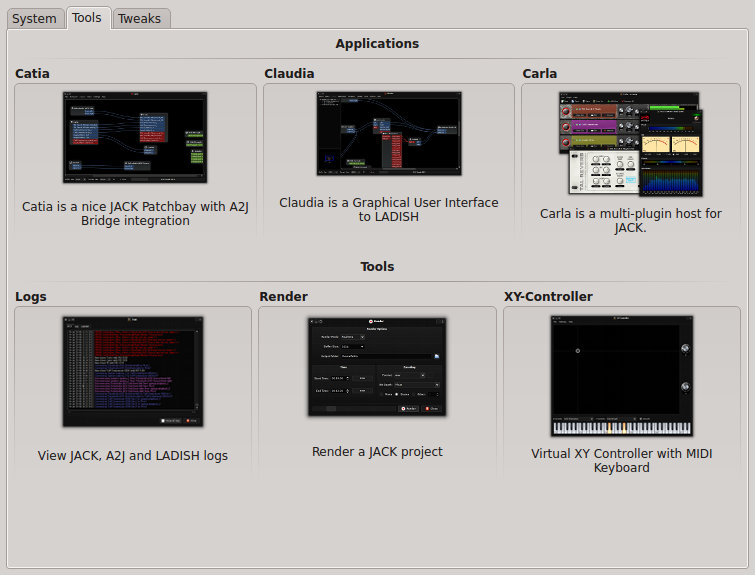
It includes new software to make it easy:
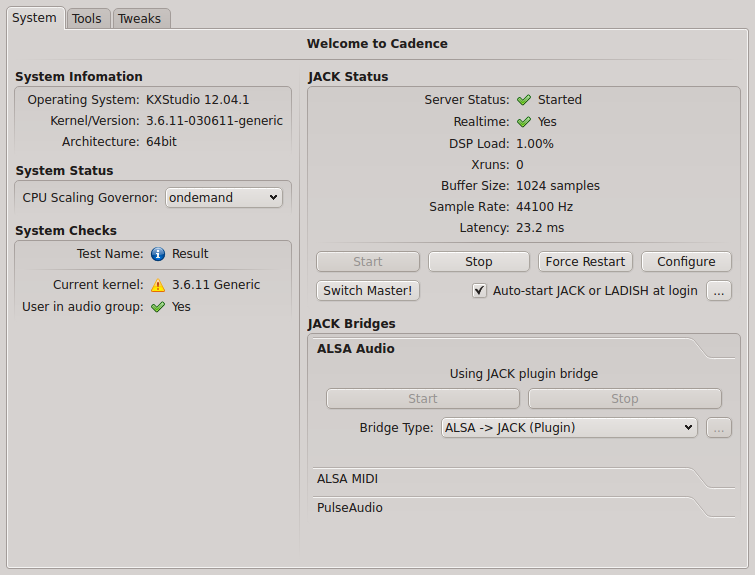
-Cadence, a cool GUI to configure JACK, check current system status, and launch the other JACK-tools.
-Catia, a simple patchbay to check and modify audio and midi connections.
-Claudia, same thing as Catia but using LADISH sessions to save and reload settings (for advanced use)
-Carla, a great multi-plugin host for JACK
-a classic log window for troubleshooting
-a render tool to record a JACK project
-a virtual XY-controller+midi keyboard to simulate the equivalent hardware.

Cadence

Cadence tools

For a better experience, I recommend to use JACK-native software as much as possible, use the alsa-jack bridge for everything else, and really just if none of these works for the software you want to use, install and launch the pulseaudio jack-bridge (but there really is not much pulseaudio-only apps, at least I don’t use any).

For audio player, Aqualung and Clementine have good JACK support.
For video, VLC and MPlayer are JACK compatible too.
Firefox/flash is using the alsa/jack bridge.

Just give it a try when you have a moment, you’ll see by yourself…

Many thanks to the little KXstudio team for all the work!

Technical note specific to intel GPU users:
I use a laptop with intel GPU (Ivy Bridge), which requires drivers much more recent than those shipped with Ubuntu 12.04 (or even 12.10, so I’m still using a 12.04 base..) so I had to activate some more external PPAs for better up-to-date drivers:
– https://launchpad.net/~ubuntu-x-swat/+archive/x-updates
– https://launchpad.net/~ubuntu-x-swat/+archive/intel-graphics-updates
And I installed by hand a more recent 3.6.x kernel from http://kernel.ubuntu.com/~kernel-ppa/mainline/
With recent kernels, it’s not really necessary to have a low-latency or realtime kernel to use realtime in JACK for most cases. However if you have a very big audio workload and start to get some xruns, you may try with a less recent but low-latency or realtime kernel (all versions I’ve find of these are 3.5.x at best…)

Source: FULL ARTICLE at Planet KDE