Tag Archives: JACK

QjackCtl 0.3.10 (KDE Sound Application)

QjackCtl 0.3.10
(KDE Sound Application)
QjackCtl is a simple Qt application to control the JACK sound server daemon, specific for the Linux Audio Desktop infrastructure.

Written in C++ around the Qt4 toolkit for X11, most exclusively using Qt Designer.

Provides a simple GUI dialog for setting several JACK daemon parameters, which are properly saved between sessions, and a way control of the status of the audio server daemon. With time, this primordial interface has become richer by including a enhanced patchbay and connection control features.

changelog:
0.3.10 2013-04-01 The singing swan rehearsal.

– Session infra-client management finally being added.
– Preparations for Qt5 migration.
– Transport tempo (BPM) precision display fixed to 4 digits.
– Color-candy (dang old ANSI terminal?) escape sequences are now silently stripped from jackdbus messages captured log (one-liner from original patch by Brendan Jones, thanks).
– List ALSA device card id. string instead of device number, while on setup dialog.
– Japanese (ja) translation added (by Takashi Sakamoto).

0.3.9 2012-05-18 The last of the remnants.

– Killing D-BUS controlled JACK server is now made optional, cf. Setup/Misc/Stop JACK audio server on application exit. (a patch by Roland Mas, thanks).
– Added include to shut up gcc 4.7 build failures.
– Make(ing) -jN parallel builds now available for the masses.
– A mis-quoting bug at the command line argument string may have been crippling the (unmaintained) Windows port since ever, leaving its main function to start jackd dead in the water, belly down 🙂 now hopefully fixed (following a mail transaction with Stephane Letz and Mathias Nagorni, thanks).
– Currently a JACK2-only feature, the JACK version string display at the About dialog box, must now be explicitly enabled on configure time (–enable-jack-version).
– A new so called “Server Suffix” parameter option appears to rescue on the situations where QjackCtl falls short on extra, exquisite and/or esoteric command line options eg. (net)jack1/2 differences.
– Fixed D-Bus Input/Output device parameter settings, filled when either interface is selected for Capture/Playback only. (probable fix for bug #3441860).
Fixed Makefile.in handling of installation directories to the configure script eg. –datadir, –localedir, –mandir. (after an original patch from h3xx, thanks).
– Main window is now brought to front and (re)activated when clicking on the system tray icon instead of just hiding it.
– Add current xrun count to the system tray icon tooltip, if not zero (after patch #3314633 by Colin Fletcher, thanks).

0.3.8 2011-07-01 JACK Session versioning.
0.3.7 2010-11-30 JACK Session managerism.
0.3.6 2010-03-09 Full D-Busification!
0.3.5 2009-09-30 Slipped Away!
0.3.4 2008-12-05 Patchbay snapshot revamp.
0.3.3 2008-06-07 Patchbay JACK-MIDI, file logging and X11 uniqueness.

[read more]

job recommendations:

[more jobs]
…read more
Source: FULL ARTICLE at KDE Apps

KXStudio, a good audio distribution using KDE

Since a few months my main computer is running a special Ubuntu-based distribution called KXStudio.
It’s actually a set of PPAs on top of ubuntu repositories, meant to provide updated and additional audio-creation software. Also it’s using KDE Plasma as official desktop, with a very good default configuration and an up-to-date 4.9.5 version. So if you’re interested in a good audio distribution, a good KDE system or both, keep on reading…

As I said KXStudio is a set of PPA repositories, divided in categories, so when I first installed it I started from a fresh Xubuntu install, added the most important repositories on top of it (main, plugins, kernel and drivers, kxstudio, and latest) and installed “kxstudio-desktop-xfce” meta-package. I used an XFCE desktop first because I’ve always had better experience for “real-time” audio on this light desktop, but then when I saw that the officially supported desktop was KDE 4.9, I added the “KDE 4.9″ PPA and installed “kxstudio-desktop-kde”, and never had to return to XFCE since then ;)
Now since ~2 weeks there’s a new .iso image to test and install it directly, so you may try it instead for a simpler installation.

The most important difference with any regular distribution is that it’s using the JACK audio server for the system by default. For those who are new to audio software on Linux, JACK is the “realtime” audio server used to run audio software with very low latency and to connect their inputs and outputs to make them work together. So here we have jack launched directly with the desktop, with some bindings for applications using only ALSA or Pulseaudio to JACK. This works very well (and, on a side note, on the KDE desktop it somehow fix the weird issue I had with phonon popping a window now and then saying it can’t find a device..)

It includes new software to make it easy:
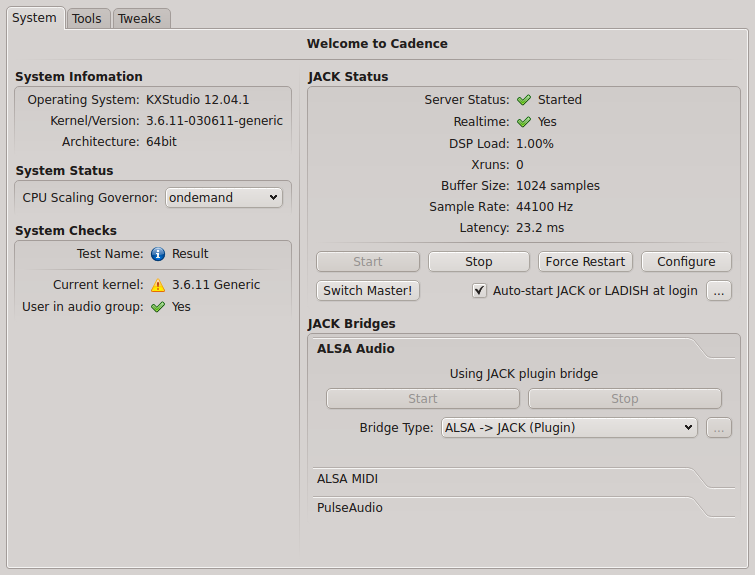
-Cadence, a cool GUI to configure JACK, check current system status, and launch the other JACK-tools.
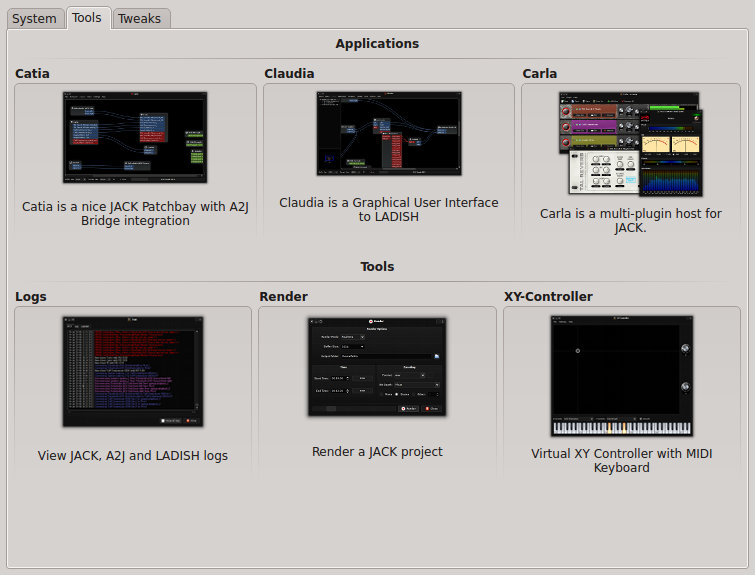
-Catia, a simple patchbay to check and modify audio and midi connections.
-Claudia, same thing as Catia but using LADISH sessions to save and reload settings (for advanced use)
-Carla, a great multi-plugin host for JACK
-a classic log window for troubleshooting
-a render tool to record a JACK project
-a virtual XY-controller+midi keyboard to simulate the equivalent hardware.

Cadence

Cadence tools

For a better experience, I recommend to use JACK-native software as much as possible, use the alsa-jack bridge for everything else, and really just if none of these works for the software you want to use, install and launch the pulseaudio jack-bridge (but there really is not much pulseaudio-only apps, at least I don’t use any).

For audio player, Aqualung and Clementine have good JACK support.
For video, VLC and MPlayer are JACK compatible too.
Firefox/flash is using the alsa/jack bridge.

Just give it a try when you have a moment, you’ll see by yourself…

Many thanks to the little KXstudio team for all the work!

Technical note specific to intel GPU users:
I use a laptop with intel GPU (Ivy Bridge), which requires drivers much more recent than those shipped with Ubuntu 12.04 (or even 12.10, so I’m still using a 12.04 base..) so I had to activate some more external PPAs for better up-to-date drivers:
– https://launchpad.net/~ubuntu-x-swat/+archive/x-updates
– https://launchpad.net/~ubuntu-x-swat/+archive/intel-graphics-updates
And I installed by hand a more recent 3.6.x kernel from http://kernel.ubuntu.com/~kernel-ppa/mainline/
With recent kernels, it’s not really necessary to have a low-latency or realtime kernel to use realtime in JACK for most cases. However if you have a very big audio workload and start to get some xruns, you may try with a less recent but low-latency or realtime kernel (all versions I’ve find of these are 3.5.x at best…)

Source: FULL ARTICLE at Planet KDE