
Google’s first high-end laptop, the Chromebook Pixel, is an impressive machine. It feels light and comfortable in my hands and on my lap. Its high-resolution display makes photos look sharp and video come to life. From a hardware standpoint, it’s everything I’d want a laptop to be. …read more
Source: FULL ARTICLE at Phys.org
Tag Archives: Chromebook Pixel
Amazon.com's Race to the Bottom
By Evan Niu, CFA, The Motley Fool
Filed under: Investing
Always one to go low, Amazon.com may be about to go even lower with its popular Kindle Fire tablet. TechCrunch is reporting that the e-tail juggernaut is preparing to launch a $99 Kindle Fire with a seven-inch display.
Amazon is reportedly going with a 1280 x 800 resolution along with a processor from Texas Instruments . If those specs sound familiar, that’s because the current $199 Kindle Fire HD bears the same characteristics. The company continues to put pressure on Apple‘s iPad mini, and also recently dropped the price of its 8.9-inch Kindle Fire HD, which is now $60 cheaper than Apple’s smaller model. A possible $99 model could potentially add even more heat, costing less than a third of an entry-level iPad mini.
Here, have some cost savings
When Amazon reduced the price of its bigger tablet, the company said that it was passing along cost savings that have materialized since the initial launch as Amazon increased production volumes. The possibility of a $99 Kindle Fire would follow in those same footsteps, and also implies that costs have come down significantly since launch.
In November, IHS iSuppli estimated that Amazon’s component costs including manufacturing totaled $174, so costs must have had to come down significantly for Amazon to make this move. The largest component for any tablet in general is always the display and touchscreen assembly ($64 of iSuppli’s November estimate). That was five months ago, and any cost reductions related to the display would go a long way in facilitating a retail price drop.
Going with TI would show how cozy the pair is, since TI publicly exited the mobile chip sector last year. TI processors have powered every Kindle Fire to date, and Amazon is undoubtedly the biggest buyer of its OMAP chips.
IDC Research Director Tom Mainelli said the $99 price point seems within reach for Amazon, since the company does have the required scale to make it worthwhile.
Stuck in the middle with you
With Google‘s upcoming second-generation Nexus 7 expected within a matter of months, a $99 Kindle Fire would also be a viable threat to the search giant if it were still targeting the original $199 price point. Google similarly pursues a strategy of little to no hardware margins for most of its devices (other than its new high-end Chromebook Pixel), so the company can also be expected to pass along cost savings to consumers wherever possible.
Although Google has also been following Apple’s lead with pushing higher-resolution displays, such as the one found in the larger Nexus 10 and the aforementioned Chromebook Pixel. If the search giant opts for a sharper display in the second-generation Nexus 7, that’s going to add a lot to the bill of materials and may prohibit a more aggressive price point. On the other hand, a higher-resolution Nexus 7 would also be positioned higher than a $99 tablet.
There aren’t a whole lot of rumors …read more
Source: FULL ARTICLE at DailyFinance

John Baer: Why the NVIDIA T4 Chromebook will best Pixel

The dust is beginning to settle from the release of the Chromebook Pixel and the editorials are focusing on what this means.
It all about setting expectations. The Chromebook Pixel proudly states cloud computing is here, is ready for prime time, and is deserving of a premium device.
But the Pixel has an architectural flaw most folks recognize.
- Do you need an Intel® Core™ i5 Dual Core Processor in order to leverage the web?
- Do you need an Intel® HD Graphics 4000 GPU to render a 2560 x 1700 screen?
- Do you need to spend $1,300 for a Pixel like user experience?
The answer to all of these questions is – NO! The nVidia Tegra 4 is a smart Chromebook choice and here is why. Of the currently available SoC’s it delivers on key requirements.
Screen Resolution
The big selling point of the Pixel is the screen.
- 12.85″ display with a 3:2 aspect ratio
- 2560 x 1700, at 239 PPI
- 400 nit screen
- 178° extra-wide viewing angle
Tegra 4 is capable of outputting 1080p @ 120Hz, full hardware encode/decode for video up to 2560×1440 (1440p), and a maximum output resolution of 3820×2160 (4K). This GPU prowess is evidenced by the Vizio announcement a forth coming Tegra 4 tablet which will feature the same fantastic 2560 x 1600 resolution found on the Nexus 10.
In summary it looks like nVidia has the chops to deliver the same or better display experience as the Pixel.
Computing Horsepower
Does the Tegra 4 have more computing horse power than an Intel Core i5-3427U? Of coarse not, but does it have enough to deliver a high quality user experience?
Barron’s reports the following.
At MWC, the company (nVidia) continued its product reve- lation by disclosing new details of the architecture and its capabilities (as well as limitations). Judging from this pre- liminary information, Tegra 4 rates as the highest-perform-ing mobile ARM processor—if power constraints don’t throttle the cores. This performance takes aim at Qual- comm’s newest Snapdragon processors; Nvidia offered a wide range of benchmark results that clearly showed Tegra 4 leading both the APQ8064 and (judging from our estimates) the forthcoming Snapdragon 800 […] We also estimated the performance of the Snap- dragon Series 800, assuming that it will achieve its rated 2.3GHz clock speed and applying a 10% gain to represent the improvements from the Krait 200 CPU to the Krait 400 CPU. This approach is probably optimistic, as most bench- mark scores do not improve linearly with CPU speed, although the Series 800 will also get a boost from faster DRAM. Based on these estimates, even Qualcomm’s best processor, which is due to enter production at about the same time as Tegra 4, won’t surpass Nvidia in these tests.
The Tegra 4 also completes well with current Chromebooks using the Intel Celeron 847 processor. CPU Boss rates the Tegra very favorably over the Intel 847 and the faster 847E.
Pricing
Pricing is difficult to establish …read more
Source: FULL ARTICLE at Planet Ubuntu

Review: Google Chromebook Pixel is an expensive curiosity

Google’s Chromebook Pixel is an idea. It describes Google’s vision of a high-end laptop for citizens of a future world, freed from the encumbrances of old-style computer operating systems, existing entirely on the Web.
The Chromebook Pixel is also a product, starting at $1299 (I reviewed the $1449 version, with 4G networking). It’s as solidly built and generously appointed as any laptop you’ll find, but it runs only the Chrome web browser, not Apple’s Mac OS X or Microsoft’s Windows.
Reigniting the Chromebook debate
As an idea sprung from Google’s view of the future of technology, the Chromebook Pixel is intriguing, even intoxicating. But it’s hard to fathom how it works as a real-world product.
If nothing else, it’s reignited the Chromebook debate. Within the editorial team here, some editors wonder what the Chromebook’s point is, while others say that Chromebook’s critics are missing the point. Meanwhile, tech legend Linus Torvalds came out in favor of the Chromebook Pixel. Reasonable people are disagreeing, and thanks to the Pixel, Chromebooks are suddenly getting a lot of attention again.
To read this article in full or to leave a comment, please click here
…read more
Source: FULL ARTICLE at PCWorld

What's Driving Google to New Highs?
By Daniel Sparks, The Motley Fool

Filed under: Investing
It was only last November when Google (NASDAQ: GOOG) traded below $650. Now, shares trade around $826. Much of this 25% gain could be attributed an overall positive market (note the 15% rise in the Dow Jones during the same period). But what’s causing the rest of the tech giant’s rise?
Understanding Google
To understand what drives Google’s stock price (or at least what should drive Google’s stock price), it’s important to break down its revenue to see which of its units really count in analysis.
Source: 2012 10-K.
Google’s network sites and its Google.com revenue make up the majority of revenue, at 25% and 62%, respectively. To better understand each of these segments, it’s first necessary to get a grasp of the difference between Google’s AdWords and AdSense programs.
- AdWords: Google’s primary auction-based advertising program, used to deliver relevant ads to search queries or web content. These text-based ads appear beside related search results or web content on Google’s own sites (Google.com) or on the thousands of Google’s partner websites (Google network).
- AdSense: Enables Google’s network partners to deliver relevant ads from AdWords advertisers on their websites.
In other words, AdWords customers pay Google to advertise, while AdSense customers get paid by Google to deliver AdWords advertisements to relevant audiences. Google makes money from the spread between the amount AdWords customers pay and the amount AdSense customers receive.
Google reports all advertising revenue that goes toward ads on its own site under the label “Google.com.” Likewise, all advertising revenue that goes toward ads on network partners’ sites is labeled “Google network sites.” This is appropriate, considering that the company shares “the majority of the revenues generated from [AdSense program ads] with the Google network members that display the ads,” as stated in the company’s 2012 10-K.
In short, advertising is what drives Google’s business. Google Glass, the Chromebook Pixel, and driverless cars are all nice — but none of these playful items meaningfully impact business results.
Key metrics driving growth
With so much depending on advertising, Google investors pay particularly close attention to cost-per-click and paid clicks — two metrics that speak volumes about Google’s success in advertising.
- Cost-per-click, or CPC: The amount an advertiser pays Google when a user clicks on an ad.
- Paid clicks: The quantity of clicks on sponsored links.
Paid-click growth came in nice, increasing 24% in Q4 from the year-ago quarter. But the real surprise was the changing trend in CPC.
Before Google’s fourth quarter results, investors were looking for a bottom to Google’s declining year-over-year CPC comparisons. In the second quarter of 2012, CPC year-over-year comparisons reached an all-time low of negative 16%. The next quarter brought little improvement, with year-over-year CPC comps coming in at negative 15%. Finally, investors saw a significant upturn in the fourth quarter of 2012, with CPC year-over-year comps declining just 6% (only 4% once adjusted for currency impacts).
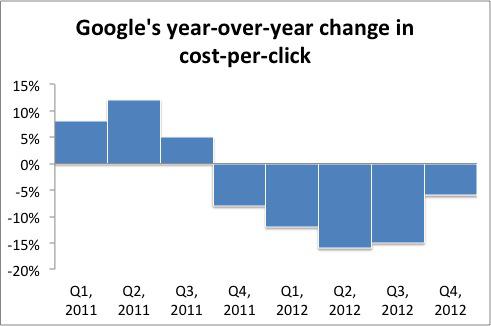
Source: SEC filings.
The Street interpreted this smaller decline in Q4 to signal a bottom to the negative CPC trend.
At the time of …read more
Source: FULL ARTICLE at DailyFinance

Review: Chromebook Pixel is beautiful, but pricey and limited

Intended as a flagship for its Chrome operating system, Google’s new Chromebook Pixel feels too much like overkill. …read more
Source: FULL ARTICLE at Phys.org
Guess who likes the Chromebook Pixel? A guy named Linus Torvalds. You may have heard of him. :-)
ZDnet: Guess who really likes the Chromebook Pixel?

The Chromebook Pixel gets a thumbs-up from Linus Torvalds

Reactions to Google’s new Chromebook Pixel may have been mixed so far, but at least one high-profile figure in the world of IT can’t seem to say enough good things about the device.
“I’ve joined all the cool kids in having one of the new Google ‘Pixel’ laptops (aka Chromebooks),” wrote Linux creator Linus Torvalds in a Google+ post on Tuesday. “And it is a beautiful screen, to the point where I suspect I’ll make this my primary laptop.”
Despite believing that laptops should generally weigh 1kg or less—the Pixel tops that by 50 percent—Torvalds added that he’s willing to make the sacrifice “because the screen really is that nice.”
‘A lot of polish’
To read this article in full or to leave a comment, please click here
…read more
Source: FULL ARTICLE at PCWorld

How I survived 7 days in Chromebook exile

I’m not a Google fangirl. I have Gmail accounts for personal and work use, and I spend some time in Google Docs and Calendar, but that’s about it. And until a few weeks ago, I had never even more than glanced at the Chrome OS or browser, let alone touched a Chromebook.
I have, however, read the vitriol aimed at Chromebooks by my tech press colleagues. The low-cost laptops that make up the majority of the Chromebook market have been dismissed as disposable toys. The new Chromebook Pixel, meanwhile, has attracted much greater interest—and even greater disdain, because it’s seen as an outrageously expensive disposable toy.
But is the Chromebook platform really such a bad idea?
With a basic Samsung Chromebook 3 in one hand and Google’s new Chromebook Pixel in the other, I spent a week finding out. I lived off of the two Chromebooks as much as I could—at work, at home, and out and about. My goal: to determine whether a Chromebook could substitute for a full-fledged Windows laptop, all without performance issues and compatibility headaches.
To read this article in full or to leave a comment, please click here
…read more
Source: FULL ARTICLE at PCWorld

First Impressions: Google Chromebook Pixel
By Jason Evangelho, Contributor

Google has an interesting problem. With the Chromebook Pixel, the technology giant has engineered a premium laptop which belies its potential, dwarfing the minimal requirements of its Chrome OS. Having used the Chromebook Pixel for the past week, the only analogy I can draw is that it feels like driving a Lamborghini in a Go-Kart race. …read more
Source: FULL ARTICLE at Forbes Latest
2 Tech Buys for March
By Daniel Sparks, The Motley Fool
Filed under: Investing
Once the market’s fast-growing darlings, many technology stocks now fully or nearly qualify as blue chip stocks. Even more surprisingly, many of them trade at conservative valuations. Two of these stocks — Google and Baidu — stand out as great buying opportunities for patient investors.
Google
Google’s 15% rise over the last three months, to a current price near $800, may scare plenty of investors away. But haggling over price on this stock could leave you Google-less; there is little reason for Google to trade at a discount given its outstanding prospects. If the company’s growth in online search isn’t enough to convince you that Google’s stock is worth buying, there are several other areas of potential expansion that could prove lucrative as well.
For instance, Google’s aggressive stance on acquisitions, combined with its $48 billion cash hoard, could prove very helpful in creating new business opportunities for the company over the next few years. Last Thursday, Google CFO Patrick Pichette explained that Google plans to keep its $48 billion in cash on hand in order to “pounce” on acquisitions when the opportunities surface. As an example, Pichette cited Google’s $12 billion acquisition of Motorola; the example hints at management’s continued willingness to make large acquisitions.
In contrast, Apple seems to be approaching the law of large numbers when it comes to acquisitions. With a $400 billion market cap and more than $100 billion sitting idle, Apple is running out of growth opportunities meaningful enough to move the dial. As the company’s board of directors continues their “active discussions about returning additional cash to shareholders,” the stock continues to fall.
As Google ponders more potentially aggressive acquisitions, it’s stirring up a new, Apple-like hardware strategy from within. Though its $1,300 price tag is raising eyebrows, the launch of the new Chromebook Pixel is the first evidence of Google’s major shift in strategy in an attempt to profit from hardware sales up front. Though Google has a long way to go to be on par with Apple when it comes to consumer electronics, its attempt is noteworthy, adding upside potential to Google’s stock over the long haul.
Google may carry a seemingly hefty P/E at 24.5. But investors need only to look at the company’s forward P/E ratio to put things in clearer perspective. Trading at just 17.7 times expected future earnings, Google is still a solid choice for buy-and-hold investors looking for a long-term core holding.
Baidu
China’s online search king, Baidu, trades at a significant discount from its price one year ago. In fact, the stock fell more than 15% in February alone, after the company reported plummeting growth rates in average client ad spending during the fourth quarter, and issued guidance for higher research and development spending going forward. Decelerating growth and strengthening competition are now top investor concerns.
But a closer look reveals that the sell-off has created a buying opportunity. The company’s decelerating revenue growth during the …read more
Source: FULL ARTICLE at DailyFinance

Steven Harms: Google Pixel for Developers

Google Pixel: The Perfect Linux Laptop?
When I ordered the Chromebook Pixel, I was confident I would not like it. $1299 for a laptop that is only a browser? For http://rcm.amazon.com/e/cm?lt1=_blank&bc1=000000&IS2=1&bg1=FFFFFF&fc1=000000&lc1=0000FF&t=mindwarpnet-20&o=1&p=8&l=as4&m=amazon&f=ifr&ref=ss_til&asins=B007472CIK, Windows 8, better battery life, more storage, more ram etc. The following post is the story of how my perspective changed, and how I use this machine as a power user / developer.
The Competition
The first though most people have with the Pixel is, why not a Macbook Retina 13 refurb, or the http://www.amazon.com/gp/product/B009LL9VDG/ref=as_li_ss_tl?ie=UTF8&camp=1789&creative=390957&creativeASIN=B009LL9VDG&linkCode=as2&tag=mindwarpnet-20.
| Feature | Pixel | Macbook Retina 13 | Samsung Chromebook |
|---|---|---|---|
| Screen | 2560×1700 12.85” | 2560×1600 13.3” | 1366×768 11.6” |
| Quality | IPS | IPS | TN |
| Touch | Yes | No | No |
| Local Storage | 32GB | 128GB | 16GB |
| Cloud Storage | 1TB | 5GB | 100GB |
| Processor | i5 1.8GHz | i5 2.5GHz | Exynos 5 1.7GHz |
| Ram | 4GB | 8GB | 2GB |
| Battery Life | 5 hours | 7 hours | 6.3 hours |
| Price | $1299 | $1499 | $250 |
What Sets the Pixel Apart?
What the table above doesn’t account for are the qualitative features which make all of the difference. The build quality is fantastic, and the Pixel feels very tough. The Aluminum used in the Pixel feels stronger and more durable than the Macbook, and feels like it is less prone to denting. The screen is extremely bright, and even when plugged in I only use it at 70% brightness, and when on the go I turn it down to nearly minimum. Even with the brightness set so low, it is easier on the eyes and more readable than the TN panels common in most laptops.
Chrome OS itself really gets out of your way. Out of the box I only installed the secure shell app, and I was able to do 50% of the Linux development I wanted to. No tweaking, driver downloading etc, out of the box I had a very fast browser, multi-monitor support, retina level text, music and cloud file storage.
The next question to answer was how do I do heavier development? Chrome actually has a great remote desktop feature built in, so I was able to connect to my much more powerful Ubuntu workstation, and run Eclipse there. It worked well over my local network, although there are even better solutions if you don’t enjoy the slight latency for screen refreshes and window dragging.
]
Enter Crouton
Crouton provides a way to install Ubuntu and run it without rebooting from Chrome OS. This means if I run Crouton and simply press CTRL-ALT-Refresh I am instantly in my XFCE full Ubuntu 12.04.2 environment, and I can run any X86 programs I desire. I was able to use SSH XForwarding to also connect to my desktop, and it was also fast and fluid. I was able to load vim, git, gcc etc, however I actually like just using regular Chrome OS and a SSH session where possible, so I can switch between locations with ease. https://github.com/dnschneid/crouton.
Battery Life
Most reviews highlight that battery life is less than four hours, but skip over how low you can set the brightness on this laptop. 60% brightness on the Pixel is brighter than a lot of laptops at 100%, and the screen is extremely clear and readible. I was able to get 6 hours of battery life without issue, …read more
Source: FULL ARTICLE at Planet Ubuntu
John Baer: Chromebook Pixel – The Saga Continues
On Thursday February 21 Google pulled the curtain back on the much rumored Chromebook Pixel. Here are the specifications.
-
Screen
- 12.85″ display with a 3:2 aspect ratio
- 2560 x 1700 at 239 PPI
- 400 nit screen brightness
- 178° extra-wide viewing angle
- Gorilla® Glass multi-touch screen
- Backlit Chrome keyboard
- Clickable, etched-glass touchpad
- Integrated 720p HD camera
- 297.7 x 224.6 x 16.2 mm
- 3.35 lbs / 1.52 kg
- Machined from anodized aluminum
- Active cooling with no visible vents
- ENERGY STAR® certified
- Intel® Core™ i5 processor (Dual Core 1.8GHz)
- Intel® HD Graphics 4000 (Integrated)
- 2 x USB 2.0
- mini display port
- SD / MMC card reader
- 4GB DDR3 RAM
- One terabyte Google Drive cloud storage for three years
- 32GB solid state drive (64GB on LTE model)
- Combo headphone/mic jack
- Built-in microphone array
- Integrated DSP for noise cancellation
- Powerful stereo speakers tuned for clarity
- Dual-band WiFi 802.11a/b/g/n 2×2
- Bluetooth® 3.0
- Built-in LTE modem (LTE model)
- Up to 5 hours of active use (59 Wh battery)
- $1,299
Inputs
Size / weight
Industrial design
CPU
Ports
Memory
Storage
Audio
Connectivity
Battery
Suggested Retail Price
The quality of the product is outstanding and I should be reaching for my plastic but I’m not. A ZNet blog post by James Kendrick states it best.
So Google’s wonderful display on the Chromebook Pixel had the desired effect on me. It made me want a great display, so I bought a 13-inch MacBook Pro with Retina Display. I don’t think it ended quite the way Google hoped it would, though.
Why did Jim abandon the Pixel and spend $200 more for an Apple?
Perceived value.
- Apple Brand
- OS X
- 2.5GHz dual-core Intel Core i5
- 128GB flash storage
- 7 hours of battery operation
In reality the price of the Pixel may very well be a great value for a laptop of this build quality, but the market expected something different. In my opinion priced at $699 or $799 sales would be viral and the Google Play store would be showing “Sold Out”.
Some things I would change to reach these price points.
- Replace Intel i5 with a low power ARM SoC (nVidia / Samsung / Qualcomm / LG / Others)
- As the product does not morph into a tablet, lose the touch screen
- Replace the anodized aluminum case with a stylish polycarbonate material
- Up battery operation to 7 hours
If the goal of Pixel was to make a statement the result has to be something different, something better, and something more affordable than a high end Ultra book or Mac book.
Hopefully the next round of Chromebooks will get there.
The post Chromebook Pixel – The Saga Continues appeared first on j-Baer.
Google's New Chromebook Is a Joke
By Kevin Spak 
Source: FULL ARTICLE at Newser – Home

Why Google bothered to make the Chromebook Pixel

As someone who already owns and loves a Chromebook, I’ve been trying to wrap my head around why Google dedicated R&D, manufacturing and marketing effort to the Chromebook Pixel.
The Pixel is clearly not a cheap, simple portal to the Web in the mold of other Chromebooks. It has frilly features like a touch screen with a Retina display-matching 2560-by-1700 resolution, an anodized aluminum chassis, and a trio of noise-canceling microphones.
The glamor doesn’t stop there, though. The Pixel’s outer beauty is matched by some beastly (for a Chromebook) hardware specs. It boasts an Intel Core i5 processor that thoroughly out-muscles the low-end Celeron chips found in most other Chromebooks, and 32GB of storage that’s far more than what’s necessary for Chrome OS.
That’s a lot of polish and performance for an operating system that revolves around a web browser. And at a starting price of $1,299, it’s hard to imagine the Chromebook Pixel selling well. Google already has a hard enough time selling the world on cheap Chromebooks, let alone super-expensive ones.
To read this article in full or to leave a comment, please click here
…read more
Source: FULL ARTICLE at PCWorld

Google Chromebook Pixel Laptop: a $1,300 Web Browser!
By Jean-Baptiste Su, Contributor

What is Google thinking? Comparing the Chromebook Pixel laptop with a 13″ MacBook Air is just insane, if not plain stupid and misleading. …read more
Source: FULL ARTICLE at Forbes Latest
Chromebook Pixel: Wow!
By finid From LinuxBSDos.com.
Chromebook Pixel: Wow! Yes, wow, just wow. I think I’m used to seeing Chromebooks in the $200 to $300 price range, so when Chromebook Pixel flashed on my RSS Feed reader, I…
[[ This is a content summary only. Visit my website for full links, other content, and more! ]]
…read more
Source: FULL ARTICLE at LinuxBSDos

Google announces $1299 touchscreen Chromebook Pixel
Would you pay $1299 for a laptop that only runs Web apps but has a high-quality, trouchscreen display? Google sure hopes so. On Thursday the company announced the Chromebook Pixel, a pricey slab of hardware that runs Google’s Web-centric Chrome OS, but defies conventional Chromebook wisdom.
This compact laptop features a 12.85-inch, 2560-by-1700 touchscreen display, a 1.8GHz Intel Core i5 processor, an Intel HD 4000 integrated graphics chipset, 4GB of memory, and 32GB of solid-state storage—all in a 3.35-pound package that’s about 0.64 inches thick.
The Pixel also comes clad in anodized aluminum and has a back-lit keyboard and 720p webcam. All in all, it looks to be a premium piece of hardware that bears very little resemblance to Chromebook devices, which emphasize low, low pricing and bargain-basement components.
Take the new Pixel’s display. Its screen resolution equates to roughly 239 pixels per inch, which is slightly greater than the 227 pixels per inch on the 13-inch Apple MacBook Pro with Retina display. The Pixel also comes with 1TB of free cloud storage via Google Drive for three years.
To read this article in full or to leave a comment, please click here
…read more
Source: FULL ARTICLE at PCWorld
Google unveils touch-based Chromebook Pixel
Google on Thursday took the wraps off the Chromebook Pixel, a touch-screen-enabled laptop. …read more
Source: FULL ARTICLE at Computerworld Latest
Google Announces Chromebook Pixel, Starting at $1,299
Google has officially unveiled the Chromebook Pixel, a high-resolution laptop running Chrome OS. The device builds upon the ever-increasing focus on cloud-computing, offering 1TB of online storage for every user, right out of the box. But Google is clearly betting on demand for a higher-end laptop with the Pixel, in comparison to the considerably cheaper, previous Chromebooks.
Featuring a touch-sensitive screen at 239ppi, the Chromebook Pixel certainly doesn’t look like a slouch in the laptop space. Google refers to the display as the “highest pixel density of any laptop screen on the market today.” The Pixel is wrapped in anodized aluminum alloy, features a 720p webcam, and runs on an Intel Core i5 processor.