Tag Archives: XFCE

Jeremy Bicha: Resigning from the Docs Team

I first got involved with Ubuntu docs around the time the Ubuntu 11.04 Beta was released. That was a very busy time as GNOME 3.0 was being finalized and Ubuntu 11.04 was switching to Unity by default. The GNOME Docs team had undertaken a massive rewrite of their user docs using the new Mallard topic-based format. The official Ubuntu documentation then was currently a snapshot of the GNOME docs but it was a bit outdated, missing a lot of the finalization work done by the GNOME volunteers at a recent hackfest.

I had been interested in contributing to docs for a while and seeing the documentation as seriously incomplete was the motivation I needed to step in and figure out what I could do to help. We had to merge in the latest GNOME improvements and rewrite the docs to mention Unity instead of GNOME Shell. We didn’t meet the normal deadlines (which meant the translators didn’t have a chance to do much by release day) but we shipped a nice update to the user docs for Ubuntu 11.04. I provided a lot of help and I wasn’t the only one.

But after 11.04 Jim moved on to contribute to GNOME directly. (Jim bucked the stereotype by switching from XFCE to GNOME when GNOME3 was released.) I would periodically remerge the GNOME work back into the Ubuntu documentation. I ended up being by far the major force keeping the Ubuntu documentation updated. Meanwhile, I was also contributing to the community in other ways by getting involved in packaging (especially GNOME) and contributing back to Debian and to GNOME itself. I also helped get the Ubuntu GNOME project going because of the widespread demand for a GNOME flavor of Ubuntu.

I’m very sad that life and my other responsibilities are pushing me to need to give up some of my responsibilities. I am stepping down from my Docs team responsibilities now. I will still be around for the next few weeks to help pass the torch to anyone who wants to take my place on the Docs team. After that I will be withdrawing my ~ubuntu-core-doc membership as well. This is a very sad moment for me and I’ve been putting it off for a while.

I was able to help Benjamin Kerensa and Kevin Godby today with some of their work to get the 13.04 user documentation out the door. Maybe they’ll help lead the next round of keeping the docs up to date; maybe others will help too. While most of my work involved the Ubuntu user guide, the other flavors of Ubuntu can use help too. I’m happy to see Doug Smythies and Peter Matulis take charge of the Server Guide. Pasi Lallinaho did a major rewrite of the Xubuntu docs last cycle. And the other flavors can use your help too.

If you’re interested in getting involved with Ubuntu documentation, jump in and get involved. …read more

Source: FULL ARTICLE at Planet Ubuntu

Kaj Ailomaa: Ubuntu Studio, new leadership, and future plans

BatchedInbox Configuration

Over the recent year, while Scott, our project lead, was finding himself having less and less time over for the Ubuntu Studio project, I kind of went in the opposite direction, becoming more and more involved in the development process. So, now that Scott has announced he will be stepping down, there couldn’t be a more suitable time for me to step into his shoes.

For those that don’t know me, I’m Kaj Ailomaa, a musician, with a great interest in computing, using puredata a lot for my own projects, and of course, I’m greatly passionate about free software. I started out using Ubuntu Studio at around 8.04, and have been hooked ever since.

As I don’t have a formal education in software development, there have been many hurdles that I’ve had to get over during the process of wanting to contribute to Ubuntu Studio. I recently became a member of the Debian Multimedia Team, as a part of my strategy to get involved in all of the parts of the development process, and I also have future ambitions with my involvement with Debian, which I feel very strongly about.

I do some coding, enough to read and be able to patch code, but my main goal will be to focus on organizational aspects and future goals for Ubuntu Studio and Debian.

Scotts’ Legacy

Move to XFCE

Scott has made a great job of leading Ubuntu Studio through some big changes. As when Unity came along, and we suddenly weren’t at all sure which way Ubuntu Studio should take. The choice fell on XFCE, and from what I’ve seen, this has been greatly appreciated in the community of Ubuntu Studio users. At the time it seemed risky tof use any of the new desktop systems, such as Unity or Gnome3, when not being able anticipate usability issues. XFCE somehow became the obvious choice, as it most resembled gnome2, which our users were already comfortable with.

Xubuntu devs were a big help during this transition, and still are, as we based the desktop on Xubuntu. During that same process, Ubuntu Studio became a live DVD, which added new functionality that didn’t exist before. Being able to do most workflows from the live DVD directly, without the need to install was a great addition.

Defining workflows

Further, Scott put a lot of emphasis on making Ubuntu Studio easy to use, for new users particularly. And, was the driving force behind us establishing clearly categorized workflows, which right now are best reflected in our custom menu.

This has led us to develop the ideas further, and Len who has been mostly involved in applying and designing the custom menu, has also been working on a panel based on these ideas. As one of our goals is now to try increase our team, we’ll be looking to find someone who would like to help us code workflow management tooling.

Len and I have also been looking at freedesktop categorization, and our plans it to see if we can expand or improve it for our workflows, …read more
Source: FULL ARTICLE at Planet Ubuntu

Re-post: David Edmundson KDE, LightDM and the Mir Kerfuffle

KDE Project:

A re-post of David Edmundson's blog KDE, LightDM and the Mir Kerfuffle for Planet Ubuntu

With Canonical’s decision to make a new display server, there’s been some questions as to how this affects LightDM and the KDE front end I’ve spent a long time working towards.
It’s a perfectly sensible question, LightDM has heavy Canonical sponsorship, and a display server needs to be supported in the display manager.
Canonical (and Ubuntu) have decided not to adopt Wayland as their new display server, but a new in-house system called Mir. We in KDE have already made the decision that Wayland is the future, and work in kwin has already begun on that. Having a Display Manager that supports a Wayland system compositor is essential to our long term strategy.
I’ve been asked to address this a lot, so I’ll put my thoughts in a blog post.
The back story
After a bad experience customising KDM for a really important and scary client I wanted to redo the UI and customisation experience of KDM.
I wanted to rewrite the whole UI and config side, so started looking through KDM code. It was around this time Robert Ancell posted about LightDM, a new display manager that aimed to be greeter agnostic. This was around 2 years ago when everyone was getting excited over Wayland, it was clear it was in LightDMs roadmap.
This seemed like a win, win situation. I get an easier platform to write my new login manager on *and* I get to bring Wayland support to KDE.
I wrote Qt bindings around LightDM upstream, along with a reference QWidget based greeter. I then started working on the KDE greeter in our repository.
The KDE greeter is approaching version 0.4. It is included in many distros, and generally feedback has generally been very positive.
The current state
Whilst LightDM is made by Canonical it is community driven and all patches go through review where anyone can comment. I have an opportunity to argue if anything is greeter specific in the libraries.
LightDM is used by my KDE greeter (used in some distros, not all), XFCE, and Razor Qt and of course Unity.
The Qt library was originally only used by us and Razor Qt, but with Unity’s move to QML this means that Canonical are now dependant on the libraries I made. I am still in charge of the Qt library and still get final say on all reviews, I have rejected some Canonical employee patches as needing a rewrite and them with some of mine, it feels like a real open meritocracy community.
The rant
The golden-egg of using LightDM in KDE was that we wouldn’t have to support all the boring things we need to make a display manager work, we wouldn’t need to support a Wayland system compositor we get it for free. We all write stuff that helps each …read more
Source: FULL ARTICLE at Planet KDE

KDE, LightDM and the Mir Kerfuffle

With Canonical’s decision to make a new display server, there’s been some questions as to how this affects LightDM and the KDE front end I’ve spent a long time working towards.

It’s a perfectly sensible question, LightDM has heavy Canonical sponsorship, and a display server needs to be supported in the display manager.

Canonical (and Ubuntu) have decided not to adopt Wayland as their new display server, but a new in-house system called Mir. We in KDE have already made the decision that Wayland is the future, and work in kwin has already begun on that. Having a Display Manager that supports a Wayland system compositor is essential to our long term strategy.

I’ve been asked to address this a lot, so I’ll put my thoughts in a blog post.

The back story

After a bad experience customising KDM for a really important and scary client I wanted to redo the UI and customisation experience of KDM.

I wanted to rewrite the whole UI and config side, so started looking through KDM code. It was around this time Robert Ancell posted about LightDM, a new display manager that aimed to be greeter agnostic. This was around 2 years ago when everyone was getting excited over Wayland, it was clear it was in LightDMs roadmap.

This seemed like a win, win situation. I get an easier platform to write my new login manager on *and* I get to bring Wayland support to KDE.

I wrote Qt bindings around LightDM upstream, along with a reference QWidget based greeter. I then started working on the KDE greeter in our repository.

The KDE greeter is approaching version 0.4. It is included in many distros, and generally feedback has generally been very positive.

The current state

Whilst LightDM is made by Canonical it is community driven and all patches go through review where anyone can comment. I have an opportunity to argue if anything is greeter specific in the libraries.

LightDM is used by my KDE greeter (used in some distros, not all), XFCE, and Razor Qt and of course Unity.

The Qt library was originally only used by us and Razor Qt, but with Unity’s move to QML this means that Canonical are now dependant on the libraries I made. I am still in charge of the Qt library and still get final say on all reviews, I have rejected some Canonical employee patches as needing a rewrite and them with some of mine, it feels like a real open meritocracy community.

The rant

The golden-egg of using LightDM in KDE was that we wouldn’t have to support all the boring things we need to make a display manager work, we wouldn’t need to support a Wayland system compositor we get it for free. We all write stuff that helps each and open source progresses faster.

If I’d known they weren’t going to add Wayland support, I’m not sure I would have invested my time in LightDM. I don’t feel decieved, they thought they would do it at the time and Canonical are perfectly …read more
Source: FULL ARTICLE at Planet KDE

Re-blog: Pau Garcia i Quiles, Mark’s divisive leadership

A repost of elite KDE contributor Pau Garcia i Quiles' blog for Planet Ubuntu

Mark Shuttleworth recently critized Jonathan Riddell for proposing Xubuntu and others join the Kubuntu community. I thought I could make a few amendments to Mark’s writing:
Jonathan Mark says that CanonicalKubuntu is not taking careof the Ubuntu community.
Consider for a minute, Jonathan Mark, the difference between our actions.
Canonical Kubuntu, as one stakeholder in the Ubuntu community, is spending a large amount of energy to evaluate how its actions might impact on all the other stakeholders, and offering to do chunks of work in support of those other stakeholder needs.
You, as one stakeholder in the Ubuntu community, are inviting people to contribute less to the broader project [all the X and Wayland -based desktops], and more to one stakeholder [Unity and Mir].
Hmm. Just because you may not get what you want is no basis for divisive leadership.
Yes, you should figure out what’s important to Kubuntu Ubuntu Unity and Mir, and yes, you should motivate folks to help you achieve those goals. But it’s simplywrong to suggest that Canonical Kubuntu isn’t hugely accommodating to the needs of others, or that it’s not possible to contribute or participate in the parts of Ubuntu which Canonical Kubuntu has a particularly strong interest in. Witness the fantastic work being done on both the system and the apps to bring Ubuntu Plasma to the phone and tablet. That may not be your cup of tea, but it’s tremendously motivating and exciting and energetic.
See Mark? I only needed to do a little search and replace on your words and suddenly, meaning is completely reversed!
Canonical started looking only after its own a couple of years ago and totally dumped the community. Many people have noticed this and written about this in the past two years.
How dare you say Jonathan or anyone from Kubuntu is proposing contributing less to the broader community?The broader community uses X and/or Wayland.
Canonical recently came with Mir, a replacement for X and Wayland, out of thin air. Incompatible with X and Wayland.
No mention of it at all to anyone from X or Wayland.
No mention of it at FOSDEM one month ago, even though I, as the organizer of the Cross Desktop DevRoom, had been stalking your guy for months because we wanted diversity (and we got it: Gnome, KDE, Razor, XFCE, Enlightenment, etc, we even invided OpenBox, FVWM, CDE and others!). I even wrote a mail to you personally warning you Unity was going to lose its opportunity to be on the stand at FOSDEM. You never answered, of course.
Don’t you think Mir, a whole new replacement for X and Wayland, which has been in development for 8 months, deserved a mention at the largest open source event in Europe?
Come on, man.
It is perfectly fine to say “yes, Canonical is not so interested in the community. It’s our …read more
Source: FULL ARTICLE at Planet KDE

Steven Harms: Google Pixel for Developers

Chrome OS Desktop

Google Pixel: The Perfect Linux Laptop?

When I ordered the Chromebook Pixel, I was confident I would not like it. $1299 for a laptop that is only a browser? For http://rcm.amazon.com/e/cm?lt1=_blank&bc1=000000&IS2=1&bg1=FFFFFF&fc1=000000&lc1=0000FF&t=mindwarpnet-20&o=1&p=8&l=as4&m=amazon&f=ifr&ref=ss_til&asins=B007472CIK, Windows 8, better battery life, more storage, more ram etc. The following post is the story of how my perspective changed, and how I use this machine as a power user / developer.

The Competition

The first though most people have with the Pixel is, why not a Macbook Retina 13 refurb, or the http://www.amazon.com/gp/product/B009LL9VDG/ref=as_li_ss_tl?ie=UTF8&camp=1789&creative=390957&creativeASIN=B009LL9VDG&linkCode=as2&tag=mindwarpnet-20.

Feature Pixel Macbook Retina 13 Samsung Chromebook
Screen 2560×1700 12.85” 2560×1600 13.3” 1366×768 11.6”
Quality IPS IPS TN
Touch Yes No No
Local Storage 32GB 128GB 16GB
Cloud Storage 1TB 5GB 100GB
Processor i5 1.8GHz i5 2.5GHz Exynos 5 1.7GHz
Ram 4GB 8GB 2GB
Battery Life 5 hours 7 hours 6.3 hours
Price $1299 $1499 $250

What Sets the Pixel Apart?

What the table above doesn’t account for are the qualitative features which make all of the difference. The build quality is fantastic, and the Pixel feels very tough. The Aluminum used in the Pixel feels stronger and more durable than the Macbook, and feels like it is less prone to denting. The screen is extremely bright, and even when plugged in I only use it at 70% brightness, and when on the go I turn it down to nearly minimum. Even with the brightness set so low, it is easier on the eyes and more readable than the TN panels common in most laptops.

Chrome OS itself really gets out of your way. Out of the box I only installed the secure shell app, and I was able to do 50% of the Linux development I wanted to. No tweaking, driver downloading etc, out of the box I had a very fast browser, multi-monitor support, retina level text, music and cloud file storage.

The next question to answer was how do I do heavier development? Chrome actually has a great remote desktop feature built in, so I was able to connect to my much more powerful Ubuntu workstation, and run Eclipse there. It worked well over my local network, although there are even better solutions if you don’t enjoy the slight latency for screen refreshes and window dragging.

]

Enter Crouton

Crouton provides a way to install Ubuntu and run it without rebooting from Chrome OS. This means if I run Crouton and simply press CTRL-ALT-Refresh I am instantly in my XFCE full Ubuntu 12.04.2 environment, and I can run any X86 programs I desire. I was able to use SSH XForwarding to also connect to my desktop, and it was also fast and fluid. I was able to load vim, git, gcc etc, however I actually like just using regular Chrome OS and a SSH session where possible, so I can switch between locations with ease. https://github.com/dnschneid/crouton.

Battery Life

Most reviews highlight that battery life is less than four hours, but skip over how low you can set the brightness on this laptop. 60% brightness on the Pixel is brighter than a lot of laptops at 100%, and the screen is extremely clear and readible. I was able to get 6 hours of battery life without issue, …read more
Source: FULL ARTICLE at Planet Ubuntu

Marcin Juszkiewicz: How to update Chrubuntu 12.04 to Ubuntu 13.04

There are many users of so-called Chrubuntu which have Ubuntu 12.04 running on their Samsung ARM Chromebooks. And I do not support them with any updates so they wonder how to upgrade to 13.04 release. So I decided to spend some time and help with it.

For this I installed Chrubuntu 12.04 on SD card (not on internal as I have own installation of Ubuntu there) and I will go though upgrade to 13.04 and document all steps here.

First thing: if your Chrubuntu installation fails on fetching 4.7MB of “ubuntu-1204-binak.bz2″ file then you probably started script with “sh” instead of “bash”. Abort process and run it with “bash” — it really needs it.

But ok, you got your Chromebook booted to Ubuntu desktop (running Unity 2D). Remember: your password is “user”. Open terminal (Ctrl+LAlt+t), get root and edit APT sources so they will point to “raring” instead of “precise”. Now refresh APT data and run distro upgrade (I used “apt-get dist-upgrade”).

There may be some issues during upgrade. I had to run “apt-get -f install” and it removed some packages including “unity” and “ubuntu-desktop”. To get them back I needed “apt-get install ubuntu-desktop gnome-control-center nautilus nautilus-share nautilus-sendto eog unity libgnome-desktop-3.4 gnome-settings-daemon” command.

Next step is adding ARM Chromebook hackers PPA: “sudo add-apt-repository ppa:chromebook-ppa” and again updating APT cache.

Now it is time to install Ubuntu kernel and tools: “apt-get install cgpt vboot-kernel-utils linux-image-chromebook”. During installation you will get “Warning: root device does not exist” message during creation of initrd image. Just ignore that and then remove “flash-kernel” package.

Time to sign kernel. Create file with kernel command line. I suggest “console=tty1 printk.time=1 quiet nosplash rootwait root=/dev/mmcblk1p7 rw rootfstype=ext4″ but you can adapt it as you want. Sign kernel: “vbutil_kernel –pack /tmp/kernel-to-boot-ubuntu –keyblock /usr/share/vboot/devkeys/kernel.keyblock –version 1 –signprivate /usr/share/vboot/devkeys/kernel_data_key.vbprivk –config CMDLINE_FILE –vmlinuz /boot/vmlinuz-3.4.0-5-chromebook –arch arm”. And do not forget to write it to SD: “dd if=/tmp/kernel-to-boot-ubuntu of=/dev/mmcblk1p1 bs=4M”.

Time to reboot to 13.04. Less kernel messages on console then before but blue screen instead of Unity desktop ;( Good that “Ctrl-LAlt-1″ switches us to text console.

Login as “user” (password is “user” as I mentioned earlier), gain root and install “chromium-mali-drivers” package. Now “restart lightdm” and check how X11 looks this time. Still blue? Switch back to text console then.

Now it is time to enable “universe” part of repository (I though that it is enabled by default). Edit “/etc/apt/sources.list” file and uncomment proper lines. Now we can install “armsoc” X11 display driver. Here you can curse at me — package in repository lacks Exynos5 part of xorg.conf ;(

But this does not change situation — still no Unity. At this moment I can recommend XFCE instead. Install “xubuntu-desktop” (181MB of disk space needed).

Ok, time to switch default session to Xubuntu one. Edit “/etc/lightdm/lightdm.conf” and set “user-session” to “xubuntu”. Save and “restart lightdm”. Now you should land in XFCE session.

Are icons broken? If yes then you probably need to complete distribution upgrade. I had 725 packages to process… Once it done — restart X11 session.

So …read more
Source: FULL ARTICLE at Planet Ubuntu

The Luminosity of Free Software Episode 2!

The day and time for the next live video cast on Google Hangout has been set. There was a clear preference among those who responded to the survey. (Thanks to you all!) The live show will happen this Thursday, the 7th of February at 20:00 UTC.

If you’d like to be there live, just add me to your circles on Google+ and you’ll get an invite. If you can’t make it, the video will appear on Youtube directly after the video cast concludes and you can pick it up there. Either way, feel free to leave questions, comments and topic suggestions in the comments below. You can, of course, bring your questions to the live show, too!

Here is the agenda (as currently planned) for the show:

  • Marble-ocity: Cool things you can do with the Marble mapping application. 5 minutes
  • Forkification: a reflection on the phenomenon of major Free software communities that have experience significant forks in recent years (MySQL, OpenOffice, XFree86, GNOME … ) and those that have maintained their community in one piece (PostgreSQL, Linux, XFCE, KDE …). 5 minutes.
  • Vivaldi tablet: finally! I can briefly share what we have been working on, our timelines and the implications for KDE software on devices. 5 minutes.
  • Audience interaction: updates from last week’s audience interaction, then on to new topics: discussion, questions and answers. 30-45 minutes.

See you there!
Source: FULL ARTICLE at Planet KDE

KXStudio, a good audio distribution using KDE

Since a few months my main computer is running a special Ubuntu-based distribution called KXStudio.
It’s actually a set of PPAs on top of ubuntu repositories, meant to provide updated and additional audio-creation software. Also it’s using KDE Plasma as official desktop, with a very good default configuration and an up-to-date 4.9.5 version. So if you’re interested in a good audio distribution, a good KDE system or both, keep on reading…

As I said KXStudio is a set of PPA repositories, divided in categories, so when I first installed it I started from a fresh Xubuntu install, added the most important repositories on top of it (main, plugins, kernel and drivers, kxstudio, and latest) and installed “kxstudio-desktop-xfce” meta-package. I used an XFCE desktop first because I’ve always had better experience for “real-time” audio on this light desktop, but then when I saw that the officially supported desktop was KDE 4.9, I added the “KDE 4.9″ PPA and installed “kxstudio-desktop-kde”, and never had to return to XFCE since then ;)
Now since ~2 weeks there’s a new .iso image to test and install it directly, so you may try it instead for a simpler installation.

The most important difference with any regular distribution is that it’s using the JACK audio server for the system by default. For those who are new to audio software on Linux, JACK is the “realtime” audio server used to run audio software with very low latency and to connect their inputs and outputs to make them work together. So here we have jack launched directly with the desktop, with some bindings for applications using only ALSA or Pulseaudio to JACK. This works very well (and, on a side note, on the KDE desktop it somehow fix the weird issue I had with phonon popping a window now and then saying it can’t find a device..)

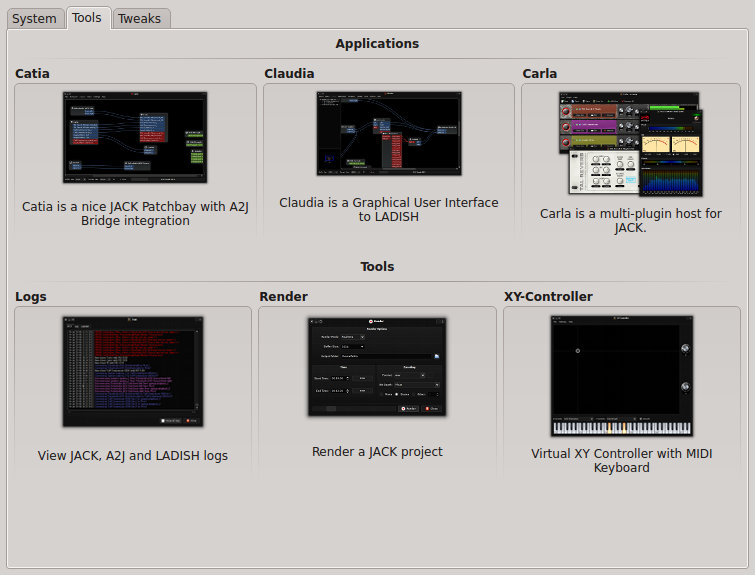
It includes new software to make it easy:
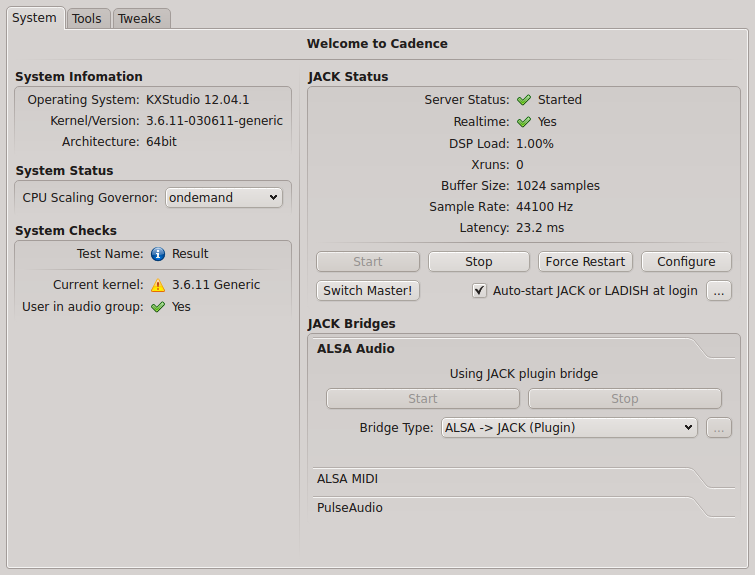
-Cadence, a cool GUI to configure JACK, check current system status, and launch the other JACK-tools.
-Catia, a simple patchbay to check and modify audio and midi connections.
-Claudia, same thing as Catia but using LADISH sessions to save and reload settings (for advanced use)
-Carla, a great multi-plugin host for JACK
-a classic log window for troubleshooting
-a render tool to record a JACK project
-a virtual XY-controller+midi keyboard to simulate the equivalent hardware.

Cadence

Cadence tools

For a better experience, I recommend to use JACK-native software as much as possible, use the alsa-jack bridge for everything else, and really just if none of these works for the software you want to use, install and launch the pulseaudio jack-bridge (but there really is not much pulseaudio-only apps, at least I don’t use any).

For audio player, Aqualung and Clementine have good JACK support.
For video, VLC and MPlayer are JACK compatible too.
Firefox/flash is using the alsa/jack bridge.

Just give it a try when you have a moment, you’ll see by yourself…

Many thanks to the little KXstudio team for all the work!

Technical note specific to intel GPU users:
I use a laptop with intel GPU (Ivy Bridge), which requires drivers much more recent than those shipped with Ubuntu 12.04 (or even 12.10, so I’m still using a 12.04 base..) so I had to activate some more external PPAs for better up-to-date drivers:
– https://launchpad.net/~ubuntu-x-swat/+archive/x-updates
– https://launchpad.net/~ubuntu-x-swat/+archive/intel-graphics-updates
And I installed by hand a more recent 3.6.x kernel from http://kernel.ubuntu.com/~kernel-ppa/mainline/
With recent kernels, it’s not really necessary to have a low-latency or realtime kernel to use realtime in JACK for most cases. However if you have a very big audio workload and start to get some xruns, you may try with a less recent but low-latency or realtime kernel (all versions I’ve find of these are 3.5.x at best…)

Source: FULL ARTICLE at Planet KDE

FOSDEM 2013

Hey guys,
I’m Mayank Madan( A GCI 2012 student). With this post, I wanted to tell you about FOSDEM 2013.

Some people may not know what is FOSDEM(Free And Open Source Software Developers’ European Meeting) . It is a non-commercial, volunteer organized European event created around free and open source development. It is aimed at developers and anyone interested in open source software movement and enable them to meet and promote the awareness and use of open source software.

In FOSDEM 2013 KDE will be a part of Cross desktop devroom alongwith GNOME, Enlightenment, Unity, Razor and XFCE. Devrooms are the places where development teams can meet and showcase their projects and discuss.

There are some talks that are in collaboration with other desktop environments like GNOME and Razor. For example:

KDE Libraries for Qt Application Developers
Qt application developers are often not aware or are uncertain what dependencies an interesting library might have. This talk will introduce 2 KDE initiatives to address those needs. Inqlude, a repository for Qt libraries, and KDE Frameworks 5, a reorganization of KDE‘s libraries into a modular structure with fewer, cleaner and better documented dependencies.

GNOME – Better, Faster, Snappier
GNOME 3 is not considered as faster and snapier as its previous versions. The aim of this talk is to highlight the part of the stack which are considered as most critical to this venture and propose solutions to the problems in improving performance of the stack.

Razor-qt – The Other Qt Desktop.
This talk introduces Razor desktop environment to those who havent heard of it and invites contribution to the project.

Well, you can actually help KDE in this noble purpose by signing up here to help at KDE‘s booth at FOSDEM. It will be a great contribution for KDE.

Freedom To Innovate!

Source: FULL ARTICLE at Planet KDE

Where's the XFCE folder?

By IhatewindowsIf a few of you look on FedoraForums, you’ll find that a little while ago, I went on a desktop installing spree. I just have a small question about XFCE desktop. In my user directory, I see .kde, .mate, and .trinity. (all three are directories), but I have XFCE 4.8 installed along with the others. I don’t see where my XFCE prefs folder is. I found online awhile back that if you delete the desktop prefs folder (in my case at the time, it was .kde) then it will set your preferences back to square one. If I do something stupid like delete a panel instead of close a window, how to I reset XFCE?
Source: The UNIX and Linux Forums