Tag Archives: Google Drive

Google reportedly working on encrypting user files on Google Drive

CNET, the online tech magazine has apparently found two sources inside of Google who are claiming that the company is embarking on a plan to encrypt user data on Google Drive. Doing so would mean that the U.S. government (read the NSA) could not legally force Google to give up the files if requested. …read more

Source: FULL ARTICLE at Phys.org

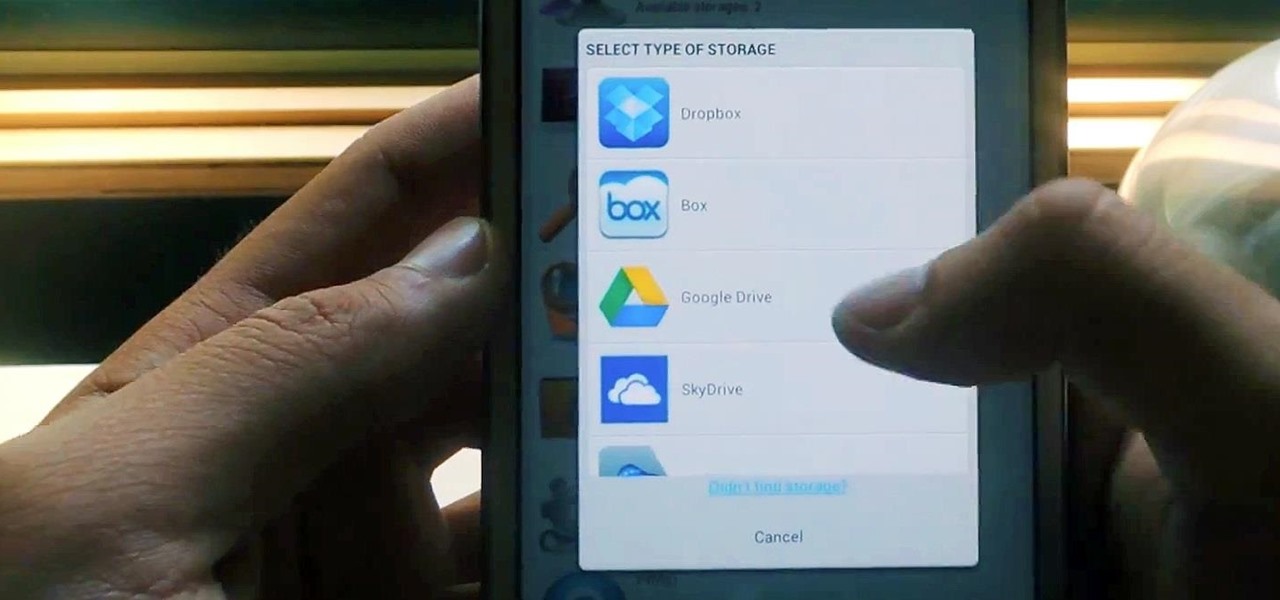
How to Manage All Your Cloud Storage Accounts from One App on Your Samsung Galaxy Note 2

Cloud storage looks pretty good compared to the heavy restrictions that hard drives and other types of external memory carry. The cloud is not only limitless in what it can hold, but it can also easily be accessed from any device that has Internet—your smartphone, work computer, personal laptop, tablet, and more. While accessing a specific cloud storage system like Dropbox or Google Drive may be easy on your Samsung Galaxy Note 2, managing all of them individually can not only get confusing, but also stressful on your smartphone’s memory (ironically). Individual apps for each cloud means more… more

…read more

Source: Wonder How To

Review: WinZip for Windows 8 is what you'd expect from a Modern app

Metro, or Modern, or whatever you’d like to call the new style of applications that debuted with Windows 8, is problematic. It’s problematic because it’s built for touch, but forces itself on your non-touch computer, too. And because of its expanse of white (or blank, for it’s often in some intense shade of color) space and very low information density. And because it relies on hidden gestures you somehow have to guess would bring up toolbars you never knew were there to begin with.

To get you started, WinZip for Windows 8 asks you to “use the app bar” without hinting what that might be.

I could keep counting the ways, but the point is that it’s very difficult to make a Modern app that actually feels “right” on a modern desktop computer. That’s the context in which I tested WinZip for Windows 8, and it proves designing a decent Modern app is a serious challenge even for a software company as established as Corel, and for a brand as iconic as WinZip.

Once you find the app bar, WinZip for Windows 8 lets you add files from your local storage, or from a cloud file storage service.

When you first launch WinZip for Windows 8, it takes over your entire screen, of course. But it presents no buttons or menus: Only the cryptic line, “Use the app bar to start adding files/folders to a new Zip file or to Open an existing Zip file,” and a vast, soothing expanse of color. That’s great, if you happen to know what the “app bar” is. If you dontt, you may find yourself randomly clicking around until you happen to right-click anywhere on the screen. This is what you need to do to pop open a toolbar that’s hidden at the bottom of the screen—and that’s the toolbar you need to get anything done with WinZip for Windows 8. Hiding the toolbar like this is a standard Modern UI convention, and it’s just as terrible on WinZip for Windows 8 as it is in other applications.

The file browser is simple to use, as long as you don’t try removing a folder you’ve asked to add.

The toolbar has six buttons: Add Files, Add a Folder, New Zip, Open Zip, and all the way to the far right, ZipSend and ZipShare. You can add files and folders locally, but WinZip for Windows 8 can also plug into Dropbox, Google Drive, and SkyDrive, letting you pull files from those cloud services into your archive. Once you tell it where you want to look for files, a file browser fills the screen. Everything is enormous and touch-optimized, but the interface works. It’s not without its Modern quirks, though: If you add a folder and regret it, you need to right-click the folder’s name at the bottom of the screen to remove it. There’s no indication that’s what you’re supposed to do (I just

From: http://www.pcworld.com/article/2033880/review-winzip-for-windows-8-is-what-youd-expect-from-a-modern-app.html#tk.rss_all

Google Releases Quickoffice on Android

By Evan Niu, CFA, The Motley Fool

Filed under:

Last summer, search giant Google acquired mobile productivity app maker Quickoffice, which was at the time exclusive to Apple‘s iOS platform. Google has now released the popular app for its own Android platform.

Quickoffice appeals to a wide audience since it supports common Microsoft Office document formats, Word, Excel, and Powerpoint.

Google offers storing and sharing options through its Google Drive service. Quickoffice competes with Apple’s own mobile iWork suite, while Microsoft has long been rumored to be working on a mobile version of its flagship productivity software package.

With Quickoffice for Android, Google is bolstering its enterprise mobility appeal.

link

The article Google Releases Quickoffice on Android originally appeared on Fool.com.

Fool contributor Evan Niu, CFA, owns shares of Apple. The Motley Fool recommends Apple and Google. The Motley Fool owns shares of Apple, Google, and Microsoft. Try any of our Foolish newsletter services free for 30 days. We Fools may not all hold the same opinions, but we all believe that considering a diverse range of insights makes us better investors. The Motley Fool has a disclosure policy.

Copyright © 1995 – 2013 The Motley Fool, LLC. All rights reserved. The Motley Fool has a disclosure policy.

(function(c,a){window.mixpanel=a;var b,d,h,e;b=c.createElement(“script”);
b.type=”text/javascript”;b.async=!0;b.src=(“https:”===c.location.protocol?”https:”:”http:”)+
‘//cdn.mxpnl.com/libs/mixpanel-2.2.min.js’;d=c.getElementsByTagName(“script”)[0];
d.parentNode.insertBefore(b,d);a._i=[];a.init=function(b,c,f){function d(a,b){
var c=b.split(“.”);2==c.length&&(a=a[c[0]],b=c[1]);a[b]=function(){a.push([b].concat(
Array.prototype.slice.call(arguments,0)))}}var g=a;”undefined”!==typeof f?g=a[f]=[]:
f=”mixpanel”;g.people=g.people||[];h=[‘disable’,’track’,’track_pageview’,’track_links’,
‘track_forms’,’register’,’register_once’,’unregister’,’identify’,’alias’,’name_tag’,
‘set_config’,’people.set’,’people.increment’];for(e=0;e<h.length;e++)d(g,h[e]);
a._i.push([b,c,f])};a.__SV=1.2;})(document,window.mixpanel||[]);
mixpanel.init("9659875b92ba8fa639ba476aedbb73b9");

function addEvent(obj, evType, fn, useCapture){
if (obj.addEventListener){
obj.addEventListener(evType, fn, useCapture);
return true;
} else if (obj.attachEvent){
var r = obj.attachEvent("on"+evType, fn);
return r;
}
}

addEvent(window, "load", function(){new FoolVisualSciences();})
addEvent(window, "load", function(){new PickAd();})

var themeName = 'dailyfinance.com';
var _gaq = _gaq || [];
_gaq.push(['_setAccount', 'UA-24928199-1']);
_gaq.push(['_trackPageview']);

(function () {

var ga = document.createElement('script');
ga.type = 'text/javascript';
ga.async = true;
ga.src = ('https:' == document.location.protocol ? 'https://ssl' : 'http://www') + '.google-analytics.com/ga.js';

var s = document.getElementsByTagName('script')[0];
s.parentNode.insertBefore(ga, s);
})();

Read | Permalink | Email this | Linking Blogs | Comments

…read more
Source: FULL ARTICLE at DailyFinance

The Surprising Reason Dropbox Should Go Public Now

By Tim Beyers, The Motley Fool

Filed under:

Some of the best companies around are still private: Evernote, SpaceX, Twitter, and, of course, Dropbox, the file-sharing service that’s ostensibly surrounded by Google‘s Drive, Microsoft‘s SkyDrive, and Apple‘s iCloud.

More than anything else, the flexibility to handle work as well as personal files deftly has made Dropbox popular. What we didn’t know is just how popular. But then Strategy Analytics released a report that found it to be the second-most-popular “locker” for digital music and movies, trailing only iCloud.

Is now the time for Dropbox to go public? Tim Beyers of Motley Fool Rule Breakers and Motley Fool Supernova answers this question and more in the following video. Please watch, and then weigh in using the comments box below.

Interested in more information about Apple’s cloud aspirations? The Motley Fool’s senior technology analyst and managing bureau chief, Eric Bleeker, has the skinny on the various reasons to buy or sell Apple right now. Click here to get his latest thinking on the stock and what opportunities are left for Apple (and your portfolio) going forward.

var FoolAnalyticsData = FoolAnalyticsData || []; FoolAnalyticsData.push({ eventType: “TickerReportPitch”, contentByline: “Tim Beyers“, contentId: “cms.26258”, contentTickers: “NASDAQ:AAPL, NASDAQ:MSFT, NASDAQ:GOOG”, contentTitle: “The Surprising Reason Dropbox Should Go Public Now”, hasVideo: “True”, pitchId: “1”, …read more
Source: FULL ARTICLE at DailyFinance

2 Reasons Google's Newest Innovation Is Here to Stay

By Steve Symington, The Motley Fool

Filed under:

Two weeks ago during its annual bout of “spring cleaning,” Google announced the coming destruction of its popular Google Reader product, which was originally released in 2005.

Of course, as is the case with any established product with a core group of loyal users, droves of annoyed Google Reader fans took to the web to decry the search giant’s decision.

It’s only natural, then, for Google’s official launch last week of Keep — the company’s new aptly named note-taking app — to be met with a certain level of skepticism. After all, why in the world would anyone want to use Google’s products if they can’t be absolutely certain they will exist in another year?

Go ahead and tell that to the more than 1.5 million people who have already downloaded Keep from the Android app market, with more than 11,000 giving it an average rating of 4.4 out of five stars as of this writing.

With that in mind, here are two big reasons Google Keep is here to stay.

Working on products that matter
When Google powered down Reader earlier this month, it provided the following anticlimactic explanation on its official blog:

There are two simple reasons for this: usage of Google Reader has declined, and as a company we’re pouring all of our energy into fewer products. We think that kind of focus will make for a better user experience.

You can’t blame Google for putting the kibosh on a product with a dwindling user base, can you? In fact, from an investing standpoint, we should be relieved Google is further honing its focus on products which have the greatest long-term potential.

And that, my fellow Fools, is exactly where young applications like Keep come into play. You see, Google isn’t afraid to change for the better, and Keep’s recent introduction makes it appear as if it stands as one of those aforementioned “fewer products” into which Google is pouring its newly focused energy.

Plenty of competition
Through Keep, Android users can effectively keep track of ideas, checklists, and photos, all while simultaneously storing them in the cloud with Google Drive.

So what’s the problem? Keep is entering an already crowded market of note-taking productivity apps; Apple, for one, has long included a simple notes feature in its operating systems, and Microsoft offers its competing OneNote product (though it’s certainly not free) as well as a suite of online tools in Office 365. Most notably, however, is the well-established Evernote, which currently boasts more than 13 million downloads from the Android App market alone.

That, however, is one of the very reasons Google needs Keep so badly, and why the app is unlikely to disappear anytime soon. Prior to Keep, Google itself had offered little in the way of task management solutions, and Keep goes a long way toward filling those gaps to make Google’s comprehensive ecosystem that much stickier. 

A few days ago, fellow Fool Tim Beyers also made a great point about Keep:

The trouble with …read more
Source: FULL ARTICLE at DailyFinance

John Baer: Android on Chrome OS

There has been much speculation that Google was setting the wheels in motion which would result in the merger of Android and Chrome OS. Maybe one day, but not today according to Google executive chairman Eric Schmidt.

Not to say there are not benefits as there are, but Android is doing too well for this type of change. I believe the changes to Chrome OS will be more subtle.

The use case for this will be driven by Google Now; the information you want when you need it.

Image opening your Chromebook to the screen above. The left panel is titled “My Library” and contains recent content and is totally integrated with Google Drive and the web. If I was recently working on a word processing document the chances are good I may want open it again. If I was just reading an article from Discovery magazine the chances are good I may want to continue. You get the idea; a smart widget with predictive behavior.

On the right side of the screen is notifications. This includes weather, calendar, social, system, “Google Now” and email. This functionality is already under development. To keep all of this sane, it will be configurable.

In the final analysis is this Android on Chrome OS?

Not really; but it is what I hope to see at Google-IO 13!

The post Android on Chrome OS appeared first on j-Baer.

…read more
Source: FULL ARTICLE at Planet Ubuntu

And That, Google, Is How You Lose The Influencers

By Ewan Spence, Contributor

The launch of Google Keep has provoked a number of interesting reactions online. The service will allow you to create short notes and checklists, snap pictures for later, dictate voice notes, and have these all stored on Google Drive for later use. The similarity to Evernote has been pointed out by many, but I’m more interested in the reaction to Keep in the wake of Google’s decision to sunset their RSS client Google Reader. …read more
Source: FULL ARTICLE at Forbes Latest

Is Apple Winning the Cloud Storage War?

By Evan Niu, CFA, CFA, The Motley Fool

Filed under:

Cloud storage has become a bona fide battleground in the war for consumer mindshare. Storage and media services have become an important area of competitive distinction for companies, as ecosystems are now of critical importance to success.

One of the earliest and most popular services is Dropbox, a cloud storage and syncing service that Apple even attempted to acquire at one point. As it turns out, Apple has now jumped ahead of Dropbox in usage, along with all other rivals, according to a recent report from Strategy Analytics. The study found that cloud storage was closely related to music, with nearly half of users keeping their tunes in the cloud.

When including iTunes Match into the equation, Apple tops the rankings with 27% market share. Dropbox ranked in second place at 17%, which is particularly notable because the smaller company has no content ecosystem whatsoever, and is primarily a storage service. Dropbox only recently got into email through its acquisition of Mailbox, following an acquisition of Audiogalaxy late last year, showing clear music aspirations.

Amazon.com was actually one of the earlier movers among the tech titans, launching its Cloud Drive in March 2011. The e-tail giant is the No. 3 provider of cloud media services, with 15% of users onboard. Nearly a year ago, Google got in the game with Google Drive, which functions almost identically to Dropbox. Google Drive was being used by 10% of the respondents.

Samsung has been trying to make a big push into software and services, which was evident at its Galaxy S4 event. The South Korean company’s Music Hub service isn’t gaining much traction, with just 3% usage. That’s due, in part, to the fact that the service has historically been limited to Samsung devices, although Samsung is planning on expanding its horizons soon.

The overall fortunes in the cloud storage and media services market is anything but decided though, as Strategy Analytics estimates that 55% of connected Americans have never used a cloud storage service of any kind. That means there’s still plenty of fish left in the cloud storage sea.

There is a debate raging as to whether Apple remains a buy. The Motley Fool’s senior technology analyst and managing bureau chief, Eric Bleeker, is prepared to fill you in on both reasons to buy and reasons to sell Apple, and what opportunities are left for the company (and your portfolio) going forward. To get instant access to his latest thinking on Apple, simply click here now.

var FoolAnalyticsData = FoolAnalyticsData || []; …read more
Source: FULL ARTICLE at DailyFinance

Hands on with Google Keep: Can it slay Evernote?

Evernote who? Google is taking on the perennial digital note-taking favorite with Google Keep, a service that lets you store quick notes, checklists, Web links, and photos for things you need to remember or keep track of.

Rumors of Keep first surfaced on Sunday after the service briefly went live for some users, but it wasn’t until Wednesday that Google officially introduced its Evernote challenger. Keep is currently available as an Android app for Android 4.0 (and up) users, and in your browser at drive.google.com/keep.

Even though Google is offering a way to get at your notes from your PC, don’t be fooled into thinking this app was designed for both the desktop and mobile devices. The current version of Keep is all about creating notes on your Android device and then accessing them from anywhere. You can certainly create new notes using Keep on the desktop, but the Web version for PCs comes with limitations the mobile version doesn’t have. That’s not to say Keep works fantastically well on Android, but the mobile app is far more developed than the current Web version.

Into the Keep

Keep for Android on a Nexus 7 running Android 4.2.2

Google is billing Keep as a digital replacement for the swarm of sticky notes strewn across your desk, monitor, and refrigerator. The major digital advantage, of course, is that you can access your notes and reminders from anywhere you have Internet access since all your notes are synced to Google Drive.

To read this article in full or to leave a comment, please click here

…read more
Source: FULL ARTICLE at PCWorld

Android And Chrome Operating Systems To Stay Separate, Eric Schmidt Says

By The Huffington Post News Editors

NEW DELHI (Reuters) – Google Inc’s Chrome and Android operating systems will remain separate products, although there could be more “commonality” between them, Executive Chairman Eric Schmidt said on Thursday.
Google last week announced that Android architect Andy Rubin was moving to a still-undefined role at the company, while Sundar Pichai, the executive overseeing its Chrome web browser and applications like Google Drive and Gmail, was taking over Rubin’s responsibilities.
Schmidt also said any rumor that he may be leaving Google is “completely false.” He was responding to a question on whether his plan to sell about 42 percent of his Google stake was a signal that he was leaving the world’s No.1 search engine.
“Google is my home,” he said, adding that he had no plans to take on a job in government.
(Reporting by Devidutta Tripathy; Editing by Tony Munroe)

Read More…
More on Eric Schmidt

…read more
Source: FULL ARTICLE at Huffington Post

Google Launches "Keep" to Help Users Remember

By Kevin Chen, The Motley Fool

Filed under:


Google launched Google Keep today to help Android users remember what they see, hear, and think.

Through Keep, users can jot down notes, organize checklists, and keep track of photos. For users who prefer voice memos, Keep can transcribe them automatically. Google has also integrated a search function to ensure that Keep notes are easily accessible. Users can change note colors, too.

Integrated with Google Drive for safe storage, Keep notes are synced across devices so users always have access to them. In the coming weeks, customers will be able to access, edit, and create new notes on the Web through their Google Drive.

For Google users on devices running Android 4.2+, they can choose to access the Keep widget quickly without unlocking the device. However, customers with Android 4.0 and above can download Google Keep now. 


The article Google Launches “Keep” to Help Users Remember originally appeared on Fool.com.

Fool contributor Kevin Chen has no position in any stocks mentioned. The Motley Fool recommends and owns shares of Google. Try any of our Foolish newsletter services free for 30 days. We Fools don’t all hold the same opinions, but we all believe that considering a diverse range of insights makes us better investors. The Motley Fool has a disclosure policy.

Copyright © 1995 – 2013 The Motley Fool, LLC. All rights reserved. The Motley Fool has a disclosure policy.

(function(c,a){window.mixpanel=a;var b,d,h,e;b=c.createElement(“script”);
b.type=”text/javascript”;b.async=!0;b.src=(“https:”===c.location.protocol?”https:”:”http:”)+
‘//cdn.mxpnl.com/libs/mixpanel-2.2.min.js’;d=c.getElementsByTagName(“script”)[0];
d.parentNode.insertBefore(b,d);a._i=[];a.init=function(b,c,f){function d(a,b){
var c=b.split(“.”);2==c.length&&(a=a[c[0]],b=c[1]);a[b]=function(){a.push([b].concat(
Array.prototype.slice.call(arguments,0)))}}var g=a;”undefined”!==typeof f?g=a[f]=[]:
f=”mixpanel”;g.people=g.people||[];h=[‘disable’,’track’,’track_pageview’,’track_links’,
‘track_forms’,’register’,’register_once’,’unregister’,’identify’,’alias’,’name_tag’,
‘set_config’,’people.set’,’people.increment’];for(e=0;e<h.length;e++)d(g,h[e]);
a._i.push([b,c,f])};a.__SV=1.2;})(document,window.mixpanel||[]);
mixpanel.init("9659875b92ba8fa639ba476aedbb73b9");

function addEvent(obj, evType, fn, useCapture){
if (obj.addEventListener){
obj.addEventListener(evType, fn, useCapture);
return true;
} else if (obj.attachEvent){
var r = obj.attachEvent("on"+evType, fn);
return r;
}
}

addEvent(window, "load", function(){new FoolVisualSciences();})
addEvent(window, "load", function(){new PickAd();})

var themeName = 'dailyfinance.com';
var _gaq = _gaq || [];
_gaq.push(['_setAccount', 'UA-24928199-1']);
_gaq.push(['_trackPageview']);

(function () {

var ga = document.createElement('script');
ga.type = 'text/javascript';
ga.async = true;
ga.src = ('https:' == document.location.protocol ? 'https://ssl' : 'http://www') + '.google-analytics.com/ga.js';

var s = document.getElementsByTagName('script')[0];
s.parentNode.insertBefore(ga, s);
})();

Read | Permalink …read more
Source: FULL ARTICLE at DailyFinance

Review: SyncUp syncs data whether you're logged on or not

Sync programs are a dime a dozen. However, tightly written, easy-to-use, and nearly feature-complete sync programs such as @Max SyncUp are not. SyncUp walks that fine line between power and ease of use very well, and succeeds largely because it puts options within easy reach, yet keeps them simple and uses as little technical jargon as possible.

Clean, simple, straightforward. You can’t argue with the way options are presented in Max SyncUp or the array of them.

SyncUp ($25, 30-day free trial) has nearly every feature you could ask for: backup, file filters, scheduling, and both two-way and one-way synchronization, as well as support for domain users, email notifications, FTP servers, networks, and very granular scheduling. However, a possible weak point is the lack of online destinations. Google Drive is supported, but nothing else. If you want to back up more than the 5GB that Google Drive allows, to say Amazon S3, you’ll need to look elsewhere.

While SyncUp doesn’t support revisioning as such, it will keep multiple older versions of your files. It also syncs using plain file copying, to zip archives, or to its own proprietary encrypted archives. The program spawns its own service as well that allows it to perform scheduled operations whether you’re logged in or not. Nice.

@Max SyncUp supports Google’s online storage and FTP servers, but not Amazon S3.

@Max SyncUp is well-executed. If you use S3 or any other non-Google online backup or storage service, it may not be for you, but otherwise it should be on your shortlist of pay sync programs if freebies such as FreeFileSync won’t do.

To read this article in full or to leave a comment, please click here

…read more
Source: FULL ARTICLE at PCWorld

Review: CloudMagic Lives Inside Windows 8

CloudMagic has gone Metro. The excellent search service, which I’ve been a fan of since it made its debut in 2010, is now available as a native application for Windows 8’s Metro interface. CloudMagic’s Windows 8 edition still delivers super-speedy, accurate search results across a host of services, but it is a bit hamstrung by some of Windows 8’s own problems.

You can download the CloudMagic app from Microsoft’s Windows Store, and it installs quickly. If you already have a CloudMagic account, the app remembers all of your settings, and doesn’t need much in the way of set up: You log in and you’re good to go.

If you don’t have a CloudMagic account already, the signup process is simple, and it’s easy to link the services you’d like it to search. CloudMagic currently searches the following services: AOL, Box, Dropbox, Evernote, Facebook, Gmail, Google Apps, Google Drive, Google Talk, GMX, Hotmail, iCloud, Mail.com, Microsoft Exchange, Microsoft Exchange ActiveSync, Microsoft Office 365, MSN, Outlook.com, SkyDrive, Twitter, Windows Live, and Yahoo Mail. You simply grant CloudMagic access to the accounts you’d like it to search, and it goes to work indexing them.

While the basics are the same, the actual experience of using CloudMagic as a Windows 8 Metro app is very different from using it in your browser, as an extension. Where the browser extension displays results right on the Web page you’re viewing, the Metro app is its own standalone app. You search from within the app itself and see all of the results in there, too.

To read this article in full or to leave a comment, please click here

…read more
Source: FULL ARTICLE at PCWorld

Google Revs Up a Radical Innovation Engine

By Anders Bylund, The Motley Fool

Filed under:

Don’t you wish more companies would dream big? I don’t mean “big” as in, let’s make some more money next year, or adding a new feature to your flagship product. I’m talking BIG, like changing the world for the better. You know, the way Google dreams.

Big G just took steps to make sure that the crazy dreams keep coming. CEO Larry Page just reassigned two of his top dreamers to the division that’s supposed to think up bigger, crazier, and more disruptive ideas without worrying too much about the business side of it all.

I thought Rubin was basically fired?
At first glance, these moves might look like demotions. Andy Rubin was part of the Danger/Sidekick team that arguably invented the first proto-smartphone, and his Android platform is now the biggest mobile computing beast in the world. He’s been replaced by the more even-keeled Sundar Pichai, who already oversees the Google Chrome web browser, Chrome OS, and the Google Drive storage product.

This frees Rubin up to “start a new chapter at Google,” in Page’s words. And what might that new chapter look like? “Andy, more moonshots please!”

The original moonshot on July 16, 1969. Image source: NASA.

Google defines a moonshot this way: “Moonshots live in the gray area between audacious technology and pure science fiction. Instead of a mere 10% gain, a moonshot aims for a 10x improvement over what currently exists. The combination of a huge problem, a radical solution to that problem, and the breakthrough technology that just might make that solution possible, is the essence of a moonshot.”

Keep that far-reaching goal and the CEO‘s gleeful order in mind as you read on.

That’s the first big innovation booster Page launched this week. The second came when mapping and commerce services leader Jeff Huber was told to report for work at Google X Lab, according to a Wall Street Journal report. Huber was champing at the bit “to work in more of a start-up-like environment,” a Google spokeswoman confirmed to the Journal.

On the organizational level, these changes simplify Google from seven core product groups to five, which is a good idea in itself. Fewer divisions means more operational unity, and managers should be able to direct resources more efficiently in a simpler structure.

But that’s not really the goal here. Like I said, it’s all about driving more innovation and more insane moonshot projects.

What is this wacky lab all about?
Huber will definitely land at the X Lab and if the facility is a refrigerator, you can think of Rubin as a giant magnet. They just belong together.

When you hear about silly or outlandish Google projects, you can assume that it started at X Labs. The Google Glass augmented-reality specs that look set to launch at retail this year? An X Lab project.

The most talked-about X Lab project to date. Image source: …read more
Source: FULL ARTICLE at DailyFinance

ownCloud 5 released: a vision realized, a vision expanded

Today we released ownCloud 5, a very important milestone for the ownCloud community and perhaps the most important release so far. But before going into the details I want to take a step back and look at what the original idea of ownCloud was at the beginning.
The idea of ownCloud was and is to enable everybody to host, control and sync and share their personal data without giving control away to the big data silos like Dropbox, Google Drive, Skydrive and iCloud. I think today we have all the features in place to say that we reached this goal. Everybody from a home user to a big enterprise can host their own personal cloud installation. I’m also super happy about the integration into KDE and GNOME because this is important to provide a really seamless experience for users.
It’s a coincidence that CERN invited me to give a talk about ownCloud and data silos that I will give here in a few hours at the exact same day ownCloud 5 is released. CERN is also the place where Tim Berners-Lee invented the World Wide Web 22 years ago. It’s interesting that the Web was built as a completely decentralized system where no distinction between someone who is publishing data and someone who is consuming data exists. There is no concept of a centralized entity that everybody connects to. Everybody can be sender and receiver at the same time. Just as Berthold Brecht proposed in 1932.
Interestingly, the web looks a bit different today where a huge amount of the traffic goes through websites like Facebook, Google, Dropbox and Amazon. Where is the idea of a decentralized and federated web?
Today we are deciding how the world will look like in the future. We, the IT community, set the course of the train that is called “open society” now and we can decide into which station the train will roll into in 5-10 years. Is it the one where all the people still control their own data and information and can decide who has access to the personal files, photos, contacts, location data, chat messages and other personal information or will we live in a future where all the personal data of all the people in the world are stored on the servers of just a few big organizations and commercial interests, terms of services and secret services decide who has access to the digital life of everybody?
If you care about these questions then join the ownCloud community or other free software projects and work on decentralized and federated alternatives.
ownCloud 5 is the result of the work of our awesome developer community. More and more people join and are getting more involved. To me this is a sign that we are doing something right and that ownCloud is not just a crazy idea that no one needs but something that is very important to …read more
Source: FULL ARTICLE at Planet KDE

Google to Close Google Reader &amp; 7 Other Products

By Kevin Chen, The Motley Fool

Filed under:

Technology constantly changes and some Google  products must make way for better initiatives. In its second announced “spring cleaning,” Google is bringing the total number of product and services closures to 70. Here is a quick rundown of the “to-close” products:

  1. started in 2005 as an alternative RSS reader and has attracted a loyal product following. Because usage has declined, Google will retire the product on July 1. Before then, users can export their data and subscriptions.
     
  2. Google Voice App for Blackberry will end next week. BlackBerry  can continue using Google Voice through Google’s HTML5 app, which is more secure and will receive updates. The HTML5 site is compatible with BlackBerry version 6 and later.
     
  3.  for Macintosh and Windows will no longer receive updates. Existing customers will continue to be able to download the software, and Google will still offer Snapseed mobile app on iOS and Android for free.
     
  4. Google Cloud Connect is a plug-in to help people work in the cloud by automatically saving Microsoft Office files from Windows PCs in Google Drive. The product will close April 30 as users can, instead, use Google Drive on the desktop. Google Drive works more effectively and across Windows, Mac, Android, and iOS devices.
     
  5. Google Building Maker helped people to make three-dimensional building models for Google Earth and Maps. It will be retired on June 1, but users can access and export their models from the 3D Warehouse. 
     
  6. Apps Script will refocus efforts from GUI Builder and five UiApp widgets to better the HTML Service. The rest of the Ui Service will not be affected. The GUI Builder will continue to be available until Sept. 16. 
     
  7. CalDAV API will become available for whitelisted developers, and will be shut down for other developers on Sept. 16. 
     
  8. Search API for Shopping will shut down on Sept. 16. While Google believes in helping developers create shopping apps based on Google’s Product Search data, it’s shifting its focus on creating a better shopping experience for users through Google Shopping

The article Google to Close Google Reader & 7 Other Products originally appeared on Fool.com.

Fool contributor Kevin Chen has no position in any stocks mentioned. The Motley Fool recommends and owns shares of Google. Try any of our Foolish newsletter services free for 30 days. We Fools may not all hold the same opinions, but we all believe that considering a diverse range of insights makes us better investors. The Motley Fool has a disclosure policy.

Copyright © 1995 – 2013 The Motley Fool, LLC. All rights reserved. The Motley Fool has a disclosure policy.

(function(c,a){window.mixpanel=a;var b,d,h,e;b=c.createElement(“script”);
b.type=”text/javascript”;b.async=!0;b.src=(“https:”===c.location.protocol?”https:”:”http:”)+
‘//cdn.mxpnl.com/libs/mixpanel-2.2.min.js’;d=c.getElementsByTagName(“script”)[0];
d.parentNode.insertBefore(b,d);a._i=[];a.init=function(b,c,f){function d(a,b){
var c=b.split(“.”);2==c.length&&(a=a[c[0]],b=c[1]);a[b]=function(){a.push([b].concat(
Array.prototype.slice.call(arguments,0)))}}var g=a;”undefined”!==typeof f?g=a[f]=[]:
f=”mixpanel”;g.people=g.people||[];h=[‘disable’,’track’,’track_pageview’,’track_links’,
‘track_forms’,’register’,’register_once’,’unregister’,’identify’,’alias’,’name_tag’,
‘set_config’,’people.set’,’people.increment’];for(e=0;e<h.length;e++)d(g,h[e]);
a._i.push([b,c,f])};a.__SV=1.2;})(document,window.mixpanel||[]);
mixpanel.init("9659875b92ba8fa639ba476aedbb73b9");

…read more
Source: FULL ARTICLE at DailyFinance