Tag Archives: Google Docs

Review: LyX is an advanced but easy-to-use document processor based on LaTeX typesetting

When one thinks of document editors, it’s usually Microsoft Word and Google Docs that come to mind. But in the world of word processors there are marquee names, and then there are some worthies not yet in the limelight. Advanced cross-platform document processor LyX has its merits. LyX is free and Open Source. LyX’s workflow is something of an adjustment from Microsoft Word, but learning it can pay off. The results are similar to professional typesetting.

Creating our first document on LyX is as simple as any other: Go to File – New. You can copy-paste or type your first text without bothering about any formatting. To start with formatting, we will say LyX uses Environments. Environments are lot like Microsoft Word and its use of Styles to format documents with consistency. But Environments give far greater control across a variety of document types.

Document processors are usually WYSIWYG (What You See Is What You Get). LyX is WYSIWYM (What You See Is What You Mean), though the frontend does not differ much from any other document editor. The way LyX controls the layout of the document lies in the background, where it uses powerful typesetting markup language LaTeX.

The default Environment is Standard. LyX has different Environments for typesetting sections, lists, sub-lists, verses, quotations, bibliography etc. Expanding the dropdown, we can choose to apply the appropriate ones and within a few clicks, our basic document now starts looking more professional. Different Text Styles can be used on the text. It can be previewed with a PDF reader.

The idea is to separate the content from its presentation. Precise control over layout is a must for academic and scientific authoring. This is where LyX comes into its own. LaTeX is complicated. LyX is the friendly GUI. The program handles the final presentation, leaving the writer with only the business of writing the content. The end result is a more attractive and consistent document.

Different documents like a book, a thesis, a letter etc. need to be typeset differently. LyX uses Document classes which tell it how to typeset the document so that we don’t have to bother about the distinctions. Each choice of a Document class also changes the Environments which go with it. Some are built-in but many Document classes and layout options are available online which allow us to extend LyX for all types of document processing needs.

LyX is available for Windows, Mac OS X, and Linux, with unofficial ports for OS/2 and Haiku. For a fresh installation on Windows, opt for the 200MB bundle, which is fully functional and includes the complete LaTeX distribution (MiKTeX) and a bibliography manager. A 35MB update installation is available for older versions of LyX with LaTeX already installed on the system.

To read this article in full or to leave a comment, please click here

From: http://www.pcworld.com/article/2034830/review-lyx-is-an-advanced-but-easy-to-use-document-processor-based-on-latex-typesetting.html#tk.rss_all

Dow Keeps On Keeping On

By Jeremy Bowman, The Motley Fool

Filed under:

The Dow Jones Industrial Average hit yet another record high today, as stocks had a late-day run for the second session in a row today. The buying activity seems to indicate increased optimism about earnings season as the blue chips finished at 14.673, up 60 points or 0.4%, momentarily climbing above 14,700. Investors have now had a two-day breather from any significant economic reports or macroeconomic events, and stocks have made solid gains both days. Despite the continuing bull run, however, there have been 4.7 times as many negative pre-announcements as positive ones, the worst proportion since 2001, according to Thomson Reuters, indicating that there may be reason to fear earnings season.

Tech stocks led the Dow today, as Microsoft and Intel both moved up more than 3%. The Windows maker joined a group of tech companies including Oracle and Nokia filing a complaint against Google in the European Union, which accused the search giant of anti-competitive behavior in its Android strategy. One of the group’s lawyers called Android “a Trojan horse used to deceive partners, monopolize the mobile marketplace, and control consumer data.” Google has become a major rival of Microsoft’s in recent years, as Google vies for dominance in software with its Chrome Internet browser and Google Docs office products. Microsoft, on the other hand, has challenged Google’s search leadership with Bing and is also gunning for a piece of the smartphone and tablet market.

Intel, meanwhile, finished up 3.1% after it unveiled its new Thunderbolt interface technology yesterday, which runs at twice the speed of the previous model. The top chipmaker also said that it had begun shipping samples of a system-in-a-chip, known as “Avoton,” to Hewlett-Packard to be used in its new Moonshot servers. HP also finished the day up 1.5%.

One other sector flying high today was solar as First Solar jumped 46% after acquiring TetraSun, a Silicon Valley start-up, and providing an outlook way above Wall Street‘s estimates. The TetraSun acquisition, for an undisclosed amount, gives First Solar access to the higher-efficiency solar-panel market that its own panels are not suited for. The company also estimated EPS for the year to come in between $4 and $4.50, while Wall Street had projected just $3.51. The rally led other solar stocks up as well, as Yingli Green Energy finished up 21% and Trina Solar gained 15%.

On the other side of the spectrum, J.C. Penney dropped 12% as investors reacted to Ron Johnson‘s dismissal and replacement with Mike Ullman, the retailer’s former CEO. Johnson’s termination marks the end of a misadventure that included a new shops-within-the-shop strategy as well as the elimination of discounts that caused sales to drop by more than 25% last year. First-quarter same-store sales are also down 10% at Penney so far, according to The Wall Street Journal, indicating that the pain is far from over. What Mike Ullman‘s plans for the department-store …read more

Source: FULL ARTICLE at DailyFinance

Collaboration in Microsoft Office: Painful but not impossible

Microsoft Office has long been the gold standard for creating, editing, and formatting serious documents. Google Docs and other Web-based competitors, however, have outpaced Office by making it easy to share and coedit documents in real time.

Enter the new Office suites. Released earlier this year, they make up lost ground by letting you collaborate with other people through a mixture of desktop and browser applications. The features are a step in the right direction, but Microsoft’s new take on collaboration ultimately fails to be as easy as it should be.

Whether you’re thinking about purchasing an Office 365 subscription or buying Office 2013 desktop software—or are already using either one—read on to learn about the agony and ecstasy of coediting.

I tested collaboration for Word, Excel, OneNote, and PowerPoint, both with colleagues on an Office 365 Small Business Premium account and with people outside our company who didn’t even have Office 2013.

To read this article in full or to leave a comment, please click here

…read more

Source: FULL ARTICLE at PCWorld

Ready for a new Google Docs alternative? Meet open source OX Documents

As the free trial period for Microsoft Office 2013 draws to a close, it’s a pretty safe bet that more users than ever are thinking long and hard about whether or not to buy or subscribe.

There’s no doubt competitors such as the open source LibreOffice and the browser-based Google Docs offer compelling alternatives, but soon there will be yet another contender to consider.

Unveiled on Wednesday by Open-Xchange, OX Documents will be a productivity suite that’s both open source  and browser-based, thus combining a bit of each of those leading alternatives.

‘Non-destructive’ support

To read this article in full or to leave a comment, please click here

…read more
Source: FULL ARTICLE at PCWorld

Cloud services: Computus Interruptus

I use Google Docs as part of my day job. On one recent morning I accessed a file and updated it but when I went back a short time later I got a “502” error page — something had gone amok in Google land. Everything seemed to work when I tried a few hours later, but the incident was a forceful reminder of one of the important features of cloud services — when they go down so do you. …read more
Source: FULL ARTICLE at Computerworld Latest

How I survived 7 days in Chromebook exile

I’m not a Google fangirl. I have Gmail accounts for personal and work use, and I spend some time in Google Docs and Calendar, but that’s about it. And until a few weeks ago, I had never even more than glanced at the Chrome OS or browser, let alone touched a Chromebook.

I have, however, read the vitriol aimed at Chromebooks by my tech press colleagues. The low-cost laptops that make up the majority of the Chromebook market have been dismissed as disposable toys. The new Chromebook Pixel, meanwhile, has attracted much greater interest—and even greater disdain, because it’s seen as an outrageously expensive disposable toy.

But is the Chromebook platform really such a bad idea?

With a basic Samsung Chromebook 3 in one hand and Google’s new Chromebook Pixel in the other, I spent a week finding out. I lived off of the two Chromebooks as much as I could—at work, at home, and out and about. My goal: to determine whether a Chromebook could substitute for a full-fledged Windows laptop, all without performance issues and compatibility headaches.

To read this article in full or to leave a comment, please click here

…read more
Source: FULL ARTICLE at PCWorld

Google to Make Transparent National Security Investigations Into User Accounts

By Kevin Chen, The Motley Fool

Filed under:

When conducting national security investigations, the FBI can request identifying information from companies. At the same time, the FBI could prohibit companies like “Don’t Be Evil” company Google from talking to the public. Now Google is finally revealing user details regarding U.S. government investigations into Google accounts.

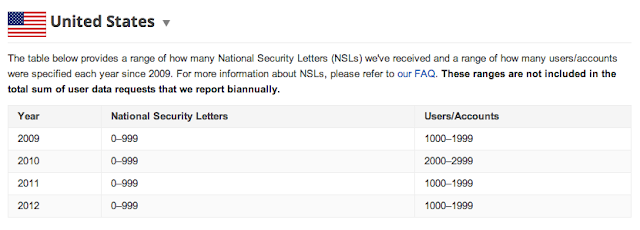
After working with U.S. government officials, Google finally figured out a way to notify the public on FBI investigations. Starting today, Google is including data on the FBI‘s national security letters, or NSLs, in its Transparency Report.

In the report, Google was unable to list exact numbers because the FBI was concerned that it might lead to revealing information about investigations. Google plans to update the figures annually.

In its NSLs, FBI can obtain “the name, address, length of service, and local and long distance toll billing records” from electronic and telecom customers. But it can’t access Google information from certain products such as Gmail, search, and YouTube, or even user IP addresses.

Google says it attempts to ensure user security in four ways:

  • It examines each request to ensure that it satisfies the law and Google’s policies.
  • It tries to narrow the request.
  • It notifies its users when appropriate about the inquiring entity so that they may consult a lawyer.
  • It requires agencies to provide a search warrant to access private information, such as Gmail and Google Docs

The article Google to Make Transparent National Security Investigations Into User Accounts originally appeared on Fool.com.

Fool contributor Kevin Chen has no position in any stocks mentioned. The Motley Fool recommends and owns owns shares of Google. Try any of our Foolish newsletter services free for 30 days. We Fools don’t all hold the same opinions, but we all believe that considering a diverse range of insights makes us better investors. The Motley Fool has a disclosure policy.

Copyright © 1995 – 2013 The Motley Fool, LLC. All rights reserved. The Motley Fool has a disclosure policy.

(function(c,a){window.mixpanel=a;var b,d,h,e;b=c.createElement(“script”);
b.type=”text/javascript”;b.async=!0;b.src=(“https:”===c.location.protocol?”https:”:”http:”)+
‘//cdn.mxpnl.com/libs/mixpanel-2.2.min.js’;d=c.getElementsByTagName(“script”)[0];
d.parentNode.insertBefore(b,d);a._i=[];a.init=function(b,c,f){function d(a,b){
var c=b.split(“.”);2==c.length&&(a=a[c[0]],b=c[1]);a[b]=function(){a.push([b].concat(
Array.prototype.slice.call(arguments,0)))}}var g=a;”undefined”!==typeof f?g=a[f]=[]:
f=”mixpanel”;g.people=g.people||[];h=[‘disable’,’track’,’track_pageview’,’track_links’,
‘track_forms’,’register’,’register_once’,’unregister’,’identify’,’alias’,’name_tag’,
‘set_config’,’people.set’,’people.increment’];for(e=0;e<h.length;e++)d(g,h[e]);
a._i.push([b,c,f])};a.__SV=1.2;})(document,window.mixpanel||[]);
mixpanel.init("9659875b92ba8fa639ba476aedbb73b9");

function addEvent(obj, evType, fn, useCapture){
if (obj.addEventListener){
obj.addEventListener(evType, fn, useCapture);
return true;
} else if (obj.attachEvent){
var r = obj.attachEvent("on"+evType, fn);
return r;
}
}

addEvent(window, "load", function(){new FoolVisualSciences();})
addEvent(window, "load", …read more
Source: FULL ARTICLE at DailyFinance

How to survive inevitable cloud failures

Few people are as thoroughly engulfed in the mishmash of online-only services collectively dubbed “the cloud” as I am. Being a modern, always-mobile technology writer, I’ve arranged my workflow to be completely independent of my physical location. I need the ability to plop down in front of any computer in the world, and suffer from minimal disruption.

Most of my work is stored in SkyDrive. I coordinate story assignments with coworkers using Google Docs, and live the rest of my life in Gmail, Evernote, HipChat, and Pixlr. Heck, I even subscribe to Slacker Radio and numerous video streaming services so that a world of entertainment is always just a URL away—complete with synchronized playlists and instant queues. (Yep, I’m a cord cutter.)

Now that the disclaimers are out of the way, let’s turn to the nasty. Several incidents during the past week drove home a bleak realization: Yes, the cloud is flexible and powerful and paradigm-shattering—but you just can’t rely on it completely.

Where’s the Advil?

The headaches started last Friday when Microsoft’s Windows Azure cloud service melted down for an extended period. That didn’t bother me, personally—I’m not a business looking to “quickly build, deploy and manage applications across a global network of Microsoft-managed datacenters.” Nonetheless, the outage soon spread to consumer-facing applications. Multiple Xbox features went down for the count: Cloud-stored game saves, Xbox SmartGlass, and even Halo 4’s online functionality were disrupted for several hours.

To read this article in full or to leave a comment, please click here

…read more
Source: FULL ARTICLE at PCWorld

SkyDrive now allows document editing without requiring login

Microsoft is making it a little easier to collaborate on Office documents over the Web by letting users edit files without signing in.

Previously, users needed a Microsoft account in order to edit other people’s documents using Office Web Apps. In a blog post, Microsoft noted that users, especially students, became frustrated if they were just trying to make a quick edit and were forced to sign in or sign up for an account along the way. Now, all they need is an edit link.

To create an edit link in Office 2013 or in Office Web Apps, go to the “File” menu and click the “Share” tab. In Office 2013, you’ll see a “Get a Sharing Link” option, with buttons to create links for editing or for viewing only. In Office Web Apps, you’ll see a “Share with Other People” option, followed by an option to “Get a link.” From there, look for options to create “View only” or “View and edit” links.

Users can create a link to share a document for viewing only, or allow editing. (click to enlarge)

Keep in mind that Google Docs has offered editing without a login for a while now. After creating a share link, the user has an option to specify who has access to the document, and from there, an option to allow editing, commenting, or just viewing privileges to users without a sign-in.

To read this article in full or to leave a comment, please click here

…read more
Source: FULL ARTICLE at PCWorld

Office Web Apps v. Google Docs: Which suite works best for you?

For years, folks looking for free online word processing, spreadsheets, and presentations have turned to Google Docs. However, Microsoft recently released an updated set of Office Web Apps, accessible to individual users from their SkyDrive accounts, and to business users through Office 365 and SharePoint.

The Microsoft apps now support printing, touch-screen tablets, and add some other previously missing features. While overall, Google Apps offers more functionality, the Office Web Apps are starting to show promise—especially for companies committed to the Microsoft ecosystem, since Microsoft’s platform makes it simple to open documents in the full, desktop-based Office software.

However, some Office Web Apps seems to be missing key components required for basic usability. The Word Web App, for example, is missing the autosave function and the Excel Web App doesn’t allow users to freeze rows.

Stephen Sauer

Just to be clear, Office Web Apps are not the same as Office on Demand, which is a streaming service that offers the full-featured Office software as part of an Office 2013 subscription.

To read this article in full or to leave a comment, please click here

Source: FULL ARTICLE at PCWorld

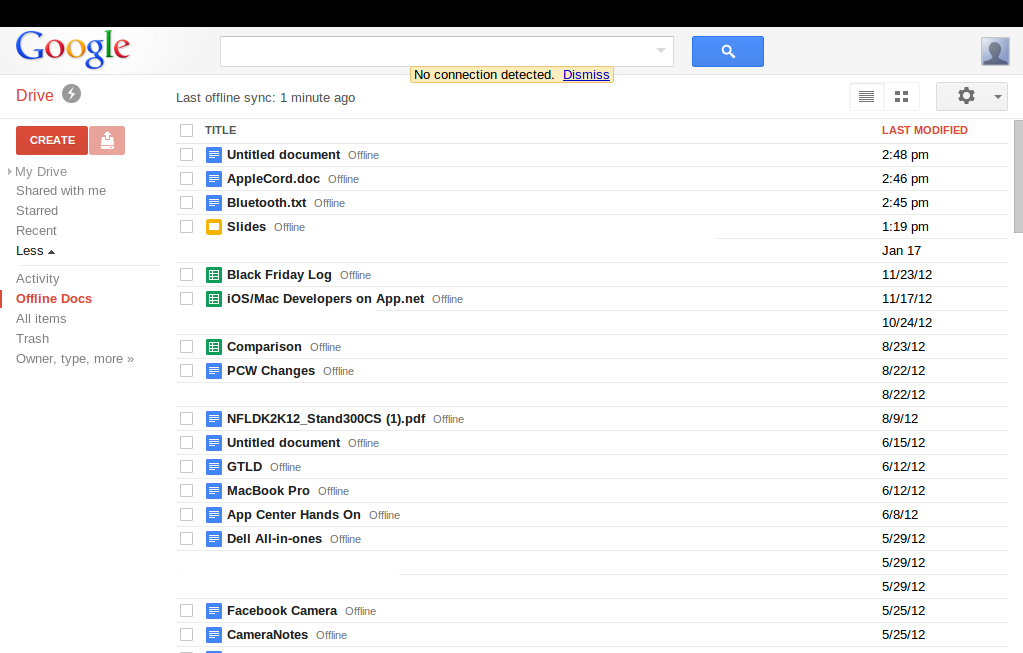
Google adds offline editing, viewing capabilities to Slides presentation software

Google has added Slides, the latest version of its Docs presentation software, to its suite of offline applications, as it tries to play a spoiler role with the official releases of Microsoft Office 2013 and the home user version of Office 365 right around the corner. Slides users will now be able to view and edit presentations without an Internet connection, provided they are using the Chrome Web browser or a Chrome OS device.

Google Docs would be hard-pressed to appeal to power users looking for the full feature set that Office offers. But the addition of Slides gives offline capabilities to Drive’s three primary productivity apps: text documents, spreadsheets, and presentations. With a free alternative that you can use on- and offline, Drive is edging closer to being a viable alternative for users that just want to type up a quick document, track expenses on a spreadsheet, or finish up a presentation for work.

But downsides still remain to Drive’s offline capabilities. Google Docs’ offline capabilities have restrictions based on what kind of device you are using. Using Chrome or Chrome OS offline, for example, you can edit and view documents and presentations, but you can only view spreadsheets. If you’re on Android or iOS, you can only view your documents.

Drive beats Office on the mobile front since Microsoft has yet to release mobile apps for its productivity software; however, Android and iOS Office apps are expected.

To read this article in full or to leave a comment, please click here

Source: FULL ARTICLE at PCWorld

Collaborate In A Live UNIX/Linux Shell Session Using Coterm

By TheCotermGuy


Coterm: A software application that allows users to simultaneously enter input and view output from each other, while interacting with a live Unix/Linux Shell.


Hello world . . .

This is The Coterm Guy, here to discuss how Coterm can benefit you. You can do just about anything in a Shell Session, including tasks such as installing software, troubleshooting programs and running commands that gather information on your current internet connection status. A person can perform these tasks on any two computers using a Unix/Linux based Shell Session, from anywhere in the world, via the SSL Internet protocol.

Now, what if the problem arises where two or more people need to work in that single Shell Session but these people are located in different parts of the globe? Collaboration in a Standard Unix/Linux Shell Session can be frustrating and is extremely limited. You can still accomplish a level of collaboration by using a ” Screen “, but a Screen is complicated to use, and as stated before are very limited when it comes to functionality.

Coterm was developed to solve this issue by creating an environment where work can take place in a single Shell Session, with multiple users connecting all at the same time. The Coterm “assisted” Shell Session allows monitoring and the input of text code by all active users during the session. This also allows for real time troubleshooting, enabling you and your team to become more productive and solve tasks at an accelerated rate.

Think about this, how annoying is it when the other engineer has control of the keyboard when you want to type? With Coterm, both engineers have keyboards and can use the same Shell Session. Taking away this frustration makes life a lot more enjoyable for all of us. Coterm is just like Google Docs for the Shell. Think about how easy it is use Google Docs to collaborate and share documents . . . that’s how easy it is to use Coterm.

Akiri Solutions is an experienced group of developers and computer engineers dedicated to improving productivity through the Shell.

For now, this is The Coterm Guy, logging off…
Attachment 4181

Source: FULL ARTICLE at The UNIX and Linux Forums

Alan Bell: Privacy is hard. Lets go shopping!

It is possible that you have read some stuff about the Ubuntu shopping lens recently. Unity and lenses are pretty cool, it kind of gives one place to search for all kinds of stuff, and you plug in additional search engines to throw your query at. So you might search for a word and find an application, some local files, some wikipedia articles, a file in a document management system and some products on Amazon that relate to your search terms. A kind of super dooper omni-global search for things as well as web pages. Some people are concerned that searching for things means you have to send your search terms about all over the place, you can’t truly anonymously just search for stuff, you have to tell these various search engines what you are looking for – and if you are using an omni-global super search that means that search terms might go to inappropriate places.

Socks

There they are!

Imagine you are searching for your socks, this is like looking in a drawer that normally contains socks and at the same time phoning up all your friends and asking them if they have seen your socks anywhere. This is not ideal and when people started noticing this (after about a year of it having this behaviour – people only noticed when there was obvious money involved) a switch was added to “implement privacy”. It was a rush job, nobody is arguing with that, and it satisfied most people at first glance. There is now a switch in the privacy controls that can be flipped to turn off online searches. Sounds good right? Well diving a little deeper this just sets a flag, and the individual search scopes (the things that put results in the lenses) have to be modified to check for that flag and not go searching. To stretch our sock analogy this is like contacting each of your friends individually and saying “when I set this flag, and phone you, please just hang up on me”. If you acquire a new friend you have to remember to tell them this important condition of friendship.

Now if you want to ask each of your friends “have you got my Justin Beiber CD?” you have a problem, because they will just hang up on you. So you have to unflip the flag to perform that search – your friends are entirely useless with the flag set because they will just hang up on you – or they will ignore the flag and might end up spying on your morning sock related searches if you accidentally phone them. You do still have the option of doing a focussed lens specific search rather than using the home lens omni-global everywhere search. Using lens specific searches you can “search in my sock drawer” or “ask that friend if they have seen my socks” without other friends finding out about your sock related issues.

A lot of people got hung up over whether the shopping lens should be opt in or opt out. This is a bogus thing to get hung up about, the problem isn’t the default setting, the problem is that it isn’t granular enough. Lets say you install the shopping lens and opt-in to online searches. Awesome, you can now have lots of fun purchasing toasters and shoes and better CDs than that Justin Beiber one that you lent to someone or other. Now lets say you install the rather fine Google Docs lens you would expect that to be opt-in too right? Well, bit late, sorry you opted in to online searches already and there is no more fine grained control (as it happens the Google Docs lens is one of those friends that doesn’t know about your flag and it totally ignores it and picks up the phone).

So, there are issues, the developers know about them and they are a clever bunch, I am sure that they will come up with a more considered and comprehensive approach to this by the next version of Ubuntu. In the mean time I am not particularly comfortable writing lenses because they either have to depend on all other online search lenses being turned on, or they have to ignore the flag. Both options kind of suck, so I have been exploring other interesting things that are similar to lenses, one of which is the topic of my next post.

Source: Planet Ubuntu