Tag Archives: IRC

Inland Real Estate Corporation Announces Addition of Ross Dress for Less® at Rivertree Court in Vern

By Business Wirevia The Motley Fool

Filed under:

Inland Real Estate Corporation Announces Addition of Ross Dress for Less® at Rivertree Court in Vernon Hills, Ill.

OAK BROOK, Ill.–(BUSINESS WIRE)– Inland Real Estate Corporation (NYS: IRC) , a publicly traded real estate investment trust that owns and operates high quality necessity and value based retail centers in select markets in the Central United States, today announced it has executed the final phase of its redevelopment of the Rivertree Court shopping center in the Chicago suburb of Vernon Hills, Ill., with the addition of a new Ross Dress for Less store (Ross). Ross is one of the largest off-price apparel and home fashion chains in the United States and has signed a lease to occupy 26,555 square feet of space at the center.

“We’re pleased to provide Ross Dress for Less with an attractive space for one of its newer stores,” said Scott Carr, chief investment officer of Inland Real Estate Corporation. “Our shopping centers are community staples, presenting strong locations for Ross Dress for Less to enter the market.”

The Company also recently signed leases with Pier 1 Imports for a 10,400-square-foot space and Shoe Carnival for an 11,250-square-foot store at the center.

The addition of these tenants, scheduled to open in late 2013 and early 2014, will complete IRC‘s repositioning of Rivertree Court, located at 701 Milwaukee Ave. in Vernon Hills within a high-traffic retail shopping hub in a growing area of upper-income housing. Tenants at the center include Gordman’s, Office Depot, Old Navy, Michaels, T.J.Maxx, Ulta and Five Guys Burgers & Fries.


About Inland Real Estate Corporation

Inland Real Estate Corporation is a self-administered and self-managed publicly traded real estate investment trust (REIT) that owns and operates open-air neighborhood, community and power shopping centers and single-tenant retail properties located primarily in the Central United States. As of December 31, 2012, the Company owned interests in 157 investment properties, including 44 owned through its unconsolidated joint ventures, with aggregate leasable space of approximately 15 million square feet. Additional information on Inland Real Estate Corporation is available at www.inlandrealestate.com.


<br …read more
Source: FULL ARTICLE at DailyFinance

Progress? It depends on your perspective

I had a disturbing discussion with a family member recently. There were no arguments over facts; we agree on the facts underlaying our discussion. Yet I was shocked at how discouraged he was by the state of the world, and the prospects for progress. No matter what examples I raised, he had more examples which convince him that we’re moving backwards. Neither of us managed to convince the other to change their mind. That part wasn’t unusual! But I’m unused to encountering this negative view of the universe. I live in the US, and I know that our politics is full of fail!

In the FOSS community, I rarely come across this depressed perspective. In fact, quite the opposite. So I’ve been thinking about why this is. Perhaps it is because we are involved in changing the world! After all, we aren’t just building and distributing free software; we’re showing the world that freedom and friendship work. We constantly demonstrate that we can cooperate; with team members, with up and downstreams, with for-profit companies and with non-profit groups, with government and educational groups, and on and on.

We promote freedom, we promote equality, we promote quality. We constantly develop new friendships, we pay attention to our users, and those users help us help them by filing bug reports, cooperating with quality initiatives, by testing, by donating money. We learn to promote our projects, learn to give talks, speeches and reports, learn to build websites, write documentation, learn to communicate in multiple venues, and even learn to recognize bad behavior by friends and team members, or maybe even burnout in our own lives. And of course, we learn what to do in those tough situations, along with dealing with bugs in our software, crochety hardware and processes, or outdated techniques.

I’ve been reading a book about increasing brain fitness, (bad title warning): Make Your Brain Smarter, by Sandra Bond Chapman which might shed some light. In the section about innovation and creativity, she says you:

incite innovation … when you: … broaden and revamp your perspectives… by reading different types of books, exposing yourself to different types of people…. Dismantle old linkages of information to allow new thoughts to brew, ponder free-flowing ideas, consciously … convert ideas into deliberate change [and] reflect and learn from mistakes — quickly. [p. 115]

This is what I see in Linuxchix, in the KDE and Kubuntu teams I work in, and on the lists, forums, planets, and in IRC. I hear new perspectives, hear about books, hear from new people, and different people, see new ideas, and old ideas blown up, and see how immediate feedback improves quality fast. Every day!

I think these experiences explain the difference between hope and despair between my family member and me. Not only do I see many groups in my country and around the world who are making a difference, I’m part of a great movement which is improving the world. …read more
Source: FULL ARTICLE at Planet KDE

Flavia Weisghizzi: Outreach report (part II)

During the first part of my OPW, I spent much of my time in investigating the issues newcomers could encounter in approaching FOSS. Results of my work, are available here.
Starting form these results, I’ve spent some time in second part of my internship in studying how to apply what I’ve discovered in the GNOME environment.
I’ve tried to provide some answers to the questions I met: I share with you the result of my work.

Classification of newcomers.

I’ve try out that newcomers could be generally set in three type:

Type A: Enthusiastic

An Enthusiastic newcomer is a great passionate of GNOME, is a GNOME user and generally decides to use some of his time to give a hand.
He has not a well established idea about what he can do, but he wants to contribute.
Probably he’ll start to follow as much ML as he can, join IRC channel, proposing himself for every task.
What he really needs is a guide not only a Mentor, but someone who can address him to the right team,   supply some indication about guidelines and more important, give him some task to do, that could help him to perfectly feel himself as a part of community.

Risks and potentialities: An Enthusiastic newcomer is proud to serve the project he chose, is very participative, but his outburst risks to burn away and fall very quickly, if he doesn’t find the right way to  take part of community.

Type B: Passionate

A Passionate newcomer is a volunteer provided of some experience in GNOME world.
He could be a GNOME user, and very often he came from other FOSS projects.
He desires offer his capabilities and some amount of his time in developing some specific part of project.
What he really needs is to find well defined task to do and some people who could steer him in early days.

Risks and potentialities: A Passionate newcomer is usually a professional who has little time to spend, but can offer a significant know-how. Generally his contribute is not daily, but often very relevant and long-lasting.

Type C: Technician

A Technician newcomer approach a community bringing a great experience.
Usually he has a technical background and is a first class citizen in FOSS world.
Coder or not coder, he has a great familiarity with community tools.
What he really needs is to find well written documentation and guidelines, and some project in which he cans easily take part.

Risks and potentialities: whatever be the know-how brought by a Technichian newcomer, it will be valuable; the main risks involve only the capability of newcomer to integrate his knowledge to work-flow.

Howdy, newcomer!

A very relevant issue we should take in consideration, is how a newcomer joins GNOME.
My personal opinion is through IRC Channels.
A direct contact is always the best, IMHO, but IRC Channels can’t be enough to provide detailed info.
This should be the role of gnome.org/ gnome.org/get-involved/ pages.
I’ve been really pleased to notice that design renewal of the site occurred …read more
Source: FULL ARTICLE at Planet Ubuntu

Nicholas Skaggs: Beta Testing Extraordinaire with Ubuntu Quality

The quality team invites you to a testing event for the final beta iso images. We’ll be providing real-time help (IRC, or even one on one video hangouts if needed), encouraging you to download the final beta images, install, upgrade and test them out with us. You only need yourself, a machine (virtual or real!) and a bit of willingness to learn. We’ll even be broadcasting for part of the event on ubuntuonair. So here’s the details you need to know:

Tuesday April 2nd, 2013

  • 1800 UTC – 2200 UTC 
  • Quality team members are dedicated to hanging out in #ubuntu-quality executing testcases and helping answer questions
  •  2000 UTC: 
    • We’ll be streaming live on ubuntuonair doing live testing demos and offering help
    • Basic iso test install
    • More exotic examples — netboot, server, non-english
    • Your requests!

    Interested? Great, mark the time and date on your calendar and check out the tutorial here to get a leg up on what you’ll be doing during the event.

    Can’t make the 4 four window? Don’t worry! Give testing a whirl anyways, and feel free to ask on #ubuntu-quality, and our mailing list for help.

    See you on Tuesday!

    …read more
    Source: FULL ARTICLE at Planet Ubuntu

    Ubuntu Podcast from the UK LoCo: S06E05 – The Good, The Bad and the Ubuntu

    Digg This

    We’re back! More cake. More chat. We’re Alan Pope, Mark Johnson, Tony Whitmore, and The Podcats. We’re here in Studio A for the fifth episode of Season (Series) Six of the Ubuntu Podcast from the UK LoCo Team!

    In this week’s show:-

    Please send your comments and suggestions to: podcast@ubuntu-uk.org
    Join us on IRC in #ubuntu-uk-podcast on Freenode
    Leave a voicemail via phone: +44 (0) 203 298 1600, sip: podcast@sip.ubuntu-uk.org and skype: ubuntuukpodcast
    Follow our twitter feed http://twitter.com/uupc
    Find our Facebook Fan Page
    Follow us on Google Plus
    Leave us some segment ideas on the Etherpad

        Stumble Now!  Buzz This  Vote on DZone  Share on Facebook  Bookmark this on Delicious  Kick It on DotNetKicks.com  Shout it  Share on LinkedIn  Bookmark this on Technorati  Post on Twitter  Google Buzz (aka. Google Reader)  

    …read more
    Source: FULL ARTICLE at Planet Ubuntu

    git.kde.org will be back and what you should be aware of

    As you might have been aware of by now, git.kde.org broke down. Sysadmins are working hard to get it back online.

    And soon it will. Now here is the problem: It could be possible that the last commit on git.kde.org for your repo isn’t that up to date as it should. If that happens and you try to force an update to your local clone and you notice an issue, then

    please immediately notify the sysadmins without doing anything else

    So they can try to find the difference between your local version and the git version.
    Ideally you should also stay away from scratch repos until further notice.

    It would look like this:

    name@local:~/dev/src/kf5{frameworks}$ git fetch
    From git://anongit.kde.org/kdelibs
    + abd4e22...6ae50bc frameworks -> origin/frameworks (forced update)
    + 67939b1...9c6a5be master -> origin/master (forced update)

    You can reach them on freenode via IRC on channel #kde-sysadmin or on their internal mailinglist sysadmin@kde.org

    …read more
    Source: FULL ARTICLE at Planet KDE

    Testing, another way to help your favorite FOSS project

    I’ve done some testing before, but this time I want to document it here, so I can come back later and remind myself of some of the critical steps, and so others new to testing can get the confidence to start contributing in this way as well.

    I’m lucky in that I have some extra computers I can use as testing machines. But when I didn’t, I used virtual machines, and those aren’t too difficult to set up. However, I’ll discuss that another time.

    In general, please read the /topic in your development IRC channel, then ask about testing, or join the testing channel if there is one. Often you’ll be given bug numbers to test for a specific package — please be sure to comment completely in the actual bug report, not just give feedback in the channel. Be sure to ask what information is necessary. ISO testing is another place where folks are needed; again, your devel channel /topic should give you some good information. And don’t forget to join and read the relevant lists as well; no one can be in IRC all the time.

    Right now, some packages need testing in the next distribution release. I prefer using the command line for things like this, because 1. in the console, upgrades happen “under” the desktop, so config files are updated cleanly, and 2. it is much faster. So first, the upgrade.

    If your computer is already on, log out of your session. At the login screen, rather than typing in your password, hit Control + Alt + F2. Then log into first your computer with your username and password, then

    sudo update-manager -d

    This updates all your repositories to the development release. Next, the start the actual upgrade:

    sudo do-release-upgrade -d

    You’ll have to OK a few things, so it’s not entirely unattended. After the packages are all downloaded, the upgrade still takes quite awhile. Sometimes I start this at night, and just check on things in the morning.

    Next, you’ll need to install the package, or build the application from a tarball, or source. Depending on your distro tools, this might vary a bit.

    Building from source

    For Amarok, Myriam has a great blog post about how to build from git: http://blogs.fsfe.org/myriam/2009/09/26/compiling-amarok-from-git-locally-full-summary/, so I won’t cover that. If you doing a local build of a different package, the steps will be similar. Consult the documentation for details.

    Install from a PPA

    To install a package from a PPA, in Debian-based distros, there is an easy way to add it (addrepo in Debian):

    sudo add-apt-repository ppa:

    This will download and register the public key, as well as adding the repository. Then you can simply install the package via the command line or using the GUI tools you prefer.

    Build from a tarball

    To get the tarball, cd to the directory …read more
    Source: FULL ARTICLE at Planet KDE

    Jono Bacon: Recent Ubuntu Community Refinements

    Our community is at the heart of how we build Ubuntu. Recently there were some concerns expressed about some aspects of our community and I have been working with various community members and internally at Canonical to resolve some of these issues to make things smoother.

    I just wanted to summarize some updates:

    • Regular, transparent planning – we want to improve how we plan the delivery of work items, and make that planning more nimble. While the major decisions are reserved for primary discussion at UDS, we want to regularly and transparently checkpoint progress on those projects, and ensure things are moving along. To do this the engineering managers at Canonical will perform this planning on a monthly basis with our community. An an example, with my team, we will decide at UDS what major projects we will work on and document the work items in those blueprints, and every month I will ask the team to commit to delivering an agreed set of work items that month and update the blueprints accordingly. This will make it easier to understand who is working on what, what needs to be done, and areas in which people can participate. This entire process will be completely open and transparent and I would like to encourage our wider community to use the same approach. As an example, this could be a useful technique for our LoCo community to use for planning their work too around advocacy campaigns. All of this work will continue to be tracked openly in status.ubuntu.com.
    • Training our engineers – our engineers at Canonical are expected to openly and transparently perform all work that is not considered customer/company confidential. While this expectation is clear, there are sometimes cases when this doesn’t happen (e.g. if someone joins Canonical without the experience of working in an open environment and isn’t really sure how to do this). I have prepared an internal slide deck with these expectations and workflows clearly laid out; my team will be working to ensure everyone gets the deck, reads it, and gets an answer to any of their questions.
    • Regular leadership problem solving meetings – one problem we have today is that we don’t have a regular problem solving meeting in our community in which our governing leaders are present at. Instead our different leadership boards (e.g. Community Council, Forums Council) tend to resolve issues pertinent to that specific board. We think it could be useful to have a meeting every two weeks that has representatives from our different governance boards and our community can join and raise topics for discussion. We are going to run the first one of these sessions tomorrow (Tue 19th March 2013) on Ubuntu On Air at 8pm UTC. We invite you to bring your topics there on IRC for discussion.
    • Online UDS refinements – as I blogged about last week we have released a survey to gather feedback about how to refine and improve UDS. We have already made some plans for some improvements but …read more
      Source: FULL ARTICLE at Planet Ubuntu

    Konversation 1.5-rc1 (KDE Chat Application)

    Thumbnail

    Konversation 1.5-rc1
    (KDE Chat Application)
    Konversation is a user-friendly Internet Relay Chat (IRC) client built on the KDE Platform.

    — What’s new —

    1.5-rc1:
    Konversation 1.5-rc1 is the first test release for our next major release. The 1.5 development cycle has lead to significant new features in many areas of the application, from support for SASL and client certificate authentication on the protocol side, to all-new topic management UI, overhauled authentication UI, per-tab spell-checking language settings, user-configurable nick context menu entries and mouse spring-loading in the frontend and all-new versions of major bundled scripts. Improved Ignore, Watched Nicknames and Edit Paste functionality and behavior, performance improvements in some critical codepaths and many other bug fixes and minor UI touch-ups round things out.

    1.4:
    The dominant theme in Konversation v1.4 is improvements and feature additions to the user interface, particularly to text views, dialogs, (context) menus and input line commands. However, nearly all areas of the application have seen some amount of improvements in this release, as is to be expected given the relatively long relase cycle: Connection behavior, IRC protocol handling, scripting support, encryption support, user documentation – new features, polish and certainly also bug fixes are to be found in all of them. In summary, we hope you will enjoy the best Konversation yet.

    — Essential links —

    Konversation’s website: http://konversation.kde.org/
    Wiki: http://userbase.kde.org/Konversation
    Report bugs and wishes at: https://bugs.kde.org/enter_bug.cgi?product=konversation
    Older releases: http://konversation.kde.org/wiki/Releases

    changelog:
    Changes from 1.4 to 1.5-rc1:
    * The user interface for the Auto Identify settings in the Identities dialog has been extended by a combo box that allows choosing the type of authentification to be performed. Depending on the chosen type, different input fields are shown below the combo box.
    * The server password-based authentification supported by some networks is now configurable in the Identities dialog as well, making it more discoverable and allowing to keep Auto Identify settings generally with the Identity rather than requiring going through the Edit Server dialog.
    * SASL PLAIN authentification is now supported. To use, pick SASL as the Auto Identify type in the Identities dialog and fill in your account name and password.
    * Standard NickServ authentification has been further improved. The command sent to to the service, previously hard-coded to “identify”, is now configurable, and the name of the service now defaults to “nickserv” in new identities (the previous default was an empty field).
    * Added support for authenticating via a SSL Client Certificate in the form of a PEM file if Konversation is built against KDE Platform v4.8.3 or higher. Choosing this type of authentication in the Identities dialog forces SSL to be enabled for a connection, overriding any server settings.
    * Added the ability to set a different spell-checking language for every tab, from the context menu of the input box. The chosen language setting is preserved across application restarts.
    * The Topic tab …read more
    Source: FULL ARTICLE at KDE Apps

    Dennis Kaarsemaker: Irssi for X-chat refugees

    I’m a pretty horrible terminal junkie. As a large scale sysadmin, my life is spent mostly in a terminal, either fixing problems or writing puppet recipes to prevent them. I also manage mail with mutt (though I still mostly read it with evolution) and my favourite editor is vim.

    As such, it’s rather odd that I use X-chat for IRC, with a bouncer on my VPS, instead of using irssi in screen. Truth is that I’ve tried to switch from X-chat to irssi many times, but never could get used to it. A week ago I tried again. Determined to make it work this time, I started off with searching a theme that resembles X-Chat. A quick search uncovered Anton Fagerberg’s irssi setup, including an X-chat theme.

    /set theme xchat
    /set indent 25
    /set autolog yes
    /set join_auto_chans_on_invite no
    /set show_names_on_join off
    /set channel_sync off

    That made a world of difference! I felt a lot more at home already, so was quite motivated to really dig into what was left that annoyed me and fix all those issues. Step one was the nicklist: I really wanted it back. Even in larger channels, where it is less than useful, I like to see and browse through the list of nicks. And on our corporate jabber rooms (yay bitlbee) I find it essential. Fortunately there is a script available that can abuse screen to do this. Problem sorted.

    /script load nicklist.pl
    /nicklist screen
    /set nicklist_automode SCREEN
    /set nicklist width 24
    /bind mup command nicklist scroll -1
    /bind mdown command nicklist scroll 1

    Next up was the list of windows. In X-chat I always use the channel tree view to get a quick overview of activity. In irssi I’ve always found this utterly impossible, the constantly changing window numbers always made me abandon it. A bit of searching, and I found that irssi can assign static numbers to windows. Problem solved! Or so I thought… irssi would now use the gaps in numbering to assign new windows to. This being the last thing to hold me back from really switching to irssi, I went ahead and dove into the code to find a solution. None existed, so I patched irssi myself. The patch adds an option to create new windows at the end of the list, or even at a much higher starting number. New windows now are numbered 200 and up, making it trivial to identify private messages.

    /set windows_auto_renumber off
    [... renumber all windows to my liking ...]
    /set create_windows_at_end on
    /set autocreate_window_min_refnum 200

    My irssi setup was now usable! I didn’t even want to switch back to X-chat, so victory could be declared there and then. But irssi is much more flexible, so why stop here? Another neat trick from Anton’s page is the go.pl script. /go ubu would bring me to #ubuntu. Except it didn’t, so I patched the script to make that work. As a bonus /go off now works for taking me to #ubuntu-offtopic. I find …read more
    Source: FULL ARTICLE at Planet Ubuntu

    Randall Ross: This Is Ubuntu Community!

    When you think of Ubuntu community, what comes to mind?

    Do you think of people huddled over keyboards, staring at dimly lit screens and IRC channels? Do you think of programming? Do you think of squabbling? In-fighting?

    I don’t.

    When I think of Ubuntu community, I think of people who love to get together to celebrate the world’s most collaborative project. I think of people who share the ethos that “we are all one.” I think of people giving up their Saturday afternoon to do something to spread Ubuntu to those who have never heard of it. I think of the person seeing Ubuntu for the first time and falling in love with technology again.

    Last week, I kicked off the first meeting of the “Ubuntu Evangelists,” a new swat-team of Ubuntu folks who know how to instill passion in others and how to raise the enthusiasm for Ubuntu in the circles they travel. And, a side-effect of this meeting was my new friend Rudy in Paris sharing this fun video. Give it a watch and then tell me in the comments that Ubuntu is anything other than amazing!

    Thank you Rudy for spreading enthusiasm and showing other Ubuntu people what this is all about!

    Are you an Ubuntu Evangelist? Do you want to see Ubuntu everywhere in your lifetime? When cut, do you bleed Pantone 1665?

    Join us! Spread your passion for Ubuntu. Help tilt the earth’s axis. We’re here: https://launchpad.net/~ubuntu-evangelists


    Do you have a photo or video of your Ubuntu community having fun? Share it with me in an email or comment here.

    …read more
    Source: FULL ARTICLE at Planet Ubuntu

    Elizabeth Krumbach: LoCo Team Portal Improvements Released

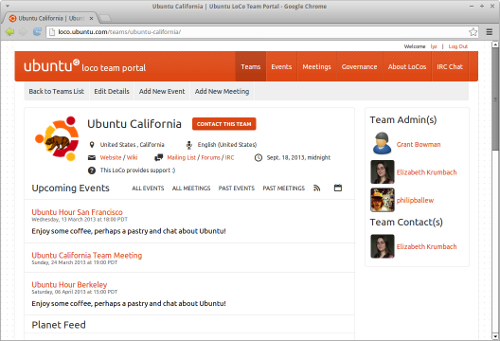
    Several weeks ago, Adnane Belmadiaf (daker) found me on IRC and gave me this exciting link: https://launchpad.net/loco-team-portal/+milestone/0.3.11

    47 LoCo Team Portal bugs with fixes committed. He let me know that the new version would be coming out soon and gave me a sneak peek at the new layout. Soon came on March 11th when 0.4.0 rolled out with an additional 19 bugs fixed, wow!

    In addition to the high priority bugs, he tackled bugs my LoCo members had mentioned to me, like No easy way to find a Past Meeting and dozens of “low” priority and wishlist items, like including team blogroll or planet to the team pages (still need to work with the LoCo Council to get feeds added). On top of this, we have a new interface! Gone are those icons no one understood, we now have text links to mailing list, website, forums and more. When you start browsing around you’ll see that there has been a pretty extensive rewrite of the UI.

    I’m also loving the spiffy new event page:

    Huge thanks to Adnane for his commitment to this project and to Canonical IS for the work deploying the new release. The portal is hugely important for my team and many others, so it’s good to see it’s in good hands.

    If you’re interested in helping him out (he’s super friendly to work with!) I wrote a blog post here back in September about how to deploy a development version using Vagrant and the necessary Django goodies to get you started. It’s probably a bit out-dated but if you swing by #ubuntu-website and ask for some help there are usually folks who can point you in the right direction.

    …read more
    Source: FULL ARTICLE at Planet Ubuntu

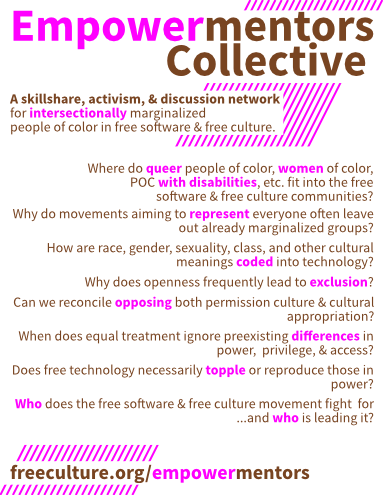
    Danny Piccirillo: Upcoming first meeting of the Empowermentors Collective: intersectionally marginalized POC in free software & free culture!

    The

    After taking an availability poll with our current active participants, our first meeting is scheduled for Sunday, March 24th at 12:00 pm eastern time in the #empowermentors IRC channel on Freenode. Also, please join us at this year’s LibrePlanet conference for a casual dinner meetup!

    Our first meeting will provide a space for everyone to get to know one another; share announcements, projects, and events of interest; and discuss the activities and direction of the collective.

    Current meeting agenda items:

    • Introductions
    • Personal plugs, announcements, events and projects to share
    • Open vs closed email list/IRC channel
    • Email list or other space for allies
    • Need for website/blog?
    • Established activities:
    • Videos to transcribe
    • Software bugs
  • New activities:
    • Alternative tech terms list (to “crippleware”, “master/slave”, “male/female plugs”, etc)
  • Your idea here!
  • To propose another item, please subscribe to our email discussion list or say hi on IRC. If you would like to learn more about our group, you can read about what we do and what motivates us on the LibrePlanet wiki:

    We provide a space to:

    • Meet and talk to people with a common interest and shared experiences in free culture and free software.
    • Develop and share our skills and knowledge around free software and free culture.
    • Identify, expose, and organize to confront issues of oppression within the free software and free culture communities.
    • Expand our own philosophy at the cutting-edge of feminist, queer, critical race, and cyborg theory.

    This opens up greater potential to:

    • Form coalitions with other causes of importance to us.
    • Create a free culture and free software movement that fights for us.
    • Bridge the free culture and free software movement with our contemporaries in the critical intersectional analysis of oppression, hierarchy, and domination.

    Please spread the word and pass this on!

      …read more
      Source: FULL ARTICLE at Planet Ubuntu

      Tanglu

      A new logo?

      Hi everyone!

      Today I make an announcement I thought I would never ever make. But things changed.

      Discussion about this has a long history, starting as a non-serious suggestion at DesktopSummit 2011, continued with people on IRC, but it was decided back then that it wouldn’t be worth the effort. This has changed too, and a small team has formed to work on it.

      We hereby announce Tanglu, a new Debian-based-Linux distribution.

      Why do we need another one? Let me explain the concepts of that distro:

      Tanglu will be based on Debian Testing and follow the Debian development closely. It will have a 6-months release-cycle and it’s target audience are Linux desktop users. We will make installing and setting up the distro as easy as possible.

      Tanglu will be usable for both developers of upstream software and the average Linux user and Linux newbie. This is possible because in our opinion developers and users don’t have different needs for a desktop system. Both kinds of users like a polished desktop which “just works”. We will not apply all kinds of fancy modifications on upstream software, we will basically just distribute what upstream wrote.

      Tanglu is designed to be able to solve the issue that Debian is frozen for a long time and Debian Developers can’t make new upstream versions available for testing easily. During a freeze, DDs can upload their software to the current Tanglu development version and then start the new Debian cycle with tested packages from Tanglu. The delta between Tanglu should be kept s minimal as possible. However, Tanglu is not meant as experimental distribution for Debian, so please upload experimental stuff to Experimental. Only packages good enough for a release should go into Tanglu.

      Ideally, Tanglu and Debian should be working well together in mixed environments, where you for example have Debian servers and multiple Tanglu desktops with the new software, targeted at desktop user. Since the differences between Tanglu and Debian should not be very high, administering both systems should be very easy (if you know Debian).

      Tanglu will be an open project, driven by community. At the beginning of each cycle, people can make suggestions for release goals they want to implement (Similar to Fedora, but without FESCo). These proposals are discussed in public and are rejected if there are major technical concerns. If consensus about a certain proposal is lacking, a vote is done for it. The proposal can be accepted with absolute majority. If this does not happen, the proposal is postponed for the next release, where people can vote for it again. If nobody wants that function, it is rejected. In general, decisions made by Debian are superior and have to be followed.

      We don’t think we know every package and every software better than the original upstream. That’s why it makes much sense to rely on feedback from others and to have a community-based and peer-reviewed distribution, instead of secretly developing stuff and dumping it on the community. Tanglu will have a highly predictable set of features, defined at …read more
      Source: FULL ARTICLE at Planet KDE

      Xubuntu: Want to help out Xubuntu? Test Raring!

      It’s again the time to call for more testers – Xubuntu Raring beta 1 is around.

      Why help with testing?

      Testing is an excellent and easy way to get involved with Xubuntu. It’s a vital part of our release cycle and anyone with a virtual machine (or even better, a spare computer!) can help out with it. When you do testing you will work with most of the people involved in Xubuntu. Don’t be afraid, we won’t bite you!

      What do I need to do?

      There are different ways of testing the ISOs for all of our releases. Here’s a quick overview of the different tests we need to run:

      1. Installation testing to make sure our ISO’s are installable
      2. Live CD testing to make sure the live CD environment works as expected (and to make sure persistency works on live USB)
      3. Post-installation testing to make sure our applications work as expected
      4. Upgrade testing to make sure upgrades from old releases work as expected

      All the results from different tests are reported and recorded on the Ubuntu ISO Tracker. You will need a Ubuntu Single Sign-On account to log in and send results.

      Finally, to run a test and report it so it helps the Xubuntu team, you need to do the following:

      1. Go to the Ubuntu ISO Tracker and Log in
      2. Click Raring Beta 1 and select your infrastructure from the Xubuntu product at the bottom of the page
      3. Download the appropriate ISO (see Link to download information at the top of the page for download links as well as zsync commands)
      4. Select a test you want to run – it’s best to start with an installation test and then advance to post-installation tests to get the most out of your time
      5. On any test page, you should see the testcase instructions (if you don’t, click on Testcase) and follow them step by step
      6. If you find bugs while running the test, add them to the report and if they don’t exist, file them
      7. In the Bugs to look for section you will see bugs that people have been experiencing with the same test before – specifically look out for these
      8. Once you’ve finished with the testcase, report your results; select the overall result for the test and list any bugs you experienced during testing. Remember to click Submit result when you’re done – if you don’t do this, the Xubuntu team doesn’t get any benefit from the test!

      Need more information or help?

      All of the different testing areas for Xubuntu follow more or less the same pattern. To get detailed instructions with pictures on how to report test results refer to the ISO testing Walkthrough on the Ubuntu wiki. You can also ask for help in our developer IRC channel #xubuntu-devel on Freenode.

      Once you get more into testing, there are ways to make downloading the latest images and testing them easier for you. These include but are not limited to zsyncing new images, using Testdrive to manage your tests, etc… To read more about the Ubuntu Testing framework and the Ubuntu Quality Assurance …read more
      Source: FULL ARTICLE at Planet Ubuntu

      Fruits of CSS2013

      Putting unexpected visions of space tourists aside, now for something completely different. This was a busy weekend with Calligra Suite Sprint 2013 which despite of different timezone fully dominated Essen and Bangalore. More about that here, here, here, here, here and here. You can find the full agenda on the KDE Community Wiki.

      Lords of the ring like me were able to join at least remotely through various media. So here’s a list of my limited activities.

      A Mockup for Calligra Words Look & Feel Rework

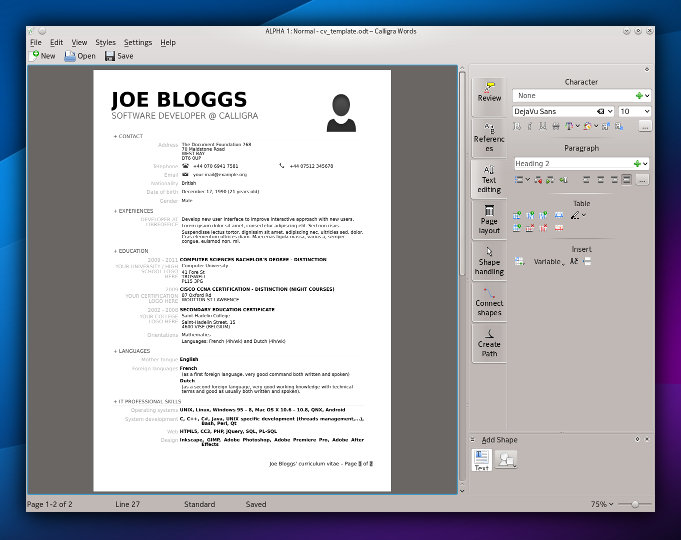
      The Modern GUI and Startup screen is already established in Kexi, people know it and use saving many mouse clicks. I took some time to present a follow up, mockup of how Calligra Words word processor would look. The topic was iterated before at the previous sprint.

      Calligra Words before:

      Calligra Words after:

      You can read about the story behind the look and inspirations that can influence what I’ll try to do. Obviously thanks to the Qt Quick taking over the overall GUI concepts, our users can expect the apps can be run will pleasure. Yes, it’s time for the desktop.

      Calligra Mail Merge

      The Kexi virtual BoF turned out to be an IRC meeting between me and Smit Patel, a Calligra dev who is successfully collaborating with me already on the Bibliographic Database project for Calligra Words. It takes advantage of rather awesome desktop database capabilities that Kexi offers to other apps.

      This time we covered fully fledged Mail merge for Calligra, an initiative that was planned long ago. It should be as easy as possible (no tinkering with database/data source as in LibreOffice) and visible in Words with some optional visibility in Kexi for premium integration. Like the Bibliographic Database, Mail Merge reuses certain features of Kexi so that provokes my attention. More on the Mail Merge Design wiki page.

      Finally a small announcement about interesting opportunity: Karbon, Plan and Braindump apps from Calligra are looking for new Maintainers. That’s rare opportunity for you!

      …read more
      Source: FULL ARTICLE at Planet KDE

      Calligra Sprint 2013 – Day 2 Bangalore

      :)

      Today I reached Thoughtworks office at 11.10 AM(IST). I saw a tall guy walking around the security area of Thoughtworks. Yes, it’s our Gopalkrishna Bhat(gopalK). We had met and talked to each other over IRC. We waited for Shantanu to arrive. While we were having conversation, Shantanu gives a call and said will be in office within 5 mins. And we all got into the office. Yesterday evening Shantanu and me were discussing about the future of Calligra Active. Hence today we decided to discuss with our team at Essen( Linux hotel). TodayBoudewijn Rempt gave a presentation which was followed up byFriedrich’s presentation on Kasten framework. After that Calligra Active team came up with discussion about future of Calligra Active. The discussion went so interesting. And came up with good approach. Why couldn’t we have a QML for calligra? So that a user can write his own QML and use Calligra’s active, stage, sheets etc. Shantanu and me were discussing that we can scale down calligra to even run with Sailfish!!! To be honest we loved the idea Special thanks toInge Wallin,Arjen Hiemstra andFriedrich for participating in the discussion and sharing the idea of Calligra’s QML. After the discussion shantanu started the idea of pairing and working. Shantanu, Me and Mani started working on this idea. And by the end of the day we got a premature text document getting displayed. We were able to edit it. Till now things are fine. Tomorrow we have a plan to focus on the zoom of canvas in text document. That should consume more time. Overall working will be done in aseparate branch in calligra( not in the master). I had taken few snaps uploaded here.That’s it for the day.

      …read more
      Source: FULL ARTICLE at Planet KDE

      Fabián Rodríguez: Moving on: how?

      flattr this!

      I am really sad to see so much energy spent by the community criticizing Canonical and on Canonical’s side, trying to explain and justify so many decisions and actions.

      My main concern is all this energy being directed where it doesn’t stand a chance to make a difference, as we know all the rocket pieces are being discarded. I invite you to consider focusing on other projects that need people like you:

      • Start a LibrePlanet group in your area. This is very much like a LoCo Team, except its focus is on 100% free open source software. This is sponsored by the Free Software Foundation and staffed with professional, responsive, full-time system administrators. I started LibrePlanet Québec right about when I stepped down from Ubuntu Québec. They also have a mission statement and a code of conduct which will feel familiar to any Ubuntu community contributor/member.. This also means it’s inclusive of Ubuntu users in your area.
      • Trisquel – an Ubuntu derivative focused on removing all non-free software while remaining as close to Ubuntu as possible. There is a lot of work remaining to achieve this. Trisquel 6 which is essentially Ubuntu 12.04 LTS, is just around the corner. I learned a lot when I started using Trisquel primarily instead of Ubuntu, about a year ago. Ubuntu help, documentation, PPAs and resources apply directly, and the community is very friendly and detail-oriented. Ethics and philosophy are valued as much and sometimes more than technical criteria when providing help.
      • Debian – Where it all begun I am using this as my primary OS now. Debian is working with the FSF to be recognized as 100% free as per FSF’s guidelines. There are rough edges which I recognize as opportunities to contribute, for example the lack of language-selector-gnome. It’s taking me some time to adjust to the project’s resources but I even re-organized Debian Quebec and requested a mailing list (since approved), and got a very warm welcome from friends and colleagues using it in my area. I guess I miss my LoCo action and excitement, I hope to put my experience in this area to good use in Debian. There are even talks about forming a Welcome Committee for Ubuntu expats there.

      There are many more out there, but I wanted to share my path after my past Ubuntu involvement. If you’re on IRC, come join #ubuntu-expats on OFTC, perhaps we can come up with other ideas. Perhaps it will help you actually finding a way you can contribute to free open source software in other ways than you did with Ubuntu.

      Life is short!


      …read more
      Source: FULL ARTICLE at Planet Ubuntu

      Why Do They Say Android Phones Run Linux?

      Hello World!

      Long time no code – exams underway, my apologies to the Plasma Team for the silence. I prefer to stay away from IRC since that gets me engaged into work real easy – I *love* the stuff we’re working on 🙂 Next week should be it and back to full-time hacking!

      Now one of the courses I’ve been doing is Android Programming. In order to test the school task software I write in a native environment, I got a real Android PDA (ZTE V985, equal to HTC 1X / LG 4x, if I recall correctly, it is built on a quad core Tegra chip). Well, the hardware is awesome to say the least, especially the high resolution display, however I’d like to elaborate on the software part of the device in this post. So, this thing runs Android, which, from what I understand, is used to refer both to an OS and a set of API‘s to code against. OK, cool, it runs Linux, sounds awesome. I’ve been using Linux for years on the desktop (ever since father made me get familiar with it, RedHat 3.0 back then IIRC) and love it, especially the control it gives to the user (as in the PC operator, regardless of the admin privilege level). If you asked we for 1 distinctive feature of Linux that sets it apart form another OS‘es, I would for sure say “control”.

      Then I started to tinker with the box. On a long journey back home from the Uni I decided to check some email, and launched the GMail built-in application. First blow: it logged in automatically, no password required. Where the heck did it manage to sneak peek my password and login from? Ah, yeah, right, I had logged into the application store to install some city navigation software. OK, why don’t you ask me if I want to share the password with another application? Not to say that this kind of behavior may teach the kids to care less for the security of their PC‘s and data (why, it’s my phone / PC / $box, why place passes all around the OS?) I admit, this is not the OS‘ fault, it’s Google security policy.

      (To be fair: the pass is not stored neither in a shadow nor encrypted, an “authentication token” is used instead.)

      So, what was the second blow like? I wanted to remove that application for goodness sake. Not possible!

      Of course, there is no package manager, at least in the default distribution. OK, there are Linux’es that lack a package manager IIRC, using a bundle system instead. But the thing won’t let me erase an application! That is, not even a library, or a userspace service / component (which I’d understand, but …read more
      Source: FULL ARTICLE at Planet KDE

      Calligra Spring 2013 Sprint started

      calligra-logo-200

      The Calligra contributor community finally is meeting again for a sprint weekend, both virtually and in real life: There are 6 people at the Thoughtworks Bangalore office in India, sitting and hacking on stuff already since the morning. And 11 people are gathering at the Linuxhotel in Europe until the evening, to follow and join them the next two days. Other people are popping up in the random Google Hangout sessions, and of course in the IRC channel #calligra.

      Today was arrival day, so more or less dynamically structured. Still the Krita people had already their BoF, as most of them arrived early. Tomorrow then there will be great discussion day, topics will be e.g. a new document/view-architecture and improving QML-support.

      With doing a few more 2.x releases in the futures, Calligra is slowly approaching the 3.0 version, as a milestone where the individual programs not only are useful as serious viewers, with e.g. excellent import filters for MS formats, but finally also as reliable, easy to use and well integrated editors (which most still need to become).

      Krita, as the current flagship, is already making waves in the world of movie and GFX studios, also Intel having used a special version (Krita Sketch) at their CES booth!
      Author is going to find a so far unclaimed niche, while Kexi is getting closer to occupy its targetted one. Words, Stage, Sheets are offering alternative UX to what AOO | LO | MS have. Plan quietly evolves into a serious project planner. And more.
      While these are all exciting developments, there are also new challenges in the future: KF5 & Qt5 & QML2 & Plasma Active.
      Also some old challenges are still around: while now only more Kexi has Qt3Support dependencies, the started big refactoring of the central Calligra libraries waits to be finished.

      There are lots of reasons to keep on pushing Calligra programs and libraries: built on Qt/kdelibs and with a quite modular architecture, it’s quite easy to adapt to new platforms out there, which e.g. can be seen with Calligra Active or the plugins for Okular, which have been done with only little effort in comparison. And Qt5 brings even more hope and options.

      This sprint would not be possible without the supporters of KDE e.V., thanks to them to make it financially possible for us to meet up to develop plans for the future roadmaps. So if you, dear reader, want to do your little contribution to the future of KDE software as well, consider to Join The Game as a supporter of the KDE e.V. !

      Thanks also to KO GmbH for supporting the sprint, to Thoughtworks Bangalore for hosting the Indian part of the sprint and for the Linuxhotel for the community-friendly offering in their great setting for the European part. And thanks to Claudia, the KDE e.V.s business manager, for her quick and uncomplicated handling of any issues.

      Next here in Linuxhotel: Pasta self-cooking for dinner (that’s why there are pasta sauce recipes on the …read more
      Source: FULL ARTICLE at Planet KDE