Tag Archives: Calligra Words

Grazer Linuxtage 2013

Every April, a couple of dedicated free software enthusiasts host a conference called “Linuxtage” at the FH Joanneum in Graz.

It’s an awesome little event that has grown organically over the last couple of years to the point where it really isn’t that “little” anymore.
Nevertheless, great management has ensured to maintain the approachable small-town feel of the conference meaning that walking through the location you’ll see everything from local seniors looking for a new challenge to Canonical employees demoing their cutting edge mobile platform.

Our very own Kevin Krammer is actually part of the organizing team and made sure that KDE always had a booth. However, staffing a booth and being responsible for literally anything else at the same time is always problematic so this year, I offered to take over the booth.

Claudia Rauch, our hardworking business manager offered to send me some t-shirts, bags and buttons to sell which were great.
Moreover, Kevin also organized a couple of KDE branded USB sticks which were a huge success.
But I also wanted something that I could hand out so that people could try out KDE software at home so I contacted the OpenSUSE promo team, which, without hesitation, agreed to send 100 freshly pressed DVDs of their newest release coupled with some additional promotional material right to my door step.

The booth itself was perfectly placed in a hight-traffic corner (apparently, it does helps to know the organizers 🙂 and I got to show off KDE to a very diverse audience.

Personally, I’ve always found it hard to quickly describe “KDE” to someone outside the FOSS world so after a couple of hours I instead ended up devising an alternate strategy: Vaguely describe KDE as a “community of like-minded people working on free software” and instead focus on a specific application: I asked people about their most exotic (non-standard) application and tried to find a KDE equivalent. Interestingly, that worked almost always and I got to show off, among others, Krita, the music editor flake in Calligra Words, Skrooge and RKWard.

All in all, it was a great event. We raised more than € 200.- for the KDE e.V., got people who had never even heard about KDE excited about it, and discussed the Join the Game program with those that already were.

Tags:

Source: FULL ARTICLE at Planet KDE

Coffice – Calligra on Android available now

Introduction

Coffice (Calligra Office or coffee-in-office) is a new project that tries to make Calligra available on mobile platforms like Android, Blackberry 10, Jolla SailfishOS and Ubuntu Phone.

With the MeeGo-saga, where Calligra was the office suite that Nokia shipped with the N9, a huge chunk of focus went on trimming Calligra for mobile platforms, improving performance and compatibility with ISO OpenDocument (ODF) and Microsoft Office formats (binary and XML). When MeeGo got finished focus shifted to other platforms. Our always present Linux Desktop got extended with a great port to Windows and Krita Scetch, both done by KO GmbH. More then a year ago we also saw a first port of Calligra on Android that unfortunately never got polished enough to be published on Android’s app-store(s).

Meanwhile I had the luck to build up Qt on Android expertise thanks to my employer KDAB.

Enter Coffice.

The Goals

Unlikely previous attemps that always tried to bring a 1:1 port of Calligra to mobile platforms including all dependencies I defined different goals. Those are:

* Focus on a Calligra Words (word processor) ODT viewer. Since bringing a whole Office suite to another platforms is a huge task and I am a small team I had to focus. Later on I plan to add doc/docx support, editing, saving and Calligra Sheets (spreadsheets) and Calligra Stage (presentations).

* Slim! Ever since ~10 years ago now when I joined KOffice/Calligra the size of the suite is overwhelming. A huge chunk is Calligra itself, that consists of a dozend of very specialized applications. That I addressed with my focus on Words, on a selected number of plugins. The other reason for that size are the dependencies. Among them kdelibs and all it drags in. During MeeGo-times we handled that with a slim hand-modified kdelibs but decided very fast that’s the wrong way. Instead we got or will get what is commonly known yet as kdeframeworks. A much more modular kdelibs that solves the huge chunk of dependencies that are dragged on to other platforms where we (as app developers) are not particular interested in Linux Desktop integration but more into the platform that app runs on.

Work Done

* Coffice uses qmake rather then cmake. I decided for qmake cause qmake works out of the box on all mobile platforms that are supported by Qt. If cmake is too it may make sense to change to cmake (or not) – don’t have a string opinion there. Its a tool to reach the goal.

* Coffice is 100% Qt-only. For that I introduced the coffice/fake library which maps kdelibs-API direct to Qt without all the functionality, without dbus, without daemons, etc. In most cases not even with implementation at all. Its a thin-layer to get Calligra or …read more
Source: FULL ARTICLE at Planet KDE

Fruits of CSS2013

Putting unexpected visions of space tourists aside, now for something completely different. This was a busy weekend with Calligra Suite Sprint 2013 which despite of different timezone fully dominated Essen and Bangalore. More about that here, here, here, here, here and here. You can find the full agenda on the KDE Community Wiki.

Lords of the ring like me were able to join at least remotely through various media. So here’s a list of my limited activities.

A Mockup for Calligra Words Look & Feel Rework

The Modern GUI and Startup screen is already established in Kexi, people know it and use saving many mouse clicks. I took some time to present a follow up, mockup of how Calligra Words word processor would look. The topic was iterated before at the previous sprint.

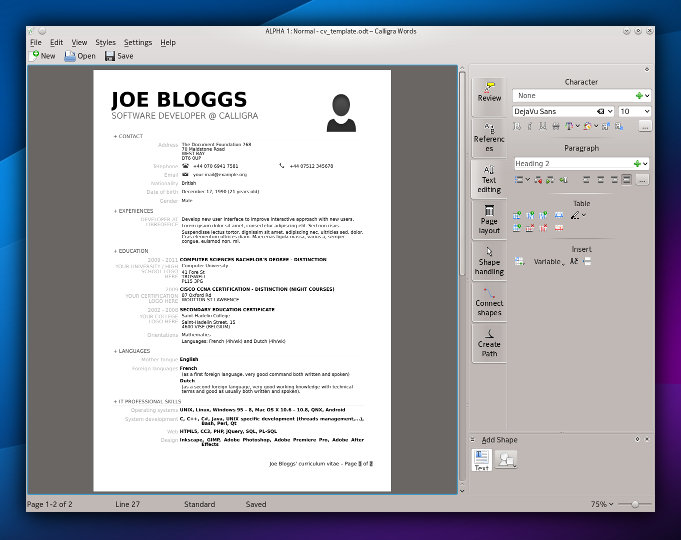
Calligra Words before:

Calligra Words after:

You can read about the story behind the look and inspirations that can influence what I’ll try to do. Obviously thanks to the Qt Quick taking over the overall GUI concepts, our users can expect the apps can be run will pleasure. Yes, it’s time for the desktop.

Calligra Mail Merge

The Kexi virtual BoF turned out to be an IRC meeting between me and Smit Patel, a Calligra dev who is successfully collaborating with me already on the Bibliographic Database project for Calligra Words. It takes advantage of rather awesome desktop database capabilities that Kexi offers to other apps.

This time we covered fully fledged Mail merge for Calligra, an initiative that was planned long ago. It should be as easy as possible (no tinkering with database/data source as in LibreOffice) and visible in Words with some optional visibility in Kexi for premium integration. Like the Bibliographic Database, Mail Merge reuses certain features of Kexi so that provokes my attention. More on the Mail Merge Design wiki page.

Finally a small announcement about interesting opportunity: Karbon, Plan and Braindump apps from Calligra are looking for new Maintainers. That’s rare opportunity for you!

…read more
Source: FULL ARTICLE at Planet KDE

Calligra 2.6 Released

The Calligra team is proud and pleased to announce the release of version 2.6 of the Calligra Suite, Calligra Active and the Calligra Office Engine. This version is the result of thousands of commits which provide new features, polishing of the user interaction and bug fixes.

As usual, Calligra is developing very fast and there are a lot of new features to be announced. This is also the second feature update after the initial release of Calligra in April last year which means that we are approaching some form of maturity. The team has used a significant part of the development time to polish away usability problems and visual glitches.

News in This Release

Here are the most important new or improved features in Calligra 2.6.

New Application: Calligra Author

Calligra Author is a new member of the growing Calligra application family. The application was announced just after the release of Calligra 2.5 with the following description:

The application will support a writer in the process of creating an eBook from concept to publication. We have two user categories in particular in mind:

  • Novelists who produce long texts with complicated plots involving many characters and scenes but with limited formatting.
  • Textbook authors who want to take advantage of the added possibilities in eBooks compared to paper-based textbooks.

The first version of Calligra Author is very similar to Calligra Words since the new features of Author are also adopted by Words. Future releases shall deviate more.

Features that were developed especially for Author include export to eBook formats EPUB2 and MOBI (the latter will come a bit delayed, in 2.6.1), and improved text statistics (word count, character count, etc).

Productivity Applications

For the productivity part of the suite (word processor, spreadsheet, and presentation program) the target user of version 2.6 is still the student or academic user. This version has a number of new features that will make it more suitable for these users.

Words, the word processing application improved layout and numerous minor fixes in dialogs and tools, e.g. the spell checking. This should make Words more pleasant to use for the normal user. Words also enjoys the same features as Author: improved text statistics and export to eBook formats.

Statistics support in Calligra Words 2.6

Statistics support in Calligra Words 2.6

Sheets, the spreadsheet application, has a new function optimizer – also known as a Solver. All standard scripts are available for translation.

Stage, the presentation program, has a new animation framework that lets the user create and manipulate animations in slide shows.

Flow, the diagram application, has improved connections.

Plan, the project management application, has updated scheduling information, improved scheduling granularity, improved performance charts, improved project creation, improved usability in the report generator and many bug fixes.

Kexi, the visual database creator, has new support for user data storage, improved CSV import and export and improved table views. Overwriting objects with the same name is now possible. Detailed lists of changes for Kexi are available here.

Text trimming in tables - Kexi 2.6

Text trimming in tables – Kexi 2.6

Artistic Applications

The artistic applications of the Calligra Suite are the most mature ones and are already used by professional users everywhere.

Krita, the drawing application, has new support for OpenColorIO, which makes it suitable for use in the movie industry. It also has big speedups in many places, including the vc library and when painting using the new precision slider in the preset editor.

Screenshot of Krita 2.6 alpha

Setting Exposure on a HDR image with Krita 2.6′s new OpenColorIO based LUT docker

There is also improvements in painting HDR images and integration into a GFX workflow as well as support for the latest OpenRaster standard and many bug fixes.

Supported Document Formats

Calligra 2.6 can now export documents to EPUB2 format. In 2.6.1 it will also be able to export to MOBI format.

And of course support for all MS Office formats has been improved even more, especially for the MS Open XML formats of MS Office 2007 and above.

Common Improvements

The architecture of the Calligra Suite lets the applications share much of the functionality of the suite with each other. Many common parts have seen improvements since the release of 2.5. Here are a few of them.

Calligra will now load and save 3D shapes and annotations. This means better interoperability with other office applications even if Calligra can not show them at this time.

Charts have a number of improvements for fine tuning the formatting. Examples include fonts for titles and labels and markers for data sets.

Mathematical formulas have an improved rendering.

Other Than the Desktop

Calligra Active, the version for tablets and smartphones, has several improvements: there is a new slide chooser for presentations, slides can be changed by flicking the device, page switching improvements for text documents and improved start up sequences including a new splash screen.

There is also a new preview for text documents, a new text search feature for all 3 document formats, support for translations, a simplified UI and some bug fixes. And, naturally, Calligra Active also benefits from all the improvements in the common parts of Calligra: the libraries and plugins.

Try It Out

  • The source code is available for download: calligra-2.6.0.tar.bz2. As far as we are aware, the following distributions package Calligra 2.6. This information will be updated when we get more details. In addition, many distributions will package and ship Calligra 2.6 as part of their standard set of applications.
  • Users of Ubuntu and Kubuntu are urged to try the daily snapshots prepared by Project Neon. Paste the following in a terminal window and you’ll find Calligra installed in /opt:
    sudo add-apt-repository ppa:neon/ppa 
    && sudo apt-get update
    && sudo apt-get install project-neon-base 
       project-neon-calligra 
       project-neon-calligra-dbg

    You can run these packages by adding /opt/project-neon/bin to your PATH.

  • Arch Linux provides Calligra packages in the [kde-unstable] repository.
  • Fedora packages are available in the rawhide development repository (http://fedoraproject.org/wiki/Rawhide), and unofficial builds are available for prior releases from kde-unstable repository at http://kde-redhat.sourceforge.net/ .
  • There are OpenSUSE Calligra packages in the unstable playground repository.
  • Calligra FreeBSD ports are available in Area51.
  • MS Windows packages will be available from KO GmbH. For download of Windows binaries, use the download page.
  • Mac OS X: We would welcome volunteers who want to build and publish packages for the Calligra Suite on OS X.

About Calligra

Calligra, comprising the Calligra Suite and Calligra Active, is part of the applications from the KDE community. See more information at the website http://www.calligra.org.

Source: FULL ARTICLE at Planet KDE

Improved Calligra for Windows after Sprint Weekend

Calligra Suite has seen improvements on Windows after a few important bugs were fixed over last weekend’s sprint in Magdeburg:

  • Calligra Words now has improved support for Microsoft .doc files, aligning with that available to Linux users.
  • Calligra Stage may now be used to give presentations, with support for multiple-monitors and the Presenter View, a custom display which assists the speaker by showing timer, slide notes and views of the current and next slide.

This updated version has been packaged and is available on KO GmbH’s downloads page.

The last few days Camilla and myself have been working to get Calligra running much more reliably on Windows – her experience in KDE, Calligra and general Linux development were invaluable, and being able to bring my own experience with the Windows platform and the build environments maintained by our employer were seen to be a perfect opportunity to host a sprint at KO GmbH‘s headquarters in Germany.

We started Friday with two big issues:

  • Microsoft .DOC import filter would load documents, but without text
  • CalligraStage would crash when the user tried to give a presentation

We started out reviewing sample documents which reflected the first issue – documents were being loaded with their structure intact (which we could see thanks to the TextDocument Inspector tool – thanks Friedrich!) but with the text missing.

Comparing stack traces helped us discover that LibreOffice and MS Word authored files were encoded slightly differently, and that the MS Word files used a format which required text to be passed through a text-converter object built on top of iconv, a text conversion library. On Windows, the iconv library used did not list the requested encoding “UNICODELITTLE” in its codepage lookup table. References to UNICODELITTLE and UNICODEBIG were replaced by UCS-2LE and UCS-2BE, which were recognised on Linux, Windows and Mac platforms. Rebuilding and opening a doc, and text!

Whilst testing the sample documents, an issue with the positioning of tables was also seen with the Windows build of the msword-odf filter only. Comparing Windows and Linux stack traces to see where the tables were being inserted into the ODT documents showed that, quite to our surprise, the Linux code didn’t follow the same execution path as Windows – all tables with the Windows-built filter were being treated as floating, even those in the test document which were not. The culprit was an uninitialised “isFloating” member variable in a data structure. A default constructor and a rebuild, and they suddenly appeared where they belonged, rather than stacked all on top of each other at the start of the document!

Calligra Stage was a little more problematic owing to issues with the build environment which affected Stage, but not Calligra Words. Thankfully we managed to find a workaround that would let us focus on debugging the presentation error. Previously we’d tried to fix this problem, and it looked like an object was getting lost, yet the event for the object was being triggered correctly with a valid object. It turned out there were subtle differences to how one could work with QWidgets in the two platforms – setting our slide-view widget’s parent to the QDesktopWidget worked fine in Linux, but led to an access violation error in Windows. Removing these calls in Windows, relying just on setting Fullscreen suddenly had presentations working, albeit hidden by the taskbar, and with an odd border. It was determined that the calls to resize and move the Widget after making it fullscreen were the problem. These were wrapped in a single setGeometry call and the fullscreen call moved til after this operation – now presentations worked, fullscreen and to secondary monitors. The Presenter View was fixed in a similar fashion, bringing the Calligra feature-set in Windows closer in line with that enjoyed by its Linux users.

The sprint was very rewarding, fixing the original document import issue, finding another and having time to fix a serious bug with Stage presentations, all making real progress towards making Calligra more usable on Windows.
Source: FULL ARTICLE at Planet KDE

4.10 Feature Presentation: Application Menu in Window Decoration

My favorite new feature in the KDE Plasma workspaces 4.10 (to be released on February, 6th) is the ability to hide an application menu inside the window decoration. I’m someone who is hardly using the menu, I get too lost in it. I’m preferring to use tool bars with the nice icons which help me to recognize what I’m looking for (a scissor is easier to recognize than “Cut” or “Ausschneiden” – depending on the language the app thinks to have to use).

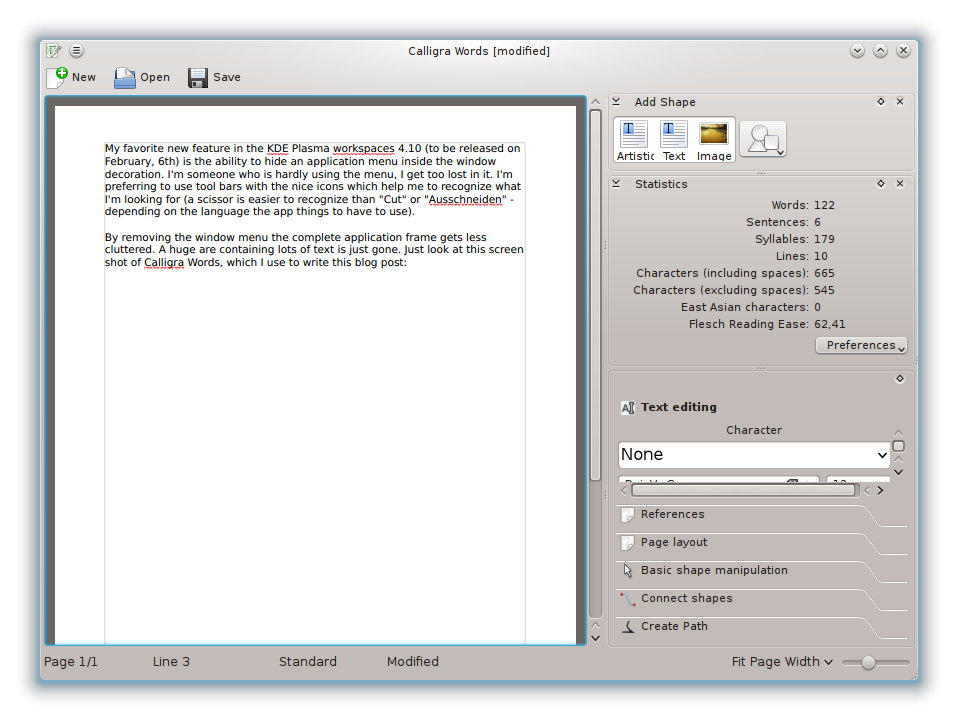
By removing the window menu the complete window frame gets less cluttered. A huge area containing lots of text is just gone. Just look at this screen shot of Calligra Words, which I use to write this blog post:

While KDE Plasma workspaces does not only allow to have the menu in the window decoration it also provides the possibility to put it into a global menu bar. Personally I do not like this (have used Mac OS, know what I’m talking about) as it disconnects the menu from the window. With the window decoration this problem does not exist and also removes the problem of long mouse distance travels in case of non-maximized windows.

In 4.10 we provide this new feature only in the Oxygen (default) window decoration. But our 4.11 development branch has seen some activity in this area: all Aurorae themes support it and also the Laptop window decoration.

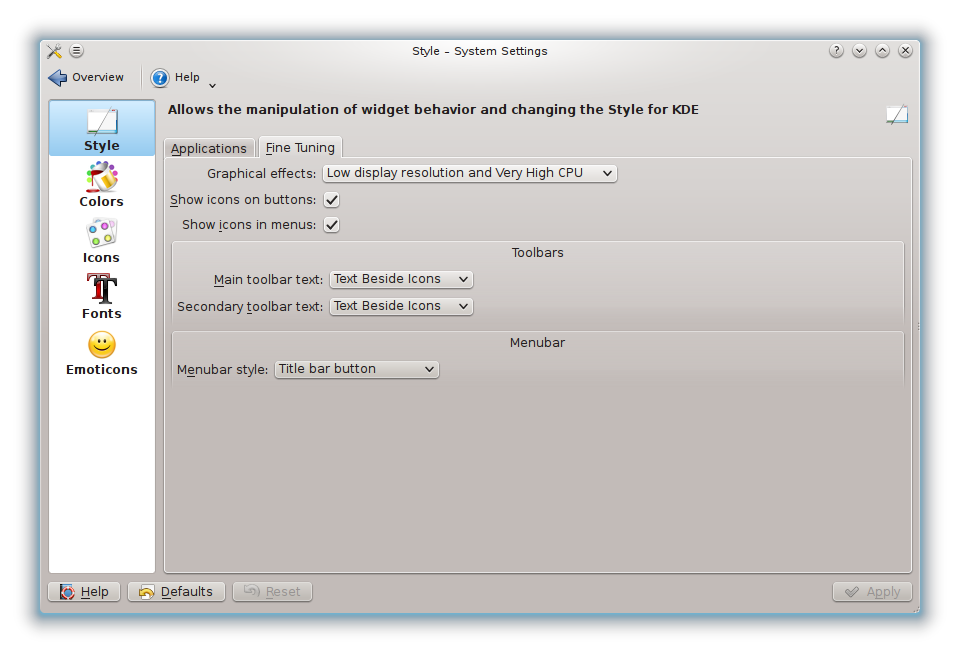
This pretty awesome new feature can be enabled in System Settings. Just go to “Application Appearance”, then to “Style”, select the second tab called “Fine Tuning”. If your system provides the required support libraries (if not complain to your distribution) you will find there a section “Menubar” with a dropdown to select the way you want to have it. If you select “Title bar button” the button will be added automatically. As screen shots say more than words:

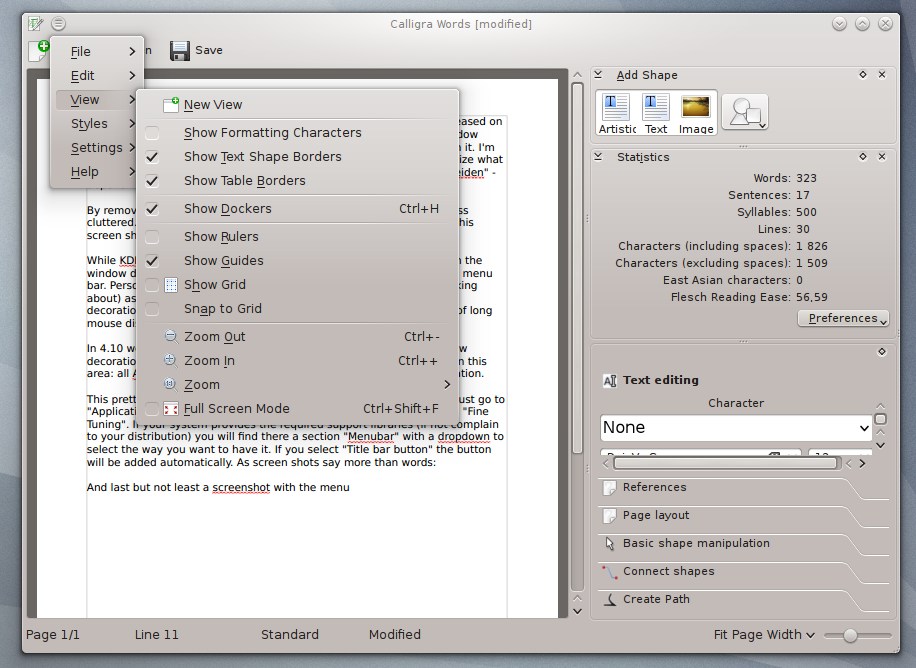
And last but not least a screenshot with the menu:

Source: FULL ARTICLE at Planet KDE