Softpedia: The first ISO images of Arch Linux with Linux kernel 3.10 on-board will be published next Thursday, on August 1, 2013.
Source: FULL ARTICLE at Linux Today
Softpedia: The first ISO images of Arch Linux with Linux kernel 3.10 on-board will be published next Thursday, on August 1, 2013.
Source: FULL ARTICLE at Linux Today
Linux User & Developer: We’ll be using Arch Linux as the operating system for our VPN server, since it is lightweight and has only the minimum packages required for a working system.
Good news everybody!
QtWebKit 2.3.0 was tagged in gitorious yesterday with the tarball available there as well
For those of you that don’t know: QtWebKit 2.3 is a port of QtWebKit from Qt 5 to Qt 4.8. It has most of the web-facing features, stability fixes and performance improvements that QtWebKit in Qt 5 has, it has skipped anything Qt 5 specific such as QQuickWebView, but has almost all improvements on the WebKit1 side (QWebView). QtWebKit 2.3 also maintains API and ABI compatibility with QtWebKit 2.2 from Qt 4.8, and is thereby an easy drop-in replacement. The released version 2.3.0 has roughly the same WebKit version and patches as Qt 5.0.2.
Note that QtWebKit 2.3 is not an official Qt release, nor will be. We recommend users to upgrade to Qt 5, but for those stuck with Qt 4.8 for the time being and who is using QtWebKit, I would personally recommend trying out QtWebKit 2.3. I have also had great feedback from the developers of the Rekonq, and Qupzilla browsers, that also recommend users to try out 2.3, several distributions are either packaging or planning to package it, the first being Arch Linux who has been packaging QtWebKit 2.3 since the betas.
Note that the sources are only buildable using the build-webkit tool, and requires the QTDIR environment set even if only to /usr. The basic build-command is “Tools/Scripts/build-webkit –qt –release –no-webkit2″. If you are packaging to x86, you might also want to add –no-force-sse2 since the library would otherwise default to using SSE2 math. Additionally you can use –qmakearg=”CONFIG+=production_build” to link with less memory. Finally I have added an option to include WebP support by adding DEFINES+=HAVE_LIBWEBP=1 to the qmakearg. After building the you need to go to WebKitBuild/Release and run make install.
If you have any questions, you can check my earlier posts about QtWebKit 2.3, ask on webkit-qt@lists.webkit.org mailing list or catch me on FreeNode IRC #qtwebkit.
…read more
Source: FULL ARTICLE at Planet KDE
The Calligra team has released version 2.6.2, the second bugfix release of the Calligra Suite, and Calligra Active. This release contains a number of important bug fixes to 2.6.1 and we recommend everybody to update.
Here is an overview of the most important fixes that are in 2.6.2. There are several others that are not mentioned here.
sudo add-apt-repository ppa:neon/ppa
&& sudo apt-get update
&& sudo apt-get install project-neon-base
   project-neon-calligra
   project-neon-calligra-dbg
You can run these packages by adding /opt/project-neon/bin to your PATH.
Calligra is part of the applications from the KDE community. See more information at the website http://www.calligra.org/.
…read more
Source: FULL ARTICLE at Planet KDE
By finid From LinuxBSDos.com.
Manjaro is a new desktop distribution based on Arch Linux. Arch Linux is known for its text-based installation process, so a feature I’m always looking for in any…
[[ This is a content summary only. Visit my website for full links, other content, and more! ]]
…read more
Source: FULL ARTICLE at LinuxBSDos
The Calligra team has released version 2.6.1, the first bugfix release of the Calligra Suite, and Calligra Active. This release contains a number of important bug fixes to 2.6.0 and we recommend everybody to update.
Here is an overview of the most important fixes that are in 2.6.1. There are several others that are not mentioned here. Since this release is very close to the big release of 2.6.0 the development team has concentrated on crash bugs and other serious bugs potentially leading to data loss.
sudo add-apt-repository ppa:neon/ppa
&& sudo apt-get update
&& sudo apt-get install project-neon-base
   project-neon-calligra
   project-neon-calligra-dbg
You can run these packages by adding /opt/project-neon/bin to your PATH.
Calligra is part of the applications from the KDE community. See more information at the website http://www.calligra.org/.
…read more
Source: FULL ARTICLE at Planet KDE
Adventures and lessons in the life of a Computer Guy: In today’s post in my prep for my yearly weekend at the Southern California Linux Expo (SCALE) I’m going to cover the subject of Arch Linux.
By finid From LinuxBSDos.com.
Chakra is a desktop distribution forked from Arch Linux. Not too long ago, it was one of my favorite desktop distributions, even made my list of the Top 6 KDE distributions in…
[[ This is a content summary only. Visit my website for full links, other content, and more! ]]
…read more
Source: FULL ARTICLE at LinuxBSDos
The Calligra team is proud and pleased to announce the release of version 2.6 of the Calligra Suite, Calligra Active and the Calligra Office Engine. This version is the result of thousands of commits which provide new features, polishing of the user interaction and bug fixes.
As usual, Calligra is developing very fast and there are a lot of new features to be announced. This is also the second feature update after the initial release of Calligra in April last year which means that we are approaching some form of maturity. The team has used a significant part of the development time to polish away usability problems and visual glitches.
Here are the most important new or improved features in Calligra 2.6.
Calligra Author is a new member of the growing Calligra application family. The application was announced just after the release of Calligra 2.5 with the following description:
The application will support a writer in the process of creating an eBook from concept to publication. We have two user categories in particular in mind:
- Novelists who produce long texts with complicated plots involving many characters and scenes but with limited formatting.
- Textbook authors who want to take advantage of the added possibilities in eBooks compared to paper-based textbooks.
The first version of Calligra Author is very similar to Calligra Words since the new features of Author are also adopted by Words. Future releases shall deviate more.
Features that were developed especially for Author include export to eBook formats EPUB2 and MOBI (the latter will come a bit delayed, in 2.6.1), and improved text statistics (word count, character count, etc).
For the productivity part of the suite (word processor, spreadsheet, and presentation program) the target user of version 2.6 is still the student or academic user. This version has a number of new features that will make it more suitable for these users.
Words, the word processing application improved layout and numerous minor fixes in dialogs and tools, e.g. the spell checking. This should make Words more pleasant to use for the normal user. Words also enjoys the same features as Author: improved text statistics and export to eBook formats.

Statistics support in Calligra Words 2.6
Sheets, the spreadsheet application, has a new function optimizer – also known as a Solver. All standard scripts are available for translation.
Stage, the presentation program, has a new animation framework that lets the user create and manipulate animations in slide shows.
Flow, the diagram application, has improved connections.
Plan, the project management application, has updated scheduling information, improved scheduling granularity, improved performance charts, improved project creation, improved usability in the report generator and many bug fixes.
Kexi, the visual database creator, has new support for user data storage, improved CSV import and export and improved table views. Overwriting objects with the same name is now possible. Detailed lists of changes for Kexi are available here.

Text trimming in tables – Kexi 2.6
The artistic applications of the Calligra Suite are the most mature ones and are already used by professional users everywhere.
Krita, the drawing application, has new support for OpenColorIO, which makes it suitable for use in the movie industry. It also has big speedups in many places, including the vc library and when painting using the new precision slider in the preset editor.

Setting Exposure on a HDR image with Krita 2.6′s new OpenColorIO based LUT docker
There is also improvements in painting HDR images and integration into a GFX workflow as well as support for the latest OpenRaster standard and many bug fixes.
Calligra 2.6 can now export documents to EPUB2 format. In 2.6.1 it will also be able to export to MOBI format.
And of course support for all MS Office formats has been improved even more, especially for the MS Open XML formats of MS Office 2007 and above.
The architecture of the Calligra Suite lets the applications share much of the functionality of the suite with each other. Many common parts have seen improvements since the release of 2.5. Here are a few of them.
Calligra will now load and save 3D shapes and annotations. This means better interoperability with other office applications even if Calligra can not show them at this time.
Charts have a number of improvements for fine tuning the formatting. Examples include fonts for titles and labels and markers for data sets.
Mathematical formulas have an improved rendering.
Calligra Active, the version for tablets and smartphones, has several improvements: there is a new slide chooser for presentations, slides can be changed by flicking the device, page switching improvements for text documents and improved start up sequences including a new splash screen.
There is also a new preview for text documents, a new text search feature for all 3 document formats, support for translations, a simplified UI and some bug fixes. And, naturally, Calligra Active also benefits from all the improvements in the common parts of Calligra: the libraries and plugins.
sudo add-apt-repository ppa:neon/ppa
&& sudo apt-get update
&& sudo apt-get install project-neon-base
   project-neon-calligra
   project-neon-calligra-dbg
You can run these packages by adding /opt/project-neon/bin to your PATH.
Calligra, comprising the Calligra Suite and Calligra Active, is part of the applications from the KDE community. See more information at the website http://www.calligra.org.
Source: FULL ARTICLE at Planet KDE
Phoronix: The Arch BSD operating system is moving forward, an attempt at a BSD platform that’s inspired by the Arch Linux distribution and using its package-set.
Source: FULL ARTICLE at Linux Today
By finid
Borrowing code or programs written by others is an accepted practice in the Free Software community. It is perfectly legal, being one of the core principles that defines Free Software. For open source or free software coders, it makes sense. Why write something from scratch when somebody else has already written it? Just take it and run, or take it and extend it.
One area I think that distro developers are overlooking with regards to reusing code concerns installation programs. Many distributions, especially those that are based on Ubuntu, have very easy-to-use, but plain-vanilla installers. Even the latest edition of Ubuntu’s installer is still not good enough (see Note to EFF: FDE implementation in Ubuntu’s Ubiquity is only at 50% and The state of manual LVM and full disk encryption configuration in Ubuntu’s Ubiquity).
A few distro developers have written new installers, but they are not even as good as Ubuntu’s plain-vanilla installer. A prime example is the installer on Linux Mint Debian Edition (LMDE). Another is Cinnarch‘s. That leaves me wondering why these new installers are being written when the developers could just port an existing one. I’m not a coder, so I do not know how easy or difficult the process is, but given that others have done it, I don’t think it should be that difficult, even when the installer that could be ported belongs to a distro from a different lineage.
Take Sabayon, a multi-purpose distribution based on Gentoo Linux. Its installer is a port of Anaconda, the Fedora Project’s installation program. So if Anaconda can be ported to Sabayon, it should not be that difficult to port YALI.
YALI (Yet Another Linux Installer) is the installer on Pardus, an original distribution (it is not based on any distribution). Development has, for now, ceased. And, as far as I know, it is not likely to be restarted, at least not by the original developers. Aside from YALI, Pardus has other applications that could be ported. The graphical firewall manager, the graphical package manager and Kaptan, the first boot application. Kaptan has already been ported to Chakra, a Linux distribution forked from Arch Linux.
So, what distribution could benefit the most from porting YALI? For one, Chakra, LMDE and Cinnarch could use YALI. Even Ubuntu and by extension, all the distributions that are derived and use its installer.
By my standards, YALI is not feature-complete, but it’s better than the installers of the above distributions. Aside from a beautiful user interface, it has support for LVM and RAID. It also has a restart feature, which is unique to it. The missing features are support for full disk encryption and boot loader password protection.
The following screen shots show most of the steps involved in using YALI.
YALI’s date picker.

Time zone options on YALI.

Setting up user accounts on YALI. The default user login setting is to require authentication to login.

Specifying the root account password and the hostname.

The four partitioning methods on YALI.

Disk partitioning schemes on YALI. LVM, the Linux Logical Volume Manager, and RAID are supported. LVM is the default partitioning scheme.

LVM configuration options

Selecting mount points.

Supported file system types on YALI.

Boot loader configuration step on YALI. GRUB, the GRand Unufied Bootloader, is the boot loader on Pardus 2011. The GRUB version is 0.97, GRUB Legacy. Though YALI does not have support for setting a GRUB password, it is possible to do that after installation.

I’m looking forward to the first distro developer who will port and extend YALI. Any takers?
Source: FULL ARTICLE at LinuxBSDos
By finid
Cinnarch is a desktop Linux distribution based on Arch Linux and using the Cinnamon as the default and only supported desktop environment. Like Arch, it follows a rolling-release development model, which is an install-once-and-update-forever model that ensures that an installed system will never need to be reinstalled, even when a new version becomes available, except for those instances when, for one reason or the other, you just need to reinstall.
The project was started in the middle of last year and has been active since. This is my first look at this distribution, and from what I’ve seen, it is a beautiful distribution.
Here are just a few screen shots from a live system.
As with most distributions, you can test the Live system or install it on you hard drive without stopping at the Live desktop. Cinnarch offers two installation methods – CLI Installer and Graphical Installer. The graphical installer, called Cnchi, is still under development. That’s why it is not selectable in this window. You may read the latest news and some screen shots of it here.

CLI Installer is actually a mouse-friendly ncurses installation program. This screen shot shows the options available.

The plain partitioning option (Auto-prepare), that is, no LVM, RAID or encryption configured, is very easy to use, even for new users.

Cinnarch has a graphical package manager called PacmanXG.

Here’s the main interface.

And here are the options available.

The package installer window could still use some work to make it more user-friendly.

The default desktop.

The desktop showing the menu.

The desktop with the menu showing installed Internet applications.

No Office suite or application is installed, just an installer for LibreOffice.

Cinnamon desktop Settings options.

You may download 32- and 64-bit installation images of Cinnarch here.
Source: FULL ARTICLE at LinuxBSDos
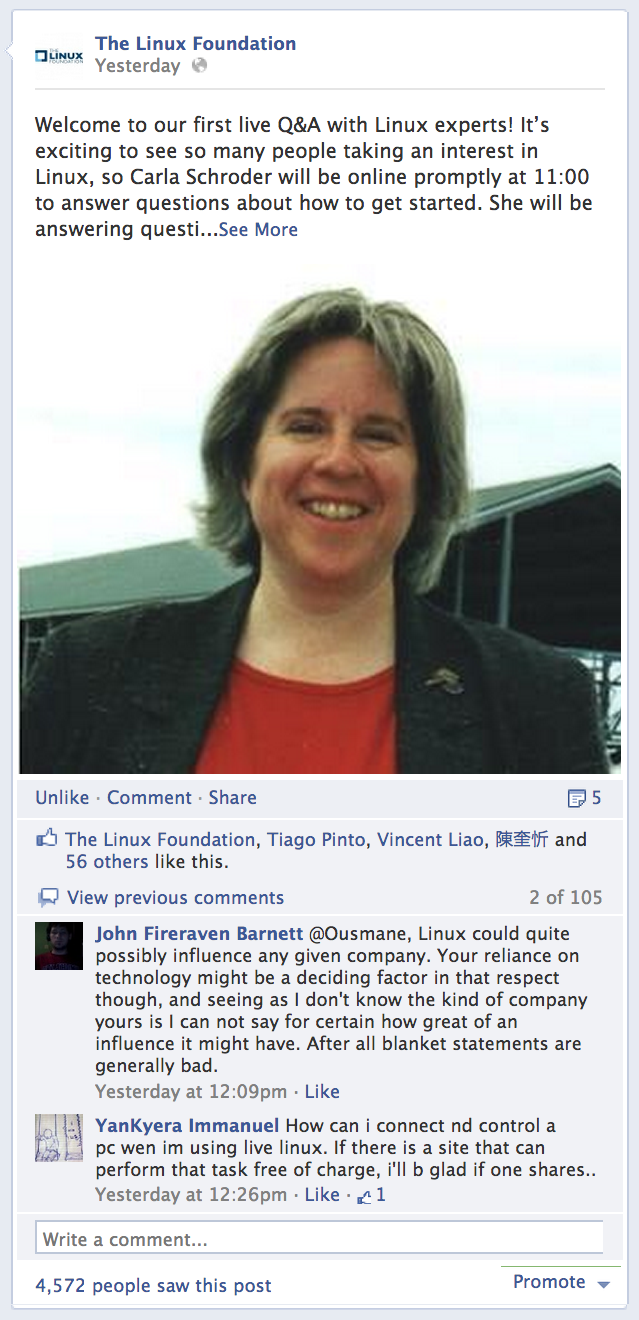 We recently conducted a Live Linux Q&A on Facebook, which was our first in a new series of live Q&A opportunities with Linux experts hosted on The Linux Foundation’s social channels. This debut Q&A featured Linux.com freelance contributor Carla Schroder, who answered questions about how to get started with Linux.
Questions were received by community members on topics ranging from malware to popular OEMs and distributions to virtualizaiton software choices, and much more.
Generally for new users, Carla recommended “getting familiar with how to install and remove software. Linux distro’s have centralized software repositories – – kind of like app stores, but Linux has had them almost from inception – – so managing software is super easy.”
Carla wasn’t the only one answering questions, either. Members of the community chimed in with helpful advice for everyone. David Chiodo suggested Linux User Groups as one place to start for newbies, for example.
There was some debate about whether or not CentOS was the best distro choice for noobs. Carla suggested it for system and network admins wanting to learn their way around Linux. Other Q&A participants suggested Ubuntu and Peppermint.
Some members of the Live Linux Q&A wanted to know more about going from newbie to pro and how to become certified. Carla suggested that the top three skills to get under your belt before choosing a specialty would be: bash scripting, basic network and system administration, and proficiency in another scripting language like Python, Ruby or PHP. She also suggested Red Hat, LPI and The Linux Foundation for Linux training and certification.
Carla suggested not to rely just on books, since Linux is developed so rapidly and books can become out of date quickly. She suggested reading distribution documentation to keep up to date. Specifically she recommended Red Hat documentation, as well as Arch Linux, which she said is great choice for new sysadmins. Carla also suggested online resources such as Linux.com, LinuxToday, LWN.net, The H and Lxer.
To review the comments and conversation in more detail, you can visit the Live Linux Q&A on Facebook.
These Live Linux Q&As will rotate throughout our social channels, from Facebook to Google+ and Twitter to LinkedIn, so you can connect when/where it makes the most sense for you. And, we’ll be sourcing experts from a variety of places that include Linux.com, our Linux training instructors, the Linux kernel development community, Linux community projects, our members and more. Stay tuned here at my blog and in our social channels for updates on the next Live Linux Q&A.
In the mean time, you can find lots of resources from throughout the community. Keep an eye on our Linux training opportunities, as well as Linux.com for free tutorials and tips.
Source: FULL ARTICLE at Linux Foundation
It has been a long time since I wrote anything on here, I am still alive and kicking! 2012 was another roller coaster of a year, with many good and bad things happening. Louise and I got our green cards early on in the year (massive thanks to my employer), which was great after having lived in the US for over five years now. We started house hunting a few months after that, which was an adventure and a half.
As we were in the process of looking for a house I was promoted to technical leader at Kitware, and I continue to work on our Open Chemistry project. We ended up falling in love with the first house we found, and found a great realtor who took us back there for a second look. We then learned how different buying a house in the US versus England, but after several rounds of negotiations came to an agreement. We had a very long wait for completion, but that all proceeded well in the end.
As we moved out of the place we had been renting for the last three years we found out just how bad some landlords can be about returning security deposits…that is still ongoing and has not been a fun process. We never rented in England, but many friends have assured us that this isn’t that unusual. Our move actually went very smoothly though, and we have some great friends who helped us with some of the heavy lifting. We have been learning what it is like to own a home in the country, with a well, septic, large garden etc. The learning curve has been a little steep at times! We attended two weddings (I was a groomsman in one) with two amazing groups of friends – it was a pleasure to be part of the day for two great friends.
I made a few guest blog posts, which I will link to in another post, and attended some great conferences including the ACS, Semantic Physical Science and Supercomputing. Our Avogadro paper was published, and was recently published in final form (I will write more about this too). I finally cancelled my dedicated server (an old Gentoo box), which I originally took when I was consulting in England, this was very disruptive in the end and I didn’t have a complete backup of all data when it was taken offline. This caused lots of disruption to email (sorry if I never got back to you). I moved to a cloud server with Rackspace in the end, after playing with a few alternatives. I was retired as a Gentoo developer too (totally missed those emails), it was a great experience being a developer and I still value many of the friendships formed during that time. My passion for packaging has wained in recent years, and I tend to use Arch Linux more now (although still love lots of things about Gentoo).

Just before Xmas our ten year old German Shepherd developed a sudden paralysis in his back legs and had to be put down. It was pretty devastating, after having him from when he was 12 weeks old. He joined our little family just after we got our own place in England, he had five great years in England and another five in the US. He was with me for so much of my life (a degree, loss of my brother, marriage, loss of my sister, moving to another country, birth of our first child, getting a “real” job). We had family over for the holidays as we call them over here (Xmas and New Year back home), which was great but we may not have been the best of company after having just lost our dog.
I think I skipped lots of stuff too, but it was quite a year! Hoping for more of a steady ride this year to say the least.
Source: FULL ARTICLE at Planet KDE
Looking For The Source Code Of Life, LINUX and More: Here I am going to discuss how I managed to get Arch up and running with XFCE, a login manager and a web browser.
Source: FULL ARTICLE at Linux Today
Hi all, this is my first 2013 post.
My last post was 5 months ago because I did finish my studies (I’ll graduate on March) and I had to do some work so I had no time to blog about Arch or the KDE projects in which I’d like to join (stay tuned!).
Here we come to the reason of this post: I got a mail yesterday from Laszlo Papp:
Laszlo: Hi Andrea,
Qt5 was out a while ago. Do you have any estimation for producing Qt5
packages for Arch? Do you need any help with those?
His request is fully reasonable and expected. Laszlo, you are talking with a maintainer of a bleeding edge distro: I want the latest software before it’s released. Knowing that a qt5 package is already available on AUR, I replied quicly:
Andrea: There’s no real hurry about that.
KDE will not use qt5 until 2014 (ok, maybe some month before) so there’s no
hurry to put qt5 in [extra] IMHO.
The I got another mail from Laszlo:
Laszlo: Well, Qt5 is not just for KDE. Besides, it would help the development for
many developers.
I agree that it would help the development of the qt developers on Arch, but I didn’t reply for a matter of time. Then I got another mail:
Laszlo: I just got to another development arch machine where I have to build qt5
again from scratch.. sigh. Yay, 2 hours waiting.
Nothing surprising here. This is the means of “building from sources”. I didn’t reply.
So I got another mail this morning:
Laszlo: After talking to several Qt arch developers, they got a bit disappointed
about this feedback as me, so I opened a bugreport:
https://bugs.archlinux.org/task/33352
Well, the first rule of our bug tracker is: Do NOT report bugs when a package is just outdated, or it is in Unsupported.
The second rule is: REPEAT: Do NOT report bugs for outdated packages!. (Yes, it sounds like the Fight Club rules).
You can see that two Arch Linux maintainers closed that bug report with the same reason and they also suggested to share the package between the several machines.
But we continue with another mail from Laszlo that caused this post:
Laszlo: I hope you do realize I had to pospone my work last night because I am
still trying to get a damn binary?
Once, I am ready with all this, I will publish a blog about your
unwelcoming reply even after my “help offer”. If private mails do not help,
let us see how the community reacts.
Well, the last two lines sound like a threat for me.
I’ve nothing to hide (this is the whole story) and you should remember that I’m not paid for this.
Laszlo: I will of course publish the built binary for x86_64 as well to aid other
arch developers’ work.Perhaps, a request will go to kde-packagers@kde.org as well soon from me.
It is not only an arch request after all.
IMHO this is the right thing to do and the first thing you should have done Laszlo: build a package and put it on dropbox/repo, share it between your machines and the community if you want.
Then I replied again:
Andrea: The package will hit [extra] when it’s ready (this means weeks or months). Meanwhile use the package from aur, you only need to build it once, not every day.
But still…
Laszlo: Just calculate 20 developers, but surely more are using Qt5: 20*4/5 hours =
80/100 hours… just by only building it “once, not every day”.
Thank you for letting me lose 40 minutes of my working day writing this post.
Note that you delayed the release of the qt5 package in [extra] (whatever date it will be released) by 40 minutes.
Source: FULL ARTICLE at Planet KDE
Muktware: I kept hearing about Arch Linux from time to time.
Source: Linux Today