Category Archives: Linux

SUSE's George Shi Explains Linux Enterprise 11 SP3 Role in Mission-Critical Computing

By libbyclark

George Shi SUSE

Earlier this month SUSE announced the general availability of SUSE Linux Enterprise 11, Service Pack 3 — their operating system for servers running mission-critical workloads in physical, virtual and cloud environments. 

In this Linux.com exclusive interview, SUSE product manager George Shi describes the new features in this latest release, including virtualization, efficiency, and hardware support. He also discusses trends in mission-critical computing, the three themes of SLE11 SP3, and their efforts to bring enterprise SUSE to ARM architectures.

Which kernel version is this latest release based on?

SUSE Linux Enterprise 11 SP3 will be based on kernel v3.0.  There is no kernel upgrade from SP2. This service pack includes lots of patches and fixes on the previous kernel version, giving our customers a more stable and reliable foundation to run mission-critical workloads.

Does it now include UEFI secure boot support?

SUSE Linux Enterprise 11 SP3 is the first enterprise Linux that includes support for the UEFI secure boot mechanism.  This mechanism reduces the risk of a malicious attack during the boot process.  This is done by the bootloader recognizing a pre-assigned digital signature key of the OS. Details can be found at:

https://www.suse.com/communities/conversations/uefi-secure-boot-overview/
https://www.suse.com/communities/conversations/uefi-secure-boot-plan/
https://www.suse.com/communities/conversations/uefi-secure-boot-details/

How does this latest release improve virtualization set up and management?

SUSE Linux Enterprise 11 SP3 supports the latest versions of both major open source hypervisors, i.e., XEN 4.2 and KVM 1.4.  This will give customers flexibility of choice to run virtualized workloads. SP3 improves the VM limits compared to SP2, for example. It supports 64 VMs per host, 64 vCPU per VM and 512GB vRAM per VM.

How does it accomplish power efficiency improvements?

By fully exploiting the power saving features (Intel Idle drivers) of Intel Ivy Bridge and Haswell, SUSE Linux Enterprise 11 SP3 improves the power efficiency.

How does it take advantage of the new Haswell processor capabilities?

SUSE is working closely with all major vendors, including Intel, and the mainline kernel community to take advantage of current and upcoming development in the hardware area; for what is known under the codename “Haswell” this includes:

–        Power saving feature as I mentioned above

–        New virtualization instructions (e.g. INVPCID) support in both XEN and KVM.  These instructions improve the efficiency of the hypervisors.

How is mission-critical computing changing and what has SUSE done to address this?

SUSE Linux Enterprise is a leader in mission-critical Linux computing, providing a competitive RAS (Reliable, Available, Serviceable) Linux foundation and driving business critical infrastructures such as SAP HANA.

With the SUSE Linux Enterprise High Availability extension, SUSE delivers the only Open Source High Availability solution, which is available and supported on five hardware architectures. This includes the OCFS2 cluster file system.

The hardware enablement in SUSE Linux Enterprise 11 SP3 in general, along with the three themes of SUSE Linux Enterprise 11 SP3 specifically, i.e., scale-up, scale-out, and security, address recent trends in mission-critical computing.

Scale-up: customers can increase the IT capacity by adding more …read more

Source: FULL ARTICLE at Linux Foundation

Jonathan Riddell: Project Neon 5 daily builds, Ubiquity Wireless Setup

KDE Project:

Project Neon is a fantastic resource for KDE developers giving daily builds for KDE software. It’s maintained by the lovely Kubuntu community on the lovely Launchpad infrastructure. KDE developers can install the various bits they need to develop their part of KDE without having to worry about compiling everything themselves. It installs everything into /opt so it doesn’t touch your normal software installation.

Thanks to the hard work of Harald and others we have the first KDE Frameworks 5 builds on Neon! I expect this to prove a vital resource in developing Frameworks 5.

As with any daily build bits will break occationally (or quite often until Frameworks 5 settles down). Take a look at the Packages in “Project Neon KDE Frameworks 5” to see the current state.

To give it a try go

sudo apt-add-repository ppa:neon/kf5 
sudo apt-get install project-neon5-session

and log into a Neon 5 session at LightDM. (Currently you need to kill lightdm to log out!)

Plasma 2 and Frameworks 5 – the first look


A lovely little addition to our installer from the lovely Aurelien Le Cake, you can now set up wireless during the installer. This means if you’re running it in installer only mode you can still get a network connection to install Flash or MP3 support

…read more

Source: FULL ARTICLE at Planet Ubuntu

AM-NV SysMonitor P./A. II X2-X6 Pack 1.0 (Plasmoid Script)

Thumbnail

AM-NV SysMonitor P./A. II X2-X6 Pack 1.0
(Plasmoid Script)
The AM-NV SysMonitor Athlon II X2/X3/X4 & Phenom X2/X3/X4/X6 Single GPU based on the EG-SysMon-QC.

System information and hardware monitor. Monitors CPU, memory, HDD, network traffic, and much more.

This Addon’s use the /etc/os-realese files to show you your Distribution.

Its works only with KDE 4, nVidia GPU’s, AM2+/AM3(+) CPU’s and was Optimized for Athlon II X2/X3/X4, Phenom II X2/X3/X4/X6 and Single Core NVidia based Grafikcards.

Tested with Asus M5A88-V EVO, Phenom II X4 960T, openSuSE 12.1, sensors version 3.3.1 with libsensors version 3.3.1 and MB Sensor atk0110

Other Versions for the Bulldozer Series will follow soon.

The “Themes” should actually be displayed the CPU Modelname.
Although the preview is on AMD Processor Model Unknown, that’s my CPU name. This is an AMD 960T drilled on X6, so “AMD Processor Model Unknown”.

Contents:
AM-NV-SysMonitor_Athlon_II_X2_S-GPU_English-Edition-v.1.0.skz
AM-NV-SysMonitor_Athlon_II_X3_S-GPU_English-Edition-v.1.0.skz
AM-NV-SysMonitor_Athlon_II_X4_S-GPU_English-Edition-v.1.0.skz
AM-NV-SysMonitor_Phenom_II_X2_S-GPU_English-Edition-v.1.0.skz
AM-NV-SysMonitor_Phenom_II_X3_S-GPU_English-Edition-v.1.0.skz
AM-NV-SysMonitor_Phenom_II_X4_S-GPU_English-Edition-v.1.0.skz
AM-NV-SysMonitor_Phenom_II_X6_S-GPU_English-Edition-v.1.2.skz
changelog
readme
Athlon_II_X2-X4_Karamba-Priview.png
Athlon_II_X2-X4_Plasma-Priview.png
Phenom_II_X2-X6_Karamba-Priview.png
Phenom_II_X2-X6_Plasma-Priview.png

The following are required:

SuperKaramba Version 0.57
x86info
cpupower
libsensors version 3.3.1
sensors version 3.3.1
KDE 4
NVIDIA GPU
AM2+, AM3 and AM3+ Mainbords

Installation:

KDE4 Plasma Desktop:

1. download the AM-NV-SysMonitor_Phenom-Athlon_II_X2-X6_S-GPU_English-Edition_Pack-v.1.0.tar.gz file, extract it where you want.

2. Click on Add Widgets –>> Get new widgets –>> install applet from local file –>> SuperKaramba: Karamba desktop design –>> your download folder –>> AM-NV-SysMonitor_Phenom-Athlon_II_X2-X6_S-GPU_English-Edition_Pack-v.1.0 –>> AM-NV-SysMonitor_XXXXX_II_XX_S-GPU_English-Edition-v.1.X.skz

3. Now you can choose the Theme in your Plasma Desktop, thats all.

Downloadlink fixed

changelog:
AM-NV SysMonitor Athlon II X2 Single GPU English-Edition:

Version 1.0:

First release

AM-NV SysMonitor Athlon II X3 Single GPU English-Edition:

Version 1.0:

First release

AM-NV SysMonitor Athlon II X4 Single GPU English-Edition:

Version 1.0:

First release

AM-NV SysMonitor Phenom II X2 Single GPU English-Edition:

Version 1.0:

First release

AM-NV SysMonitor Phenom II X3 Single GPU English-Edition:

Version 1.0:

First release

AM-NV SysMonitor Phenom II X4 Single GPU English-Edition:

Version 1.0:

First release

AM-NV SysMonitor Phenom II X6 Single GPU English-Edition:

Version 1.2:

CPU Cores read interval=10000 changed to interval=1000

Version 1.1:

Add a readme file
Add the changelog file
Add a Logofile
Fixed the maindata.xml

Version 1.0:

First release

[read more]

job recommendations:

[more jobs]
…read more

Source: FULL ARTICLE at KDE Apps

Mike O'Donohue: My second experience of the Ubuntu LoCo Team re- approval process. Not as straight forward as the first!

Back in the Summer of 2011 my first experience of the Ubuntu LoCo Team re- approval process was very positive and exciting. I happily helped in the preparation and delivery of the Ubuntu Ireland 2011 re-approval application. I even wrote a very enthusiastic blog post about the whole experience.

This time though, things were much different…..

Activity in the Ubuntu Ireland Team has decreased significantly since our initial re-approval in 2011. By the summer of 2012 I was becoming concerned that our low activity levels would reduce our chances of retaining our approved status at the next time of asking. I aired my concerns regarding the poor state of the Irish LoCo on the Team mailing list in August 2012 (my initial post can be found here).  The positive feedback received led to a team reboot discussion developing which started in November 2012 (my initial post regarding the team reboot can be found here). This team reboot is ongoing but there is no denying that our team activity remains weak. However, despite this low activity it was clear that there were still a few warm cinders in the Ubuntu Ireland Team fire and there certainly was a lot of good will being expressed towards remaining approved. Based on this I felt it was worthwhile for our LoCo to seek re-approval. I prepared our 2013 re-approval application, basing it on the standard template and our 2011 application.  Active Team member Keith Drummond provided some very useful suggestions that were incorporated into our application.

Our Team was up for re-approval at the 16th of July, 2013 LoCo Council meeting.   I was quite nervous and by no means confident about our chances. Despite this I was relieved that the time had come to honestly state the current condition on our LoCo and see how that would be received. We were the third and last team up for re-approval. Two very impressive teams preceded us (The Japanese Team and the Tunisian Team).

When the time came we gave a frank account of our slow demise over the last two years. We also maintained that some activity still existed and that the reboot efforts were ongoing. The LoCo council recognised this lull in activity as a somewhat common occurrence. Given due consideration to the remaining activity in our LoCo and the fact that four team members had turned up to offer support for our application the LoCo Council approved our re-approval application. I was truly delighted that we had achieved this and I am very thankful that the LoCo Council saw fit to keep faith in our little LoCo and maintain our approved status.

<span style="font-family: 'Open Sans', 'Helvetica Neue', Helvetica, …read more

Source: FULL ARTICLE at Planet Ubuntu

Michael Hall: Ubuntu Terminal Hackfest

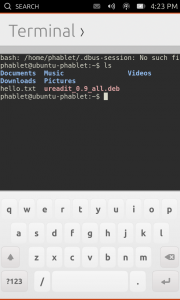
We’re back again for another Ubuntu Core Apps Hack Day!  As always you can find us in #ubuntu-app-devel on Freenode IRC from 9am to 9pm UTC, you can ping me (mhall119) or Alan Pope (popey) and we’ll help you get setup with a development environment and a copy of the Core Apps source code so you can start hacking.

Today’s app is one that was most requested when we announced Ubuntu on phones, and has since proven to be one of the most often used by developers and testers the like.  That’s right, I’m talking about the Terminal!  The Terminal went through very rapid development, thanks to the herculean efforts of one very talented developer, and the ability to re-use the KTerminal QML component from KDE’s Konsole project.  Because of both, the Terminal app has been dogfoodable for a while now.

  • Issue commands. DONE!
  • Use case: ssh into another computer. DONE!
  • Use case: edit a file with vi. DONE!
  • Use case: tail a log file. DONE!
  • Use case: apt-get update. DONE!

But that doesn’t mean that the work here is done.  For starters, we need to make sure that changes to the KTerminal code are submitted back upsteam, something we could certainly use some help from somebody who is familiar with either Konsole’s development specifically or KDE in general.  We also want to improve the availability of special keys like the function keys and ctrl+ combinations that are oh so useful when interacting with the command line, so anybody with QML/Javascript experience or who is familiar with the on-screen keyboard specifically would be able to help us out quite a bit here.

…read more

Source: FULL ARTICLE at Planet Ubuntu

Valorie Zimmerman: Getting a Green Thumb

The phrase green thumb comes from gardening. When a person is really in tune with their garden plants, they often rub off nubs which will become branches in the wrong place, or pull out small, tender weeds before they grow to be pest-sized, thus ending up with green-stained fingers and thumbs. In our community, such tuned-in consciousness can help us grow and thrive. When one sees or hears a comment heading into negative territory, each of us can perhaps take a moment to ask the commenter more about their situation. Maybe they have encountered a bug, or just don’t see how to choose to do what they need to get their task done. If you are a developer, maybe their difficulty can guide you toward a better user interface! If you do documentation, their questions and difficulties might help you explain the software more clearly. Perhaps the person is feeling bad for some other reason entirely. In any case, by asking for more information, you will effectively have turned what could have turned into a “trollish” situation, into a pleasant personal interaction and maybe more. Of course not all of us have the time or feel like spending our time being tuned in all the time. Which is why I urge each of my readers to take your turn by doing this part of the time. Our list moderators, IRC channel operators, and forum admins get tired, have vacations and other time off, and so forth. We can all be leaders of the community part-time, in this gentle, non-confrontational way. If you’re good at it, and enjoy it, maybe it’s time to volunteer to help moderate a list, become one of the channel operators, or help administer the forums. It is not necessary to have an official leadership position though, to exercise leadership. Perhaps you would like to become part of the KDE Community Working Group?[1] We have a need for a new team member right now. See the KDE-Community list for more information.[2] And see the Freenode Catalysts page [3] for more details about this mode of leadership. The Ubuntu 1. Community Working Group: http://ev.kde.org/workinggroups/cwg.php 2. KDE-Community list: https://mail.kde.org/mailman/listinfo/kde-community 3. Be a Catalyst: http://freenode.net/catalysts.shtml …read more

Source: FULL ARTICLE at Planet Ubuntu

Chris Wayne: fitbit-steps-indicator ready for initial testing

Inspired by Stuart Langridge’s Ubuntu Edge Progress Indicator, I decided that it would be a good idea to make a new indicator.  The first thing that came to mind was my Fitbit, so that I can keep track of my steps straight from my OS.  So, I updated the account-plugin-fitbit online account, and made a new indicator to show you the number of steps you’ve made so far today.  The indicator looks like this:


Currently it’s not very configurable, and will show a notification once you reach your steps goal.  This is still in an alpha state, but I think it is ready to be tested by people that aren’t me.  To install:

sudo add-apt-repository ppa:cwayne18/fitbit
sudo apt-get update
sudo apt-get install account-plugin-fitbit fitbit-steps-indicator

To start, log in and log out, or simply reboot.  Any questions or comments, please email me at cwayne@ubuntu.com.  I’m currently working on fixing this up to get it into Universe for Saucy.

…read more

Source: FULL ARTICLE at Planet Ubuntu

Robie Basak: Better two factor ssh authentication on Ubuntu

In the past, true two factor authentication in ssh has been something of
a hack to set up. Now that OpenSSH 6.2 has now been released with full
and proper support
, the next release of Ubuntu (Saucy Salamander)
will include it.

Quick Start

All you have to do is:

  1. apt-get install libpam-google-authenticator.

  2. Users who want to continue using ssh must each run the command
    google-authenticator. This tool interatively helps you to create the
    file ~/.google_authenticator, which contains a shared secret and
    emergency passcodes. It’s a terminal application, but it does still
    display a QR code for quick loading of the shared secret into your two
    factor device (in my case, this is the Google Authenticator app on my
    Android smartphone).

  3. Edit /etc/ssh/sshd_config. Set:

    ChallengeResponseAuthentication yes
    PasswordAuthentication no
    AuthenticationMethods publickey,keyboard-interactive
    

    In case you have changed them in the past, you should also check the
    following two settings (these are both defaults on Ubuntu):

    UsePAM yes
    PubkeyAuthentication yes
    
  4. Run sudo service ssh reload to pick up your changes to
    /etc/ssh/sshd_config.

  5. Edit /etc/pam.d/sshd and replace the line:

    @include common-auth
    

    with:

    auth required pam_google_authenticator.so
    

That’s it! Now ssh logins will require a key, and after your key is
verified will additionally require proof that you hold your second
factor device.

Your existing ssh session should not be affected by these changes. So
before you continue, make sure that you can still access the machine by
authenticating with your new two factor system in another session. If
you’re using shared connections (or aren’t sure), be sure to use the
-Snone option to ssh in order to make sure that you don’t accidentally
skip authentication by re-using an existing connection.

How It Works

Traditionally, ssh only verified one thing. That was either your
password, or verification that you held your private key, or something
else (GSSAPI/Kerberos and other things I won’t cover here). Multiple
methods were allowed, and success using any one method was considered a
successful authentication.

ssh continues to be able to defer to PAM for authentication. However,
authentication with an ssh key happens outside PAM, and ssh treats any
one of these (key or PAM) as successful. This means that it checks for
your password, or that you hold your private key, but not both. This
makes it difficult to use a key together with PAM for a second factor,
since ssh will just go ahead and never consult PAM for the second factor
if your client proves that you hold your key.

With the new feature, AuthenticationMethods can be used to specify two
methods that are both required. This means that you can require both
ssh key authentication and PAM, and adjust your PAM configuration to be
the second factor device in the case of the ssh service.

Why is this more secure?

It’s always a good idea to reduce your attack surface, and limit
authentication code only to areas designed with security in mind.
Previous methods to implement this kind of support involved hacks or
patches. With this new support, the only security sensitive code used is
PAM and ssh itself, being used as they were designed to be used, and
without any third party patches. Both were designed for security from
the …read more

Source: FULL ARTICLE at Planet Ubuntu

Stephen Michael Kellat: LAST CALL — We Do Not Have Enough Talks For UbuCon

As sent to Ubuntu Ohio’s mailing list on July 30th:

Alrighty. If we do not conflict with the Early Penguins Keynote that is expected, we have about 8 hours to work with. We have three presentations proposed with an hour alloted to each. I would start the day with an introduction and Ohio economy chat that would take one hour. Assuming we allow an hour for lunch, we still come up three hours short.

In presenting an UbuCon, we are not going to plan to have things fall together at the last minute. We need three presentation proposals in at least rough outline form by tomorrow. Ohio Linux Fest is our time to shine but I also want those presenting to have a little over a month to refine their presentations. Initial pitches at this stage are okay but time is needed to build full presentations.

With what we do have at the time I write this, I do not feel we have enough to justify putting on a program. We need three more presentations. If we do not have further proposals in by 11:59 PM Eastern Time on July 31st we may not be able to proceed with presenting UbuCon at Ohio Linux Fest 2013. Proposals can be sent to skellat@ubuntu.com & will be acknowledged as promptly as possible. Proposals can come from outside the Ubuntu Ohio community for consideration.

We’re either doing this or we’re not. We’re not throwing this together at the last minute. What is the community’s pleasure?

Stephen Michael Kellat

…read more

Source: FULL ARTICLE at Planet Ubuntu