
This is going to be the first in a series of articles about my journey into the wonderful world of Ubuntu SDK app development. I’m no stranger to programming, or even app development on Ubuntu, but I am a stranger to Qt and QML. Or at least I was.
Why build a Reddit client?
I started uReadIt for two primary reasons:
- I missed browsing Reddit in bed from my Nexus 7 (/r/science/ is nice when the “educational” channels in the US are playing crap), which I could do when it was running Android. But even more importantly…
- I wanted to learn to write apps using the new Ubuntu SDK, and I always learn best by building something real.
The first of these was remarkably easy, I has a way of browsing my favorite subreddits within a day. It’s the second reason, now, that is driving this development. That’s important to remember, because it means I may choose to add features so that I can learn a part of the SDK, not necessarily because it’s an overly useful feature. It also means I probably won’t be adding features that would make for an awesome Reddit app, unless they provide a way for me to try something new.
Tabs or PageStack? That is the question
The Ubuntu SDK uses QtCreator, and adds plugins for integration with Ubuntu Devices, the Ubuntu Components, and also a set of Ubuntu App templates. The QML templates both use the Ubuntu MainView component as it’s top-level element, but where they immediately differ is on the second-level components used for managing multiple “pages” in your app.
The first option is Tabs, which allows the user to switch between pages using an Ubuntu-themed tab-bar at the top. This is what the Core Apps are using, and also what is used by default apps included in the Ubuntu Touch devices images, such as the Phone and Gallery apps. Tabs are an easy way to provide flat navigation that the user can switch between any time.
The second option uses the PageStack component, which as the name implies manages a stack of pages. PageStack doesn’t give you automatic navigation like Tabs do, you have to write the code to push pages to the stack (such as onClicked event handlers on a ListView itemm more on that later). But it will automatically put a “Back” toolbar button in the bottom toolbar for you when when you push more than one page onto the stack, and clicking that will bring the user to the previous page in the stack.
I started out with Tabs, but decided that PageStack made more sense for what I wanted.
Putting it all together
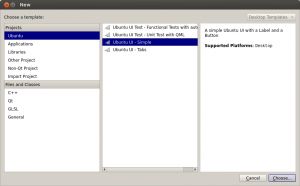
So, to get started I created a new project in QtCreator, using the Ubuntu UI – Simple template (this is the PageStack one). This gave me MainView, PageStack, and a single Page components in my uReadIt.qml file. I knew I wanted the first page to be my subreddit list of articles, so I gave it an …read more
Source: FULL ARTICLE at Planet Ubuntu

