Tag Archives: PC

Dell’s acquisitions not yet paying dividends

Dell’s effort to move away from PCs into enterprise products has been slow as the company battles a challenging economy and tries to weave together acquisitions in a coherent manner.

Dell’s legacy has been entrenched in the PC business, but in recent years it has focused on moving into the fast-growing enterprise segment to improve profits. Dell is pushing hot technologies like cloud and virtualization products to link its mainstay client and server hardware business to newer business areas such as networking, storage, services and increasingly, software.

Dell has had a large string of acquisitions in recent years. (Click to enlarge.)

Dell’s acquisition spree over the past few years has helped reshape its strategy. Dell spent $4.9 billion on seven companies this year, with a marquee acquisition of Quest Software, which is the “foundational platform” for the company’s evolving software strategy, said Brian Gladden, Dell’s chief financial officer, at the Credit Suisse technology conference last month.To read this article in full or to leave a comment, please click here
Source: PCWorld
Next-Gen Game Engine in Action

Former Mafia developer Daniel Vávra and his new studio Warhorse studios has shown off the next-gen game engine he’s using to make his next game – an unannounced medieval RPG.
You can see the engine in action in the video below (offscreen):
It might be just some muddy roads and a few run-down barns, but it does look uncannily real. Is this what we can expect from the next generation of home consoles? It’s definitely whet our appetite. Eurogamer Czech has reported that the game is using a modified version of CryEngine 3.
Expect to see the untitled game on the next Xbox, the next PlayStation or a high-end PC near you at some unspecified date in the future (that’s about as exact as we can be with this sort of thing).
Continue reading…
Source: IGN Video Games

Watch streaming video better with these tips for power users

If you’re reading this, you don’t need to be told that streaming live video on your PC and mobile gadgets is blowing up in a big way; with streaming sites like Justin.tv, UStream, and game-specific streaming services Twitch.tv and Own3d.tv, you have more options for live news and entertainment than ever before. But with so many streams on so many sites (and not so many full-featured standalone player apps), staying on top of the brave new world of streaming TV can be a pain. With that in mind, here are some quick tips and tricks for making your live video streaming experience less painful.
Switch streams easily using third-party clients
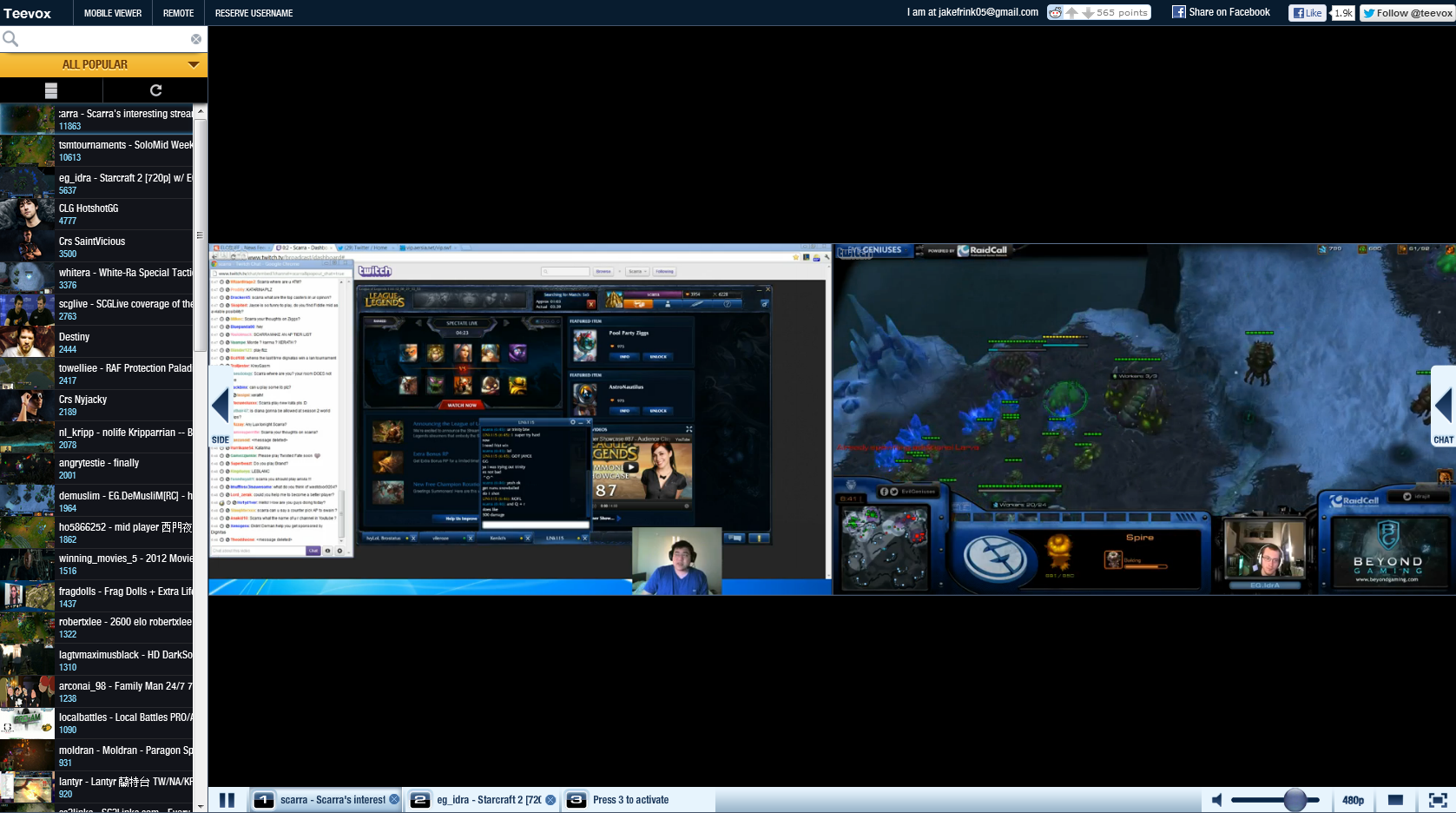
This tip is mostly useful for folks who like to stay on top of video game-related streams; third-party stream viewers Teevox and WellPlayed offer a much more user-friendly, all-in-one interface for watching streams from Twitch.tv and Own3d.tv. Teevox in particular makes it very easy to quickly switch between two streams, or watch multiple streams at once, both of which are handy if you’re trying to follow a major game event with multiple concurrent streams. What’s more, Teevox even features two mobile apps (Android only), one which lets you use Teevox’s multiple-stream features on the go, and one which lets you use your smartphone or tablet as a remote control for your PC–excellent if you’re watching a stream on an HDTV through your PC and don’t want to get up to change the channel.
Use a third-party program like Teevox to switch between multiple live video streams quickly and efficiently.
 
Use an IRC client for chat
Part of the fun of watching live streaming events is the chance to interact with other viewers (and sometimes even the host) through the built-in chat client. If you already use an IRC chat client (mIRC, for instance) and you’d rather use that, you can log into Justin.tv and Twitch.tv chat rooms by setting your login name to your Justin.tv/Twitch.tv account name, your IRC server to [channelname].jtvirc.com (replace [channelname]  with the name of the channel you want to join; if you’re on the Justin.tv site, just take the name that shows up after www.justin.tv/ in the URL), the port to 6667, and the server password to your Justin.tv or Twitch.tv account password. Once you’ve connected to the IRC server, you can join the stream chat room by using as the name of the channel you want to join. This tip will help alleviate stress on your browser (leading to less lag on your video stream) and make it easier for you to chat with your fellow viewers quickly and efficiently.
To read this article in full or to leave a comment, please click here
Source: PCWorld

Shatter Breaking Out on iPad

A simple brick-busting game that bashes its way into your mind with effects and techniques, Shatter by development studio Sidhe made a significant impact when it debuted on the PlayStation Network in 2009. It garnered a 9.0 Editor’s Choice from IGN and is still held in high regard for its addictive gameplay and enrapturing music, and is often on the list for gamers begging for a sequel out of titles in the downloadable gaming market.
We still don’t have a proper Shatter follow-up, but at least the love is spreading. The game hit PC download sites in 2010, and now Sidhe has confirmed on its official Facebook page (via a sneaky NeoGAF tease  picked up by Pocket Gamer) that Shatter will be released on iPad in 2013. Studio head Mario Wynands slipped the mention that the iPad version will release early next year through the company’s PikPok label. No info on pricing or content, but we’re going to assume it’s likely a free-to-play, DLC-based release akin to the company’s Into the Dead, released just yesterday.
Continue reading…
Source: IGN Video Games

10 gifts for obscenely wealthy PC fanatics

Around this time of year, everyone rolls out gift guides—suggestions for what to buy for the special, computer-loving people in your life. But we think that such guides sorely underserve one crucial but oft-ignored demographic: the filthy, stinking rich.

To remedy this pattern of neglect, we’ve put together the ultimate gift guide for recipients for whom the word “budget” holds no meaning: Here are 10 pieces of PC paraphernalia with price tags that push the boundaries of rational expense. We’re not talking about cheesy solid-gold mice and diamond-encrusted cell phone cases that nobody actually buys, either. The products on our list are legitimately awesome (though not exactly great bargains).

Source: PCWorld

NPD: Black Ops 2, Halo 4 Top U.S. Sales Charts

The NPD Group has revealed the top ten best-selling games in the United States for the month of November.
The best-selling titles in the United States for the period between October 28th and November 24th were:

Call of Duty: Black Ops II (360, PS3, PC, Wii U)**
Halo 4 (360)**
Assassin’s Creed III (360, PS3, Wii U, PC)**
Just Dance 4 (Wii, 360, Wii U, PS3)
Madden NFL 13 (360, PS3, Wii, PSV, Wii U)
Skylanders Giants (Wii, 360, PS3, 3DS, Wii U)**
Need for Speed: Most Wanted 2012 (PS3, 360, PSV, PC)
NBA 2K13 (360, PS3, Wii, PSP, Wii U, PC)**
Continue reading…
Source: IGN Video Games

Scribblenauts Unlimited brings your imagination to life

If you want to keep your brain and creative imagination imagination in shape it may be time to pick up Scribblenauts Unlimited.

This is the fourth installment of the Scribblenauts franchise; the original made a name for itself back in 2009 for its innovative ability to render almost any noun you could think of onscreen using a magic notebook. This, however, is the first iteration to make it to the big, hi-def screens of your PC and television.

The goal of the game, like the previous Scribblenauts, is to collect “Starites” which you receive when completing a puzzle or riddle using objects you create. A major departure form the previous games is the level selection. Instead of discrete linear puzzles, Unlimited has a single world that is split into different themed areas, all with their own objectives. Visit the big city to help the police catch a thief or a tropical island to help a shipwrecked couple. How you help them is completely up to you and your magic notebook. As long as they end happy, you get the Starite.
Level selection takes place on a huge world map consisting of different themes.
Of course, it’s hard to create a database of every imaginable object in existence, but the developers at 5th Cell did a darn good job. As usual, proper nouns and obscenities are excluded from the list of playable words, narrowing your choices. If you’re feeling ambitious and creative you can fire up the new item editor and modify any item in the game in a myriad of ways to create whole new objects. Change the color, move parts around, change sizes and even add in physical properties, adjectives and scripted behaviors. Turn Death, the Grim Reaper himself, into a tutu-wearing ballerina that flies and throws confetti! Or whatever else comes out of your imagination.
To read this article in full or to leave a comment, please click here
Source: PCWorld

Bethesda Prioritising Getting Dragonborn on PS3

Bethesda has revealed its new priority is to get Dragonborn on the PlayStation 3, before recommencing work on solving the technical issues that prevent Dawnguard and Hearthfire from working on the console.
In a post on the Bethesda Blog, the publisher reasserted that it was committed to getting all its DLC working on the PS3, but that it had recently re-evaluated which pack to focus on.
“For those that are playing the content already, we hope you’re having a blast in Solstheim. And as noted in Monday’s blog post, we’re hard at work to make this content available early next year on PS3 and PC.
Continue reading…
Source: IGN Video Games

Review: Microsoft Office 2013 features new look, prices

Although consumers and businesses are turning more often to Web-based software and mobile apps, many millions still depend on Microsoft Office to get their work done every day. The folks in Redmond want you to use Office wherever you go—on your PC, your tablet, and your Windows Phone handset. To that end, Microsoft is pushing deep integration between its desktop applications and your data, stored on Microsoft servers.

Office 2013, the next edition of Microsoft’s flagship productivity suite, is available for business customers but won’t go on sale to consumers until the first quarter of 2013. This review focuses on the desktop applications, which you’ll be able to buy either on their own or as part of the cloud-connected Office 365 suite next year. We’ll review Office 365 when it becomes available.

Both the Office 2013 and Office 365 packages provide online document storage and collaboration. The primary difference between the two? Office 365 is constantly updated, and it lets you run Office away from your main PC via an Office on Demand virtualization tool. Office 365 users get extra online storage and, for the Small Business option, add-ons such as shared calendars and HD videoconferencing.

In addition to the highly touted cloud features, the new Office desktop applications look sleeker and deliver several useful improvements.
To read this article in full or to leave a comment, please click here
Source: PCWorld

Review: Xerox ColorQube 8700/X solid-ink color multifunction printer

Xerox’s ColorQube product line, including the $2,799 (as of 12/05/2012) 8700/X multifunction (copy/fax/print/scan), is designed for corporate use in busy
workgroups, but it’s not a laser. The ColorQube technology uses blocks of crayon-like solid ink, rather than an inkjet printer’s liquid ink or a laser
printer’s toner particles. The result is no muss, no fuss, and a lot of fun sliding the ink blocks down their little chutes. With the ink layered on top,
like a laser printer, instead of absorbed into the paper, as with an inkjet printer, output is good no matter what kind of media you place in the tray. The
ColorQube 8700/X may be expensive, but it offers plenty of administrative features and capacity upgrades that make it a significant step up from color
laser multifunction models in lower price ranges.

The ColorQube 8700/X weighs 90 pounds and is sturdily built. It comes with 1GB of memory (not upgradable), plus an 80GB hard drive for storing jobs–a necessity when you’re
providing secure printing for a large workgroup.

Software setup for the ColorQube 8700/X is simple via either USB or ethernet. The printer ships with PC drivers for Postscript, PCL 5 and 6, as well as
XMS. The software is minimal, but effective, with a nice scanning program.

The ColorQube 8700/X is controlled via a spacious, 7-inch touchscreen control panel. Still, the unit is complex to learn. The many high-end features that
come with this corporate unit–administrative accounts, lots of options, secure printing, metering, and the like–are great. But having all the options on
one screen is rather daunting when you begin, though easier once you know the interface. Also, the touchscreen wasn’t as responsive as we’d like, requiring
more pressure than expected to operate.
To read this article in full or to leave a comment, please click here
Source: PCWorld

How Windows 8 rewrites the rules of PC gaming

PC gaming is primed for a renaissance—or at least a reinvention—like we haven’t seen since the advent of 3D acceleration in the late 1990s. For this, we can thank the mobile revolution and all its attendant technologies. Game developers can now tap into accelerometers, touchscreens, and the cloud to add new features and gameplay scenarios. And even Microsoft’s comprehensive approach to Windows—merging desktops, tablets, and smartphones under a common code base—is changing the ways in which game creators should approach their work.

All of these developments were made patently clear at the recent Microsoft Build conference. Justin Saint Clair, a Microsoft business development manager, stood before an audience of game developers and encouraged them to reset their approach. Don’t just think about graphics, themes, and plot lines, argued Saint Clair. The first question every developer should be asking is, “What is a PC?”

The very definition of the term “personal computer” has been upended over the past few years, and now PC gaming looks to be catching up at last. We’re no longer bound to keyboard and mice. We’re no longer even bound to playing the very same game—or the very same campaign within a single game—on the same device. In this article, I’ll walk you through all the new use cases that game developers are exploring. The fruits of their labor will become manifest in all genres of PC gaming, from the casual titles we play on tablets to the deep, textured 3D extravaganzas we download from Steam.
One game, multiple manifestations
When the iPad launched a couple of years ago, the tablet quickly redefined the rules of video gaming. Thanks to its built-in accelerometers and touch sensitivity, the iPad became both a game screen and a game controller. Not only could we tilt the tablet to, say, control a car’s steering in a driving game, but we could also use our fingers to directly manipulate the gameplay action.
To read this article in full or to leave a comment, please click here
Source: PCWorld

With Younity, access your PC’s data from your iPhone or iPad

Move over iCloud, there’s a new app in town. Younity, a personal cloud service, launched a public beta today of its mobile app that enables iPhone and iPad users to  access data seamlessly from Mac OS X or Windows PCs.

The premise is fairly simple: Download Younity on your Mac OS X or Windows computer and set up an account. Younity scans the entire PC to find documents, songs, photos, and videos, and then makes that data available to your mobile devices. When you install Younity on your iPhone or iPad and log in to the account you created, your iOS devices can instantly access all of the data catalogued by Younity.

It’s not all sunshine and roses, though. Let’s start with the good stuff: The data doesn’t have to be placed in specific folders in order to be available via Younity, and it isn’t stored in the cloud. Nor is data synced across devices—so you don’t have to worry that data available through Younity will eat up the limited storage capacity on your iPhone or iPad.

Basically, Younity just enables you to see your data across all devices in one place, and streams it on demand. It means that your 16GB iPhone can have seamless access to terabytes of data from multiple Mac OS X or Windows PCs. Documents, songs, photos, and videos can also be downloaded so they’re available when your mobile device isn’t even connected to the Internet.
To read this article in full or to leave a comment, please click here
Source: PCWorld  

Assassin’s Creed 3 Hidden Secrets DLC Out Today

The first downloadable content for Assassin’s Creed III launches today. Called the Hidden Secrets Pack, the content will be available on Xbox 360, PlayStation 3 and PC for Season Pass holders. The pack will launch for everyone else on December 11th, and Ubisoft notes that the content will come to Wii U “at a later date.”
The Hidden Secrets pack includes three missions: the Lost Mayan Ruins, the Ghost of War, and a Dangerous Secret. Ubisoft says the pack will add about an hour of extra content and will take players “from lost Mayan ruins to the high seas.” In-game weapons will be rewarded for completing each mission. The pack will also include two single-player costumes (Captain of the Aquila uniform and traditional Colonial Assassin outfit) and two multiplayer characters (the Redcoat and Sharpshooter).
Continue reading…
Source: IGN Video Games  

PS3 is Netflix’s Most Popular Streaming Device

Today, the PlayStation Blog revealed some rather interesting and unexpected news: PlayStation 3 is the single most-used Netflix streaming device (connected to a television, anyway).
Netflix CEO Reed Hastings had the following to say: “PS3 is our largest TV-connected platform in terms of Netflix viewing, and this year, at times, even surpassed the PC in hours of Netflix enjoyment to become our number one platform overall… We can transparently update our application with new features on a daily basis, and through the free PlayStation Network, people around the world can sign up for Netflix directly from their PS3.”
Continue reading…
Source: IGN Video Games