Tag Archives: GPL

Get pointer for existing device class (struct class) in Linux kernel module

By hdaniel@ualg.pt

Hi all!

I am trying to register a device in an existing device class, but I am

having trouble getting the pointer to an existing class.
I can create a class in a module, get the pointer to it and then use

it to register the device with:

*cl = class_create(THIS_MODULE, className);
dev_ret = device_create(*cl, NULL, *dev, NULL, driverName);

However I need to register another device in the same class with

another module, but I couldn’t find a way to get the pointer to an

existing class. And I can not crete the class again in the other

module, because since class already exists class_create() returns NULL

and not the pointer to the class required by device_create().

I found in a function that returns a pointer to a class by its name googling (sorry system did not allowed to post url)

struct class * class_find(char * name)

However when I try to compile the function compiler says it does not exist.
I thougth this function was exported by the kernel (my module have
license GPL) but it appears it is not.
Maybe I need to include some header?

I know its a patch I suposed it was in main stream kernel already.
I tried to rewrite this function since the code is available. The code is:

+struct class * class_find(char * name)
+{
+ struct class * this_class;
+
+ if (!name)
+ return NULL;
+
+ list_for_each_entry(this_class, &class_subsys.kset.list, subsys.kset.kobj.entry) {
+ if (!(strcmp(this_class->name, name)))
+ return this_class;
+ }
+
+ return NULL;
+}

But when I try to iterate over class_subsys with:

list_for_each_entry(this_class, &class_subsys.kset.list, subsys.kset.kobj.entry)

now symbol class_subsys is not found. Again I thougth it is exported

to the kernel.

I am not sure what is missing. Some header?
Am I doing it the wrong way?
There is another function to do it?

I supose if I could traverse sysfs from start I could get a pointer to an existing class.
But I also did not find how to start traversing sysfs.
All functions I have seen requires a pointer to kobject or kset to

start traversing. But I have no poniter even to the root of sysfs or kernel objects, so I can not start traversin the tree to get a class pointer.

Can anyone point me in the right direction please?

From: http://www.unix.com/unix-advanced-expert-users/221699-get-pointer-existing-device-class-struct-class-linux-kernel-module.html

Kevin DuBois: Mir and Android GPU’s

With Ubuntu Touch, (and mir/unity next) we’re foraying into a whole new world of android drivers. Given the community’s bad memories from the past about graphics, let’s clear up what’s going on, and how we’ll steer clear of the murky waters of new driver support and get rock-solid Ubuntu on mobile platforms.

Android Driver Components and their Openness

First let’s talk about openness. Driver ecosystems tend to be complex, and android is no exception. To get a driver to work on android, the gpu vendors provide:

  1.  a kernel module
    The kernel module must be GPL compatible and this part of the driver is always open. This part of the driver has the responsibility of controlling the gpu hardware, and its main responisibility is to manage the incoming command buffers and the outgoing color buffers.
  2. libhardware implementations from android HAL.
    These libraries are the glue that takes care of some basic operations the userspace system has to do, like composite a bunch of buffers, post to the framebuffer, or get a color buffer for the graphics driver to use. These libraries (called gralloc, hwc, fb, among others) are sometimes open, and sometimes closed.
  3. an OpenGLES and EGL userspace library
    These are the parts that program the instructions for the GPU, and they are the ‘meat and potatoes’ of what the vendors provide. Unfortunately this code is closed source, as many people already know. Just because they are closed source though doesn’t mean we don’t have some idea of what’s going on in them though. They rely on the open source parts and have been picked apart pretty well by various reverse-engineering projects (like freedreno)

All the closed parts of the driver system are used via headers that are Apache license or  Khronos license. These headers are API’s that change slowly, and do so in a (relatively) non-chaotic manner controlled by Google or the Khronos groups. These APIs are very distinct from DRM/gbm/etc that we see on ‘the free stack’

The drivers are not 100% open, and its not 100% closed either.  Without the closed source binaries, you can’t use the core GLES functionality that you want, but enough parts of the system are open that you can infer what big parts of the system are doing. You can also have an open source ecosystem like Mir or android built around them because we interface using open headers.

As far as openness goes, its a grey area; its acceptable to call them blob drivers though

Stability/Performance/Power

We have a lot of bad memories about things not working. I remember fighting all the time with my compiz drivers back in the days of AIGLX and the like. Luckily when we’re working on Mir and phones, we’ve remembered all this pain and have a reasonable way that we’ll jump onto the new driver platform without any wailing or gnashing of teeth.

The biggest advantage we have with the mobile drivers is that they are based around a fixed industry API that has proven itself on hundreds of millions of devices. We’re not reinventing the wheel …read more

Source: FULL ARTICLE at Planet Ubuntu

Luis de Bethencourt: Do you use Vim? donate to Uganda

Independently of where you stand in the Vim versus Emacs infamous battle, it is hard to deny that Vim is an amazing text editor, but did you knew about Vim’s peculiar license? Vim is charityware, with a GPL-compatible license. It’s distributed freely, but they ask that if you find it useful you make a donation to help children in Uganda through the ICCF.

Bram Moolenaar, author and maintainer of Vim, helped establish a foundation called ICCF Holland that works to support to a children’s center in Uganda. He encourages users to consider making a donation to ICCF Holland or the Kibaale Children’s Fund. He serves as treasurer of the foundation and visits the site in Uganda nearly every year to monitor the center’s progress.

You can become a registered user by sponsoring 10 euros or more, and you can vote for new features. Amazing.

Inside Vim try :help sponsor, and :help uganda, for more information. …read more
Source: FULL ARTICLE at Planet Ubuntu

Adam Stokes: x230T, realtek wifi, and my solution

Recap

I can ping all devices on the network except the gateway
(192.168.0.1) and in turn can not access outside of the network
without proxying through another device.

The system:

Lenovo x230 Tablet with a Realtek wifi adapter running on Quantal:

Network controller: Realtek Semiconductor Co., Ltd. RTL8188CE
802.11b/g/n WiFi Adapter (rev 01)

The wtf:

I can obtain an IP from the router


wlan0 Link encap:Ethernet HWaddr e0:06:e6:c2:d2:e0
inet addr:192.168.0.102 Bcast:192.168.0.255 Mask:255.255.255.0
inet6 addr: fe80::e206:e6ff:fec2:d2e0/64 Scope:Link
UP BROADCAST RUNNING MULTICAST MTU:1500 Metric:1
RX packets:178844 errors:0 dropped:0 overruns:0 frame:0
TX packets:101517 errors:0 dropped:0 overruns:0 carrier:0
collisions:0 txqueuelen:1000
RX bytes:121465876 (121.4 MB) TX bytes:10612848 (10.6 MB)

I can ping other devices:


➜ ~ ping 192.168.0.101
PING 192.168.0.101 (192.168.0.101) 56(84) bytes of data.
64 bytes from 192.168.0.101: icmp_req=1 ttl=64 time=3.84 ms
64 bytes from 192.168.0.101: icmp_req=2 ttl=64 time=1.32 ms

I can not ping the gateway:


➜ ~ ping 192.168.0.1
PING 192.168.0.1 (192.168.0.1) 56(84) bytes of data.
From 192.168.0.102 icmp_seq=1 Destination Host Unreachable
From 192.168.0.102 icmp_seq=2 Destination Host Unreachable

My resolv.conf is autogenerated with:

“`
➜ ~ cat /etc/resolv.conf

Dynamic resolv.conf(5) file for glibc resolver(3) generated by

resolvconf(8)

DO NOT EDIT THIS FILE BY HAND — YOUR CHANGES WILL BE OVERWRITTEN

nameserver 127.0.1.1
search nc.rr.com
“`

My /etc/hosts:


➜ ~ cat /etc/hosts
127.0.0.1 localhost
127.0.1.1 quantal

My routing table:


➜ ~ route
Kernel IP routing table
Destination Gateway Genmask Flags Metric Ref Use Iface
default 192.168.0.1 0.0.0.0 UG 0 0 0 wlan0
link-local * 255.255.0.0 U 1000 0 0 wlan0
192.168.0.0 * 255.255.255.0 U 9 0 0 wlan0

Lastly, my module info for device:


➜ ~ modinfo rtl8192ce
filename: /lib/modules/3.5.0-17-generic/kernel/drivers/net/wireless/rtlwifi/rtl8192ce/rtl8192ce.ko
firmware: rtlwifi/rtl8192cfw.bin
description: Realtek 8192C/8188C 802.11n PCI wireless
license: GPL
author: Larry Finger
author: Realtek WlanFAE
author: lizhaoming
srcversion: DD4F3D83A75531AC98862F2
alias: pci:v000010ECd00008176sv*sd*bc*sc*i*
alias: pci:v000010ECd00008177sv*sd*bc*sc*i*
alias: pci:v000010ECd00008178sv*sd*bc*sc*i*
alias: pci:v000010ECd00008191sv*sd*bc*sc*i*
depends: rtlwifi,mac80211
vermagic: 3.5.0-17-generic SMP mod_unload modversions
parm: swlps:bool
parm: swenc:using hardware crypto (default 0 [hardware])
(bool)
parm: ips:using no link power save (default 1 is open)
(bool)
parm: fwlps:using linked fw control power save (default 1 is open)
(bool)

Things I’ve attempted:

Turning off fwlps, ips. Attempted to compile a driver from upstream
and even tried the latest daily mainline kernel for Quantal.

Has anyone seen this before? What really baffles me is that I can not
ping the gateway. To verify I can ping the gateway from another
system:


λ ~ → ping 192.168.0.1
PING 192.168.0.1 (192.168.0.1) 56(84) bytes of data.
64 bytes from 192.168.0.1: icmp_req=1 ttl=64 time=1.35 ms
64 bytes from 192.168.0.1: icmp_req=2 ttl=64 time=1.22 ms
64 bytes from 192.168.0.1: icmp_req=3 ttl=64 time=5.11 ms

This also doesn’t happen outside of my network as I was able to use
this laptop at UDS-R which kind of points to a router issue but
anything without a Realtek adapter works :

Solution

Turns out that this particular laptop was having issues resolving dns queries because on my particular cable modem/router there was an option for “Enable DNS relay” that was not checked (off). Once I checked that option my laptop suddenly started working! I tried to do some more research on what could be a possible reason as to why this specific laptop/wifi combo requires dns relay to be enabled on the router in order to access anything outside my network? Another odd thing is that if I directly connect the laptop to the router everything works so I assume it is something to do with the actual wifi driver/hardware. Anyway, I’m finally back to being able to use my recently purchased laptop 🙂

p.s – Im in London next …read more
Source: FULL ARTICLE at Planet Ubuntu

ComicBook 7zip Thumbnail Plugin 0.1 (KDE Improvement)

ComicBook 7zip Thumbnail Plugin 0.1
(KDE Improvement)
This library not support cbz, cbr and cbt. For support this files, install
“ComicBook Thumbnail Plugin“. – Included in KDE from ver 4.4.

A cb7 thumbnail plugin for the K Desktop Environment (KDE 4).
Licensed under GPL, v3.

Uses the KDE4’s KIO::ThumbCreator class to add a service
that provides previews for cb7 files (.cb7).

See INSTALL for information on installing the plugin.

USAGE
=====

To see it in action, open Dolphin and set the previews to on. Or hover
over a .cb7 file to see the preview in the Information panel.

If you want to turn on/off the previews for comic books, go to
“Dolphin > Settings > Configure Dolphin… > General > Previews”
and check/uncheck the “Comic Books (cb7)” plugin in it.

NOTES
=====
* In some cases, you have to increase the Maximum File Size
limit (~40 MB) in the configuration dialog to make certain previews work.
* 7zl is part of program. 7zl must be installed in system –
without this, library will be not work

cb7thumbnails License
====================

This library is free software; you can redistribute it and/or
modify it under the terms of the GNU Lesser General Public
License as published by the Free Software Foundation; either
version 3 of the License, or (at your option) any later version.

This library is distributed in the hope that it will be useful,
but WITHOUT ANY WARRANTY; without even the implied warranty of
MERCHANTABILITY or FITNESS FOR A PARTICULAR PURPOSE. See the
GNU General Public License for more details.

You should have received a copy of the GNU Lesser General Public
License along with this library. If not, see .

7zl License
===========

This program is free software: you can redistribute it and/or modify
it under the terms of the GNU General Public License as published by
the Free Software Foundation, either version 3 of the License, or
(at your option) any later version.

This program is distributed in the hope that it will be useful,
but WITHOUT ANY WARRANTY; without even the implied warranty of
MERCHANTABILITY or FITNESS FOR A PARTICULAR PURPOSE. See the
GNU General Public License for more details.

You should have received a copy of the GNU General Public License
along with this program. If not, see .

changelog:
21-Mar-2013:
cb7thumbnails
Version 0.1
* Initial program – supports thumbs for .cb7
7zl
Version 1.0.1
* Initial program
<br …read more
Source: FULL ARTICLE at KDE Apps

Robert Ancell: Mir

Today we go public with the Ubuntu graphics stack for the post X world. Since the beginning Ubuntu has relied on the X server to support the user experience and while it has worked generally well; it’s time for something new. My team is working on a big new component for this – Mir. Mir is a graphics technology that allows us to implement user experience we want for Ubuntu across all devices we support.

In many ways, Mir will be completely transparent to the user. Applications that use toolkits (e.g. Qt, GTK+) will not need to be recompiled. Unity will still look like Unity. We will support legacy X applications for the foreseeable future.

This is a big task. A lot of work has already been done and there’s a lot more to go. We’re aiming to do incremental improvements, and you can find more about this on the Wiki page and in the blueprints. You can help. From today our project is public, it’s GPL licensed and you’re welcome to use the source and propose changes.


It’s exciting times, and I hope you enjoy the results of this work! …read more
Source: FULL ARTICLE at Planet Ubuntu

Thorsten Wilms: New Ardour Logo

ardour_process_old

Ardour is an application for recording, editing and mixing music. It is licensed under the terms of the GPL 2.

The upcoming 3.0 release seemed like a good opportunity to take another look at the logo I designed in 2006. A selection of drafts from back then, ending with the final design:

I had to ask myself: Is this logo (still) appropriate for Ardour?

The upcoming 3.0 release will be a digital audio and MIDI production application, available for Linux and Mac OS X. It is designed for frequent and prolonged use, being able to deal with huge amounts of material, complex signal pathways, precise and intense editing. Reliability, correctness and precision are of utmost importance.

The logo should take a matching stance, be sharp and have a strong presence. I think the old version does a fine job in this regard. It also happens to be well established and liked by the community (of course not by everyone). Back then I decided to use a free-form wave shape, less stylized, more realistic. Now I think a shape with even subdivisions will make the logo appear more precise.

I worked my way through variations of the curves that describe top and bottom of the wave, the number of teeth, their shape, relative height of the type and its consequences on letter spacing:


PDF of above image, in case you’d like to take a closer look.

ardour_logo_old_and_new

Application icons, first column are the old ones. I reduced the number of teeth for the smaller versions, keeping them at least 1 pixel wide.
ardour_app-icons

The new logo is already in use on the new website that went online about a week ago. I helped a bit with color selection, made a few suggestion and provided 3 icons:
record-edit-mix

Filed under: Ardour, Icons, Linux Audio, Logos, Planet Ubuntu …read more
Source: FULL ARTICLE at Planet Ubuntu

And now for something old… Plouf!

This is by far my longest release ever: 18 years!

18 years ago I was learning the ropes of coding on an Amiga 500. Using
AMOS, a game-oriented Basic, I played with creating games and demos. I was
not as persevering as nowadays: most of those creations got started and
abandoned a few weeks later, but I did manage to finish one of those game
attempts: Plouf!

The game

Plouf! is a top-down game where players sit on floats, trying to sink the other
players by throwing sea urchins at them. “Plouf!” is the French onomatopoeia
for the sound made by an object when it falls into a liquid.

You control your float like an RC car: you can accelerate, slow down and rotate
left or right. The islands on the screen are randomly generated, so each game
looks different.

It only support 2 or 3 players: I didn’t have the skills to code a computer
player by then.

You start with a very limited number of sea urchins, so you need to collect them
as they appear randomly in the sea. You can also grab float bonuses which
increase the strength of your float by one point.

Here are some screenshots:

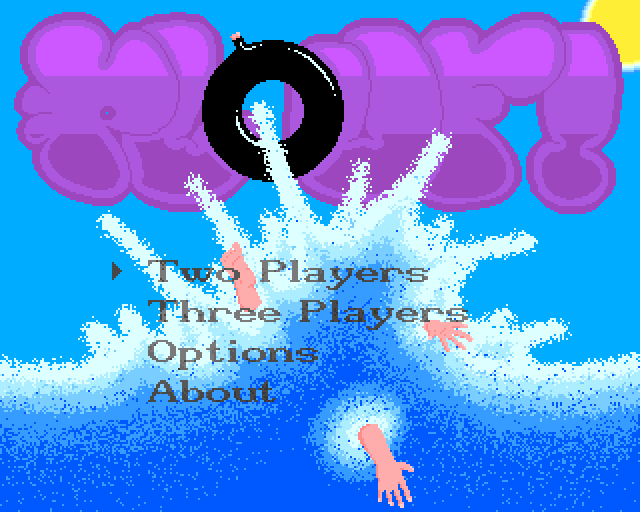
The start screen

The start screen

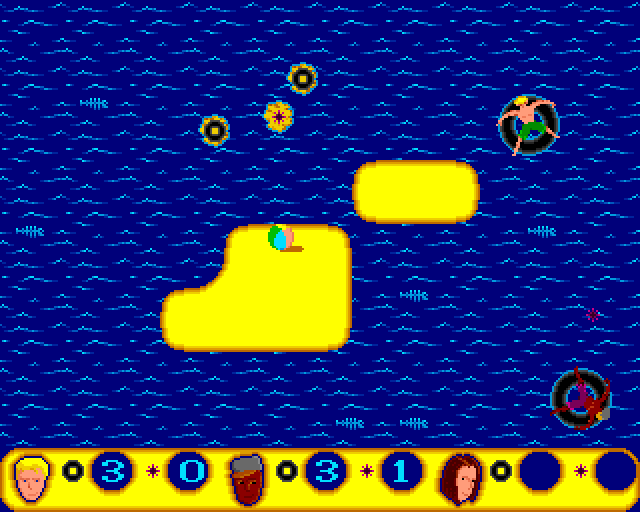
A 2 player game, blond guy has just thrown a sea urchin, but it's going to miss its target

A 2 player game, blond guy has just thrown a sea urchin, but it’s going to miss its target

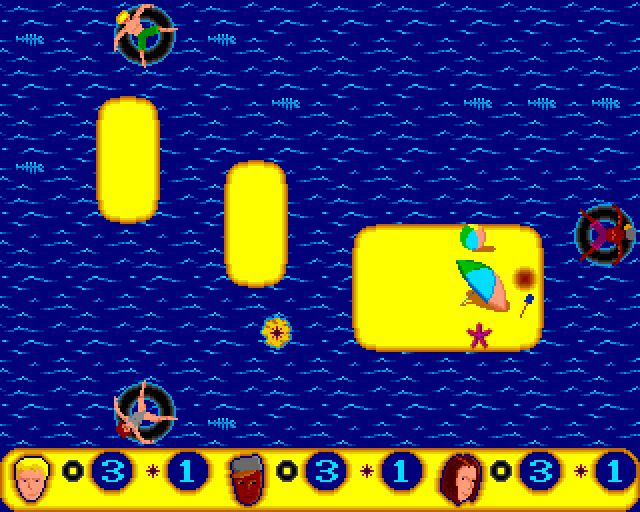
A 3 player game starting

A 3 player game starting

First release

I released Plouf! as a shareware in 1994: a floppy disk of the demo version
(limited to 4 games) could be obtained from a few Amiga freeware and shareware
floppy disk dealers (this was a time where Internet was not ubiquitous…)

It sold the impressive number of 0 full versions 🙁 Playing with friends is a
lot of fun, but I guess the lack of a single-player mode was a show stopper.

Fast forward

Some time ago I decided to release it as free software. I bought a NULL-modem
cable and transfered the source code to my laptop.

There was one problem though: all text was in French 🙁 I wanted to at least
translate all visible strings to English. One would think it would just be a
matter of opening the source code with a modern editor and run the AMOS
Compiler to regenerate binaries… It’s not that simple: the format of .AMOS
files is binary: it bundles the source code and the program assets. This means
it can only be edited with AMOS Editor. I thus ran AMOS Editor in UAE to do all
my edits… I can confirm editors have made a lot of progress since 1994…

Editing Plouf! source code with AMOS

Nevertheless, it was a lot of fun to use these tools again. I eventually
managed to figure out again how everything worked. I translated the visible
strings (note that I didn’t went as far as translating the source code),
adjusted a few other things and here it is: Plouf! is released under GPL 3 or
later license!

Playing Plouf!

To play Plouf! you first need to download plouf-1.1.adf. Then either you are
the lucky owner of an Amiga and you know how to transfer it on a disk to use on
your machine, or you don’t have an Amiga and you can run it with an Amiga
emulator.

If you want to give it a try on an emulator, I recommend FS-UAE, a user-friendly
fork of UAE, with a nicely done frontend.

Source code

The source code is available from github: https://github.com/agateau/plouf.
Just keep in mind you can’t really read it online since the .AMOS files are
not text files.

Flattr this

Source: FULL ARTICLE at Planet KDE