Tag Archives: Free Software

Software for Real People

I try to follow Planet KDE as close as my buggy mobile RSS reader allows me to, and I frequently see posts start with phrases like

I haven’t been able to dedicate much time to KDE lately because I’ve been busy with real life

which is a very misleading phrase, for a number of reasons: First of all, KDE is software for real people, which means that the stuff we do in KDE is real life. Second, you get to read that phrase even from people who take their role in the community very seriously, and I am pretty sure they do not mean their work in KDE is imaginary (which is the logical contraposition of real life).

What this phrase usually means is that people have been busy with (paid) jobs, family, personal life and even health issues in some cases. These are all parts of our real lives, as KDE is part of our real lives too. We either do software or help drive a community that revolves around software that directly affects the life of many people around the world, and we know this because we have much feedback, be it positive or negative, every time we collaborate with any part of the KDE community. Unlike great RPG titles like World of Warcraft and Second Life, KDE Software is used in the government, in education, in research and of course at home, and the particular needs that are satisfied by this software are all very real and evolving.

So I would like to encourage fellow posters of Planet KDE to refrain from using that phrase, because it fosters a misconception of Free Software as a hobby and proprietary software as the real deal; and even though many of us dedicate our time to KDE for fun, as opposed to being paid developers or community managers, at the end of the day the time we dedicate to it directly affects the life of many others – I actually think that’s one of the main reasons I find this fun, after all – so we better give our work the merit it deserves.

Source: FULL ARTICLE at Planet KDE

2012 for KDE: the financial perspective

2012, a great year for KDE

2012 has been an important year for KDE from many perspectives. KDE e.V. turned 15 years old, Nokia finally quit Qt and a new ecosystem lead by Digia is laying on KDE to get mature. We have published our Manifesto, that is the result of long internal and very interesting conversations (I wouldn’t call them discussions) about who we are, how did we get here and what we want. ALERT, out first experience in EU R&D projects, is now a reality. KDE has broken every record in the GSoC program, our KDE 4 series is getting mature and attention is coming back little by little to our software since users are understanding that we are delivering what we promised. Plasma is way more than a crazy idea and now many people perceive how powerful can be, not in a few years, but in a few months.
Applications like Krita, Calligra, Dolphin, etc. are getting more and more popular and others, that lost track in the past, like Kontact, are recovering the favor of many users since improvements and better integration with Akonadi and Nepomuk (semantic desktop), are becoming obvious. We feel that more and more people recognize us as a key member of the Free Software ecosystem, not just for our software, but also for our commitment with freedom and our well desired reputation as serious and stable organization.

Financial situation

2012 has been the year in which Nokia showed us once again that corporations can become your best allies, but also that their commitment with freedom and specific technologies are strong only as far as they are compatible with their strategy, which can vary quiet fast. Once again, KDE has shown others that strong principles are a great base for not just surviving, but digesting changes.
Our economic model, like many other FLOSS community projects, was based on the support of big corporations that invested in us as R&D environments (they were interested in our technologies), as cheap talent ecosystems (recruiting well formed young developers) and as branding feeders (investing in community projects has positive effects in company reputation).
But that support to upstream project, specially to desktops, from big corporations, has been reduced the last few years for different reasons. We are not the next year big thing in the desktop/mobile space anymore and that have a reflection in our financial situation. Many of those who have supported us in the past, link success to market share. That has never been our battle but, we did very little to fight against that wave. It was profitable.
So our past economic model, is drained and we need to adapt ourselves to a new field in which SMB (Small and Medium size Business) and individual support must become more relevant. Since previous Boards made a good job, we can face today those challenges with little risk, in financial terms, taking the required time to make the internal changes that, if we do them right, will define our future in this area the following five years. As simple as that.
This model change will take some time. This 2012 we have taken relevant decisions and some more are coming in 2013. Results must become clear in 2014. This is a very tough sector and it is very risky to make plans, but I have faith in the path initiated in 2012. Many Free Software projects around us are growing like hell. We have to catch up a little, yes, but we have been here long enough to understand that running is not always the fastest way to get to the finish line… and frequently not the healthiest.

2013 goals

Our major goal for 2013 is to get take more steps toward sustainability, in a very volatile environment.
How do we want to achieve this from the financial perspective?
There are two main work lines:
  1. Reducing our exposure to market changes.
  2. Becoming a more flexible organization.
In this journey, we will need everybody’s support. As a technical community, finances haven’t been a priority for our members. This do not have to change in the future since KDE e.V. is here to support KDE community. Just a little more collective focus will be needed. More communication effort from our side, as Board/Organization, and from those involved in this area, will speed up the process. We are already working on it.
I feel lucky of playing a key role in KDE these days. I am having fun and I am optimistic about our future in the financial area. If during 2013 we confirm the switch we began this year, we will have a good platform for growing healthy and strong the following years.

How can you help us?

If you are a KDE community member, please consider joining KDE e.V. If you are simply a KDE user or fan, you can get involved in our project as contributor or, if you do not have time to invest, please consider supporting us economically through our Join the Game program. KDE financial activity is summarized in our Quarterly Reports, you can download in .pdf format.

Source: Planet KDE

KEncFS 1.2 (KDE System Tool)

ThumbnailKEncFS 1.2
(KDE System Tool)
KEncFS is a gui frontend for encfs. With KEncFS you can easily create, mount, umount and delete your encrypted filesystem.

Use of KEncFS is very simple: to create a new encrypted filesystem you must create new or select two existent dirs, one directory to archive encrypted files and another directory to mount on the encrypted filesystem with encfs (a mountpoint). After this, you can select a conventional ID for your encrypted filesystem and then a password.

With KEncFS you can also manage your encrypted filesystem. You can browse, mount, umount, remove from list (not from disk) your encrypted filesystem, in easy way.

Author: Felice Murolo – Salerno – Italy
eMail: linuxboy@RE-MO-VEfel.hopto.org (delete RE-MO-VE and send your email)

/******************************************************************
** KENCFS – (c) 2010 by Felice Murolo, all rigths reserved
** Author: Felice Murolo, Salerno, Italia
** eMail: linuxboy@RE-MO-VEfel.hopto.org
**
** GNU Lesser General Public License Usage
** KEncFS and it’s sources may be used under the terms of the GNU Lesser
** General Public License version 2.1 as published by the Free Software
** Foundation and appearing in the file LICENSE.LGPL included in the
** packaging of this file. Please review the following information to
** ensure the GNU Lesser General Public License version 2.1 requirements
** will be met: http://www.gnu.org/licenses/old-licenses/lgpl-2.1.html.
**
**/

INSTALL FOR KUBUNTU 10.10
===========================
Download and install supplied DEB package. Dependencies will be automatically installed.

INSTALL FROM SOURCE
=====================
Open a konsole into source dir and write

$> qmake
$> make
$> sudo make install

Note: the automatic installation is done in the following directories:

/usr/bin/ for KEncFS itself
/usr/share/doc/kencfs-1.0 for this README
/usr/share/kde4/apps/kencfs/translations for .qm files of languages
/usr/share/applications/ for kencfs.desktop file

If you want to change some of those path, adjust qmake kencfs.pro file.

Note: KEncFS has nothing to do with programs with similar name (for example k-encfs), who carry out similar functions. This is a new program designed specifically for KDE4.

=====
NEWS
=====
KEnCFS is now in the Portage-tree for Gentoo! (25 sep 2011)
http://packages.gentoo.org/package/app-crypt/kencfs

=========
DONATION
=========
If you like this application, please donate something. All money raised will be donated to charity for meritorious initiatives.

changelog:
12 sep 2010 1st version, 1.0a

12 dec 2010 version 1.1
– fixed some minor bugs in sources.
– fixed a major bug (segmentation fault). It was generated by pressing a button (browse or umount or remove) when no row was selected into treeview of filesystem
– fixed a window title
– added warning request when you try to remove a filesystem

25 sep 2011, version 1.2
– Now, double click on the line corresponding to a filesystem, it turns on the mounting and opening.

[read more]

job recommendations:
Sales Engineer full time employee
ownCloud Inc. United States of America, Boston more about this offer
[more jobs]

Source: KDE Apps

Jono Bacon: Happy Holidays!

Just a quick post to wish all of you a safe and happy holidays, wherever you may be, and whoever you are spending it with.

This year was a great year for Ubuntu, and a great year for Free Software. Step by step we are bringing freedom of technology to more and more people across the desktop, cloud, and devices, and underlining this freedom with a continued focus on elegance and quality. We still have a long road ahead of us, but our wheels are rolling and we are cranking out some AC/DC for the journey; anything is possible.

On a personal note, I just want to thank all of you for reading my blog and social networks and participating in the conversations therein. I know sometimes my posts have sometimes generated some dissenting views, but I cherish all perspectives that you folks share, both supportive and challenging to the work that we do in Ubuntu and the work I do personally as a community manager. I have always been a firm believer in personal growth and evolution, and this year I have been blessed by many of you providing me with different ways of viewing challenges, and different ways of seeing opportunities. These views help me to be a better person, and do a better job.

This is a very special Christmas for me and my family with our new little addition, Jack, and I hope all of you have an equally special and relaxing break. Thanks!

Source: Planet Ubuntu

Google Code-in experience – Kexi

KDE Project: DevelopmentKexi

KDE is taking part in Google Code-in (GCI) this year once again. It’s a contest to bring 13 to 17 year-olds closer to Free Software.

One of the tasks I proposed for Kexi was Adding d-pointers to the code. Because of its size I split the challenge into two GCI tasks for truly motivated students. One part has been taken by Shou Ya and second by Andrew Inishev. Both parts have been finished successfully, the patches (2 * 10 thousands of lines) are already in the Calligra master repository.

Andrew writes on his blog:”[..] It was hard for me at beginning because I am beginner in C++ and I didn’t know about d-pointers before, but when mentor of this task explained me how to use d-pointers right, task became to be easier. And I must to mention that he is very patient, if keep in mind my inattention when modify code.

Collaboration with KDE community is very useful for me (and, may be, for community 🙂 because I am getting experience and skills which will be useful in my future work. For example, experience of using version-control systems and build systems (which are important skills in collaborative development), experience in C++, etc.”

Another student tries to find UI issues while running Kexi under non-KDE desktops. This particular task expresses commitment of Kexi to be highly portable software that adapts to various environments, what is I think in line with the rest of the Qt and KDE world.

Source: Planet KDE

Guest post: Google Code-in experience #4 (Thomas)

KDE is once again taking part in Google Code-in this year, a contest to bring 13 to 17 year-olds closer to Free Software. I asked some of our students to write about their experience with KDE. Here’s the fourth one by Thomas.

Google Code-In 2012 marks the first time in which I have participated in the Code-In or any similar program. Having some experience with smaller organizations and personal development, I did not know what to expect, but I signed up ready to learn and be challenged. Less than two weeks into the program I have completed two tasks (and now a third!) with KDE. More specifically, I have worked with the team behind ownCloud, a personal cloud
service, to help test and design new features for an upcoming release.
My first task was to help test and debug a RSS reader for ownCloud that was actually developed as part of this year?s Google Summer of Code program. The News app runs within the ownCloud instance and allows for each user to have their own RSS reader with multiple feeds. The app was operational, but lacked key features and was too buggy to be released as part of the ownCloud package. My mentor Alessandro Cosentino (zimba12) helped guide me with testing tips and practices. I also suggested features and changes to the existing help to make it more appealing for users. I personally do not use an RSS feed reader, but I found the news app to be easy to use and enjoyable.
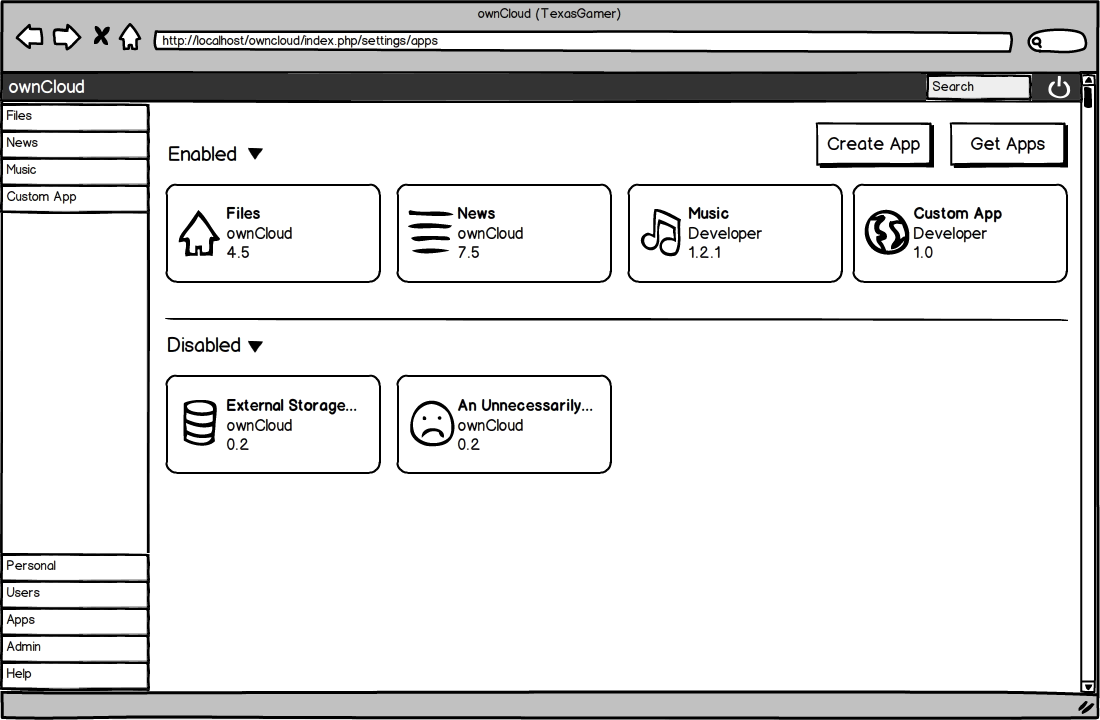
My second task with ownCloud involved designing mock ups for a redesign of the software?s application administration panel. The current panel doesn?t use space effectively and has an excessive amount of whitespace. My second mentor Bernhard Posselt (Raydiation) introduced me to Balsamiq, a mockup creation tool. I designed the new control panel with a much more user-friendly features such as drag and drop and contextual menus. The design looks somewhat reminiscent of Google Chrome?s new tab page, with tweaks to make the interface more powerful for administrators. I also had the opportunity to design potential new features such as system-wide settings per app and an integrated app market. Feedback from the designs has been positive so far.

My experience with KDE through GCI has been phenomenal so far. The community of developers who I have had the opportunity to work with have been very helpful and supportive with my efforts to complete the tasks assigned to me. Alessandro, for example, guided me in setting up ownCloud on my own system for testing. Without my mentors? help and guidance I would not be able to be as successful with the tasks. The information and skills that I have developed through these and future tasks are invaluable to me as a student in both my academic work but also when I develop my own software. I look forward to working with the ownCloud and other KDE organizations in the near future as part of GCI and other programs.
Source: Planet KDE

Guest post: Google Code-in experience #3 (ctaka)

KDE is once again taking part in Google Code-in this year, a contest to bring 13 to 17 year-olds closer to Free Software. I asked some of our students to write about their experience with KDE. Here’s the third one by ctaka.

“What have I gotten myself into with the Google Code-In?! I’m smart. I get good grades. I’m good at learning stuff. Yet I kept running into little problems on every task. What makes it so frustrating is that it’s basic stuff. I feel like I’m learning to walk again. And look, now I’m talking to myself …”
Ohhhh, the stories my mentors could tell you! Fortunately, the three of them are sworn to secrecy. ;-) [Note: This includes you too, Lydia … although I have yet to do something eye-roll-worthy. But the task isn’t over yet. Just give me time!!! hahaha] What I am at liberty to say, is that working on the tasks and getting things done is very satisfying, but the best thing about the Google Code-In has been getting to know the mentors. KDE has some really amazing people.
My first mentor, who shall remain nameless (hint: his name rhymes with Mascha Sanns!), welcomed questions and suggestions. He laughed at my misconceptions and good-naturedly pointed out reality. He was very patient and appreciative, and it felt great to have my work acknowledged. (THANK YOU, Mascha!) Even after the task was over, he encouraged me to learn DocBook, as it is widely used in industry. So I’m working on that. Lafar, whose name I have so cleverly encrypted (I’m a walking Enigma machine), works for CERN. He may as well have said, “I work on Mount Olympus.” It’s the same thing. Still, he found the time to explain APIs, answer my questions about CERN, and offered very constructive feedback. And then there’s Anne-Marie, who is very efficient at diagnosing problems. It took her all of three questions to figure out what I was doing wrong. Of course, that was after patiently waiting while I muddled through learning to use IRC. Note to others: If you want to chat with someone, don’t bother looking for a nice, big “Click here to reply” box or button. It’s about 5mm tall and is disguised as part of the bottom border. :-P
I’m impressed with how well my mentors communicate in English, and am inspired to continue studying Spanish until I become as fluent. I am aware that they are helping us with Code-In tasks in addition to their regular jobs, and this encourages me to become more selfless. I love the idea of free and open source projects; I had no idea this type of collaboration was going on. Welcoming students to work on their projects makes me feel like the world is not so big and far away, and that we can work as one to advance society. As a result of the Google Code-In, I am developing more than code; I am developing into a better person.*
@ Anne-Marie: Don’t forget our virtual pinkie swear.
@ Lafar: One basket of cookies delivered to your altar every third waxing gibbous moon when the sum of the digits of that day is evenly divisible by 3. Got it.
@ Mascha: Just remember that I have your email address … and I’m not afraid to use it!
@ Lydia: Please disable the mentors’ “reject” button. If they don’t currently have that option (for when students request tasks), you might be getting some requests! LOL =D
*Disclaimer: I have not done any actual coding yet, as I am waiting for winter break and a task I think I can do without causing too much pain to my mentor—HAHAHA. But linguistically, it seemed like the perfect phrase.
Source: Planet KDE

Guest post: Google Code-in experience #2 (Sumit)

KDE is once again taking part in Google Code-in this year, a contest to bring 13 to 17 year-olds closer to Free Software. I asked some of our students to write about their experience with KDE. Here’s the second one by Sumit.

“I come from India, where one in every five of the world’s children lives. I come from India, where 400 million children and young people below the age of 18 live; this is larger than the population of America, Argentina and Australia put together. “ – Derek O’Brien
I’m a 16 year old kid from Kolkata. I started learning how to code when I was in grade 7, while stumbling across a few YouTube tutorials on Java. 3 years later, Google Code-In was the first time I was exposed to the world of open-source, and I must say, it has been truly marveling.
My first task with KDE was relating to ownCloud. I learnt how to use IRC and immediately after, got in touch with Michael Gapczyski(MTGap) , my mentor. I encountered many helpful souls in the IRC chat, who were a great resource when the task seemed daunting at first. They helped me understand what the task wanted, and how I was supposed to go about all my work. This was one of the most counter-intuitive things I had learnt in my life. That people will go out of their way to help you out just because you ask. I discovered how truly wonderful the open source community was. But coming back to the task, my job was to write a short overview of describing the different types of apps available on ownCloud. After spending several hours using the ownCloud demo online, experimenting with internal and 3rd party apps, reading source gode on git, I finally began writing my summary. After several proofreads, I felt ready to upload my file online. MTGap thought that my summary needed a little more work, and helped by adding the text to TitanPad, where both of us could edit it simultaneously. After a little more research and some edits, my work was finally approved. I felt proud. It was my first task on Google Code-In, and I was glad it went well. Immediately after, I searched for another task. Maybe it was coincidence, but my 2nd task also ended up with KDE. Once I switched, over to Ubuntu, I downloaded Kamoso, which was the crux of my 2nd task. Kamoso is a program to use your webcam to take pictures or make videos. I fired up Kamoso on Ubuntu and started fiddling with all the features. Once I felt I had explored it fully, I started my task of writing documentation for how to use it. Some problems arose as I never got a chance to speak to my mentor, Alex Fiestas, and even long after I had completed the task, nobody reviewed my work. But it was a very minor issue, for when I inquired with GCI, they immediately spoke to KDE, and my work was approved. KDE was extremely swift at getting my work approved and I was equally contented by the fact that I had now completed 2 tasks. I was enthralled by the experience of open source software.
KDE has given me my debut to open source development, and, hopefully, I have a long way to go from here. I felt a little lost coming into Google Code-In, but I can safely say, I know what to do a lot better, and can take on tasks without feeling ill at ease, and it’s all thanks to KDE.
Links to my work :
ownCloud : http://www.google-melange.com/gci/task/view/google/gci2012/7989204
Kamoso : http://www.google-melange.com/gci/task/view/google/gci2012/7980218
Thank you.
Source: Planet KDE

Guest post: Google Code-in experience #1 (Adam)

KDE is once again taking part in Google Code-in this year, a contest to bring 13 to 17 year-olds closer to Free Software. I asked some of our students to write about their experience with KDE. Here’s the first one by Adam. More will follow in the next days.

I don’t know C++. I don’t know anything about Qt. And yet with the support of Google Code-In mentors, I managed to contribute to a project in a language I don’t know, in a toolkit I am clueless about, in an unfamiliar codebase. And I managed to dive into KDE, even though diving into development can be difficult with so many different tasks to be solved. Google Code-In helps a ton in reducing the initial workload to getting involved with the KDE community. Instead of the titanic mass of the bug tracker there are a few simple, easy tasks that are not too hard for someone like me to get involved and to start solving problems.
One of these problems was in the anagram app, Kanagram. Kanagram simply gives the user an anagram to solve and a button to show the answer. The bug was a simple one in which the reveal anagram button still appeared after the user had either figured out the anagram or solved it. It was a minor detail and yet an important one, as it was confusing to have a button to reveal an anagram when there is no anagram to reveal. This was a minor inconsistency, and becuase of the simplicity of the problem, a good place to start for me. I apt-getted kubuntu-desktop and I was ready to start my first bug. I, being unfamilliar with Qt, turned to Google to try to solve the problem and came up with an idea. I posted it, and the mentor for that task, Laszlo Papp, looked over the code, and told me what I was doing wrong. A few more changes and I had got in working. I reposted it, and again I had a variety of code-style problems. One more iteration and it was accepted. The mentor turned this from what would’ve been a rather frustrating experience to a much simpler and easier one. In addition, once he marked the bug as fixed he continued to talk to me about what I did wrong with integration, further educating me about KDE and C++.
Another great plus to working with KDE is the reality of the problems I’m solving; in short, I know that what I do makes a difference. It may be a tiny bit of QA or it might be the removal of a button; either way, that change I made directly helps people around the world. And it has taken me just a few days to get started with the KDE community with virtually no hassle, beyond some minor kinks with setting up a build environment, though once set up KDevelop + Git really worked well. Even though KDE does a lot of things well there are some problems for a newbie KDE developer. Many of these are tiny details like the lack of a unified account for the wiki and the bug tracker, but in total they pose an obstacle. Overall the combination of mentors and the list of tasks materially reduces the difficulty of getting started with KDE development.
Source: Planet KDE