Microsoft will issue security fixes for its Windows Store apps on the fly, not just on the familiar monthly Patch Tuesday, the company said this week. …read more
Source: FULL ARTICLE at Computerworld Latest
Tag Archives: Windows Store

Microsoft to roll out fast Windows Store app patches

Microsoft will release security updates for applications in its Windows Store as those patches are available in order to speed up the updating process.
The policy will apply to applications that are preinstalled on Windows 8 but updated through the Windows Store, such as Mail, wrote Mike Reavey, senior director of the Microsoft Security Response Center, part of the company’s Trustworthy Computing group.
The Windows Store, which opened to developers in September 2012, is an application marketplace where users can buy programs for Windows 8 and Windows RT computers and tablets.
“Our goal is to have a quick, transparent and painless security update process,” Reavey wrote. “With this in mind, we will deliver high quality security updates for Windows Store apps as they become available.”
To read this article in full or to leave a comment, please click here
…read more
Source: FULL ARTICLE at PCWorld
Microsoft to roll out Windows Store app patches quickly
Microsoft will release security updates for applications in its Windows Store as those patches are available in order to speed up the updating process. …read more
Source: FULL ARTICLE at Computerworld Latest

Surface sales aren't dominating, and that's okay with Microsoft's Ballmer

PC makers may not be satisfied with Windows 8 hardware sales, but at least they needn’t worry about Microsoft’s Surface tablets swallowing the industry whole.
According to AdDuplex, Microsoft’s Surface RT only accounts for 6.8 percent of Windows 8/RT devices, at least among those that accessed the firm’s cross-promotion ad network. That’s still good for the top slot, however, with the HP Pavilion G6 proving to be the second most-popular device with a 4.2 percent share. The Intel Core i5-packing Surface Pro was barely a blip, ranking as the 52nd-most common Windows 8 device.
Keep in mind that AdDuplex’s stats aren’t an accurate breakdown of Windows device sales. The firm runs a cross-promotion network for Windows and Windows Phone apps, so the stats are just a measure of how many devices have run apps that accessed the network. In other words, if a user doesn’t run any Windows Store apps with AdDuplex advertising—or doesn’t access the Store at all—that user doesn’t get counted.
Still, we can see some interesting trends over time. This month, for instance, Surface RT share fell to 6.8 percent in AdDuplex’s stats, down from 7.6 percent last month. In the United States, its share is down from 13 percent to 10 percent. AdDuplex’s numbers are joined by reports from both IDC and IHS iSuppli, two research firms that recently estimated that Surface RT sales have totaled less than 1 million units thus far .
To read this article in full or to leave a comment, please click here
…read more
Source: FULL ARTICLE at PCWorld

Windows 8 app releases grind to a near-complete halt

When it comes to mobile platforms, it’s all about the apps. Got apps? Then you’ve got users. If you don’t, then you don’t—just ask BlackBerry about its failed Playbook, and both Palm and HP about the disaster that was WebOS. Overall app quality means more than numbers alone, of course, but if you don’t have many apps populating a storefront, the odds are pretty low that new entries will knock your socks off.
Now consider Windows 8. A picture is worth a thousand words; the gray line in the graph below—from MetroStore Scanner, a site that keeps unofficial tabs on new additions to the Windows Store—shows the growth rate over the Windows Store over the past 15 days. It’s a flat line, and it’s not very pretty.
Starting fast, then fizzling out
Yep, the Windows Store‘s growth has slowed to a near-standstill. That’s a catastrophe for a platform that started out lagging far behind the competition.
Worse, the pace of new submissions has only slowed since Windows 8’s launch. Despite early qualms about the state of the Windows Store, Microsoft’s bold new operating system actually proceeded to grow at a fairly brisk pace once it hit the streets. Developers hit the ground running, pumping nearly 500 apps into the market each and every day, pushing the global total to 20,000 apps in less than a month.
To read this article in full or to leave a comment, please click here
…read more
Source: FULL ARTICLE at PCWorld
PSA: Today Is Final Chance For $40 Windows 8 Upgrade
By Jason Evangelho, Contributor If you’ve wanted to embrace Windows 8 without spending serious coin, today is the final day to take advantage of the $40 upgrade special being offered from the Windows Store.
Source: FULL ARTICLE at Forbes Latest
Should you upgrade to Windows 8 while it's still $40?
Thursday marks the last day of January, and this particular flip of the calendar brings about the end of more than just another month. Jan. 31 is the last day you’ll be able to pick up an upgrade license to Windows 8 Pro for the dirt-cheap price of $39.99 (or $69.99 if you want a physical disc). Starting in February, the price of a Windows 8 Pro upgrade license skyrockets fivefold to the full retail price, a much, much less wallet-friendly $199.99.
The time for fence-straddling is over, folks. But does that mean it’s time for you to take the plunge into Windows 8, while the price is still as low as it is ever likely to plummet? Not necessarily.
Do you really need Windows 8?
Setting the money talk aside for a minute, whether you actually need Windows 8 the big question. Nabbing Windows 8 Pro for $40 is only a deal if you want to move to Windows 8—otherwise, it’s just $40 down the drain.
There are credible arguments for adopting Windows 8, and there are credible arguments against adopting Windows 8. Three months in, we’re going to have to stick with the decree we made in our original Windows 8 review: If you’re a perfectly happy Windows 7 user, the new operating system doesn’t offer a compelling reason to upgrade. You’ll need to learn a new, less-than-intuitive interface, the Windows Store (which stocks modern UI-style Windows 8 apps) is still woefully barren, and the operating system’s controls simply work better on a touchscreen—a capability that many PCs under upgrade consideration simply don’t have.
To read this article in full or to leave a comment, please click here
Source: FULL ARTICLE at PCWorld
Windows Store finally breaks 40,000 app milestone
Microsoft’s Windows 8 app selection may still be of somewhat dubious quality overall, but Microsoft deserves a pat on the back for making strides on the quantity front. The Windows Store has finally cracked the 40,000 app milestone, according to the unofficial count at MetroStore Scanner.
The global tally stands at 40,158 apps after 302 new apps were introduced yesterday.
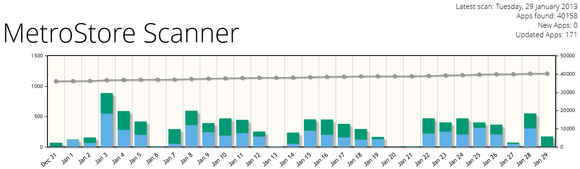 MetroStore Scanner
While 40,000 apps is a notable milestone, it’s well short of the 100,000 apps that one overly ambitious Microsoft VP estimated would be available at the three-month mark, and far behind the 700,000-plus apps available for both iOS and Android.
More concerning is the reduced pace at which new Windows 8 apps have been landing in the Windows Store now that its honeymoon period is over. After crossing the 20,000 app barrier one month after launch and 35,000 apps the month after that, only 5,000 new apps (give or take a handful) were introduced between December 27 and January 28 by MetroStore Scanner’s count.
To read this article in full or to leave a comment, please click here
Source: FULL ARTICLE at PCWorld
Lucrative Windows crapware market is exactly why we need app stores
Even as Microsoft tries to popularize its Windows Store for PC apps, shown above, the market for Windows crapware remains alive and well.
A couple of stories have bubbled up recently about how lucrative the crapware business can be. It started with a post from TechCrunch about InstallMonetizer, a wrapper for Windows desktop software that presents “offers” to users after installation. For instance, users might see an offer to install a third-party browser toolbar or some anti-virus software. If the user agrees, the original software developer gets paid.
The idea of crapware installers isn’t new. What’s interesting about this particular example—aside from its seemingly contradictory privacy policies—is that it’s backed by $500,000 in venture capital and supported by startup accelerator Y Combinator. Vince Mundy, CEO of InstallMonetizer, told TechCrunch that the software is profitable, and that it doubles its number of bundled software installations every two or three months. It’s good to be a crapware pusher.
The story on InstallMonetizer stoked an even more interesting story by Long Zheng, who develops the Twitter client MetroTwit for Windows. On his blog, Zheng talked about a few of the offers he’s received over the years to wrap crapware installers around MetroTwit.
To read this article in full or to leave a comment, please click here
Source: FULL ARTICLE at PCWorld
Microsoft Actually Applauds Hacker For Windows RT Jailbreak Attempt
By Kelly Clay Over the weekend, it was reported that a hacker had claimed to discover a way to jailbreak a Windows RT device so that it would run non-Windows Store apps on a Windows RT device via a circumvention method. The method was discovered by clokr on Sunday, and and Microsoft immediately responded it was investigating the claims, which were verified.
Source: FULL ARTICLE at Forbes Technology
Windows RT can be tweaked to run desktop apps, hacker says
Running traditional desktop apps on Windows RT may be one step closer to reality, thanks to a vulnerability that a hacker claims lets you run any desktop app on the ARM version of Windows.
A hacker called ‘clrokr‘ recently detailed the Windows RT exploit, which requires manipulating a part of Windows RT‘s system memory that governs whether unsigned apps can run. Clrokr says the exploit was possible thanks to a vulnerability in the Windows kernel that was ported to Windows RT.
The bad news is this is not a simple exploit and requires significant knowledge of how Windows works, so for now the RT exploit is strictly in the domain of programmers and tinkerers. Even if you got the exploit working, you’d also have to know how to compile legacy Windows desktop programs for ARM processors. It also appears this hack is temporary and would be wiped out following a system reboot.
Nevertheless, it’s interesting to see that hackers are hard at work figuring out how to run unapproved apps on Windows RT tablets. Microsoft decided to follow in Apple’s footsteps with Windows RT by completely locking down devices running the OS. The traditional desktop on Windows RT will run only apps that are digitally signed by Microsoft; third-party apps are not allowed. And apps for the modern UI Start Screen on Windows RT are available only through the Windows Store.
To read this article in full or to leave a comment, please click here
Source: FULL ARTICLE at PCWorld
10 third-party alternatives for 'missing' Windows 8 apps
The Windows Store has grown significantly since the dark and dreary pre-launch days of Windows 8, more than quadrupling its catalog size since October 26th. Don’t let that 20,000 app number fool you, though. Quantity is not the same as quality, and the platform still suffers from hit-or-miss availability when it comes to blockbuster apps. You’ll find modern UI offerings for some of the big-name apps from other platforms in the Windows Store—including Netflix, Hulu, Skype, and Kindle—but you’re bound to hit a brick wall when looking for many other must-have titles, including Pandora, Twitter, and Facebook.
Luckily, third-party developers have stepped in with their own versions of your favorite missing apps. We’ve sifted through the Windows Store to identify the best Band-aids for the most painful Windows Store no-shows.
Source: PCWorld
17 best apps to download for your new Windows 8 tablet
The first time you boot up your shiny new Windows 8 tablet and witness Microsoft’s live tiles in all their constantly shifting, multi-hued glory, it’s only natural to want to dive into the Windows Store and try a few apps out for yourself. Just one problem, though: There are tens of thousands of Windows 8 apps available, and Microsoft doesn’t do a great job of directing people to the cream of the crop.
Fortunately, I’ve already played around wi… um, researched, hundreds of apps to find the very best. If you’re new to Windows 8, these are the apps you’ll want to install first.
Windows 8 Cheat Keys
 Windows 8 Cheat Keys can helpfully be snapped to the side of the screen.
Microsoft doesn’t do a great job explaining the various interface changes introduced in Windows 8, which could throw you for a loop when you’re looking to, say, shut the system down, close an app, or simply print a web page.
Some manufacturers include proprietary Windows 8 tutorials into their boxed PCs—most notably Vizio’s helpful full-color manual and Dell’s preinstalled video tutorial app—but if yours does not, check out the free Windows 8 Cheat Keys app. In addition to corralling a big list of controls, tips, and all-around useful knowledge in the app itself, Windows 8 Cheat Keys pops up random notifications throughout the day to keep the new controls fresh in your mind. It’s a great way to get a hang for the OS gradually.
To read this article in full or to leave a comment, please click here
Source: PCWorld
Review: iCookbook turns your Windows 8 laptop or tablet into a gorgeous cookbook
There are few things more appetizing than gorgeous, high-resolution photos of delicious food. Cookbook editors have known this for years, and the modern cookbook is bursting with full-page glossy photos showcasing the recipes. iCookbook is a $5 cooking app for Windows 8 that takes this aesthetic and brings it to life with thousands of photos, each leading to a beautifully typeset recipe.
Windows 8’s Modern UI is all about tiles, and iCookbook uses them to good advantage. Every recipe is represented by a tile bearing a photo and caption, but they’re not all the same size: The main screen is subdivided into several categories, each with a large centerpiece tile and three smaller tiles below. These categories let you browse recipes by dish, ingredient, theme, cuisine, occasion, and brand.
 iCookbook’s main screen surfaces recipes using beautiful, bold imagery.
If one of the images on the main screen catches your fancy, just click to open the full recipe. But if you’d like to drill deeper into a category, you can click its header and find yourself in a submenu with vertical tiles, one per subcategory. So click Dish, and you get Appetizers & Snacks, Beverages, Breakfasts & Brunches, and many more. Click a subcategory, and you’ll find yourself in a screen full of alphabetically sorted tiles, each for a recipe in that subcategory. There are often more recipes in a subcategory than can fit on the screen, so you can scroll to see more – horizontally. In fact, all scrolling in iCookbook is horizontal. This can be strange and distracting at first, but such is the way of the Modern UI.
 iCookbook lets you easily and visually browse recipes by several different categories.
With thousands of recipes available, search is a must-have feature. At first I just tried typing, expecting a search bar to pop up with my first keystroke, like it does in the Windows Start Screen and Windows Store. When that didn’t happen, I brought up the Windows 8 Charms bar and clicked the Search icon. That did the trick, and I was able to quickly search for recipes.
To read this article in full or to leave a comment, please click here
Source: PCWorld
The best Windows 8 video apps for tile-loving cord cutters
Every app store has its bleak and early days, when quality apps are rare, buried in heaps of throw-it-against-the-wall-to-see-what-sticks, fart apps, poorly coded abominations, and general dreck. The iTunes App Store had them. The Play Store—formerly Android Market—had them. The Window Store, well, it’s dredged in those early days right now—but video apps are a shining star amongst the quagmire.
The modern UI beating at the heart of all Windows 8 and Windows RT apps ensures a similar experience across all of the apps you’ll find in the Windows Store, making them simple and clean and designed to run full-screen. For many types of content, this isn’t ideal. For video, it’s perfect.
Here are seven Windows 8 video apps that don’t suck. Your mileage shouldn’t vary.
Source: PCWorld
Microsoft flooded with Windows Phone app submissions, none from Google
Microsoft says Windows Phone app reviewers will be working into the holidays to deal with a flood of new app submissions to the Windows Phone Store, but at least one major company isn’t buying into the Windows Phone hype. “Since the launch of Windows Phone 8 in late October, we are experiencing a sustained 40 percent increase in Windows Phone app submissions,” the company said in a blog post. Microsoft says it will close on December 24 and 25, and January 1 but remain open the rest of the holiday season to keep its approval turnaround time to five days for app submissions.
While Microsoft’s announcement was directed at app developers, it suggests Windows Phone users can expect to see more apps hitting the Windows Phone Store in the coming weeks. That does not appear to be same story for the Windows Store, Microsoft’s tablet and PC app store built into Windows 8. The software maker said in a separate blog post that the Windows Store team would have a reduced staff between December 22 and January 1. Windows 8 does not appear to be experiencing the same flood of apps as the Windows Phone Store supposedly is. The Windows Store app count surpassed 20,000 in late November.

It’s not clear if the Windows Phone Store is experiencing a higher volume of app submissions because of an effort by Microsoft to reach out to developers or if more developers are willing to bet on Windows Phone than the fledgling tablet interface on Windows 8.
Whatever the reason for the Windows Phone app uptick, we’ll have to see if the apps will be high-quality popular apps from services like Facebook and Dropbox or just more drek such as fart sounds, wallpaper catalogs and other novelty apps.
To read this article in full or to leave a comment, please click here
Source: PCWorld
Ear candy! The best Windows 8 music apps
The touch-friendly modern UI at the core of Windows 8 looks and feels like no Windows that’s come before, but for music lovers, the question is how does it sound? This early into the life cycle of the Windows Store, the best music apps—as with any other genre—are going to be the ones that tap into services that were robust long before the first Live Tile crossed a desktop monitor. Here are some of the best music apps we’ve found for the Metro interface.
The Music app
 Xbox Music: Microsoft’s slick native music player.
Every operating system needs a dedicated music app, and Windows 8 keeps things simple by naming its modern-style music app, well, the Music app. Check out our Deep Dive into the Music appfor a full breakdown on all its new features, but in a nutshell: the app is pretty good.
In addition to full access to whatever it finds in your Music Library and the ability to download digital tunes from a vast library of songs (for an iTunes-esque fee, of course), the Music app gives Windows 8 or RT users free, ad-supported access to Xbox Music Pass, which lets you stream more than 18 million songs on-demand or listen to a surprisingly decent Smart DJ mode, which offers dynamic playlists in a manner similar to Pandora or Slacker.
After 6 months, free Music Pass subscribers are limited to 10 hours of gratis listening per month unless they pony up a $10 per month subscription, which also removes the ads.
To read this article in full or to leave a comment, please click here
Source: PCWorld