Tag Archives: HOST

How do i deal with values on multiple lines?

By chandika_diran

Hi,

I have a file which has the contents:
sh-4.2# pwd
/tmp
sh-4.2# cat servernfiles
server1 /var/tmp/file
server2 /var/tmp/file1

I want to manage each line one after the other. I have this basic script :

#!/bin/sh

HOST=`cat /tmp/servernfiles | awk ‘{print $1}’`
CMD=`cat /tmp/servernfiles | awk ‘{print $2}’`

for i in `cat /tmp/servernfiles`
do
echo $HOST,$CMD
done

When i run the script, i was expecting to get the output of each line (i.e “server1 /var/tmp/file” followed by the other line “server2 /var/tmp/file1” ) but get this:

sh-4.2# ./servern
server1 server2,/var/tmp/file /var/tmp/file1

Can anyone please explain why this is or how i can output of each line individually?

To put this into context, im going to develop my script so it can recursively log onto each host and output the /var/tmp/file – but this bit i can do once i can figure out why im getting this first problem

Thanks!

From: http://www.unix.com/shell-programming-scripting/220915-how-do-i-deal-values-multiple-lines.html

Search and replace a line in perl

By arindam guha

Hi All,
i can replace a perticular value in sentence using perl.
perl -pi -e ‘s/old/new/’ sample.txt
but i am not able to replace whole string by perl.

file1 contains “jdbc:oracle:thin:@(DESCRIPTION=(ADDRESS=(PROTOCOL=tcp)(HOST=10.147.109.211)(PORT=1526))(CONNECT_DAT A=(SID= MWDBD22)))”. i want to change this value with following target value.

target value:”jdbc:oracle:thin:@(DESCRIPTION=(ADDRESS_LIST=(FAILOVER=yes)(LOAD_BALANCE=yes)(ADDRESS=(PROTOC OL=TCP)(HOST=10.144.223.236)(PORT=1521))(ADDRESS=(PROTOCOL=TCP)(HOST=10.144.223.237)(PORT=1521)))(CO NNECT_DATA=(SERVICE_NAME=RICPCF.shareprod.org)))”

i used the following one. bt it didn’t change the value

perl -pi -e “s/jdbc:oracle:thin:@(DESCRIPTION=(ADDRESS=(PROTOCOL=tcp)(HOST=10.147.109.211)(PORT=1526))(CONNECT_DATA =(SID= MWDBD22)))/jdbc:oracle:thin:@(DESCRIPTION=(ADDRESS_LIST=(FAILOVER=yes)(LOAD_BALANCE=yes)(ADDRESS=(PROTOCOL=TCP) (HOST=10.144.223.236)(PORT=1521))(ADDRESS=(PROTOCOL=TCP)(HOST=10.144.223.237)(PORT=1521)))(CONNECT_D ATA=(SERVICE_NAME=RICPCF.shareprod.org)))/” file1

From: http://www.unix.com/unix-advanced-expert-users/220831-search-replace-line-perl.html

Pass parameter

By sandy162

Hi,

I have following for loop , please let me know how to get ${TXP_EXT_TABLE_${i}_SQL} parameter with 1DAY and 7DAY values.

Code:

for i in 1DAY 7DAY
do
${NZSQL_DIR}/nzsql -h ${HOST} -time -v ON_ERROR_STOP=1 -f ${SQL_DIR}/${TXP_EXT_TABLE_${i}_SQL} > ${TMP_LOG_FILE} 2>&1
done

####Main start here####
TXP_EXT_TABLE_1DAY_SQL=ext_table_1day.sql
TXP_EXT_TABLE_7DAY_SQL=ext_table_7day.sql


…read more

Source: FULL ARTICLE at The UNIX and Linux Forums

Execution problem with the FTP shellscript

By Kannannair

Hi Friends

I am new to the shell script and i have a script which will connect to server enviornment which will read a file and will FTP to an another server location. But while executing this script FTP transfer is not occuring. But when I enter in FTP mode I am able to transfer the file from one server to another.

Script is

Code:


#!/bin/sh
FILE_NAME="/user/sba-appl/productie/sscr/ramu/dd.DAT"
HOST='130.144.240.108'
USER='user name'
PASSWD='password'
ftp -nv <<EOF
open $HOST
user $USER $PASSWD
cd /user/sba-appl/test/sscr/ramu
put $FILE_NAME
EOF


The error which I am getting is 553. The problem is I cant change the chmod permission of the target server as it is an production server. the root directory user doesnt have a write permission. But while using FTP mode I am able to write the the file but through script I am getting 553 error.Can anybody tell me how to solve this problem.Whether I can use symbolic links??. But If i am able to transfer the file using th FTP mode why it is not working with the script??

…read more
Source: FULL ARTICLE at The UNIX and Linux Forums

Shell : sftp autologin not working …

By scriptscript

Hi folks,

for sftp autologin, while browing in unix.com forums.. I got the below code. I tried to execute that code but no luck.

Code:

#!/bin/sh
HOST=yourservername
USER=yourusername
PASS=yourpassword
echo "sftping file ..."
lftp -u ${USER},${PASS} sftp://${HOST} <<EOF
cd /tmp
get tmpfile
bye
EOF
echo "done"


the error message is as follows

Code:

ubuntu1[johng]/mypath>sh sftp_new.sh
sftping file ...
sftp_new.sh: line 8: lftp: command not found


Could anyone please help me what went wrong….

…read more
Source: FULL ARTICLE at The UNIX and Linux Forums

Using spawn and expect getting error

By madlot

#!/bin/sh
#
#
set -x
stty -echo;
read -p “Input password:” A;
stty echo;
echo;
for HOST in `cat elc.hosts.list`
do
#
echo “Connecting to $HOST
expect -c “set timeout -1;
spawn sshr $HOST -l root “mkdir /perfstat;”;
match_max 100000;
expect *’/root/.ssh/id_dsa’:*;
send — $Ar;
interact;”
echo “Finished job on $HOST

done

error:
+ expect -c ‘set timeout -1;spawn sshr host01 -l root “mkdir /perfstat;”;match_max 100000;#expect *”’/root/.ssh/id_dsa”’:*;expect *”’/root/.ssh/id_dsa”’*;send — passwordr;interact;’
spawn sshr host01 -l root mkdir /perfstat;
couldn’t execute “”: no such file or directory
while executing

…read more
Source: FULL ARTICLE at The UNIX and Linux Forums

Need to split a string

By adshocker

Hi,

We have a SunOS 5.10 Generic_142900-13 sun4v sparc SUNW,T5240.

I’m trying to find a way to split a string into 2 variables.

Ex:
parm1=”192.168.1.101/parent/child”

What I need to do is split the string above into:

host=”192.168.1.101″
location=”parent/child”

I saw the solution provided here http://www.unix.com/shell-programmin…tion-file.html but somehow we don’t have the -o option for grep as I keep getting illegal option –o.

The purpose of this is for a shell script already created to do an FTP function. Originally it was intended for accepting HOST, USER, PASS and FILE parameters only. Basically file goes to whatever the main directory on FTP connect. Now users are passing HOST/folder as value for HOST parameter which gives out an error now since 192.168.1.101/parent/child is not a valid HOST. And it would be a lot of work to add another parameter for LOCATION because a lot of other programs are already using this script so I’m trying to avoid this solution for now.

I’d appreciate any suggestions.

Thanks.

…read more
Source: FULL ARTICLE at The UNIX and Linux Forums

Basic awk help

By sectech

Im sure this is an easy question, but Ive tried and tried to get this to print all on one line and cant figure out why its not, so maybe someone can help


awk '/AP/{sub(/:80/, "", $4);printf $4"t"} /User-Agent/{sub(/^[^:][^:]*:/,"");print}/Host/{sub(/^[^:][^:]*:/,"");print}'


What this prints is “AP” then “User-Agent” on one line(good) but then prints “HOST” on a separate line? How can I get all three to print on a single line?

Thanks!:confused:

…read more
Source: FULL ARTICLE at The UNIX and Linux Forums

Logging in to multiple Linux servers and running the command.

By jpkumar10

Hi,

I am trying to write a script to run a command on multiple linux based servers and get the o/p. I am using ssh to login. It is a celerra box and EMC NAS product.
I am able login but i am not able to run nas command nas_pool -size -all the NAS server. I am getting the following error.

Code:

bash: /nas/sbin/nas_pool: No such file or directory


here is my code. I have added the directory where the command or found but still the bash is not able to run the command. I tired with #!/bin/bash and #!/bin/sh none of the shell are working here is the code that I am running.

Code:

#!/bin/sh
# Linux/UNIX box with ssh key based login
SERVERS="192.168.1.1" ## I have changed the ip addresses for security reason.
# SSH User name
USR="nasadmin"

# Email
SUBJECT="Server user login report"
EMAIL="abcdefgh@gmail.com"
EMAILMESSAGE="/tmp/emailmessage.txt"

# create new file
>$EMAILMESSAGE

# connect each host and pull up user listing
for host in $SERVERS
do
echo "--------------------------------" >>$EMAILMESSAGE
echo "* HOST: $host capacity report " >>$EMAILMESSAGE
echo "--------------------------------" >>$EMAILMESSAGE
echo "for host $host "
ssh $USR@$host /nas/sbin/nas_pool -size -all >> $EMAILMESSAGE
done

# send an email using /bin/mail
/bin/mail -s "$SUBJECT" "$EMAIL" < $EMAILMESSAGE


I am not sure what I am missing. EMC Celerra is a propitiatory LINUX. I did get the o/p for pwd command. I am not sure why /nas/sbin/nas_pool -size -list is not working.

Any help is greatly appreciated.

…read more
Source: FULL ARTICLE at The UNIX and Linux Forums

Which nameserver is used?

By soeren1176

Hello,

i change the nameserver in the resolv.conf file and want to test the new settings.

On Linux i can call nslookup and it shows the nameserver which is used:

Code:

># nslookup www.unix.com
Server: XXX.XXX.XXX.XXX
Address: XXX.XXX.XXX.XXX#53

Non-authoritative answer:
Name: www.unix.com
Address: 4.59.125.171


If i use the same command on HPUX it only shows me this information:

Code:

># nslookup www.unix.com
Using /etc/hosts on: HOST

looking up FILES
Trying DNS
Non-authoritative answer:
Name: www.unix.com
Address: 4.59.125.171


Is there a chance to see the used nameserver in HPUX to?

Best Regards

soeren

…read more
Source: FULL ARTICLE at The UNIX and Linux Forums

Awk: Help with how to remove 4rth octet :

By rveri

Experts,
In one example I have seen how to get output upto 3rd octet, when there is a “:” separated with the 4rth octet.

However in this example how to remove 4rth octet and to keep upto 3rd octet with regular expressions and awk sub function:

I have tried with :but not working:

Code:

# awk '{ sub(/.[0-9]+[ ]/,x,$3); print $2,$3}' file


Code:

HOST= cmiHOST06 10.26.107.73 /data120 /nbu/cmiHOST06/athpx07/aa1
HOST= cmiHOST05 10.26.12.76 /data120 /nbu/cmiHOST05/athpx07/cc1
HOST= cmiHOST05 10.26.1.75 /data120 /nbu/cmiHOST05/athpx07/dd1


output should be look like:

Code:

cmiHOST06 10.26.107
cmiHOST05 10.26.12
cmiHOST05 10.26.1


Thanks a lot,

…read more
Source: FULL ARTICLE at The UNIX and Linux Forums

awk Quick Help: printing upto 3rd octet .

By rveri

Hi Experts,
I am trying to print $2 & the IP_address upto 3rd octet only.
But unable to do so, Trying

Code:

# awk '{print $2, substr($4,1,9)}' file


. but not correct

File:

Code:

HOST= cmiHOST06 :: 10.26.107.73:/data120 /nbu/cmiHOST06/athpx07/aa1
HOST= cmiHOST05 :: 10.26.12.76:/data120 /nbu/cmiHOST05/athpx07/cc1
HOST= cmiHOST05 :: 10.26.1.75:/data120 /nbu/cmiHOST05/athpx07/dd1


Output should be look like:

Code:

cmiHOST06 10.26.107
cmiHOST05 10.26.12
cmiHOST05 10.26.1


Thanks a lot,

…read more
Source: FULL ARTICLE at The UNIX and Linux Forums

Perl scripts: requesting for logic explanation

By royalibrahim

Hi,

balajesuri and durden_tyler, I have found your perl script for the thread http://www.unix.com/shell-programmin…ng-string.html, but find it difficult to understand the syntax.

Could you or any forum members kindly shed some light on the logic used in the below Perl scripts?


perl -ne 'while(/((HOST|PORT) = .+?))/g) {print "$1n"}' tnsnames.ora
perl -lne 'print "$1n$2" if /(HOST.*))((PORT.*?))/' tnsnames.ora


…read more
Source: FULL ARTICLE at The UNIX and Linux Forums

awk – printing the passwd file

By westmoreland

I’ve got a number of RHEL systems and I’m trying to use awk to read and format the output of /etc/passwd. But I’d like to display the host name of the system at the beginning of each line of output.

I’ve got it working without the adding the host name in this script:

Code:

#!/bin/bash

#HOST=`hostname -s`

awk -F: '
BEGIN {printf ("%-20s%-8s%-8s%-45s%-30s%-20sn", "Username", "UID", "GID", "Description", "Home Directory", "Shell")}

$3 > 100 && $3 < 50000 {printf ("%-20s%-8s%-8s%-45s%-30s%-20sn", $1,$3,$4,$5,$6,$7) }

' /etc/passwd


Here’s the output and it’s the way I want it except for the host name. I don’t think it copied and pasted well below:

Quote:

Username UID GID Description Home Directory Shell
rrdcached 101 102 rrdcached /var/rrdtool/rrdcached /sbin/nologin
nagios 501 100 /home/nagios /bin/bash
powersdp 502 504 /home/powersdp /bin/bash
westmorc 503 505 …read more
Source: FULL ARTICLE at The UNIX and Linux Forums

Script to get required output from textfile

By surender reddy

Hi

Iam running below script on one text file.

usr/xpg4/bin/awk ‘BEGIN {print “IP HOST_NAME SUB “}
/IP IS/ {IP=$3}
/local/ {HOST=$1}
/PPPoE/ {SUB=$3 ;print IP, HOST, SUB}
‘ /Scripts/sub_report_$FILE>/Scripts/sub_final_report_.txt

the output is coming as below

IP

HTML Code:

HOST_NAME SUB
10.238.48.1 [local]bgl-ras-bng-bge-01#cont 12853
10.238.48.33 [local]bgl-ras-bng-bge-02#cont 9527
10.238.48.193 [local]bgl-ras-bng-jnr-03#cont 13475
10.238.48.225 [local]bgl-ras-bng-jnr-04#cont 10753


but I need script to get below output

HTML Code:

IP HOST_NAME SUB
10.238.48.1 bgl-ras-bng-bge-01 12853
10.238.48.33 bgl-ras-bng-bge-02 9527
10.238.48.193 bgl-ras-bng-jnr-03 13475
10.238.48.225 bgl-ras-bng-jnr-04 10753


can anybody help

tnx in advance.

…read more
Source: FULL ARTICLE at The UNIX and Linux Forums

How to produce a executable Oracle script from bash script?

By jediwannabe

Hi here’s my code

Code:


${ORACLE_HOME}/bin/sqlplus /nolog <<!EOF
--step 5 create db script start
set feedback off
set heading off
set echo off
conn / as sysdba
spool ${ORACLE_SID}_db_link.sql

SELECT 'CREATE '||DECODE(U.NAME,'PUBLIC','public ')||'DATABASE LINK '||CHR(10)
||DECODE(U.NAME,'PUBLIC',Null, 'SYS','',U.NAME||'.')|| L.NAME||chr(10)
||'CONNECT TO ' || L.USERID || ' IDENTIFIED BY "'||L.PASSWORD||'" USING
'''||L.HOST||''''
||chr(10)||';' TEXT
FROM SYS.LINK$ L, SYS.USER$ U
WHERE L.OWNER# = U.USER#;

spool off

set feedback on
set heading on
set echo on

!EOF


here’s the output where i run the script

Code:

[oracle@TU-RH5 manual_upgrade]$ export ORACLE_SID=SUPERB
[oracle@TU-RH5 manual_upgrade]$ /home/oracle/chunhung/NI/manual_upgrade/create_db_link.sh

SQL*Plus: Release 10.2.0.4.0 - Production on Tue Feb 5 17:59:16 2013

Copyright (c) 1982, 2007, Oracle. All Rights Reserved.

SQL> SQL> SQL> SQL> SQL> Connected.
SQL> SQL> SQL> 2 3 4 5 6 7
CREATE DATABASE LINK
SUPERB_ADMIN.UEM_CBS_DBLINK
CONNECT TO ABC_ADMIN IDENTIFIED BY "" USING
'/s01/oracle/product/10.2.0/db_1'
;

SQL> SQL> SQL> SQL> SQL> SQL> SQL> SQL> Disconnected from Oracle Database 10g Enterprise Edition Release 10.2.0.4.0 - 64bit Production
With the Partitioning, OLAP, Data Mining and Real Application Testing options


my output file SUPERB_db_link.sql

looks like the following

Code:

SQL>
SQL> SELECT 'CREATE '||DECODE(U.NAME,'PUBLIC','public ')||'DATABASE LINK '||CHR(10)
2 ||DECODE(U.NAME,'PUBLIC',Null, 'SYS','',U.NAME||'.')|| L.NAME||chr(10)
3 ||'CONNECT TO ' || L.USERID || ' IDENTIFIED BY "'||L.PASSWORD||'" USING
4 '''||L.HOST||''''
5 ||chr(10)||';' TEXT
6 FROM SYS.LINK$ L, SYS.USER$ U
7 WHERE L.OWNER# = U.USER#;

CREATE DATABASE LINK
SUPERB_ADMIN.UEM_CBS_DBLINK
CONNECT TO ABC_ADMIN IDENTIFIED BY "" USING
'/s01/oracle/product/10.2.0/db_1'
;

SQL>
SQL> spool off


unfortunately this is not what I want.

what I want is

Code:

CREATE DATABASE LINK
SUPERB_ADMIN.UEM_CBS_DBLINK
CONNECT TO ABC_ADMIN IDENTIFIED BY "" USING
'/s01/oracle/product/10.2.0/db_1'
;


would really appreciate if someone could help me on this!

thanks a lot!

Source: FULL ARTICLE at The UNIX and Linux Forums

Help/Advise on parsing these line of text

By newbie_01

Hi,

Can anyone please advise how do I parse the following line of strings?


14-OCT-2012 06:38:59 * (CONNECT_DATA=(SID=test)(GLOBAL_NAME=test.mydb.com.ch)(CID=(PROGRAM=Z:Ora6iBINifrun60.EXE)(HOST=8000XXX05004RV)(USER=mickey))) * (ADDRESS=(PROTOCOL=tcp)(HOST=11.90.24.239)(PORT=1552)) * establish * test * 0
14-OCT-2012 06:39:15 * (CONNECT_DATA=(SID=test)(GLOBAL_NAME=test.mydb.com.ch)(CID=(PROGRAM=Z:Ora6iBINRWRBE60.exe)(HOST=8000XXX05004RV)(USER=mickey))) * (ADDRESS=(PROTOCOL=tcp)(HOST=11.90.24.239)(PORT=1574)) * establish * test * 0
14-OCT-2012 06:40:48 * (CONNECT_DATA=(SID=test)(GLOBAL_NAME=test.mydb.com.ch)(CID=(PROGRAM=Z:Ora6iBINifrun60.EXE)(HOST=8200XXX138060Z)(USER=mouse))) * (ADDRESS=(PROTOCOL=tcp)(HOST=11.217.35.94)(PORT=2525)) * establish * test * 0
14-OCT-2012 07:01:04 * (CONNECT_DATA=(CID=(PROGRAM=)(HOST=server911)(USER=oracle))(COMMAND=status)(ARGUMENTS=64)(SERVICE=test)(VERSION=135296000)) *
status * 0


– I am wanting parse or de-construct it so that I can get the HOST, PROGRAM and USER

– awk’s -F and cut only accept single delimiter so am lost on how to parse these strings.

– Feedback/advise much appreciated. Thanks in advance.

Source: FULL ARTICLE at The UNIX and Linux Forums

Help with awk using * (asterisk) as the delimiter

By newbie_01

Hi

I am trying to parse the following lines and has to use * (asterisk) as the delimiter.

These lines are in a file, for example tmp.txt and I am using a while loop


tmp.txt:

14-OCT-2012 06:38:59 * (CONNECT_DATA=(SID=test)(GLOBAL_NAME=test.mydb.com.ch)(CID=(PROGRAM=Z:Ora6iBINifrun60.EXE)(HOST=8000XXX05004RV)(USER=mickey
))) * (ADDRESS=(PROTOCOL=tcp)(HOST=11.90.24.239)(PORT=1552)) * establish * test * 0
14-OCT-2012 06:39:15 * (CONNECT_DATA=(SID=test)(GLOBAL_NAME=test.mydb.com.ch)(CID=(PROGRAM=Z:Ora6iBINRWRBE60.exe)(HOST=8000XXX05004RV)(USER=mickey
))) * (ADDRESS=(PROTOCOL=tcp)(HOST=11.90.24.239)(PORT=1574)) * establish * test * 0
14-OCT-2012 06:40:48 * (CONNECT_DATA=(SID=test)(GLOBAL_NAME=test.mydb.com.ch)(CID=(PROGRAM=Z:Ora6iBINifrun60.EXE)(HOST=8200XXX138060Z)(USER=mouse))) * (ADDRESS=(PROTOCOL=tcp)(HOST=11.217.35.94)(PORT=2525)) * establish * test * 0
14-OCT-2012 07:01:04 * (CONNECT_DATA=(CID=(PROGRAM=)(HOST=server911)(USER=oracle))(COMMAND=status)(ARGUMENTS=64)(SERVICE=test)(VERSION=135296000)) *
status * 0

- while loop code block

while read line
do
echo " ---> Parsing ---> "
echo " - $line"
echo ""
timestamp=`echo $line | awk -F* '{ print $1 }'`
echo " - timestamp = ${timestamp}"
echo ""
echo ""
done < ${pid}.tmp.01


Instead of just getting the timestamp, I am getting the timestamp plus what looks like a directory listing of all files, i.e. like a timestamp and echo * of the directory that I am in.

Can anyone please advise how to get around this?

Feeback/advise much appreciated. Thanks in advance.

Source: FULL ARTICLE at The UNIX and Linux Forums

Kees Cook: facedancer built

I finally had the time to put together the facedancer11 that Travis Goodspeed was so kind to give me. I had ordered all the parts some time ago, but had been dreading the careful surface-mount soldering work it was going to require. As it turned out, I’m not half bad at it — everything seems to have worked the first time through. I did, however, fail to order 33ohm 0603 resistors, so I have some temporary ones in use until I can replace them.
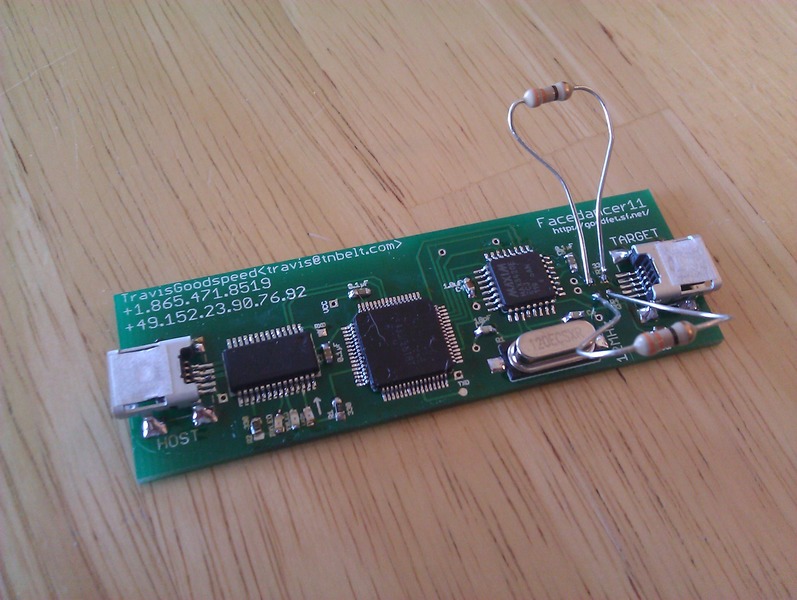
My facedancer

This device allows the HOST side computer to drive USB protocol communication at the packet level, with the TARGET seeing a USB device on the other end. No more needing to write careful embedded code while breaking USB stacks: the fake USB device can be controlled with Python.

This means I’m able to start some more serious fuzzing of the USB protocol layer. There is already code for emulating HID (Keyboard), Mass Storage, and now Firmware Updates. There’s probably tons to look at just in that. For some background on the fun to be had just with Mass Storage devices, see Goodspeed’s 23C9 presentation on it.

© 2013, Kees Cook. This work is licensed under a Creative Commons Attribution-ShareAlike 3.0 License.
Creative Commons License

Source: FULL ARTICLE at Planet Ubuntu