Tag Archives: Ubuntu Server

Xfce installer script

By cesar-rgon

Xfce desktop installer script on Ubuntu for home, office or server computers.

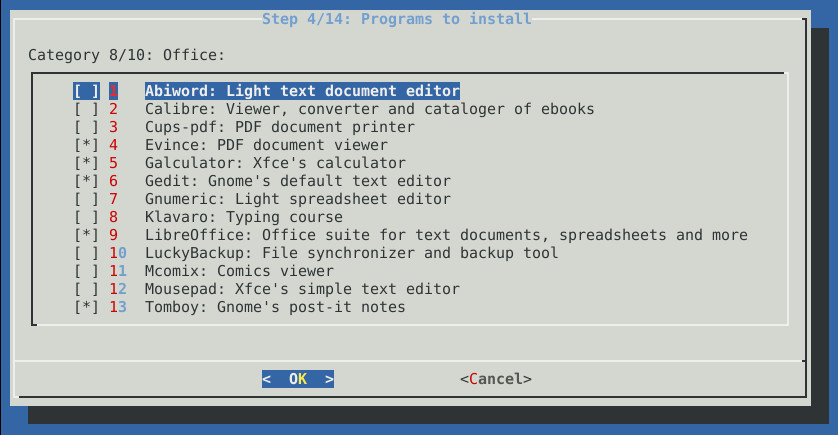
This advanced script installs Xfce desktop and a set of programs according to user needs starting from an Ubuntu Server base system.

Main features
Unattended installation of the Xfce desktop and selected applications by user.
Error Log during the installation process.
Ability to shutdown, restart or show error log at the end of the installation process.
It offers a great variety of programs of different types.
Automatic configuration of applications to be ready to use them.
Multi-lingual support: english and spanish texts included in script.

Why use this script over other alternatives?
Not a distro. It’s a script. Quick to download it and use it.
It’s valid for homes, offices and servers.
It can be installed on different versions of Ubuntu: 12.04 and 13.04.
Lower consumption of system hardware resources.
Greater customization of applications to install.
Ubuntu Server offers more maintenance period than a conventional Ubuntu desktop version.
Save configuration time after the installation proccess.
More dynamic, it offers applications from different desktops. Not limited only to Xfce desktop.
Modern desktop themes (Faenza icons and GreyBird theme).
Automatic installation of third-party repositories.

For more information you can visit the script website or facebook webpages.
Sorry i can’t post URL according to forum rules until i have at least five posts.

You can find the github project searching in google with keywords “xfce installer” and the link is “cesar-rgon/xfce-installer”
In github project page, you can find the URL of the web page.

In the script website you can find full information, screenshots, installation steps and facebook links.

I hope find usefull this script.

Regards.

…read more

Source: FULL ARTICLE at The UNIX and Linux Forums

Ayrton Araujo: Amazon AWS OpsWorks

Amazon released a platform as service like appfog/heroku for be more attractive to web developers.

They are calling it by OpsWorks, supporting deployment and scale wep apps and setup load balancer layers with a few clicks. Initially the list of stack scripts is not too big, supporting only the following:

  • Load balancer 
  • HAProxy 
  • App Server 
    • Static Web Server 
    • Rails App Server 
    • PHP App Server 
    • Node.js  
  • DB 
    • MySQL 
  • Other 
    • Memcached
    • Gangila
    • Custom (Not tested. I don’t know what is it) 

    Except missing python apps and other dbs, I think this have a lot of potential.

    The cool stuff is the possibility of choose between Apache 2 or Nginx and Ubuntu 12.04 LTS instead Amazon Linux.

    The service if free, but use carefully because it automatically setup EC2 machines, load balancers and other AWS related features to make your stack run. It is also interesting because you can access your machines remotely via SSH and manage it via your AWS panel or API, as a normal EC2 machines.

    If you choose to use Ubuntu Server, you could set up juju for make your stack more powerful, but avoid conflicts with OpsWorks.

    See it in action: 

    And, of course, to test it:
    https://console.aws.amazon.com/opsworks/home?#firstrun

    What do you think about?

    From: http://blog.ayrtonaraujo.net/2013/04/amazon-aws-opsworks.html

    Ben Howard: Official Ubuntu Mirrors in HP Cloud

    We are pleased to announce that Canonical has stood up official mirrors in HP Cloud’s AZ-1, 2, and 3 regions.

    If you are using Ubuntu Server 12.10 Cloud Images, there is no action to take; 12.10 images are by default configured to use the new mirror address.

    For Ubuntu 12.04 instances, the default Ubuntu image does not automatically use the in-HP Cloud mirrors. We are currently working with HP to publish a new image that defaults to the local mirrors. If you would like to switch to the new in-HP mirrors, simply run:
              
        $ sudo sed -i -e
                ‘s,^archive.ubuntu.com/ubuntu,nova.clouds.archive.ubuntu.com/ubuntu,g’ 
                 /etc/apt/sources.list 

        $ sudo apt-get -y update

    Note: *.clouds.archive.ubuntu.com is configured using split-horizon DNS. This means that the DNS answer to queries is based on the askering IP address; only queries originating within HP Cloud are answered with the HP Cloud mirror addresses. If your DNS resolver[s] is not based in HP Cloud, then you will be unable to benefit from these new mirrors. 
      …read more

    Source: FULL ARTICLE at Planet Ubuntu

    Bash Vs. Bourne REGEX: metacharacters escaping

    By ConcealedKnight

    I am currently reading a very old reference from O’Reilly: Sed and Awk 2nd Edition reprinted in 2000. So far, it’s a solid read and still very relevant. I’d highly recommend this to anyone.

    The only problem I have with this book is that I had to resort to bourne shell to get my examples to work since bash wasn’t ubiquitous when the book was written.

    So, when I was trying to follow the book example, I get the error in bash on my latest Ubuntu Server distro.

    I tried to use a regular expression that looked for any line containing the string, “book” in the bookworks file. It is not my ultimate goal to correctly extract all lines with the string “book” yet as I was following the book examples, which will show me the correct form.

    I tried the following command in bash:

    Code:

    grep " ["[{(]*book[]})"?!.,;:'s]* " bookwords


    I get the following error in bash:

    Code:

    -bash: !.,: event not found


    But when I tried the command after switching over to bourne shell, I get no error, and it gave me the output I expected like the one in the book examples. Can someone please tell me why is this happening? I’d like to know what metacharacters are causing this and how I can escape it in Bash? I wish there is a third edition of this book that covers REGEX in bash.

    …read more
    Source: FULL ARTICLE at The UNIX and Linux Forums

    Ubuntu Server blog: Ubuntu Server Team Meeting Minutes 20130226

    It was decided not to send an alpha-2 call for testing, but to wait for beta instead. Daviey mentioned that matsurba has kindly offered to help with dep-8 tests.

    BLUEPRINTS

    Daviey thinks we look a little further behind than we actually are, and asks that everyone take a look to make sure their blueprints are uptodate. If you’d like to mark some items postponed, please first talk to Daviey, jamespage or smoser.

    QA

    plars will be taking hggdh’s place representing QA.

    plars noted that conffile failures no longer raise individual bugs, but rather are reported at https://jenkins.qa.ubuntu.com/view/Raring/view/Smoke%20Testing/job/raring-upgrade-quantal-server/ARCH=amd64,LTS=non-lts,PROFILE=server-tasks,label=upgrade-test/lastSuccessfulBuild/artifact/results/obsolete_conffiles.log

    KERNEL

    smb re-advertised http://people.canonical.com/~smb/lucid-ec2-ng/

    ACTIONS:

    * jamespage to milesone documentation updates [carryover]
    * serge to update server meeting docs to reflect palrs representing qa
    * serge to consider putting the obsolete_conffiles.log url in weekly triaging knowledgebase section

    …read more
    Source: FULL ARTICLE at Planet Ubuntu

    Scott Moser: Using Ubuntu cloud-images without a cloud

    Since sometime in early 2009, we’ve put effort into building the Ubuntu cloud images and making them useful as “cloud images”. From the beginning, they supported use as an instance on a cloud platform. Initially that was limited to EC2 and Eucalyptus, but over time, we’ve extended the “Data Sources” that the images support.

    A “Data Source” to cloud-init provides 2 essential bits of information that turn a generic cloud-image into a cloud instance that is actually usable to its creator. Those are:

    • public ssh key
    • user-data

    Without these, the cloud image cannot even be logged into.

    Very early on it felt like we should have a way to use these images outside of a cloud. They were essentially ready-to-use installations of Ubuntu Server that allow you to bypass installation. In 11.04 we added the OVF as a data source and a tool in cloud-init’s source tree for creating a OVF ISO Transport that cloud-init would read data from. It wasn’t until 12.04 that we improved the “NoCloud” data source to make this even easier.

    Available in cloud-utils, and packaged in Ubuntu 12.10 is a utility named ‘cloud-localds’. This makes it trivial to create a “local datasource” that the cloud-images will then use to get the ssh key and/or user-data described above.

    After boot, you should see a login prompt that you can log into with ‘ubuntu’ and ‘passw0rd‘ as specified by the user-data provided.

    Some notes about the above:

    •  None of the commands other than ‘apt-get install’ require root.
    •  The 2 qemu-img commands are not strictly necessary. 
    • The ‘convert’ converts the compressed qcow2 disk image as downloaded to an uncompressed version.  If you don’t do this the image will still boot, but reads will go decompression.
    • The ‘create’ creates a new qcow2 delta image backed by ‘disk1.img.orig’. It is not necessary, but useful to keep the ‘.orig’ file pristine. All writes in the kvm instance will go to the disk.img file.
  • libvirt, different kvm networking or disk could have been used. The kvm command above is just the simplest for demonstration. (I’m a big fan of the ‘-curses’ option to kvm.)
  • In the kvm command above, you’ll need to hit ‘ctrl-alt-3’ to see kernel boot messages and boot progress. That is because the cloud images by default send console output to the first serial device, that a cloud provider is likely to log.
  • There is no default password in the Ubuntu images. The password was set by the user-data provided.
  • The content of ‘my-user-data’ can actually be anything that cloud-init supports as user-data.  So any custom user-data you have can be used (or developed) in this way.

      …read more
      Source: FULL ARTICLE at Planet Ubuntu

      Ben Howard: Ubuntu Cloud Images automated release updates fully enabled

      Earlier we announced[1] that Canonical had worked this cycle to enable more frequent releases to the Ubuntu Cloud Images stable and long term releases. As of today, we are pleased to announce that Ubuntu Server 10.04 LTS, 11.10, 12.04 LTS and 12.10 are now fully enabled to follow the kernel SRU schedule with automated update releases. This means that within 24 hours of most SRU kernel releases, a new Ubuntu Cloud Image will be published.

      Please note: with this change, the release notes have been moved the http://cloud-images.ubuntu.com/releases website. You can find them under /release/unpacked/release-notes.txt. Effective today, all emails announcing these new updates are discontinued. 

      However, at this time, 12.04 LTS and 12.10 Cloud Images are not yet being promoted automatically to Windows Azure. We expect that as Windows Azure moves closer to General Availability (i.e. moves out of preview status) that automatic promotion will be enabled.

      Please use either Cloud-Images[2], the AMI Finder[3], the RSS feed[4], or “ubuntu-cloudimg-query” from the Cloud-Utils packages to find the latest released images.

      [1] http://blog.utlemming.org/2013/01/ubuntu-cloud-images-automated-release.html
           https://lists.ubuntu.com/archives/ubuntu-cloud-announce/2013-January/000045.html
           https://lists.ubuntu.com/archives/ubuntu-cloud/2013-January/000879.html
           https://groups.google.com/forum/?fromgroups=#!topic/ec2ubuntu/Mg-qpfguE10
      [2] http://cloud-images.ubuntu.com/releases
      [3] http://cloud-images.ubuntu.com/locator/ec2/
      [4] http://cloud-images.ubuntu.com/rss/
      Source: FULL ARTICLE at Planet Ubuntu