Tag Archives: Chrome App Launcher

The new Chrome App Launcher: Google's backdoor into the offline world

On Friday, Google gave Windows users something that they’ve been pining for: A Start button. And even better than that, Google’s version keeps you on the desktop and actually opens a pop-up menu full of programs, unlike the nerfed Start button that’s slated to appear in the Windows 8.1 update.

No, Larry Page hasn’t decided to jump into the crowded Windows Start button replacement arena. Instead, Google’s engineers quietly dragged Chrome OS’s App Launcher—the Googlefied equivalent of a Start button—over to Chrome for Windows today. The seemingly simple addition is a major step in Google’s push to bring Web standards to walled gardens.

Big things in little packages

The Chrome App Launcher is exactly what you’d expect: A taskbar icon that lets you quick-launch Chrome browser apps, such as Gmail, the Play Store, Angry Birds, and yep, even Chrome itself. Simple, right? But the little launcher is a Trojan horse for much bigger ambitions—especially when paired with packaged Chrome apps.

Packaged apps are available now, but since Google has yet to highlight them in the Chrome Web Store, you might not be familiar with them. Packaged apps are programs built on the bones of the Chrome browser. They use traditional Web languages such as HTML5 and CSS, but they run as separate, standalone software that can also be used offline, unlike traditional browsers.

To read this article in full or to leave a comment, please click here

…read more

Source: FULL ARTICLE at PCWorld

Infiltration complete: Google's Chrome app launcher lands on Windows

After months of behind-the-scenes teases, Google appears to have quietly introduced the Chrome App Launcher in the stable version of Chrome for Windows. The Chrome OS feature—ported over to the Chrome for Windows developer channel in February—wasn’t available through a search of the Chrome Web Store or advertised on the site’s front page at this writing, but Windows users can install it now by navigating directly to the Chrome App Launcher page inside Chrome’s app store.

First spotted by Engadget, the new feature is Google’s incursion into the desktop PC, creating a self-sufficient Chrome ecosystem inside Microsoft’s OS. The Chrome App Launcher lets you directly fire up any Chrome Web app or packaged app right from the Windows taskbar—even when Chrome itself isn’t running.

Packaged apps are HTML 5-based standalone desktop apps based on Chrome that don’t look anything like your Web browser. There are no tabs, URL address bars, or bookmarks, but these apps do rely on Chrome’s underlying infrastructure and are installed via the Chrome Web Store.

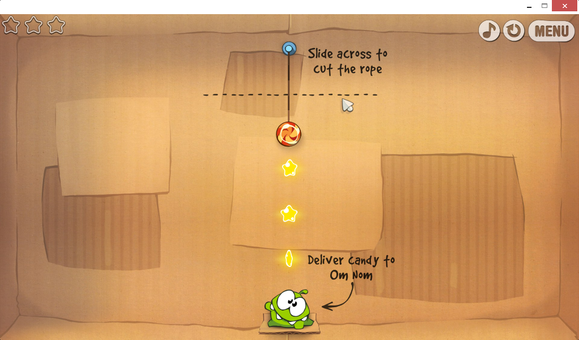
Play Cut The Rope on your desktop with the Chrome packaged app.

It’s still early days for packaged apps, but there are a number you can try out, such as a generic text editor and an IRC client, as well as known quantities like Cut the Rope, the Economist, and Weather Bug. For a list of interesting packaged apps to test see this post from Pocketables.

To read this article in full or to leave a comment, please click here

…read more

Source: FULL ARTICLE at PCWorld

Google adds Chrome OS app launcher to Windows taskbar

Google is invading the traditional desktop with a new feature for Chrome that lets you launch Web apps and Chrome standalone apps directly from the Windows taskbar without starting your browser. The new app launcher is ported from Google’s browser-in-a-box operating system, Chrome OS, and puts all your Chrome apps under one icon on your taskbar. The feature makes it even easier for Windows users to fire up Chrome apps instead of full-fledged desktop applications for everything from editing documents to chatting over IRC to reading e-books.

Chrome’s app launcher is not quite ready for prime time; the feature is only available on the developer version of Chrome for Windows. The official release should show up in the stable version of Chrome in the coming months. Google also has plans to add the app launcher to Chrome for Mac and Linux in the coming weeks.

How the Chrome App Launcher works

To get started, you need to download the Chrome for Windows developer version from Google’s dev channel. If you’re already running Chrome, this will replace your current version with the developer release. Keep in mind, the developer version can sometimes break features or introduce browser crashes, so you may not want to work with it if you rely on Chrome day to day. The good news is you can easily switch back to the public release of Chrome by downloading and installing the current stable version.

Packaged apps

Once you’ve got the developer version up and running, you need to install a Chrome packaged app before you will see the Chrome OS app launcher on your taskbar. If you already use a packaged app, delete then reinstall it to see the launcher. Packaged apps, introduced to Chrome last June, are desktop-like apps that open in their own window and work offline, but are based on Chrome and built with Web technologies such as HTML5, JavaScript and CSS.

To read this article in full or to leave a comment, please click here

…read more
Source: FULL ARTICLE at PCWorld