Tag Archives: Iobit Start Menu

'Start' button devs say Windows 8.1 doesn't put them out of business

Windows 8 Start Menu Start8

When Microsoft added support for the revamped Start page into Windows 8.1, that eliminated the need for dedicated third-party Start menus, right? Wrong, say developers like Stardock, Classic Shell, and others.

Perhaps not surprisingly, the third-party devs say there’s still a need for their products, even though Windows 8.1 will be more friendly to those used to the traditional, or legacy, Start menu found in Windows 7. Many have released updates for the Windows 8.1 preview, but none that spoke to PCWorld said that they’ve thrown in the towel.

If nothing else, fans of Iobit’s Start Menu 8, Classic Shell, and Stardock’s Start8 can rest assured that their favorite plugins aren’t going away. (Pokki, an “apparating system” that was designed to facilitate the interaction of mobile-style apps with the Windows OS, also offers a “classic” Start menu.)

Stardock
“Classic” Start menus provide an alternative to the Windows 8.1 Start button.

These products fill a need: to ease the transition to Windows 8 and its unfamiliar Start page. In many ways, Windows 8 is just Windows 7 with a tablet interface layered on top of it, but—sorry!—no Start button. Users upset by the jarringly different Start page had no refuge from it other than third-party alternatives.

To read this article in full or to leave a comment, please click here

…read more

Source: FULL ARTICLE at PCWorld

Review: Start Menu 8 is a free Window 8 Start Menu par excellence

Third-party replacement of the missing Windows 8 Start menu (I’m sorry, the Modern/Metro UI is not a start menu) has become quite the booming cottage industry. Stardock’s Start8, a $5 alternative, has been the most seamless replacement for several months, but it’s now going to have to share that honor with Iobit’s Start Menu 8. And, unfortunately for Stardock, Start Menu 8 is free.

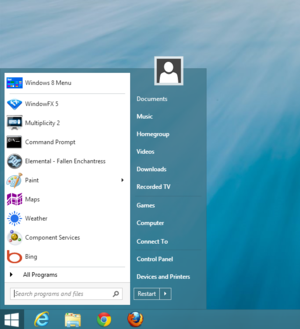
Start Menu 8 looks and works just like a native app.

Start Menu 8 installs easily, mimics the Windows 7 Start menu to a tee—including the search field—and is just as configurable as that which it seeks to duplicate. You can show or hide the items such as administrative tools, control panel, documents, network, photos, etc., as well as disable the hot corners and the Windows 8 sidebar. You can also change the appearance of the start button to match Windows 8, XP, Windows 7, etc., though the menu itself retains the look of Windows 8. You may also easily reach the Modern UI (formerly known as Metro) interface when you want to explore it at your leisure.

The Start Menu 8 installation routine will ask you if you want to install Iobit’s Advanced SystemCare 6 software (the default is yes), but there’s no advertising aside from that.

To make a long review short: Start Menu 8 it works just like the Start Menu you wanted to see when you first got your Windows 8 PC. Do yourself and anyone else you know who’s been saddled with a new interface they didn’t really want a favor: Download Start Menu 8; install it; leave the Windows 8 learning curve and inefficiency behind; and get on with your lives.

To read this article in full or to leave a comment, please click here

…read more
Source: FULL ARTICLE at PCWorld