At Kaplan, a genuine enthusiasm for technology comes from the top: Its CIO embraces the consumerization of IT and wants employees to be as excited about technology as he is. That culture led Kaplan to migrate from Microsoft Exchange to Google Apps and, mostly recently, to Google+.
Source: FULL ARTICLE at Computerworld Latest
Tag Archives: Google Apps
Review: Unroll.me condenses emailed subscriptions into digests
More and more email services are tackling the problem of email overload. One of the latest is Unroll.me, which attempts to organize your inbox by tidying up the mess left by all of those subscriptions most of us receive. Unroll.me has plenty of promise, but this free beta service remains a bit rough around the edges.
Unroll.me works with Gmail, Google Apps, and Yahoo email accounts; the company (also called Unroll.me) says it is working on adding support for AOL and other email services, but does not say when that will happen. You sign up for the free service online and link your email account, and Unroll.me goes to work automatically, scanning your email account to see which subscriptions you receive. It took just a few minutes for Unroll.me to scan a Gmail account that holds more than 10,000 messages.
Once the initial scan is complete, Unroll.me shows you your Rollup, which the company describes as “a digest that gives you an overview of the subscriptions you receive each day.” By default, Unroll.me places all messages that it deems subscriptions into your Rollup, and it proved fairly accurate, though it did mistakenly identify messages from a few colleagues as subscriptions. You do have complete control over your Rollup, though, so it was easy to tell Unroll.me to deliver these messages to my inbox, instead.

You also can tell Unroll.me what time of day you’d like to receive your daily Rollup: morning, afternoon, or night. If you can’t wait until your Rollup arrives to peruse its contents, you don’t have to: you can either login to Unroll.me’s website or you can take a look in the Unroll.me folder that’s automatically added to your email account. All of your messages are delivered directly to this folder, which appears on mobile devices and any browser that you use to view your account.
To read this article in full or to leave a comment, please click here
Source: FULL ARTICLE at PCWorld
Zimbra Open Source: Frequent Winner vs Microsoft, Google Apps
The VAR Guy: For channel partners, this is the latest proof that you gotta get beyond the hype to truly understand what customers want for their private and public cloud applications.
Source: FULL ARTICLE at Linux Today
Power through schedules with 21 Google Calendar tricks
Maybe you charge through your plans with Patton-like precision, planning everything down to the minute. Or, like Marilyn Monroe, perhaps you’ve “been on a calendar, but never on time.” It really doesn’t matter which approach you take—Google Calendar can fit your style.
The service is accessible wherever you go, and it offers granular controls for Type A personalities as well as color coding for the style-conscious. It’s even socially aware, allowing you to add calendars outside your organization, and to involve your social network in events. However, you’re likely to curse every now and then when it freezes (although Google guarantees 99 percent uptime), or when calendar clutter makes you miss a meeting.

This guide will help you take control, whether you’re a Google Calendar novice or a power user. Most of the tips apply both to the free Google Calendar and to the one bundled with a paid Google Apps for Business subscription.
Not all of the useful shortcuts are official features. Google is constantly brewing new concoctions, so visit its Labs to find unique tools. Unlike with desktop software, Google can roll out new features whenever it likes.
To read this article in full or to leave a comment, please click here
Source: PCWorld
Google offers free Quickoffice app to Google Apps subscribers
Google has launched a free iPad app to allow its paying business customers to edit Microsoft Office documents.
Source: Latest from Computerworld
Microsoft courts Google Apps users with free Office 365 trial
For the second day in a row, Microsoft on Tuesday pitched one of its products to customers abandoned by arch-rival Google.
In an attempt to woo users of Google Apps, Microsoft yesterday tripled the length of its Office 365 Small Business free trial from 30 to 90 days. The deal—pegged “P1” in Microsoft’s current stable of subscription plans—offers cloud-based email, shared calendars and Web-based Office app access to up to 10 employees.
Normally, P1 costs $72 per user per year.
Although Tony Tai, an Office 365 product marketing manager who announced the extended trial in a blog post, did not make the target audience explicit, he referenced firms what had ditched Google Apps and replaced it with Office 365.
To read this article in full or to leave a comment, please click here
Source: PCWorld
Microsoft courts Google Apps small-biz users with longer Office 365 free deal
For the second day in a row, Microsoft on Tuesday pitched one of its products to customers abandoned by arch-rival Google.
Source: Latest from Computerworld
Gmail wobbles again, the fourth time since last week

Gmail ran into technical difficulties again on Friday, the fourth such issue in a little over a week, and all happening after Google announced the elimination of its free Google Apps edition.
The latest problem cropped up early Friday afternoon Eastern Time and affected users’ ability to access or send attachments, according to Google’s Apps Status Dashboard.
To read this article in full or to leave a comment, please click here
Source: PCWorld
Gmail wobbles again on Friday, fourth incident since late last week
Gmail ran into technical difficulties again on Friday, the fourth such issue in a little over a week, and all happening after Google announced the elimination of its free Google Apps edition.
Source: Latest from Computerworld
Google will start charging small businesses for Google Apps
Google is ending availability of a free version of its Google Apps online application suite for small businesses, saying it wants to provide a stronger and more uniform experience to users.
The Internet giant said Thursday in a blog post that now even small businesses with ten or fewer users will have to pay to use its online app platform, a group that up until now has been free. All businesses will now be charged US$50 per user, per year, for the service.
Google Apps will remain free for individual users, as well as existing business customers that currently use the free version.
“Google Apps for Business,” the company’s paid offering, provides its email, calendar and online office suite as an all-in-one service, allowing them to be used on private domain names and adding features such as 24-hour phone support. It also offers features such as an archiving service and additional storage for extra fees.
To read this article in full or to leave a comment, please click here
Source: PCWorld
Google Play now lets businesses host their own app stores
Google announced Tuesday that companies with their own in-house Android applications can now distribute them internally via the new Private Channel feature of the Play Store.
“Whether you’ve built a custom expense reporting app for employees or a conference room finder, the Google Play Private Channel is designed to make your organization’s internal apps quick and easy for employees to find. Once your company has loaded these internal apps using the Google Play Developer Console, users just need to log in with their company email address to browse the Private Channel and download apps,” said Google Play product manager Ellie Powers in an official blog post.

The system is controlled via the aforementioned Developer Console, which allows administrators to choose which users are allowed to upload apps to the private channel, and which have download access. A support articleon the new feature recommends that dedicated administrative Google accounts be created, so that access isn’t lost if a key employee leaves the company. A $25 publisher registration fee is required, and the functionality is currently restricted to Google Apps for Business, Education or Government customers.
To read this article in full or to leave a comment, please click here
Source: PCWorld
Evernote CEO Phil Libin talks Evernote Business
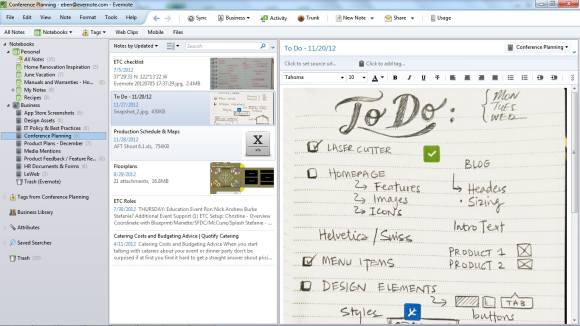 Evernote Business features notebooks that are shared across a company.
Most of Evernote’s 45 million users already put the app to work at work. Now Evernote is tailoring its service to small and midsize companies with the launch of Evernote Business for Mac, Windows, iOS and Android.
The new tool lets users share information within a company or with clients, while IT controls permissions. You can join Evernote Business with your existing personal account, which remains invisible to the company, and you keep your own data if you leave at any time.
For companies that already have a core group of Evernote users, this is a natural upgrade, It’s double the price of Evernote Premium, which offers 1GB of monthly uploads. For $10 per user per month, Evernote Business covers 2GB of new personal content per user and another 2GB of shared content across shared Business Notebooks. If your business is new to Evernote, though, it may be a tougher sell. By comparison (admittedly, not an apples-to-apples one), it costs the same as the full Google Apps for Business suite with Vault for extra security.
Evernote CEO Phil Libin doesn’t see Evernote as a competitor to productivity suites like Google Apps. Instead, his service fills a “universal human need.” He explained last week ahead of the launch.
To read this article in full or to leave a comment, please click here
Source: PCWorld
