Tag Archives: Home Premium

Install any version of Windows using any Windows disc you can find

Reader Chris needs to reinstall Windows 7 Home Basic on his laptop. Just one problem: he lost his recovery discs.

A more common problem is when you need to reinstall Windows and you never had recovery discs to begin with. Few manufacturers provide them anymore, and many new PCs don’t have optical drives even if they did.

Thankfully, there’s a way around this. All you need is a Windows ISO file (basically the entire Windows operating system in a single container) and the free Ei.cfg Removal Utility. The latter deletes a key file inside the former, thus allowing you to install any version of Windows.

Let me explain that a bit further. Windows 7 and 8 installation discs are version-specific; they’re designed to match up with your product key. That’s why you can’t use, say, a Windows 7 Home Premium product key to install Windows 7 Professional, even if you have a disc for the latter.

To read this article in full or to leave a comment, please click here

…read more

Source: FULL ARTICLE at PCWorld

Microsoft launches special Chinese version of Surface Pro aimed at home users

Microsoft is hoping to build momentum behind its Surface Pro tablet in China by launching a special edition including Office Home & Student 2013—but with Windows 8 Standard, rather than Windows 8 Pro.

Microsoft’s Surface Pro 128 GB version goes on sale in the country this Tuesday. But along with it, the U.S. tech giant is also releasing an exclusive “Surface China Edition,” with an x86 processor like its Pro cousin, the company announced.

Unlike the Surface Pro tablet, the China Edition comes with the standard Windows 8 OS rather than the Professional version. In addition, it only supports the simplified Chinese language. But the tablet also contains Office Home & Student 2013, a product suite Microsoft excluded from its Surface Pro tablet in favor for a one-month trial of Office 365 Home Premium.

The Surface China Edition will be available in 64 GB and 128 GB versions for 6588 yuan (US$1050) and 7388 yuan (US$1178), respectively. The Surface Pro will be priced at 7388 yuan.

To read this article in full or to leave a comment, please click here

…read more
Source: FULL ARTICLE at PCWorld

Digital Storm x17: It's a more portable gaming option

Even the untrained eye can spot a Digital Storm laptop from across the room, thanks to the company’s insistence on slapping its huge logo across the lid of each system. The overbranded, gaming-oriented x17 is no different: There’s also a large logo on the wrist rest. That said, at just 8.8 pounds sans accessories, it is actually one of the lightest 17.3-inch gaming laptops we’ve seen.

Our review model, which costs $1777 as configured, packs a third-generation Intel Core i7-3610QM processor, 16GB of RAM, and an AMD Radeon HD7970M graphics card. The system also features a 750GB hard drive, built-in Bluetooth, an 802.11n Wi-Fi adapter, and a DVD-RW optical drive. The x17 runs a 64-bit version of Windows 7 Home Premium.

Performance

In PCWorld’s WorldBench 7 benchmark tests, it scored 99 out of 100. This means it’s only one percent slower than our reference machine, a desktop PC with a second-generation Intel Core i5-2500K processor, 8GB of RAM, and a 1TB hard drive. While this is an acceptable score for a desktop replacement—the Dell Inspiron 17R-1316MRB scored just 86 on WB7—it’s a little low for a gaming-oriented desktop replacement. The Alienware M17x R4 and the Samsung Series 7 Gamer both scored decently higher on WB7, with scores of 146 and 123, respectively.

The x17’s performance is just about what you’d expect on individual tests. It starts up in 35.6 seconds, which is about 10 seconds slower than the aforementioned gaming laptops. It manages 15.6 frames per second in our Web Performance tests (just a little slower than the Alienware and the Samsung), and it scores only 2006 in the PCMark 7 Office Productivity tests, compared with the Alienware’s 4549 and the Samsung’s 2513.

To read this article in full or to leave a comment, please click here

…read more
Source: FULL ARTICLE at PCWorld

Microsoft sends cut-off notices to Office 365 preview users

Microsoft has started to warn customers who signed up for Office 365 subscription previews that their free ride is about to end.

Emails sent by Microsoft last week outline what happens when the previews expire and urge customers to subscribe to the paying versions of Office 365.

Microsoft is sending out Office 365 Home Premium preview expiration warnings: Pay up or lose full functionality. (Image: Microsoft)

“Your Office 365 Home Premium Preview will end soon, and there are a few important things for you to know,” read one email. Another noted: “Your subscription to Office 365 Home Premium Preview will expire on Saturday, March 16, 2013. To avoid a possible interruption of your subscription service, please renew your subscription by Saturday, March 16, 2013.”

To read this article in full or to leave a comment, please click here

…read more
Source: FULL ARTICLE at PCWorld

What Office 2013's draconian licensing policy really means for you

Microsoft might be selling two versions of its Office suite, but its licensing policies suggest the company is not only trying to thwart software piracy, but also drive customers away from Office 2013 and over to the Office 365 subscription model

First, a little background. Purchasing Office 2013 only provides a license for a single PC (as opposed to up to five PCs with Office 365). The Office 2013 license goes one step further into the draconian abyss, though, by specifying that the software is literally tied to the device it’s installed on. This means you can’t re-install Office 2013 if you get a new PC.

Microsoft is taking a draconian approach to Office 2013 licensing.

Let’s state that again: You can never install Office 2013 on a new PC—even if you own the new PC, and even if you have removed Office 2013 from the original PC. So, if you buy Office 2013 today and install it on your PC, and then tomorrow your PC is turned into a molten pool of plastic in a house fire, Microsoft will expect you to purchase a new copy of Office 2013 for your replacement PC. Seriously.

I asked Microsoft for clarification, and I received this official response: “Office 365 Home Premium works across up to 5 devices (Windows tablets, PCs or Macs) and can be transferred across devices. The Office 2013 software is licensed to one computer for the life of that computer and is non-transferable.”

To read this article in full or to leave a comment, please click here

…read more
Source: FULL ARTICLE at PCWorld

Why Office 365 and Office 2013 may not be right for you

The next generation of Office is here, and while it’s not necessarily an essential upgrade for Office 2010 users, it’s easily the best Office suite to date. Editing complicated financial spreadsheets has never been so semi-seamless!

That said, with this particular $100-plus investment, you’ll want to look before you leap. Whether you’re opting for a straightforward Office 2013 installation or the multi-PC, cloud-connected ubiquity of an Office 365 subscription, there are four potentially crippling gotchas to consider before you plunk down your hard-earned cash. I’ve also identified a supposed gotcha that you can actually ignore entirely.

1. Your computer may not run Office 2013.

Unlike Office 2010, Office 2013 does not work with Windows XP or Windows Vista. Yet the latest data from NetApplications shows that roughly 45 percent of all Internet users still rock those two aging operating systems. If you’re part of that sizable horde, there’s absolutely no reason to buy Office 2013—it won’t work on your system. And because an Office 365 Home Premium subscription simply lets you install the latest version of Office—Office 2013, again—on up to five PCs, you’ll want to pass on that as well.

2. Other computers may not run Office on Demand.

Office Web Apps offer basic functionality, but nowhere near as much utility as Office on Demand.

One of the big draws of an Office 365 subscription is Office on Demand, a full-fledged, Internet-streamed version of the productivity suite that Microsoft calls “Your Office away from home.” And it really, truly is—if the host computer meets the suite’s fairly stringent requirements. As with local installations of Office 2013, Office on Demand plays nice only with PCs running Windows 7 or 8. It also requires the PC to have a fairly modern browser: Internet Explorer 9 or later, Mozilla Firefox 12 or later, Apple Safari 5 or later, or Google Chrome 18 or later.

To read this article in full or to leave a comment, please click here

…read more
Source: FULL ARTICLE at PCWorld

Microsoft releases free Bing apps for Office 365

Microsoft has released five free apps for the new Office 365 Home Premium suite that make it easier to insert images and information from Bing into documents.

Office 365 is the subscription version of Office 2013, which costs $100 per year for the Home Premium edition and $150 for the Small Business Premium Edition. Office 365 provides Web-based Office apps paired with cloud storage, and it also comes with a version of Office 2013 software for your PC.

The five new Bing-powered apps are free to use with the Office 365 Home Premium, which is available now; the Small Business Premium Edition is scheduled for release at the end of February. The free apps are Bing Finance for Excel, Bing Maps for Excel, Bing Image Search for Word, Bing News Search for Word, and Bing Dictionary for Excel and Word.

bing maps app
Bing Maps for Office

To read this article in full or to leave a comment, please click here

Source: FULL ARTICLE at PCWorld

Microsoft Office 2013 is here: Hands-on impressions and buying advice

The wait is over for Office 2013 and Office 365. Starting Tuesday, the latest version of Microsoft’s venerable productivity suite goes on sale to consumers and academics, both on Microsoft’s Office.com site and at retail outlets. You can buy the traditional stand-alone desktop software or, for the first time, consumers and students can buy Office as a subscription service that will make multiple installations cheaper.

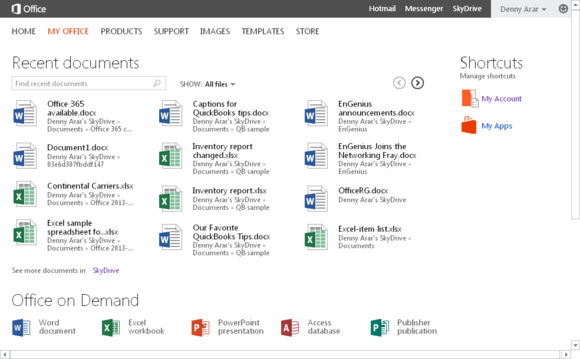
Along with assorted new features and a design overhaul, Office 365 subscription services introduce the much-touted “Office on Demand” feature that allows subscribers to access full versions of Office applications on Web-connected PCs.

You can still buy stand-alone versions of Office 2013 the old way (for prices ranging from $140 to $400). But if you need even the least-expensive edition on more than two or three computers in your household, you might wind up paying more than you would under the $100-a-year Office 365 Home Premium subscription plan (see our previous story on Office pricing), which covers up to five desktop installations (PC or Mac) versus a single installation for the stand-alone license.

Here’s the Office 365 online hub.

For students, faculty members, and anyone else who qualifies for the Office 365 University license, the deal is even sweeter: Microsoft is charging a mere $80 for a four-year subscription that covers two desktop installations.

To read this article in full or to leave a comment, please click here

Source: FULL ARTICLE at PCWorld